Hello,
I’ve installed DietPi on a Raspberry Pi 5 (2 GB), and I’d like to set it up with X11 and a lightweight window manager (i3, AwesomeWM, Qtile, etc.).
I want to make sure I understand the best way to do this, as I’m still getting used to how DietPi’s configuration works.
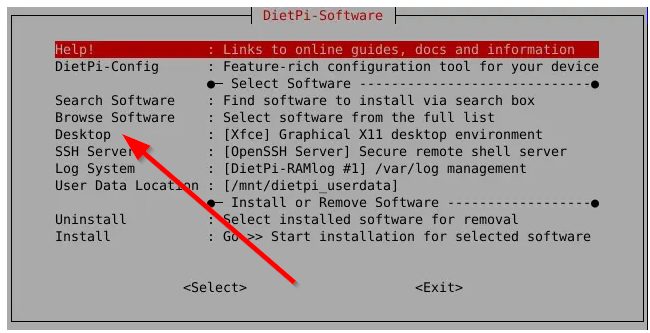
- I see that X11 is available in DietPi’s software installer. So, I assume that’s the best way to install X11. I know that I can then use DietPi’s autostart tool to tell X to autostart (or manually start X) via
startx.
- After I install X11, can I just follow the standard Debian 13 instructions for installing the Window Manger and Session Manager I want to use? I’ve noticed that DietPi doesn’t seem to use SystemD (even though it’s installed); I’m not sure how that impacts futzing around with X11.
EDIT 1: LightDM: Futzing around a bit more, I found the option to enable LightDM in the autostart settings. So, That answers which Session Manager I’ll be using.
EDIT 2: I’m an idiot. I just realized that if I install XFCE, it will install and properly configure XFCE, LightDM, and other supporting packages, as well as configuring the GPU RAM and hardware codecs.
Then, I think I can just proceed to install the window mangers I want. As long as XFCE is never set to auto-run, it shouldn’t take up any extra RAM space when it’s not in use. Right?
Thanks!
Maybe this can help as starting point. At least it can give an idea on how it could work Discover exciting X11 desktops for your DietPi - DietPi blog
Thanks! That is helpful. I didn’t realize GNU Step was an option.
After doing a bit more reading last night and this morning, I think this is true:
- If I tell the system to install LightDM using the
dietpi tools, it will pull in X11 as a dependency. I can then configure LightDM to autostart, and once I manually install a Window Manager of my choice, it should be available from there.
- If I install XFCE or GNU Step, it’ll autoconfigure X11, LightDM, the video codecs, the RAM separation, and everything else for me. This seems like the best way to do it right, but I hesitate to install a desktop environment I’m not planning to use.
- Installing LightDM and X11 should be enough to set up proper GPU RAM reservation and activate the hardware codec support that’s off by default. This is the part I’m guessing about. I’m assuming I don’t have to install an actual desktop environment for these things to be auto-configured?
If those aren’t auto-configured, I can just toggle them myself, but that made me curious about something else: Is there a command somewhere to see all the defaults I’ve changed/things I’ve installed using the dietpi tools?
There is no tool that will display all settings and packages installed. You can follow the output of dietpi-software or you have a look into the source code of dietpi-software
You can read also this blog post for a further description: Install a DietPi desktop system in a few steps.
Additionally, in our actual release v10.2 we might have what you need.
See DietPi v10.2 - DietPi.com Docs :
“DietPi-Tools | DietPi-Software: A desktop selection menu was added to make it clearer and easier to get started for those who require a graphical desktop environment.”