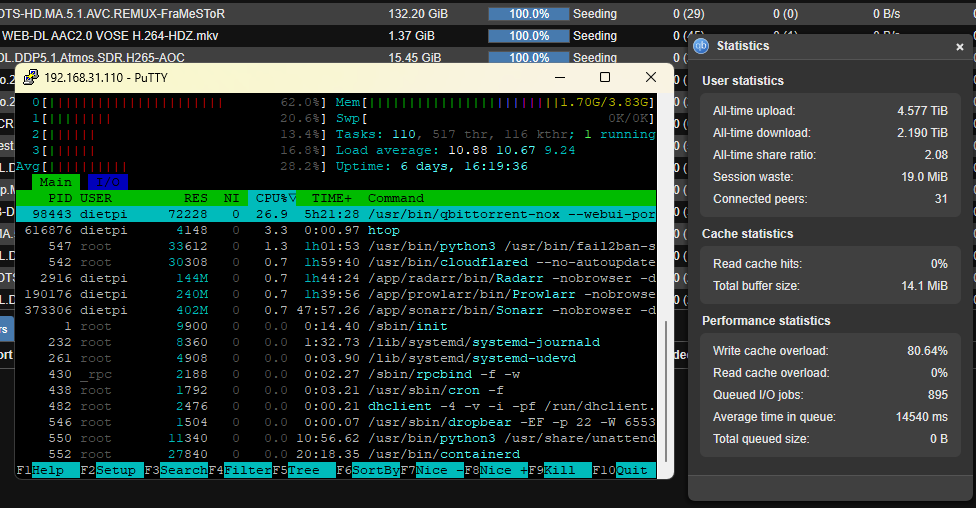
I tried to connect it trough Samba protocol but is doing the same, it starts downloading at 20MB/s and then it lowers to 50kb/s - I noticed that everytime this happens write cache overload is 90%
I noticed that is only write speed which is affected, cause when I try to read from the disk is ok - disks are fine, cause on Windows with Samba is getting 30MB/s stable.
Since it’s working with windows (Downloading on win and write to NAS) the OrangPi is maybe the bottleneck.
Can you check with htop the cpu utization and how much RAM is used. Maybe the bottleneck is there.
I would also stick to NFS and try to force it to use NFSv4 (if supported by your NAS)
You can also limit the number of parallel downloads to get rid of a high amount of parallel writes, maybe this is helping.
Also ChatGPT ( ) says, your rsize/wsize=1048576 is very high and it recommends rsize=32768,wsize=32768 or at max 128k (maybe doublecheck this idea)
Does the speed stays high when you download to a local storage on the OPi?
Ok so the CPU is not limiting, but your write cache is already 80% full, so qbittorrent will slow down the downloads already. Your load avg is also around 9, so a lot of processes are waiting for I/O. (probably bc the writes of qbittorent clocking up the system)
You don’t have this problem on windows, bc windows is buffering massively into RAM, collecting the files into a big chunk before sending them via SMB. Linux does not do this, it handles it different to achieve better data consistency.
Just download one or two torrents at the same time to reduce the amount random writes.
You could also download the files first to local storage on the OPi and when finished transfer them to the NAS (There is an option Keep incomplete torrents in:”), so you don’t have so many random writes on the NAS.
 ) says, your rsize/wsize=1048576 is very high and it recommends