3rink
23 March 2026 21:52
1
Hello,
I’ve been a proud and truly impressed DietPi user for a few days now.
It’s running on a Pi 5 with the latest version of DietPi.
It’s amazing how easy it is for a novice to work with and how much you can get it to run.
I’ve been using the dashboard to manage the software because I do everything on my phone, and it’s easier there than fumbling around in a terminal with my clumsy fingers.
Suddenly, when I checked it again, I noticed that while the dashboard works without any issues, However, under the Software or Installed tabs, it simply isn’t showing any packages anymore. I’ve already uninstalled and reinstalled it. Restarted it and cleared the cache in the browser. Unfortunately, without success.
Can anyone help with this? I think this convenient solution for installing and uninstalling packages is great.
I’m happy to be here. This is a great OS!
ADMIN edit: translation from German > English
Translated with DeepL.com (free version)
A similar issue has been reported on GitHub. Please follow the corresponding entry.
Quick tip: This is an English-language forum. Therefore, I would ask you to use English. It’s no problem to use tools like DeepL or similar services. For now, I’ve translated your initial post.
3rink
24 March 2026 19:06
4
Hi, sorry I didn’t notice that because Chrome translated everything. I will discuss my problems in English in the future.
3rink
24 March 2026 19:11
5
Mär 24 12:12:39 DietPi systemd[1]: Started dietpi-dashboard-backend.service - Dashboard Backend (DietPi).
Mär 24 12:12:39 DietPi backend[538]: 2026-03-24T11:12:39.656Z INFO [backend] Starting DietPi-Dashboard backend v0.7.0…
Mär 24 12:12:39 DietPi backend[538]: 2026-03-24T11:12:39.656Z INFO [backend] Connecting to 127.0.0.1:5253
root@DietPi:~
I don’t think there is any valuable information.I don’t think there is any valuable information.
It works well on two test systems here. Can you apply debug log level and see whether the backend reveals some more?
G_SUDO G_CONFIG_INJECT 'log_level[[:blank:]]' 'log_level = "debug"' /opt/dietpi-dashboard/config-backend.toml
sudo systemctl restart dietpi-dashboard-backend
Then visit the dashboard software page, and check backend logs again afterwards:
sudo journalctl -u dietpi-dashboard-backend
3rink
26 March 2026 23:25
7
Mär 26 23:30:20 DietPi systemd\[1\]: Started dietpi-dashboard-backend.service - Dashboard Backend (DietPi).
Mär 26 23:30:20 DietPi backend\[561\]: 2026-03-26T22:30:20.596Z INFO  \[backend\] Starting DietPi-Dashboard backend v0.7.0...
Mär 26 23:30:20 DietPi backend\[561\]: 2026-03-26T22:30:20.596Z INFO  \[backend\] Connecting to 127.0.0.1:5253
Mär 27 00:22:32 DietPi systemd\[1\]: Stopping dietpi-dashboard-backend.service - Dashboard Backend (DietPi)...
Mär 27 00:22:32 DietPi systemd\[1\]: dietpi-dashboard-backend.service: Deactivated successfully.
Mär 27 00:22:32 DietPi systemd\[1\]: Stopped dietpi-dashboard-backend.service - Dashboard Backend (DietPi).
Mär 27 00:22:32 DietPi systemd\[1\]: Started dietpi-dashboard-backend.service - Dashboard Backend (DietPi).
Mär 27 00:22:32 DietPi backend\[7637\]: 2026-03-26T23:22:32.763Z INFO  \[backend\] Starting DietPi-Dashboard backend v0.7.0...
Mär 27 00:22:32 DietPi backend\[7637\]: 2026-03-26T23:22:32.763Z INFO  \[backend\] Connecting to 127.0.0.1:5253
Hmm, I just tested debug logs as well, and neither backend nor frontend seem to produce any debug logs when browsing through the GUI.
I need to have a look into the source code to see how dietpi-software list is executed and parsed, and whether/how this can lead to an empty list.
The problem is I cannot replicate it. On x86_64 VM as well as NanoPi R6C, it works as expected for me.
Does this happen within the Dashboard or on SSH?
3rink
27 March 2026 21:20
11
I did over SSH. Now again in the dashboard terminal.
Both report it in the same way.
Pls try to redo the current DietPi version
G_DEV_BRANCH master
This will download all DietPi scripts again
3rink
27 March 2026 22:07
13
I did that. I restarted the PI. Dashboard is still empty under Software.
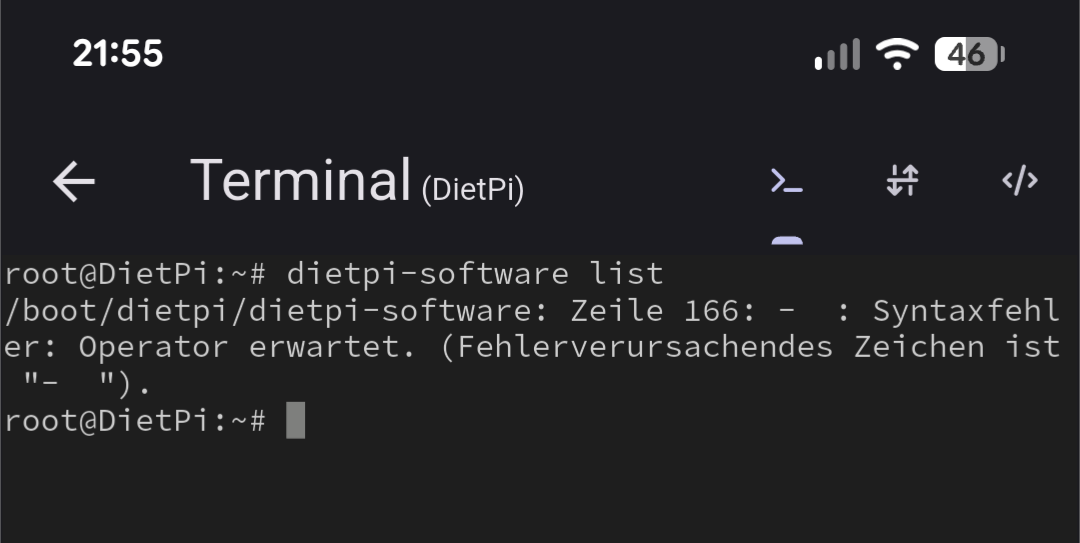
Okay that is a good reason why it does not work. As long as dietpi-software list returns an error, no need to check the dashboard.
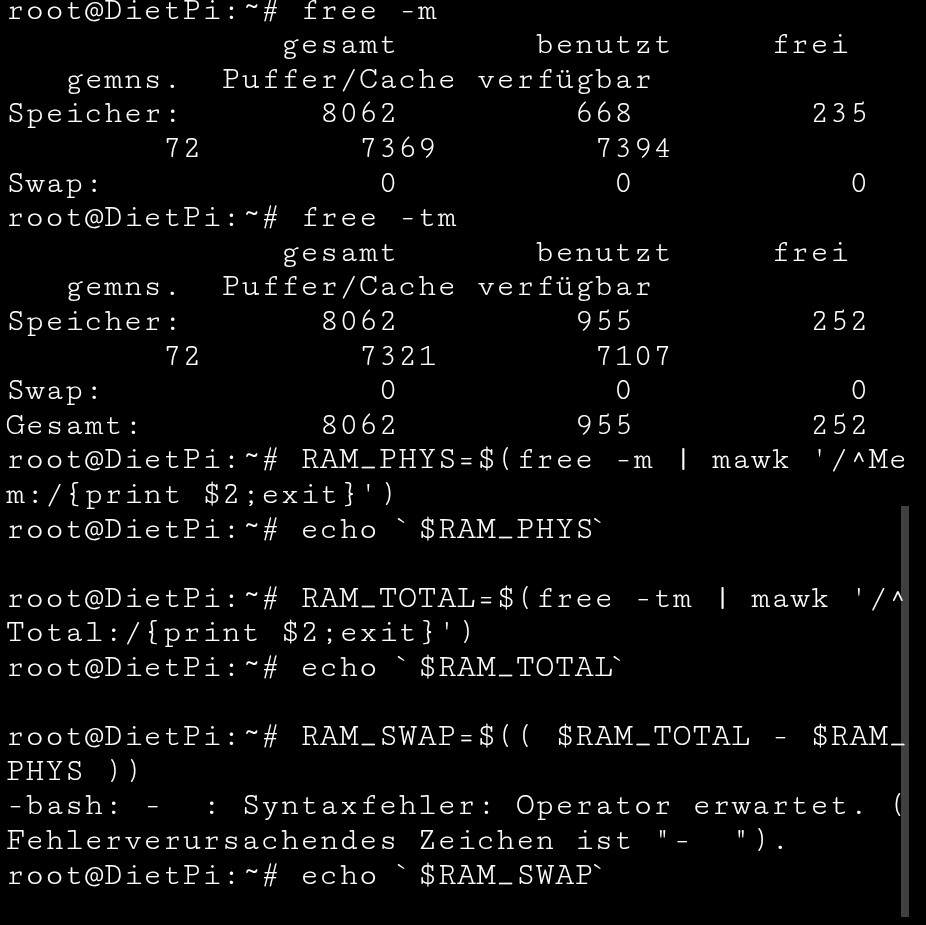
Here is the relevant code that runs in line 166 of the script. Can you try these manually:
free -m
free -tm
RAM_PHYS=$(free -m | mawk '/^Mem:/{print $2;exit}')
echo `$RAM_PHYS`
RAM_TOTAL=$(free -tm | mawk '/^Total:/{print $2;exit}')
echo `$RAM_TOTAL`
RAM_SWAP=$(( $RAM_TOTAL - $RAM_PHYS ))
echo `$RAM_SWAP`
3rink
28 March 2026 02:18
15
With the RAM_SWAP command, this error message comes up again.
But can you execute dietpi-software on CLI now?
To summarize, dietpi-software is working again via SSH but still not via the dashboard, right?
Ohh, because the list command does not enforce C (English) locales, so the Mem:/Total: lines do not match.
Fixed with: dietpi-software: list: do not parse memory sizes · MichaIng/DietPi@16da300 · GitHub
You can patch dietpi-software manually until next release:
sudo apt install patch
curl 'https://github.com/MichaIng/DietPi/commit/16da300.patch' | sed '1,/^+++ b\/dietpi\/dietpi-software/d' | sudo patch /boot/dietpi/dietpi-software