Yes, and if i click the img.xz, I see this:
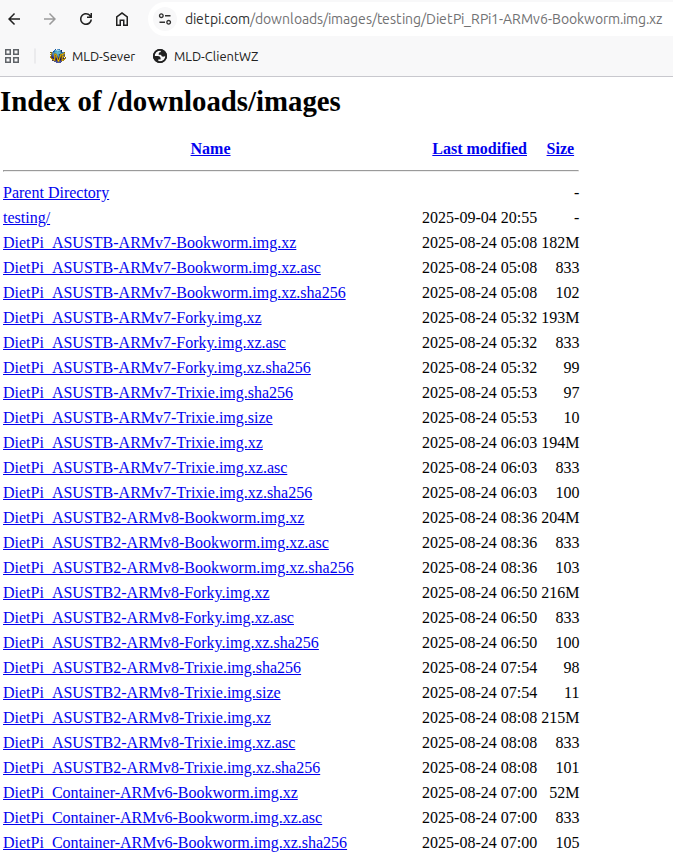
ok so we might need look into the web server hosting our download files.
@Melomane Can you check that again? The images are already available in the regular download folder.
The view you saw was a hanging Cloudflare cache. This has now been cleared.
Thanks, I had to empty the Browsercache and got the Download! 
This is what I meant with this, means the links from the download page point to the new images already, but I forgot to purge the directory index documents from the Cloudflare cache, hence they were showing wrong content and timestamps.
Weel, no sucess with the trixie-img. Hm…
Then your issue seems to be a different one, since that one booted for @Joulinar  . You need a HDMI screen or UART adapter then, else we have no way to find out what is going wrong.
Yes, I think so too. Well, I have an HDMI-Display, this one:
No problem with an Pi Zero WH. But so far, it doesn’t want to work with the Pi1. For the newer Zero, I had to configure the following in Config.txt:
#dtoverlay=vc4-kms-v3d
dtoverlay=dpi24
enable_dpi_lcd=1
display_default_lcd=1
dpi_group=2
dpi_mode=87
dpi_output_format=0x6f005
hdmi_cvt 1024 600 60 6 0 0 0
disable_overscan=1
But with this configuration, the Pi1 won’t start even with Raspbian.
Do you know how I need to configure the display?
AFAIK with the new kernel stack, KMS is required and the dedicated KMS overlay for this display. Several legacy components have been removed.
KMS + display_auto_detect=1 should work.
EDIT: The product page you linked even describes it. Aside of base KMS overlay, try with auto-detect above, which might select the needed overlays (aside of KMS) automatically, based on what it detects.
Thanks again. DietPi started and says: LAN IP: Use dietpi-config to setup a connection (NONE).
Ok, I’ll search a keybord.  But what about DHCP?
This Pi is annoying. Now he doesn’t like the USB keyboard. But I could see earlier that the network had started and ifup had been executed for eth0. Is there a problem with the kernel/network module after all?
Edit: The Keyboard is working with annother PC.
Looks like this really is the crux of the problem, some quirk with the network adapter, or the combination of it with the router.
Not that I am aware of. It is the official RPi Ltd kernel which is 2 months old in the meantime.
Maybe it is also a powering issue. If you get the keyboard up:
dmesg -l 0,1,2,3
journalctl -u ifup@eth0
Ok, obiously a problem with psu. When I connect the display and keyboard to the otherwise functioning installation with Raspbian, the Pi does not boot up. I have tried different PSUs - but no look. I think that means the Pi1 project can be buried. In any case, thank you again for your support.
Addendum: max_usb_current=1 didn’t help either.
One more thing comes to mind: Is it possible to give the installation card a script that writes the output of
dmesg -l 0,1,2,3
journalctl -u ifup@eth0
to a file that could then be read on another computer? Where would such a file have to be located?
We already write some log information to the card. But to the ext4 partition. Meany you would need to read this from another Linux box
Great! What’s the name of the log file?
This has no effect anymore since some years, USB ports are fully powered OOTB .
Check out the content of /var/tmp/dietpi/logs.
max_usb_current: LOL, This thread is worth reading. You learn a thing or two that was previously unknown.
And here we go:
dietpi-firstboot.log (9,7 KB)

Raspberry Pi is not exactly verbose about such changes. Invalid/unknown settings are silently ignored. While checking whether there is any deprecation notice in the docs, I found this: https://www.raspberrypi.com/documentation/computers/raspberry-pi.html#power-supply-warnings
So cat /proc/device-tree/chosen/power should show usb_max_current_enable = high then, I assume.
Back to the network issues. Setup goes through, but no DHCP lease could be obtained during the … not sure 30 seconds or so ifup tries it in foreground, before it forks into background.
Internet Systems Consortium DHCP Client 4.4.3-P1
Copyright 2004-2022 Internet Systems Consortium.
All rights reserved.
For info, please visit https://www.isc.org/software/dhcp/

Listening on LPF/eth0/b8:27:eb:09:e7:be
Sending on   LPF/eth0/b8:27:eb:09:e7:be
Sending on   Socket/fallback
Created duid "\000\001\000\0010KF\323\270'\353\011\347\276".
DHCPDISCOVER on eth0 to 255.255.255.255 port 67 interval 3
DHCPDISCOVER on eth0 to 255.255.255.255 port 67 interval 3
DHCPDISCOVER on eth0 to 255.255.255.255 port 67 interval 4
DHCPDISCOVER on eth0 to 255.255.255.255 port 67 interval 6
DHCPDISCOVER on eth0 to 255.255.255.255 port 67 interval 12
DHCPDISCOVER on eth0 to 255.255.255.255 port 67 interval 21
DHCPDISCOVER on eth0 to 255.255.255.255 port 67 interval 12
No DHCPOFFERS received.
No working leases in persistent database - sleeping.
This is not that uncommon. But in your case, it seems to never get an answer from the DHCP server in background either. You could try to set a static IP instead, but I have the feeling this wouldn’t work either .
Since you have access to the ext4 partition, you could add a script /etc/rc.local, make it executable and add some things for debugging:
#!/bin/dash
{
sleep 60 # just give it more time
dmesg -l 0,1,2,3 # kernel warnings and errors
journalctl -u ifup@eth0 # further DHCP client output
# bring down interface and switch to static IP
ifdown eth0
sed -i '/^iface eth0/s/dhcp/static/' /etc/network/interfaces
sed -i '/^address/c\address 192.168.0.2' /etc/network/interfaces
sed -i '/^gateway/c\gateway 192.168.0.1' /etc/network/interfaces
systemctl daemon-reload
# bring up interface, and check again status
ifup eth0
sleep 60
journalctl -u ifup@eth0
# try to enforce 100 Mbit, as this seems to be what was hanging before
ethtool -s eth0 speed 100 duplex full autoneg off
exit 0
} 2>&1 | tee /boot/firmware/debug.log
Adjust address and gateway to match a free IP in your network and the router IP. Give it 10 minutes of so, and if you cannot connect via SSH then, unplug power and check debug.log at the FAT partition (chose that one for possible access from Windows and macOS). While output is shown on the LCD as well, relevant parts could be moved off screen quickly.
I waited about 12 minutes and then turned off the Pi because it didn’t appear on the network. The file /boot/firmware/debug.log was not created.
I don’t see the file /etc/network/interfaces either. Is it created when the Pi boots up?
Edit: -rwxr-xr-x 1 root root 684 Sep 7 08:43 rc.local