It probably has to do with that wifi needs to be enabled in diepi.txt?
It would be nice if the installation instructions posted on the website would be working.
the search on dietpi.com diesn’t return any example configuration neither for dietpi-wifi.txt nor for dietpi.txt
It would be nice to be able to change the configuration files so that one just has to put the SD card into the PI Zero and things would start to work.
I had an example configuration for the two mentioned files but can’t find them anymore.
Now it is not possible to get dietpi running on the zero 2W anymore.
Can anybody help please?
# Entry 0
# - WiFi SSID: required, case sensitive
aWIFI_SSID[0]='abc'
# - WiFi key: If no key/open, leave this blank
# - In case of WPA-PSK, alternatively enter the 64-digit hexadecimal key returned by wpa_passphrase
# - Please replace single quote characters ' in your key with '\''. No other escaping is required.
aWIFI_KEY[0]='123456789abc'
# - Key type: NONE (no key/open) | WPA-PSK | WEP | WPA-EAP (then use settings below)
aWIFI_KEYMGR[0]='WPA-PSK'
# - WPA-EAP options: Only fill if WPA-EAP is set above
so is it supposed to be aWIFI_SSID[0]=‘abc’ or aWIFI_SSID[0]=abc?
and
aWIFI_KEY[0]=‘123456789abc’ or aWIFI_KEY[0]=123456789abc?
and what does # - Please replace single quote characters ’ in your key with ‘\’'. No other escaping is required. is supposed to mean? ‘yourkeyhere’? but probably ’ and not “?
thanks for trying to help.
I am happy that it works for you, but it doesn’t work for me nor for others unfortunately.
It would be great if the dietpi/docs/instalation could be edited so that they work in a real world scenario.
Who doesn’t use special characters in there wifi password these days!
why not just write instructions so that people can follow them and so that they work?
Make it simple.
I am trying to edit dietpi-wifi.txt so that I can just simply insert the SD card into the pi and automatically connect to my wifi so that it boots.
# - Please replace single quote characters ' in your key with '\''. No other escaping is required.
aWIFI_KEY[0]='-+/?%&$*'
does not work
# - Please replace single quote characters ' in your key with '\''. No other escaping is required.
what does that mean? what is it supposed to mean? what is ’ and what is ‘\’'?
‘ “ ‘ “ ‘ “ ‘ “ ‘ “ ‘ “ ‘ “ ‘ “ ???
can you please update the dietpi-wifi.txt and dietpi/docs/instalation?
It is also missing how to get the Access Point working on first boot to just log in to the dietpi.
How to install DietPi
The installation of DietPi consists of few steps:

Provide an installation media (e.g. SD card for single board computer or USB stick for PC)
Get the DietPi image (and put it on the installation media)
Boot up the DietPi device and go through one time installation steps
Boot up the DietPi device and go through one time installation steps
But how do I connect to it? How do I get there to go through the steps?
The documentation is correct and works. In my test, I did nothing other than what is described in the documentation. Here, too, it would be good to describe what does not work.
I don’t know how it could be any simpler.
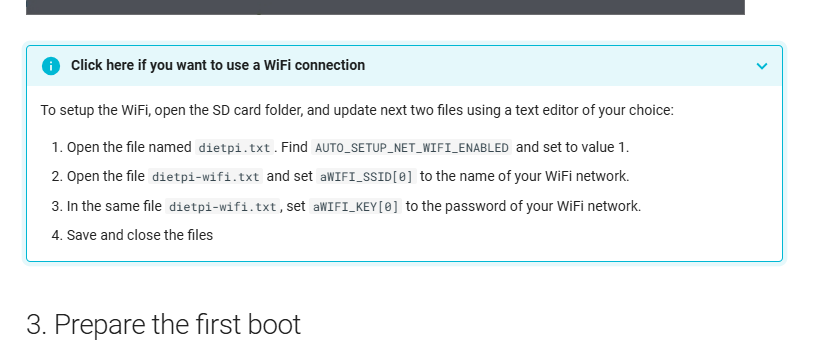
Open the file named dietpi.txt. Find AUTO_SETUP_NET_WIFI_ENABLED and set to value 1
Open the file dietpi-wifi.txt and set aWIFI_SSID[0] to the name of your WiFi network.
In the same file dietpi-wifi.txt, set aWIFI_KEY[0] to the password of your WiFi network.
Save and close the files
With what?
There is no such function. The SBC must connect to the Wi-Fi or Ethernet for the initial setup. An internet connection is essential.
You can then connect to the SBC via the local LAN/Wi-Fi.
' characters needs to be escaped. To escape a character, you put a \ in front of it, so you get \'
So if you password would be ', you need to write '\''
Because the whole password sequence is enclosed in ' single quote characters, the system needs to know what is part of the password and what not.
Imaging you have a password !#123Pass'LOL and in the file you write '!#123Pass'LOL' the system would just take !#123Pass, because that is the part between two ' single quotes.
To prevent this behavior you escape the single quotes which are part of the password, so you would need to write '!#123Pass\'LOL'

 thanks