i have a suggestion about a backup script that i found and i am very happy with.
i use calcardbackup (Bash script to backup calendars and addressbooks from a local ownCloud/Nextcloud installation).
So i have an “always working” backup of my calenders and contacts on all devices.
Maybe it is useful for others as well,
My goodness, this is a huge script. It seems to have a large feature set, also SQLite and PostgreSQL support (if Nextcloud was manually installed/configured to use it instead of MariaDB), support for encryption, compression and remote transfer of the backup etc etc.
For those who think it is an overkill:
cat << '_EOF_' > /etc/cron.daily/nextcloud_db_backup
#!/bin/dash

# Enable maintenance mode
sudo -u www-data php /var/www/nextcloud/occ maintenance:mode --on

# Backup Nextcloud database with numerically sortable timestamp
mysqldump nextcloud > /path/to/backup/$(date '+%Y-%m-%d_%T').sql

# Disable maintenance mode
sudo -u www-data php /var/www/nextcloud/occ maintenance:mode --off

# Remove old backups as long as more than 10 are present
while [ $(find /path/to/backup -name '*.sql' | wc -l) -gt 10 ]
do
rm -v "$(find /path/to/backup -name '*.sql' | sort -n | head -1)"
done

exit 0
_EOF_
chmod +x /etc/cron.daily/nextcloud_db_backup
So you have a daily running script which creates a whole Nextcloud database backup (instead of calendar/contacts only) and keeps 10 iterations of it.
Btw I did a little but important syntax fix in the script above.
Since .sql files are not binary but plain text, it can be also used to restore single tables, individual rows or data. I agree that .ics and .vcf files are pretty handy. So basically the question is what you need. I do the database backups to be able to restore the full or parts of the database, when corrupted, on the server itself, to repair a broken Nextcloud server. Calendar/contacts exports can be done at the clients instead, also when the server is dead. But indeed depending on the client removed/broken data could be synced so that a central export/backup to quickly access/restore those on the clients is nice as well.
coming back to your backup script:
I may do a fresh install of dietpi and would install nextcloud.
How do i restore the sql-dump?
what would happen, if external mounted drives were changed? when i mount them to same /mnt/directory is it ok?
Theoretically if you create the NextCloud data directory /mnt/dietpi_userdata/nextcloud_data manually and store the SQL dump named as dietpi-nextcloud-database-backup.sql inside, it should be restored automatically on new installation.
what would happen, if external mounted drives were changed? when i mount them to same /mnt/directory is it ok?
Nothing should happen if the new drive contains the very same data and is mounted to very same mount point.
so i switched to armv8 64bit and i copied the .sql in the folder /mnt/dietpi_userdata/nextcloud_data.
i also copied /mnt/dietpi_userdata/nextcloud_data from old system to new system
during the install of nextcloud (114) it says database is migrated.
when i login, i have only the admin account without any users.
what else is missing? /var/www/nextcloud/apps and /var/www/nextcloud/config ?
whats the correct order of installing? first create folders, than install 114 or otherway round?
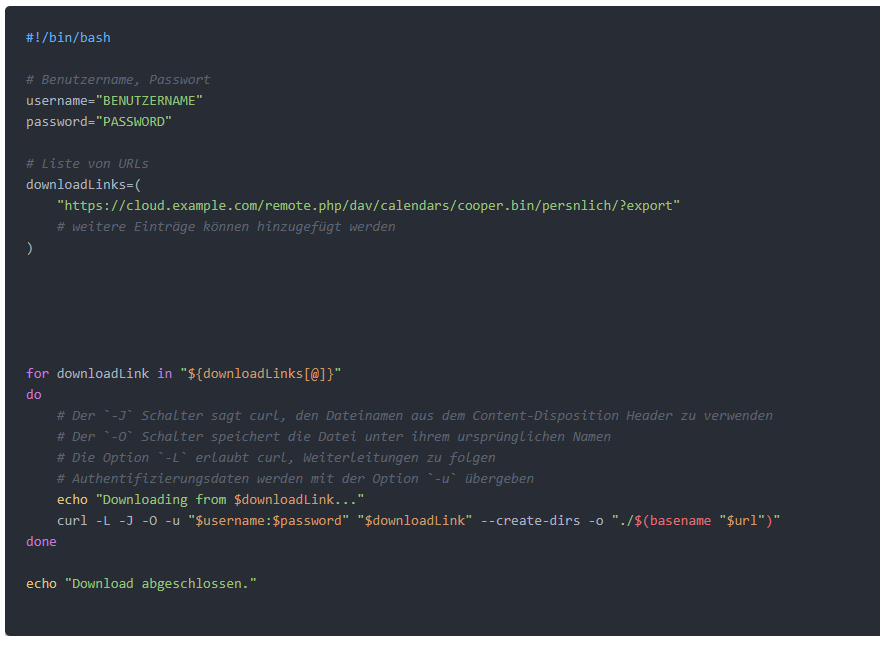
I found another script that can export contacts and calendars via WebDAV. It is much leaner and exports contacts directly to ICS and calendars to VCF files. It is written in German, but should still be understandable.