I’m trying to disable Bluetooth on my Dietpi. When I go into the dietpi-config and Advanced, I see Bluetooth, but I can’t set it to off. New to Linux/Raspberry Pi. Thanks!
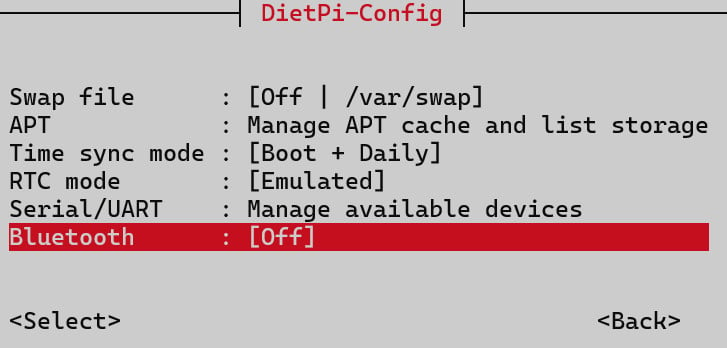
Can you explain further? How did you try to disable it?
I guess this should describe the Issue · GitHub
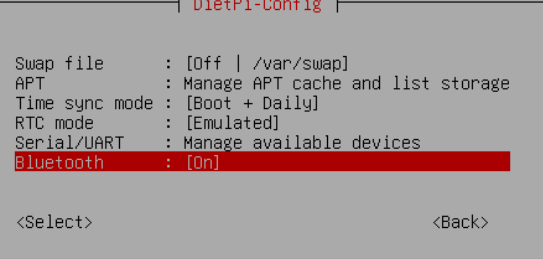
I’m trying to add a Home Assistant Voice to my HA setup on DietPi, but because it detects Bluetooth on the device, it gives me an error on the install. Reddit says that I need to disable Bluetooth on the pi/DietPi and that will allow the setup to go through.
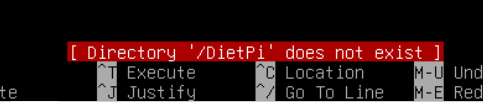
It’s known visual issue as stated above. And /dietpi did not exist. It has been moved to /boot/dietpi/ years ago.
Joulinar,
Thanks for the quick responses. I did put the disable-bt command in /boot/dietpi/config.txt but there is still a ‘flag’ that is telling the VoiceAssistant that bt is enabled. I verified by spinning up a HAOS instance and the voice speaker worked fine. I really like DietPi, it is much easier and more lightweight than the HAOS instance, so I will still be following this closely. Writing this off as a bug now. Thanks again!
What exactly did you set?
And where did you start HAOS? On the same device as DietPi is running on?
And /boot/dietpi/config.txt is a typo? As it is /boot/firmware/config.txt, which needs to contain dtoverlay=disable-bt.
But dietpi-config should have set that and purged all Bluetooth userland packages already. The bug only shows it as still enabled, and does break enabling it with the menu.
Did you reboot the system in between? Not sure how HAOS checks whether Bluetooth is “enabled” or not (whatever this means exactly), but a stale hciuart process might still be running. Try:
sudo systemctl stop hciuart
The service is disabled and the package which ships it purged. But we do not actively stop it. Since when it was stopped once, it cannot be started anymore without rebooting the system.
And the overlay to take effect, freeing/exposing the UART device to be used otherwise, requires a reboot as well.
Michalng,
Thanks, I’ll put the command there and try it out to see if it works.
I did reboot it after I put that command in.
I typed in:
dtoverlay=disable-bt
And the HAOS, I spun up a new VM on my ProxMox box. Both HA instances have the same IP on my LAN, so I can swap between the 2 for testing.
My system said the /boot/firmware directory does not exist.
And seems like that service is not there on my DietPi:

Regarding the service: after a reboot that is expected, so that service is not what causes HAOS to think Bluetooth is enabled.
/boot/firmware does not exist, not even an empty directory? And this is an up-to-date DietPi instance based on an official image from our website? All RPi images must have the boot FAT partition mounted there, else essential RPi firmware package upgrades would fail, and hardware configuration strictly requires access to the config.txt on the boot partition.
Please show the output of
lsblk -o name,fstype,label,size,type,mountpoint
So we get an idea which partition is available and mounted where.

I should have read nore carefully: As of your “New to Linux/Raspberry Pi” and config.txt, I thought it is a Raspberry Pi. But it is an x86_64 Proxmox VM. Okay, then there is no config.txt, hciuart, and no dtoverlays.
On x86_64, Bluetooth kernel modules are loaded ondemand if a Bluetooth adapter is detected/attached. On a VM, this does not usually exist, as no WiFi adapter does, unless a USB adapter is passed through from the host to the guest.
Can you check which kernel modules are loaded?
lsmod
If no WiFi/Bluetooth-related kernel module is loaded (not in the command output), then HAOS does a very weird Bluetooth-enabled detection, and we’d need to look into the code of the related HA component.
If a WiFi/Bluetooth module is loaded, it can be blacklisted. But the better approach would be to check where the WiFi/BT device itself is coming from, and remove it from the VM.
Is there a way to pause the output? The console is not letting me clip the entire output. Really appreciate the help, BTW.
NM, I just Puttied into it and copy/pasted it.
root@DietPi:\~# lsmod
Module                  Size  Used by
sha512_ssse3           53248  0
sha256_ssse3           32768  0
sha1_ssse3             32768  0
aesni_intel           122880  0
gf128mul               16384  1 aesni_intel
crypto_simd            16384  1 aesni_intel
bochs                  16384  0
cryptd                 28672  1 crypto_simd
drm_vram_helper        28672  1 bochs
drm_ttm_helper         16384  3 bochs,drm_vram_helper
ttm                   106496  2 drm_vram_helper,drm_ttm_helper
vga16fb                28672  0
drm_kms_helper        253952  3 bochs,drm_vram_helper,drm_ttm_helper
virtio_balloon         32768  0
vgastate               16384  1 vga16fb
pcspkr                 12288  0
button                 24576  0
sg                     45056  0
evdev                  28672  2
joydev                 24576  0
drm                   774144  6 drm_kms_helper,bochs,drm_vram_helper,drm_ttm_helper,ttm
configfs               69632  1
efi_pstore             12288  0
nfnetlink              20480  1
qemu_fw_cfg            20480  0
ip_tables              28672  0
x_tables               53248  1 ip_tables
autofs4                57344  2
ext4                 1146880  1
crc16                  12288  1 ext4
mbcache                16384  1 ext4
jbd2                  200704  1 ext4
crc32c_generic         12288  0
hid_generic            12288  0
usbhid                 77824  0
hid                   262144  2 usbhid,hid_generic
sr_mod                 28672  0
cdrom                  81920  1 sr_mod
ata_generic            12288  0
ata_piix               45056  0
sd_mod                 81920  1
uhci_hcd               61440  0
libata                466944  2 ata_piix,ata_generic
ehci_pci               16384  0
ehci_hcd              110592  1 ehci_pci
virtio_net            118784  0
virtio_scsi            28672  1
psmouse               217088  0
net_failover           24576  1 virtio_net
usbcore               409600  4 ehci_pci,usbhid,ehci_hcd,uhci_hcd
scsi_mod              331776  5 virtio_scsi,sd_mod,libata,sg,sr_mod
failover               12288  1 net_failover
serio_raw              16384  0
crc32c_intel           16384  2
i2c_piix4              28672  0
usb_common             16384  3 usbcore,ehci_hcd,uhci_hcd
i2c_smbus              16384  1 i2c_piix4
scsi_common            16384  5 scsi_mod,sd_mod,libata,sg,sr_mod
floppy                 94208  0
With a pager:
lsmod | pager
or
lsmod | more
the default pager from util-linux.
EDIT: Yeah, via SSH it is easier  .
.