OK, reinstall perl-base…
root@DietPi:~# mv /var/lib/dpkg/info/grub-efi-amd64.postinst /var/lib/dpkg/info/grub-efi-amd64.postinst.bak
dpkg --configure -a
apt install --reinstall perl-base debconf
apt update
apt upgrade
mv /var/lib/dpkg/info/grub-efi-amd64.postinst.bak /var/lib/dpkg/info/grub-efi-amd64.postinst
perl /usr/share/debconf/frontend /var/lib/dpkg/info/grub-efi-amd64.postinst configure 2.12-9
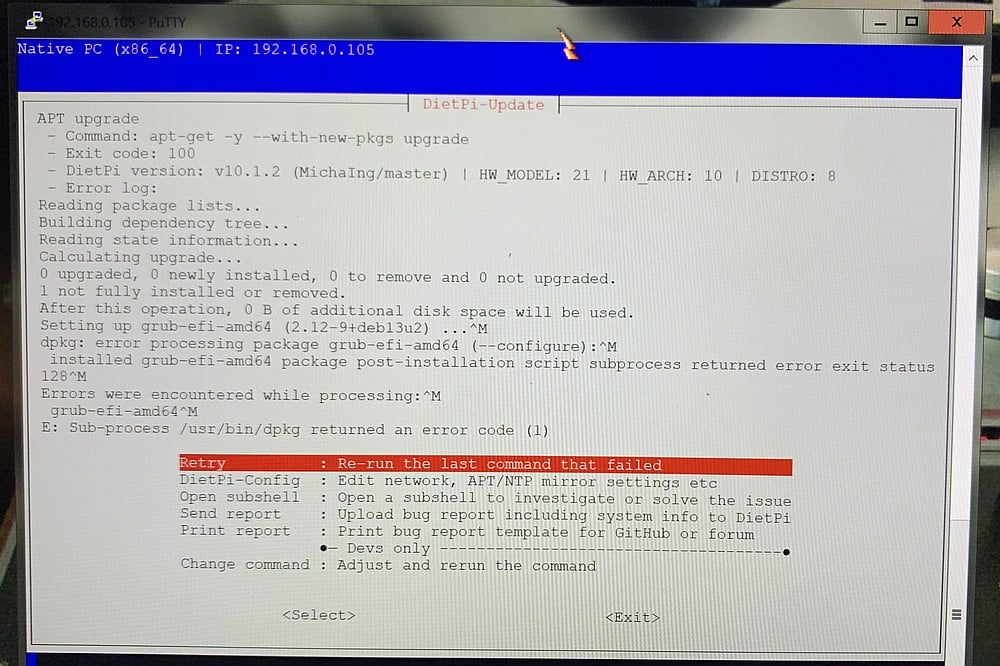
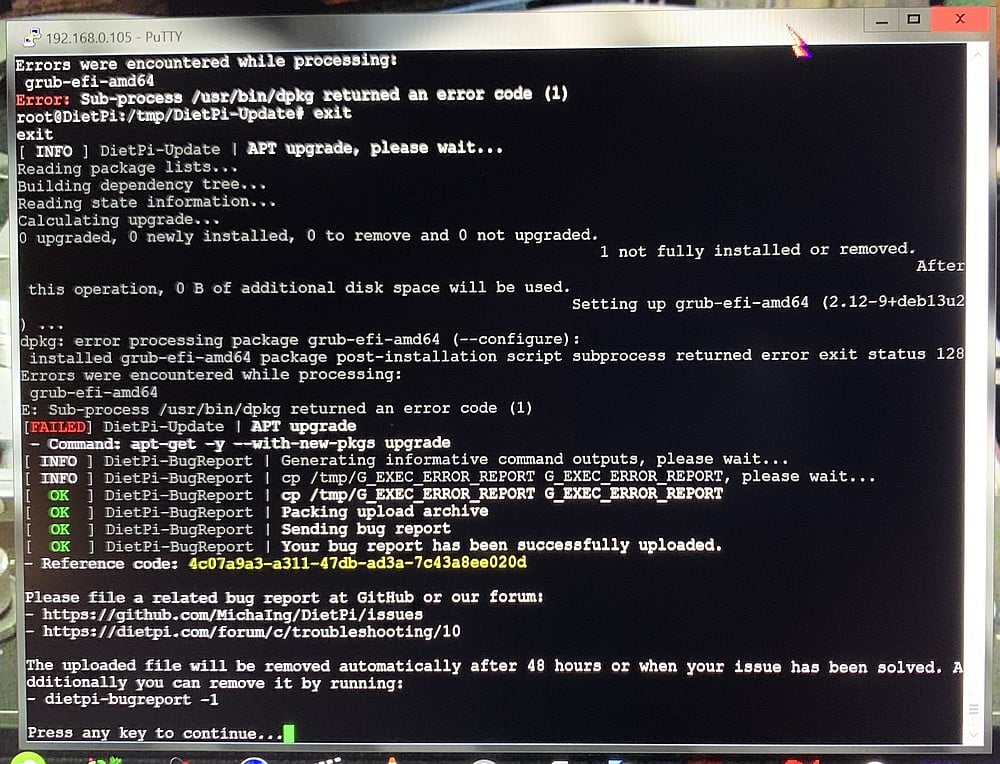
Setting up grub-efi-amd64 (2.12-9+deb13u2) ...
Summary:
  Upgrading: 0, Installing: 0, Reinstalling: 2, Removing: 0, Not Upgrading: 0
  Download size: 1787 kB
  Space needed: 0 B / 236 GB available

Get:1 https://deb.debian.org/debian trixie/main amd64 perl-base amd64 5.40.1-6 [1666 kB]
Get:2 https://deb.debian.org/debian trixie/main amd64 debconf all 1.5.91 [121 kB]
Fetched 1787 kB in 0s (4163 kB/s)
Preconfiguring packages ...
(Reading database ... 28352 files and directories currently installed.)
Preparing to unpack .../perl-base_5.40.1-6_amd64.deb ...
Unpacking perl-base (5.40.1-6) over (5.40.1-6) ...
Setting up perl-base (5.40.1-6) ...
(Reading database ... 28352 files and directories currently installed.)
Preparing to unpack .../debconf_1.5.91_all.deb ...
Unpacking debconf (1.5.91) over (1.5.91) ...
Setting up debconf (1.5.91) ...
Hit:1 https://deb.debian.org/debian trixie InRelease
Get:2 https://deb.debian.org/debian trixie-updates InRelease [47.3 kB]
Get:3 https://deb.debian.org/debian-security trixie-security InRelease [43.4 kB]
Get:4 https://deb.debian.org/debian trixie-backports InRelease [54.0 kB]
Get:5 https://deb.debian.org/debian trixie-backports/main amd64 Packages.diff/Index [63.3 kB]
Get:6 https://deb.debian.org/debian trixie-backports/main amd64 Packages T-2026-08-04-0801.37-F-2026-08-02-0802.51.pdiff [6307 B]
Get:6 https://deb.debian.org/debian trixie-backports/main amd64 Packages T-2026-08-04-0801.37-F-2026-08-02-0802.51.pdiff [6307 B]
Get:7 https://dietpi.com/apt trixie InRelease [2140 B]
Get:8 https://dietpi.com/apt trixie/main amd64 Packages [6512 B]
Fetched 223 kB in 1s (285 kB/s)
All packages are up to date.
Summary:
  Upgrading: 0, Installing: 0, Removing: 0, Not Upgrading: 0
root@DietPi:~#
Rerun of prev script gave same result as above: END: $?=128
so install of perl:
root@DietPi:~# apt install perl
perl -d /usr/share/debconf/frontend /var/lib/dpkg/info/grub-efi-amd64.postinst configure 2.12-9
Installing:
  perl

Installing dependencies:
  libgdbm-compat4t64  libgdbm6t64  libperl5.40  perl-modules-5.40

Suggested packages:
  gdbm-l10n  perl-doc  libterm-readline-gnu-perl  | libterm-readline-perl-perl  make  libtap-harness-archive-perl

Summary:
  Upgrading: 0, Installing: 5, Removing: 0, Not Upgrading: 0
  Download size: 7753 kB
  Space needed: 51.6 MB / 236 GB available

Continue? [Y/n] y
Get:1 https://deb.debian.org/debian trixie/main amd64 perl-modules-5.40 all 5.40.1-6 [3019 kB]
Get:2 https://deb.debian.org/debian trixie/main amd64 libgdbm6t64 amd64 1.24-2 [75.2 kB]
Get:3 https://deb.debian.org/debian trixie/main amd64 libgdbm-compat4t64 amd64 1.24-2 [50.3 kB]
Get:4 https://deb.debian.org/debian trixie/main amd64 libperl5.40 amd64 5.40.1-6 [4341 kB]
Get:5 https://deb.debian.org/debian trixie/main amd64 perl amd64 5.40.1-6 [267 kB]
Fetched 7753 kB in 1s (9652 kB/s)
Selecting previously unselected package perl-modules-5.40.
(Reading database ... 28352 files and directories currently installed.)
Preparing to unpack .../perl-modules-5.40_5.40.1-6_all.deb ...
Unpacking perl-modules-5.40 (5.40.1-6) ...
Selecting previously unselected package libgdbm6t64:amd64.
Preparing to unpack .../libgdbm6t64_1.24-2_amd64.deb ...
Unpacking libgdbm6t64:amd64 (1.24-2) ...
Selecting previously unselected package libgdbm-compat4t64:amd64.
Preparing to unpack .../libgdbm-compat4t64_1.24-2_amd64.deb ...
Unpacking libgdbm-compat4t64:amd64 (1.24-2) ...
Selecting previously unselected package libperl5.40:amd64.
Preparing to unpack .../libperl5.40_5.40.1-6_amd64.deb ...
Unpacking libperl5.40:amd64 (5.40.1-6) ...
Selecting previously unselected package perl.
Preparing to unpack .../perl_5.40.1-6_amd64.deb ...
Unpacking perl (5.40.1-6) ...
Setting up libgdbm6t64:amd64 (1.24-2) ...
Setting up libgdbm-compat4t64:amd64 (1.24-2) ...
Setting up perl-modules-5.40 (5.40.1-6) ...
Setting up libperl5.40:amd64 (5.40.1-6) ...
Setting up perl (5.40.1-6) ...
Processing triggers for libc-bin (2.41-12+deb13u3) ...

Loading DB routines from perl5db.pl version 1.80
Editor support available.

Enter h or 'h h' for help, or 'man perldebug' for more help.

main::(/usr/share/debconf/frontend:8):
8:      };
  DB<1>
…at which point not sure of next thing to do, so I dropped the sed string in…
  DB<2> root@DietPi:~# sed -i '1a\END {\
    warn "END: \\$?=$?\\n";\
}\
$SIG{__DIE__} = sub {\
    require Carp;\
    Carp::confess(@_);\
};' /usr/share/debconf/frontend
sed -i '/my $confmodule=make_confmodule/i\warn "before make_confmodule\\n";' /usr/share/debconf/frontend
sed -i '/$confmodule->owner/i\warn "after make_confmodule\\n";' /usr/share/debconf/frontend
sed -i '/1 while ($confmodule->communicate)/i\warn "before communicate\\n";' /usr/share/debconf/frontend
sed -i '/1 while ($confmodule->communicate)/a\warn "after communicate\\n";' /usr/share/debconf/frontend

perl /usr/share/debconf/frontend /var/lib/dpkg/info/grub-efi-amd64.postinst configure 2.12-9
  cont:   cont:   cont:   cont:   cont:   cont: Array found where operator expected (Missing operator before "@DietPi"?) at (eval 18)[/usr/share/perl/5.40/perl5db.pl:742] line 2, near "root@DietPi"
 at (eval 18)[/usr/share/perl/5.40/perl5db.pl:742] line 2.
        eval 'no strict; ($@, $!, $^E, $,, $/, $\\, $^W) = @DB::saved;package main; $^D = $^D | $DB::db_stop;
root@DietPi:~# sed -i \'1a\\END {
    warn "END: \\\\$?=$?\\\\n";
}
$SIG{__DIE__} = sub {
    require Carp;
    Carp::confess(@_);
};\' /usr/share/debconf/frontend;
' called at /usr/share/perl/5.40/perl5db.pl line 742
        DB::eval called at /usr/share/perl/5.40/perl5db.pl line 3444
        DB::DB called at /usr/share/debconf/frontend line 8
syntax error at (eval 18)[/usr/share/perl/5.40/perl5db.pl:742] line 2, near "root@DietPi"
Execution of (eval 18)[/usr/share/perl/5.40/perl5db.pl:742] aborted due to compilation errors.
 at (eval 18)[/usr/share/perl/5.40/perl5db.pl:742] line 2.
        eval 'no strict; ($@, $!, $^E, $,, $/, $\\, $^W) = @DB::saved;package main; $^D = $^D | $DB::db_stop;
root@DietPi:~# sed -i \'1a\\END {
    warn "END: \\\\$?=$?\\\\n";
}
$SIG{__DIE__} = sub {
    require Carp;
    Carp::confess(@_);
};\' /usr/share/debconf/frontend;
' called at /usr/share/perl/5.40/perl5db.pl line 742
        DB::eval called at /usr/share/perl/5.40/perl5db.pl line 3444
        DB::DB called at /usr/share/debconf/frontend line 8

  DB<3> String found where operator expected (Do you need to predeclare "i"?) at (eval 19)[/usr/share/perl/5.40/perl5db.pl:742] line 2, near "i '/my $confmodule=make_confmodule/i\warn "before make_confmodule\\n";'"
 at (eval 19)[/usr/share/perl/5.40/perl5db.pl:742] line 2.
        eval 'no strict; ($@, $!, $^E, $,, $/, $\\, $^W) = @DB::saved;package main; $^D = $^D | $DB::db_stop;
sed -i \'/my $confmodule=make_confmodule/i\\warn "before make_confmodule\\\\n";\' /usr/share/debconf/frontend;
' called at /usr/share/perl/5.40/perl5db.pl line 742
        DB::eval called at /usr/share/perl/5.40/perl5db.pl line 3444
        DB::DB called at /usr/share/debconf/frontend line 8
syntax error at (eval 19)[/usr/share/perl/5.40/perl5db.pl:742] line 2, near "i '/my $confmodule=make_confmodule/i\warn "before make_confmodule\\n";'"
Execution of (eval 19)[/usr/share/perl/5.40/perl5db.pl:742] aborted due to compilation errors.
 at (eval 19)[/usr/share/perl/5.40/perl5db.pl:742] line 2.
        eval 'no strict; ($@, $!, $^E, $,, $/, $\\, $^W) = @DB::saved;package main; $^D = $^D | $DB::db_stop;
sed -i \'/my $confmodule=make_confmodule/i\\warn "before make_confmodule\\\\n";\' /usr/share/debconf/frontend;
' called at /usr/share/perl/5.40/perl5db.pl line 742
        DB::eval called at /usr/share/perl/5.40/perl5db.pl line 3444
        DB::DB called at /usr/share/debconf/frontend line 8

  DB<4> String found where operator expected (Do you need to predeclare "i"?) at (eval 20)[/usr/share/perl/5.40/perl5db.pl:742] line 2, near "i '/$confmodule->owner/i\warn "after make_confmodule\\n";'"
 at (eval 20)[/usr/share/perl/5.40/perl5db.pl:742] line 2.
        eval 'no strict; ($@, $!, $^E, $,, $/, $\\, $^W) = @DB::saved;package main; $^D = $^D | $DB::db_stop;
sed -i \'/$confmodule->owner/i\\warn "after make_confmodule\\\\n";\' /usr/share/debconf/frontend;
' called at /usr/share/perl/5.40/perl5db.pl line 742
        DB::eval called at /usr/share/perl/5.40/perl5db.pl line 3444
        DB::DB called at /usr/share/debconf/frontend line 8
syntax error at (eval 20)[/usr/share/perl/5.40/perl5db.pl:742] line 2, near "i '/$confmodule->owner/i\warn "after make_confmodule\\n";'"
Execution of (eval 20)[/usr/share/perl/5.40/perl5db.pl:742] aborted due to compilation errors.
 at (eval 20)[/usr/share/perl/5.40/perl5db.pl:742] line 2.
        eval 'no strict; ($@, $!, $^E, $,, $/, $\\, $^W) = @DB::saved;package main; $^D = $^D | $DB::db_stop;
sed -i \'/$confmodule->owner/i\\warn "after make_confmodule\\\\n";\' /usr/share/debconf/frontend;
' called at /usr/share/perl/5.40/perl5db.pl line 742
        DB::eval called at /usr/share/perl/5.40/perl5db.pl line 3444
        DB::DB called at /usr/share/debconf/frontend line 8

  DB<5> String found where operator expected (Do you need to predeclare "i"?) at (eval 21)[/usr/share/perl/5.40/perl5db.pl:742] line 2, near "i '/1 while ($confmodule->communicate)/i\warn "before communicate\\n";'"
 at (eval 21)[/usr/share/perl/5.40/perl5db.pl:742] line 2.
        eval 'no strict; ($@, $!, $^E, $,, $/, $\\, $^W) = @DB::saved;package main; $^D = $^D | $DB::db_stop;
sed -i \'/1 while ($confmodule->communicate)/i\\warn "before communicate\\\\n";\' /usr/share/debconf/frontend;
' called at /usr/share/perl/5.40/perl5db.pl line 742
        DB::eval called at /usr/share/perl/5.40/perl5db.pl line 3444
        DB::DB called at /usr/share/debconf/frontend line 8
syntax error at (eval 21)[/usr/share/perl/5.40/perl5db.pl:742] line 2, near "i '/1 while ($confmodule->communicate)/i\warn "before communicate\\n";'"
Execution of (eval 21)[/usr/share/perl/5.40/perl5db.pl:742] aborted due to compilation errors.
 at (eval 21)[/usr/share/perl/5.40/perl5db.pl:742] line 2.
        eval 'no strict; ($@, $!, $^E, $,, $/, $\\, $^W) = @DB::saved;package main; $^D = $^D | $DB::db_stop;
sed -i \'/1 while ($confmodule->communicate)/i\\warn "before communicate\\\\n";\' /usr/share/debconf/frontend;
' called at /usr/share/perl/5.40/perl5db.pl line 742
        DB::eval called at /usr/share/perl/5.40/perl5db.pl line 3444
        DB::DB called at /usr/share/debconf/frontend line 8

  DB<6> String found where operator expected (Do you need to predeclare "i"?) at (eval 22)[/usr/share/perl/5.40/perl5db.pl:742] line 2, near "i '/1 while ($confmodule->communicate)/a\warn "after communicate\\n";'"
 at (eval 22)[/usr/share/perl/5.40/perl5db.pl:742] line 2.
        eval 'no strict; ($@, $!, $^E, $,, $/, $\\, $^W) = @DB::saved;package main; $^D = $^D | $DB::db_stop;
sed -i \'/1 while ($confmodule->communicate)/a\\warn "after communicate\\\\n";\' /usr/share/debconf/frontend;
' called at /usr/share/perl/5.40/perl5db.pl line 742
        DB::eval called at /usr/share/perl/5.40/perl5db.pl line 3444
        DB::DB called at /usr/share/debconf/frontend line 8
syntax error at (eval 22)[/usr/share/perl/5.40/perl5db.pl:742] line 2, near "i '/1 while ($confmodule->communicate)/a\warn "after communicate\\n";'"
Execution of (eval 22)[/usr/share/perl/5.40/perl5db.pl:742] aborted due to compilation errors.
 at (eval 22)[/usr/share/perl/5.40/perl5db.pl:742] line 2.
        eval 'no strict; ($@, $!, $^E, $,, $/, $\\, $^W) = @DB::saved;package main; $^D = $^D | $DB::db_stop;
sed -i \'/1 while ($confmodule->communicate)/a\\warn "after communicate\\\\n";\' /usr/share/debconf/frontend;
' called at /usr/share/perl/5.40/perl5db.pl line 742
        DB::eval called at /usr/share/perl/5.40/perl5db.pl line 3444
        DB::DB called at /usr/share/debconf/frontend line 8

  DB<7>
  DB<7> Illegal division by zero at (eval 24)[/usr/share/perl/5.40/perl5db.pl:742] line 2.

  DB<8> debconf: before make_confmodule

debconf: after make_confmodule

debconf: before communicate

debconf: after communicate

END: $?=128
root@DietPi:~#Bareword found where operator expected (Do you need to predeclare "before"?) at (eval 25)[/usr/share/perl/5.40/perl5db.pl:742] line 2, near "before make_confmodule"
 at (eval 25)[/usr/share/perl/5.40/perl5db.pl:742] line 2.
        eval 'no strict; ($@, $!, $^E, $,, $/, $\\, $^W) = @DB::saved;package main; $^D = $^D | $DB::db_stop;
debconf: before make_confmodule;
' called at /usr/share/perl/5.40/perl5db.pl line 742
        DB::eval called at /usr/share/perl/5.40/perl5db.pl line 3444
        DB::DB called at /usr/share/debconf/frontend line 8
syntax error at (eval 25)[/usr/share/perl/5.40/perl5db.pl:742] line 2, near "before make_confmodule"
Execution of (eval 25)[/usr/share/perl/5.40/perl5db.pl:742] aborted due to compilation errors.
 at (eval 25)[/usr/share/perl/5.40/perl5db.pl:742] line 2.
        eval 'no strict; ($@, $!, $^E, $,, $/, $\\, $^W) = @DB::saved;package main; $^D = $^D | $DB::db_stop;
debconf: before make_confmodule;
' called at /usr/share/perl/5.40/perl5db.pl line 742
        DB::eval called at /usr/share/perl/5.40/perl5db.pl line 3444
        DB::DB called at /usr/share/debconf/frontend line 8

  DB<9>
  DB<9> Bareword found where operator expected (Do you need to predeclare "after"?) at (eval 27)[/usr/share/perl/5.40/perl5db.pl:742] line 2, near "after make_confmodule"
 at (eval 27)[/usr/share/perl/5.40/perl5db.pl:742] line 2.
        eval 'no strict; ($@, $!, $^E, $,, $/, $\\, $^W) = @DB::saved;package main; $^D = $^D | $DB::db_stop;
debconf: after make_confmodule;
' called at /usr/share/perl/5.40/perl5db.pl line 742
        DB::eval called at /usr/share/perl/5.40/perl5db.pl line 3444
        DB::DB called at /usr/share/debconf/frontend line 8
syntax error at (eval 27)[/usr/share/perl/5.40/perl5db.pl:742] line 2, near "after make_confmodule"
Execution of (eval 27)[/usr/share/perl/5.40/perl5db.pl:742] aborted due to compilation errors.
 at (eval 27)[/usr/share/perl/5.40/perl5db.pl:742] line 2.
        eval 'no strict; ($@, $!, $^E, $,, $/, $\\, $^W) = @DB::saved;package main; $^D = $^D | $DB::db_stop;
debconf: after make_confmodule;
' called at /usr/share/perl/5.40/perl5db.pl line 742
        DB::eval called at /usr/share/perl/5.40/perl5db.pl line 3444
        DB::DB called at /usr/share/debconf/frontend line 8

  DB<10>
  DB<10> Can't locate object method "before" via package "communicate" (perhaps you forgot to load "communicate"?) at (eval 29)[/usr/share/perl/5.40/perl5db.pl:742] line 2.

  DB<11>
  DB<11> Can't locate object method "after" via package "communicate" (perhaps you forgot to load "communicate"?) at (eval 31)[/usr/share/perl/5.40/perl5db.pl:742] line 2.

  DB<12>
  DB<12>
  DB<13> q
END: $?=128
 at /usr/share/debconf/frontend line 3.
        main::END() called at /usr/share/debconf/frontend line 0
        eval {...} called at /usr/share/debconf/frontend line 0
root@DietPi:~#
Does this explain anything about the issue ? Thanks again…
 . It is a large one. The only practical way is to run it with
  )
) .
.  .
. .
.
 .
. .
.