OK, ran the above commands. DietPi gave a number of choices to make under the dialog heading “Configuring grub-efi-amd64”, then completed without any messages:
root@DietPi:~# mv /var/lib/dpkg/info/grub-efi-amd64.postinst /var/lib/dpkg/info/grub-efi-amd64.postinst.bak
dpkg --configure -a
mv /var/lib/dpkg/info/grub-efi-amd64.postinst.bak /var/lib/dpkg/info/grub-efi-amd64.postinst
dpkg-reconfigure grub-efi-amd64
Setting up grub-efi-amd64 (2.12-9+deb13u2) ...
root@DietPi:~#
Setting up grub-efi-amd64 (2.12-9+deb13u2) ... is from the dpkg --configure -a, so dpkg-reconfigure grub-efi-amd64 seems to not have produced any console output, aside of the dialogs. So it failed as well.
Can you run dpkg-reconfigure grub-efi-amd64 again, confirming/leaving untouched all values/choices by just hitting return, and tell me which dialog is the last you see?
Oh actually, I just see this:
You added quite a number of cmdline arguments to the GRUB_CMDLINE_LINUX_DEFAULT setting. It might be copy&paste quirk, but after this line in your config script debug output, there is an empty line, which shouldn’t be there. The same can be seen in the frontend debug output:
vs other sections, which do not have the empty line after printf ...:
+ IFS=
+ printf %s\n SET grub2/linux_cmdline net.ifnames=0
+ IFS=
So maybe the error is not coming from the grub2/linux_cmdline value in debconf or GRUB_CMDLINE_LINUX in /etc/default/grub, but from the grub2/linux_cmdline_default or GRUB_CMDLINE_LINUX_DEFAULT respectively. And maybe that newline in the value itself spills over into the next variable/question.
A proper newline in this file would not cause a newline inside the assigned variable value. I could imagine that you edited the file with an editor on Windows, which added a carriage return (common for Windows line endings: CRLF vs LF). Or another control character was accidentally added. Please try to edit /etc/default/grub with a Linux editor, or nano /etc/default/grub from console, and remove the line ending and at best last character of GRUB_CMDLINE_LINUX_DEFAULT. E.g.:
Navigate to the start of GRUB_CMDLINE_LINUX below.
Hit the delete (<—) key 2 or 3 times, until the last character 7 of the GRUB_CMDLINE_LINUX_DEFAULT was deleted.
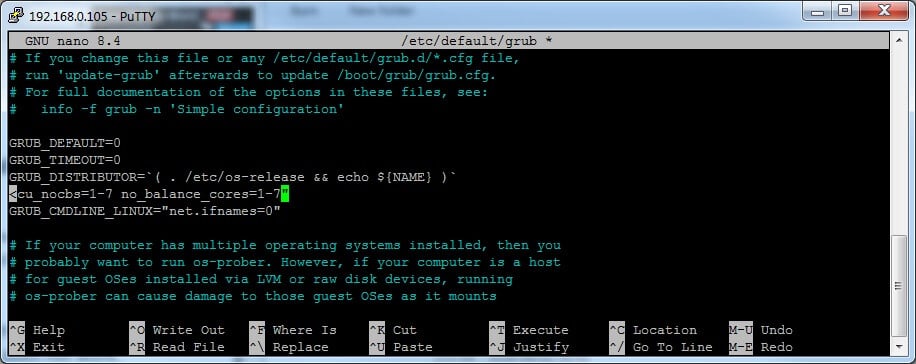
Re-add the 7 and hit return to re-add a proper newline between the two settings.
Save with CTRL+O, return.
Exit with CTRL+X.
And then we should also check the respective debconf value:
sed -n '/grub2\/linux_cmdline_default/,/^$/l' /var/cache/debconf/config.dat
This shows also control characters in the grub2/linux_cmdline_default section of the debconf data.
Thanks for the continued deep sleuthing… By way of explanation, the long string of arguments comes from a recipe to build an awesome mpd-based music player, running on dietpi OS. The parameter string is a cut-n-paste from the build instruction document.
It warns to beware of Windows messing with line endings, suggesting nano or Notepad++ on a Windows machine to do the job.
So, as you suggested… edit using nano, only to find the closing quote (ie: double-quote character) alone by itself on the line below the long string . As found:
root@DietPi:~# update-grub
Generating grub configuration file ...
Found linux image: /boot/vmlinuz-6.12.100+deb13-amd64
Found initrd image: /boot/initrd.img-6.12.100+deb13-amd64
Found linux image: /boot/vmlinuz-6.12.57+deb13-amd64
Found initrd image: /boot/initrd.img-6.12.57+deb13-amd64
Adding boot menu entry for UEFI Firmware Settings ...
done
root@DietPi:~#
root@DietPi:~# dpkg-reconfigure -f noninteractive grub-efi-amd64
Installing for x86_64-efi platform.
Installation finished. No error reported.
Generating grub configuration file ...
Found linux image: /boot/vmlinuz-6.12.100+deb13-amd64
Found initrd image: /boot/initrd.img-6.12.100+deb13-amd64
Found linux image: /boot/vmlinuz-6.12.57+deb13-amd64
Found initrd image: /boot/initrd.img-6.12.57+deb13-amd64
Adding boot menu entry for UEFI Firmware Settings ...
done
Processing triggers for shim-signed:amd64 (1.51~1+deb13u1+16.1-2~deb13u1) ...
root@DietPi:~#
Oh yes, that worked . So the newline really was the culprit. Glad we finally found it, and good to know the effect of such on debconf dialogues. I’ll open a bug report at Debian, as I think debconf requires to print a meaningful error message, instead of just exiting silently, considering that debugging this nested shell => perl => shell call path is so difficult.
Yes, just to confirm - the update to v10.6.2 ran cleanly and without incident .
Thank you so much for digging in to solve this obscure little show-stopper - I really appreciate your persistence & dedication to making DietPi “so easy” to use (…with help and assistance when required).
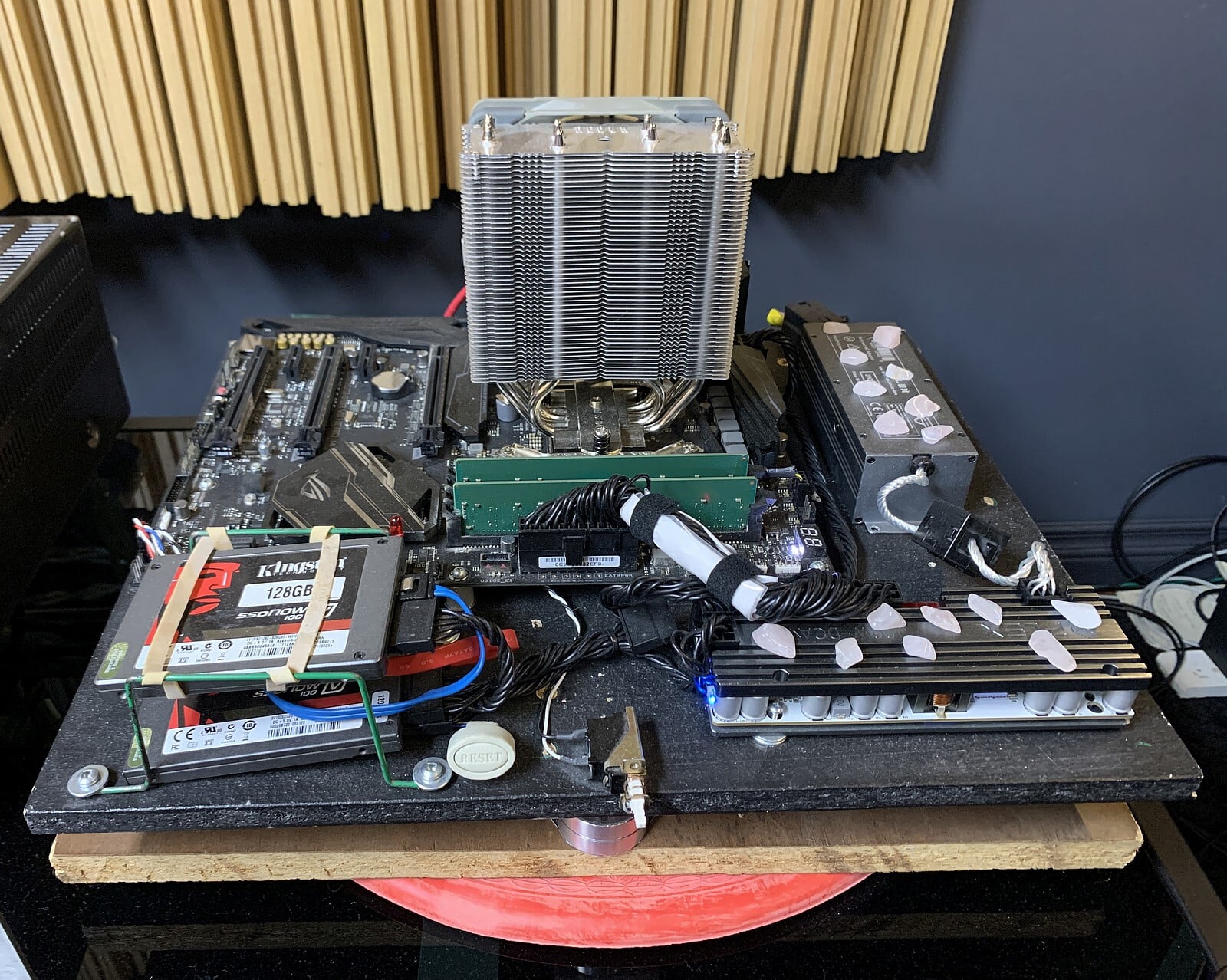
As an added bonus, the OS upgrade has once again improved the quality/ precision of the music playback by a tiny - but undeniable - degree. So thanks to the Dev Team for continuing to make my HiFi a little more satisfying !! !!
Seeing the cooler, I just learned recently that these heat pipes do contain actual liquids, which vaporize at the chip side and condense within the fins side. Hence latent heat absorption and actual convection to make dissipation to and throughout the fins quite effective. Totally makes sense, but I never took the word “pipe” that literal .


 By way of explanation, the long string of arguments comes from a recipe to build an awesome mpd-based music player, running on dietpi OS. The parameter string is a cut-n-paste from the build instruction document.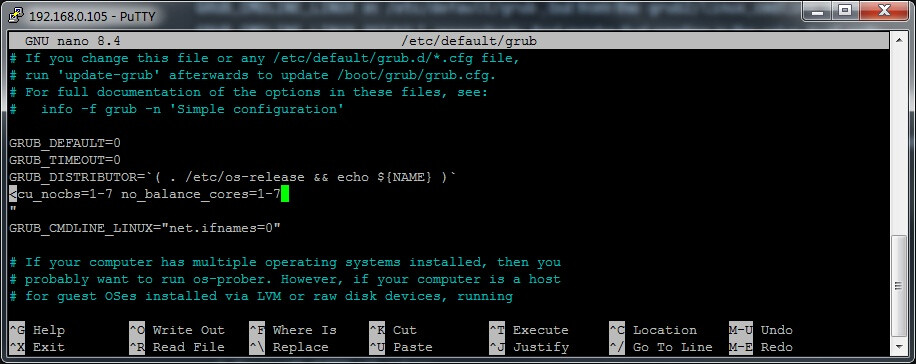
 . So the newline really was the culprit. Glad we finally found it, and good to know the effect of such on debconf dialogues. I’ll open a bug report at Debian, as I think debconf requires to print a meaningful error message, instead of just exiting silently, considering that debugging this nested shell => perl => shell call path is so difficult.
 .
. !!
!!
 .
.