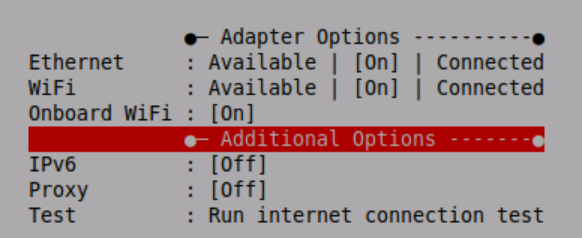
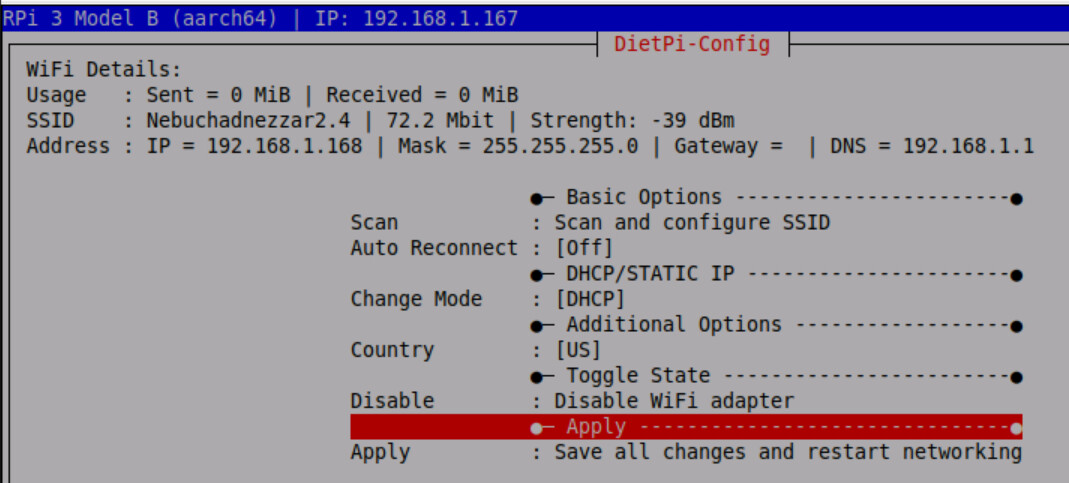
Linux projectpi 6.12.34+rpt-rpi-v8 #1 SMP PREEMPT Debian 1:6.12.34-1+rpt1~bookworm (2025-06-26) aarch64 GNU/Linux, arm64, RPi 3 Model B
I was trying to connect my device to my wireless AP, and I was successful. I setup my Pi to use DHCP, and assigned it a static address (via a reservation to its MAC address) on the NAT device and AP I use (TP-Link AX1500) for wlan0. This was after having it connected via a CAT5 on eth0. The problem I am currently facing is that after removing my CAT5 from the Pi, I can no longer access the device via VNC, SSH, and the IP that was assigned for wlan0 no longer responds to pings.
Is this a standard mode of operation? I do not want to have to test bringing down eth0 and have to cable other equipment or reflash the OS for the device in the case the wireless adapter does not reconnect.
root@projectpi:/# ip a
1: lo: <LOOPBACK,UP,LOWER_UP> mtu 65536 qdisc noqueue state UNKNOWN group default qlen 1000
    link/loopback 00:00:00:00:00:00 brd 00:00:00:00:00:00
    inet 127.0.0.1/8 scope host lo
       valid_lft forever preferred_lft forever
2: eth0: <BROADCAST,MULTICAST,UP,LOWER_UP> mtu 1500 qdisc pfifo_fast state UP group default qlen 1000
    link/ether b8:27:eb:85:b8:3b brd ff:ff:ff:ff:ff:ff
    inet 192.168.1.167/24 brd 192.168.1.255 scope global eth0
       valid_lft forever preferred_lft forever
3: wlan0: <BROADCAST,MULTICAST,UP,LOWER_UP> mtu 1500 qdisc pfifo_fast state UP group default qlen 1000
    link/ether b8:27:eb:d0:ed:6e brd ff:ff:ff:ff:ff:ff
    inet 192.168.1.168/24 brd 192.168.1.255 scope global wlan0
       valid_lft forever preferred_lft forever
Just tested on my other board with a different SD card. No issue after setting the adapter DOWN and unplugging the CAT5 on it. Going to amount it to a corrupted SD card I should probably just toss.
So I just did a fresh install of DietPi on the same board and a different SD card for a test bench. My other board is working (both model 3 B+). I am still experiencing the same issue where when I pull the CAT5 from the board, I can no longer ping wlan0 at all. I’m wondering if there is a board malfunction or damage to it :(.
I have the same issue with v9.20.1
RPi 3 Model B
When eth0 is connected, wifi works.
When I unplug the cable, wifi stops working (I cannot ssh to wifi ip)
I don’t dare to disable ethernet, as If wifi still not working, I cannot ssh to my Pi.
I don’t think it is a specific RPi 3 B hardware issue, as I tried already raspbian and ubuntu server on it, and wifi was working without plugged in ethernet.
Please check this issue and bring us a fix for DietPi.
I tried to recreate this with my RPi3B+, as I don’t have a 3B directly. In addition, both share a single image.
After the basic installation, I configured WiFi & Ethernet and then removed the Ethernet cable, which resulted in the 3B+ no longer being accessible. I then pulled the power plug and completely restarted the system. This also brought WiFi back, and the 3B+ is now only online via WiFi.