I would suggest to run tcpdump on guest and host systems to verify where is the packet blocked. It will help find the culprit.
sorry, how exactly do i run that? on the dietpi itself and my computer?
Install tcpdump on both the vps (guest) and the host OS. Then run tcpdump -i $INTERFACE udp port 53 , try to resolve from unbound, stop with ctrl-c, and post here the output.
The $INTERFACE is the egress interface on the guest and both ingress and egress on the host.
i hope i did this correctly for you
root@Pi-hole:~# tcpdump -i eth0 udp port 53
tcpdump: verbose output suppressed, use -v[v]... for full protocol decode
listening on eth0, link-type EN10MB (Ethernet), snapshot length 262144 bytes
01:32:57.560717 IP 192.168.1.6.48001 > 192.168.1.2.53: 63798+ A? connectivitycheck.gstatic.com. (47)
01:32:57.561975 IP 192.168.1.2.53 > 192.168.1.6.48001: 63798 ServFail 0/0/0 (47)
01:32:57.564153 IP 192.168.1.6.33989 > 192.168.1.2.53: 63798+ A? connectivitycheck.gstatic.com. (47)
01:32:57.565030 IP 192.168.1.2.53 > 192.168.1.6.33989: 63798 ServFail 0/0/0 (47)
01:32:57.567375 IP 192.168.1.6.31307 > 192.168.1.2.53: 60601+ A? connectivitycheck.gstatic.com. (47)
01:32:57.568243 IP 192.168.1.2.53 > 192.168.1.6.31307: 60601 ServFail 0/0/0 (47)
01:32:57.570350 IP 192.168.1.6.39937 > 192.168.1.2.53: 60601+ A? connectivitycheck.gstatic.com. (47)
01:32:57.571205 IP 192.168.1.2.53 > 192.168.1.6.39937: 60601 ServFail 0/0/0 (47)
01:32:57.577796 IP 192.168.1.6.41343 > 192.168.1.2.53: 41726+ A? connectivitycheck.gstatic.com. (47)
01:32:57.578670 IP 192.168.1.2.53 > 192.168.1.6.41343: 41726 ServFail 0/0/0 (47)
01:32:57.580660 IP 192.168.1.6.25586 > 192.168.1.2.53: 41726+ A? connectivitycheck.gstatic.com. (47)
01:32:57.581541 IP 192.168.1.2.53 > 192.168.1.6.25586: 41726 ServFail 0/0/0 (47)
01:32:57.583731 IP 192.168.1.6.16629 > 192.168.1.2.53: 38362+ A? connectivitycheck.gstatic.com. (47)
01:32:57.584583 IP 192.168.1.2.53 > 192.168.1.6.16629: 38362 ServFail 0/0/0 (47)
01:32:57.586603 IP 192.168.1.6.47436 > 192.168.1.2.53: 38362+ A? connectivitycheck.gstatic.com. (47)
01:32:57.587465 IP 192.168.1.2.53 > 192.168.1.6.47436: 38362 ServFail 0/0/0 (47)
01:32:57.620746 IP 192.168.1.6.48910 > 192.168.1.2.53: 42150+ A? ccp-lh.googleusercontent.com. (46)
01:32:57.623216 IP 192.168.1.2.10430 > one.one.one.one.53: 48137+% [1au] A? CCp-Lh.goOGlEUseRcontENt.com. (57)
01:32:57.624524 IP 192.168.1.2.53 > 192.168.1.6.48910: 42150 ServFail 0/0/0 (46)
01:32:57.626725 IP 192.168.1.6.56371 > 192.168.1.2.53: 42150+ A? ccp-lh.googleusercontent.com. (46)
01:32:57.627731 IP 192.168.1.2.53 > 192.168.1.6.56371: 42150 ServFail 0/0/0 (46)
01:32:57.629821 IP 192.168.1.6.20451 > 192.168.1.2.53: 51698+ A? ccp-lh.googleusercontent.com. (46)
01:32:57.630778 IP 192.168.1.2.53 > 192.168.1.6.20451: 51698 ServFail 0/0/0 (46)
01:32:57.633051 IP 192.168.1.6.50074 > 192.168.1.2.53: 51698+ A? ccp-lh.googleusercontent.com. (46)
01:32:57.634054 IP 192.168.1.2.53 > 192.168.1.6.50074: 51698 ServFail 0/0/0 (46)
01:32:57.636292 IP 192.168.1.6.54118 > 192.168.1.2.53: 6134+ A? ccp-lh.googleusercontent.com. (46)
01:32:57.637190 IP 192.168.1.2.53 > 192.168.1.6.54118: 6134 ServFail 0/0/0 (46)
01:32:57.637815 IP one.one.one.one.53 > 192.168.1.2.10430: 48137 2/0/1 CNAME googlehosted.l.goOGlEUseRcontENt.com., A 142.251.211.225 (102)
01:32:57.639448 IP 192.168.1.6.63390 > 192.168.1.2.53: 6134+ A? ccp-lh.googleusercontent.com. (46)
01:32:57.640729 IP 192.168.1.2.21670 > one.one.one.one.53: 22321+% [1au] A? GOOGlehoSted.l.googleUSErcONTent.cOM. (65)
01:32:57.642333 IP 192.168.1.2.53 > 192.168.1.6.63390: 6134 ServFail 0/0/0 (46)
01:32:57.644494 IP 192.168.1.6.15829 > 192.168.1.2.53: 30348+ A? ccp-lh.googleusercontent.com. (46)
01:32:57.645251 IP 192.168.1.2.53 > 192.168.1.6.15829: 30348 ServFail 0/0/0 (46)
01:32:57.647343 IP 192.168.1.6.8460 > 192.168.1.2.53: 30348+ A? ccp-lh.googleusercontent.com. (46)
01:32:57.648085 IP 192.168.1.2.53 > 192.168.1.6.8460: 30348 ServFail 0/0/0 (46)
01:32:57.651282 IP 192.168.1.2.39565 > one.one.one.one.53: 13399+ PTR? 6.1.168.192.in-addr.arpa. (42)
01:32:57.652666 IP one.one.one.one.53 > 192.168.1.2.39565: 13399 NXDomain* 0/0/0 (42)
01:32:57.652969 IP 192.168.1.2.41999 > one.one.one.one.53: 5969+ PTR? 2.1.168.192.in-addr.arpa. (42)
01:32:57.654424 IP one.one.one.one.53 > 192.168.1.2.41999: 5969 NXDomain* 0/0/0 (42)
01:32:57.655444 IP one.one.one.one.53 > 192.168.1.2.21670: 22321 1/0/1 A 142.251.211.225 (81)
01:32:57.655990 IP 192.168.1.2.48622 > one.one.one.one.53: 12131+ PTR? 1.0.0.1.in-addr.arpa. (38)
01:32:57.670383 IP one.one.one.one.53 > 192.168.1.2.48622: 12131 1/0/0 PTR one.one.one.one. (67)
01:32:57.753853 IP 192.168.1.2.37193 > one.one.one.one.53: 31251+ PTR? 1.1.1.1.in-addr.arpa. (38)
01:32:57.768332 IP one.one.one.one.53 > 192.168.1.2.37193: 31251 1/0/0 PTR one.one.one.one. (67)
01:32:58.334091 IP 192.168.1.9.50333 > 192.168.1.2.53: 14055+ A? google.com. (28)
01:32:58.336737 IP 192.168.1.2.56770 > dns.quad9.net.53: 10409+% [1au] A? gOoglE.cOM. (39)
01:32:58.337673 IP 192.168.1.2.53 > 192.168.1.9.50333: 14055 ServFail 0/0/0 (28)
01:32:58.351754 IP dns.quad9.net.53 > 192.168.1.2.56770: 10409 1/0/1 A 142.251.211.238 (55)
01:32:58.377839 IP 192.168.1.2.51784 > one.one.one.one.53: 14115+ PTR? 9.1.168.192.in-addr.arpa. (42)
01:32:58.380054 IP one.one.one.one.53 > 192.168.1.2.51784: 14115 NXDomain* 0/0/0 (42)
01:32:58.380587 IP 192.168.1.2.58600 > one.one.one.one.53: 38578+ PTR? 112.112.112.149.in-addr.arpa. (46)
01:32:58.392030 IP one.one.one.one.53 > 192.168.1.2.58600: 38578 1/0/0 PTR dns.quad9.net. (73)
01:32:58.604621 IP 192.168.1.6.44588 > 192.168.1.2.53: 47430+ A? connectivitycheck.gstatic.com. (47)
01:32:58.605727 IP 192.168.1.2.53 > 192.168.1.6.44588: 47430 ServFail 0/0/0 (47)
01:32:58.608385 IP 192.168.1.6.13520 > 192.168.1.2.53: 47430+ A? connectivitycheck.gstatic.com. (47)
01:32:58.609244 IP 192.168.1.2.53 > 192.168.1.6.13520: 47430 ServFail 0/0/0 (47)
01:32:58.611453 IP 192.168.1.6.28598 > 192.168.1.2.53: 28559+ A? connectivitycheck.gstatic.com. (47)
01:32:58.612291 IP 192.168.1.2.53 > 192.168.1.6.28598: 28559 ServFail 0/0/0 (47)
01:32:58.614386 IP 192.168.1.6.39798 > 192.168.1.2.53: 28559+ A? connectivitycheck.gstatic.com. (47)
01:32:58.615292 IP 192.168.1.2.53 > 192.168.1.6.39798: 28559 ServFail 0/0/0 (47)
01:32:58.619926 IP 192.168.1.6.22169 > 192.168.1.2.53: 22510+ A? connectivitycheck.gstatic.com. (47)
01:32:58.620824 IP 192.168.1.2.53 > 192.168.1.6.22169: 22510 ServFail 0/0/0 (47)
01:32:58.622990 IP 192.168.1.6.5247 > 192.168.1.2.53: 22510+ A? connectivitycheck.gstatic.com. (47)
01:32:58.623888 IP 192.168.1.2.53 > 192.168.1.6.5247: 22510 ServFail 0/0/0 (47)
01:32:58.626134 IP 192.168.1.6.17970 > 192.168.1.2.53: 5031+ A? connectivitycheck.gstatic.com. (47)
01:32:58.627028 IP 192.168.1.2.53 > 192.168.1.6.17970: 5031 ServFail 0/0/0 (47)
01:32:58.629082 IP 192.168.1.6.18750 > 192.168.1.2.53: 5031+ A? connectivitycheck.gstatic.com. (47)
01:32:58.630026 IP 192.168.1.2.53 > 192.168.1.6.18750: 5031 ServFail 0/0/0 (47)
01:32:59.647795 IP 192.168.1.6.7812 > 192.168.1.2.53: 41004+ A? connectivitycheck.gstatic.com. (47)
01:32:59.648958 IP 192.168.1.2.53 > 192.168.1.6.7812: 41004 ServFail 0/0/0 (47)
01:32:59.651370 IP 192.168.1.6.1534 > 192.168.1.2.53: 41004+ A? connectivitycheck.gstatic.com. (47)
01:32:59.652284 IP 192.168.1.2.53 > 192.168.1.6.1534: 41004 ServFail 0/0/0 (47)
01:32:59.654412 IP 192.168.1.6.55188 > 192.168.1.2.53: 27900+ A? connectivitycheck.gstatic.com. (47)
01:32:59.655305 IP 192.168.1.2.53 > 192.168.1.6.55188: 27900 ServFail 0/0/0 (47)
01:32:59.657317 IP 192.168.1.6.10957 > 192.168.1.2.53: 27900+ A? connectivitycheck.gstatic.com. (47)
01:32:59.658258 IP 192.168.1.2.53 > 192.168.1.6.10957: 27900 ServFail 0/0/0 (47)
01:32:59.663911 IP 192.168.1.6.24727 > 192.168.1.2.53: 9057+ A? ccp-lh.googleusercontent.com. (46)
01:32:59.664827 IP 192.168.1.2.53 > 192.168.1.6.24727: 9057 ServFail 0/0/0 (46)
01:32:59.666737 IP 192.168.1.6.7694 > 192.168.1.2.53: 45637+ A? connectivitycheck.gstatic.com. (47)
01:32:59.667059 IP 192.168.1.6.36461 > 192.168.1.2.53: 9057+ A? ccp-lh.googleusercontent.com. (46)
01:32:59.667946 IP 192.168.1.2.53 > 192.168.1.6.7694: 45637 ServFail 0/0/0 (47)
01:32:59.668419 IP 192.168.1.2.53 > 192.168.1.6.36461: 9057 ServFail 0/0/0 (46)
01:32:59.670318 IP 192.168.1.6.36594 > 192.168.1.2.53: 45637+ A? connectivitycheck.gstatic.com. (47)
01:32:59.670667 IP 192.168.1.6.19564 > 192.168.1.2.53: 54614+ A? ccp-lh.googleusercontent.com. (46)
01:32:59.671525 IP 192.168.1.2.53 > 192.168.1.6.36594: 45637 ServFail 0/0/0 (47)
01:32:59.672000 IP 192.168.1.2.53 > 192.168.1.6.19564: 54614 ServFail 0/0/0 (46)
01:32:59.673860 IP 192.168.1.6.51870 > 192.168.1.2.53: 54614+ A? ccp-lh.googleusercontent.com. (46)
01:32:59.673863 IP 192.168.1.6.2822 > 192.168.1.2.53: 9761+ A? connectivitycheck.gstatic.com. (47)
01:32:59.675252 IP 192.168.1.2.53 > 192.168.1.6.51870: 54614 ServFail 0/0/0 (46)
01:32:59.675401 IP 192.168.1.2.53 > 192.168.1.6.2822: 9761 ServFail 0/0/0 (47)
01:32:59.677733 IP 192.168.1.6.17382 > 192.168.1.2.53: 27208+ A? ccp-lh.googleusercontent.com. (46)
01:32:59.678605 IP 192.168.1.2.53 > 192.168.1.6.17382: 27208 ServFail 0/0/0 (46)
01:32:59.679285 IP 192.168.1.6.39118 > 192.168.1.2.53: 9761+ A? connectivitycheck.gstatic.com. (47)
01:32:59.680140 IP 192.168.1.2.53 > 192.168.1.6.39118: 9761 ServFail 0/0/0 (47)
01:32:59.681285 IP 192.168.1.6.13205 > 192.168.1.2.53: 27208+ A? ccp-lh.googleusercontent.com. (46)
01:32:59.682177 IP 192.168.1.2.53 > 192.168.1.6.13205: 27208 ServFail 0/0/0 (46)
01:32:59.684678 IP 192.168.1.6.31254 > 192.168.1.2.53: 53449+ A? ccp-lh.googleusercontent.com. (46)
01:32:59.685614 IP 192.168.1.2.53 > 192.168.1.6.31254: 53449 ServFail 0/0/0 (46)
01:32:59.687956 IP 192.168.1.6.8554 > 192.168.1.2.53: 53449+ A? ccp-lh.googleusercontent.com. (46)
01:32:59.688835 IP 192.168.1.2.53 > 192.168.1.6.8554: 53449 ServFail 0/0/0 (46)
01:33:00.700851 IP 192.168.1.6.46606 > 192.168.1.2.53: 58299+ A? connectivitycheck.gstatic.com. (47)
01:33:00.701948 IP 192.168.1.2.53 > 192.168.1.6.46606: 58299 ServFail 0/0/0 (47)
01:33:00.704135 IP 192.168.1.6.60772 > 192.168.1.2.53: 58299+ A? connectivitycheck.gstatic.com. (47)
01:33:00.704851 IP 192.168.1.2.53 > 192.168.1.6.60772: 58299 ServFail 0/0/0 (47)
01:33:00.707082 IP 192.168.1.6.15618 > 192.168.1.2.53: 39704+ A? connectivitycheck.gstatic.com. (47)
01:33:00.707779 IP 192.168.1.2.53 > 192.168.1.6.15618: 39704 ServFail 0/0/0 (47)
01:33:00.709927 IP 192.168.1.6.19474 > 192.168.1.2.53: 39704+ A? connectivitycheck.gstatic.com. (47)
01:33:00.710619 IP 192.168.1.2.53 > 192.168.1.6.19474: 39704 ServFail 0/0/0 (47)
01:33:00.715503 IP 192.168.1.6.62859 > 192.168.1.2.53: 41739+ A? connectivitycheck.gstatic.com. (47)
01:33:00.716191 IP 192.168.1.2.53 > 192.168.1.6.62859: 41739 ServFail 0/0/0 (47)
01:33:00.718192 IP 192.168.1.6.37700 > 192.168.1.2.53: 41739+ A? connectivitycheck.gstatic.com. (47)
01:33:00.718876 IP 192.168.1.2.53 > 192.168.1.6.37700: 41739 ServFail 0/0/0 (47)
01:33:00.721137 IP 192.168.1.6.11995 > 192.168.1.2.53: 32820+ A? connectivitycheck.gstatic.com. (47)
01:33:00.721848 IP 192.168.1.2.53 > 192.168.1.6.11995: 32820 ServFail 0/0/0 (47)
01:33:00.723929 IP 192.168.1.6.35678 > 192.168.1.2.53: 32820+ A? connectivitycheck.gstatic.com. (47)
01:33:00.724608 IP 192.168.1.2.53 > 192.168.1.6.35678: 32820 ServFail 0/0/0 (47)
01:33:01.740309 IP 192.168.1.6.61592 > 192.168.1.2.53: 59455+ A? connectivitycheck.gstatic.com. (47)
01:33:01.741493 IP 192.168.1.2.53 > 192.168.1.6.61592: 59455 ServFail 0/0/0 (47)
01:33:01.743830 IP 192.168.1.6.38364 > 192.168.1.2.53: 59455+ A? connectivitycheck.gstatic.com. (47)
01:33:01.744723 IP 192.168.1.2.53 > 192.168.1.6.38364: 59455 ServFail 0/0/0 (47)
01:33:01.746981 IP 192.168.1.6.20448 > 192.168.1.2.53: 34929+ A? connectivitycheck.gstatic.com. (47)
01:33:01.747846 IP 192.168.1.2.53 > 192.168.1.6.20448: 34929 ServFail 0/0/0 (47)
01:33:01.749880 IP 192.168.1.6.49609 > 192.168.1.2.53: 34929+ A? connectivitycheck.gstatic.com. (47)
01:33:01.750755 IP 192.168.1.2.53 > 192.168.1.6.49609: 34929 ServFail 0/0/0 (47)
01:33:01.755080 IP 192.168.1.6.29183 > 192.168.1.2.53: 23919+ A? connectivitycheck.gstatic.com. (47)
01:33:01.755940 IP 192.168.1.2.53 > 192.168.1.6.29183: 23919 ServFail 0/0/0 (47)
01:33:01.758103 IP 192.168.1.6.15041 > 192.168.1.2.53: 23919+ A? connectivitycheck.gstatic.com. (47)
01:33:01.758960 IP 192.168.1.2.53 > 192.168.1.6.15041: 23919 ServFail 0/0/0 (47)
01:33:01.761562 IP 192.168.1.6.45644 > 192.168.1.2.53: 61218+ A? connectivitycheck.gstatic.com. (47)
01:33:01.762416 IP 192.168.1.2.53 > 192.168.1.6.45644: 61218 ServFail 0/0/0 (47)
01:33:01.765462 IP 192.168.1.6.37639 > 192.168.1.2.53: 61218+ A? connectivitycheck.gstatic.com. (47)
01:33:01.766318 IP 192.168.1.2.53 > 192.168.1.6.37639: 61218 ServFail 0/0/0 (47)
01:33:02.664585 IP 192.168.1.6.60255 > 192.168.1.2.53: 43890+ A? mtalk.google.com. (34)
01:33:02.667163 IP 192.168.1.2.35400 > one.one.one.one.53: 24277+% [1au] A? mTALK.GOoglE.coM. (45)
01:33:02.668065 IP 192.168.1.2.53 > 192.168.1.6.60255: 43890 ServFail 0/0/0 (34)
01:33:02.670104 IP 192.168.1.6.57263 > 192.168.1.2.53: 43890+ A? mtalk.google.com. (34)
01:33:02.670934 IP 192.168.1.2.53 > 192.168.1.6.57263: 43890 ServFail 0/0/0 (34)
01:33:02.672664 IP 192.168.1.6.54390 > 192.168.1.2.53: 35979+ A? mtalk.google.com. (34)
01:33:02.673454 IP 192.168.1.2.53 > 192.168.1.6.54390: 35979 ServFail 0/0/0 (34)
01:33:02.675585 IP 192.168.1.6.2151 > 192.168.1.2.53: 35979+ A? mtalk.google.com. (34)
01:33:02.676333 IP 192.168.1.2.53 > 192.168.1.6.2151: 35979 ServFail 0/0/0 (34)
01:33:02.680877 IP one.one.one.one.53 > 192.168.1.2.35400: 24277 2/0/1 CNAME mobile-gtalk.l.GOoglE.coM., A 74.125.142.188 (90)
01:33:02.683743 IP 192.168.1.2.61304 > one.one.one.one.53: 8095+% [1au] A? moBILe-GTalK.l.GOoGle.COM. (54)
01:33:02.685237 IP 192.168.1.6.8677 > 192.168.1.2.53: 29750+ A? alt1-mtalk.google.com. (39)
01:33:02.686174 IP 192.168.1.2.53 > 192.168.1.6.8677: 29750 ServFail 0/0/0 (39)
01:33:02.688232 IP 192.168.1.6.19979 > 192.168.1.2.53: 29750+ A? alt1-mtalk.google.com. (39)
01:33:02.688976 IP 192.168.1.2.53 > 192.168.1.6.19979: 29750 ServFail 0/0/0 (39)
01:33:02.691094 IP 192.168.1.6.6686 > 192.168.1.2.53: 60787+ A? alt1-mtalk.google.com. (39)
01:33:02.691838 IP 192.168.1.2.53 > 192.168.1.6.6686: 60787 ServFail 0/0/0 (39)
01:33:02.693669 IP 192.168.1.6.41168 > 192.168.1.2.53: 60787+ A? alt1-mtalk.google.com. (39)
01:33:02.694423 IP 192.168.1.2.53 > 192.168.1.6.41168: 60787 ServFail 0/0/0 (39)
01:33:02.700256 IP one.one.one.one.53 > 192.168.1.2.61304: 8095 1/0/1 A 74.125.142.188 (70)
01:33:02.782537 IP 192.168.1.6.64191 > 192.168.1.2.53: 7730+ A? connectivitycheck.gstatic.com. (47)
01:33:02.783479 IP 192.168.1.2.53 > 192.168.1.6.64191: 7730 ServFail 0/0/0 (47)
01:33:02.785565 IP 192.168.1.6.16303 > 192.168.1.2.53: 7730+ A? connectivitycheck.gstatic.com. (47)
01:33:02.786279 IP 192.168.1.2.53 > 192.168.1.6.16303: 7730 ServFail 0/0/0 (47)
01:33:02.788440 IP 192.168.1.6.39198 > 192.168.1.2.53: 62061+ A? connectivitycheck.gstatic.com. (47)
01:33:02.789126 IP 192.168.1.2.53 > 192.168.1.6.39198: 62061 ServFail 0/0/0 (47)
01:33:02.791268 IP 192.168.1.6.17874 > 192.168.1.2.53: 62061+ A? connectivitycheck.gstatic.com. (47)
01:33:02.791952 IP 192.168.1.2.53 > 192.168.1.6.17874: 62061 ServFail 0/0/0 (47)
01:33:02.800369 IP 192.168.1.6.14477 > 192.168.1.2.53: 40907+ A? connectivitycheck.gstatic.com. (47)
01:33:02.801062 IP 192.168.1.2.53 > 192.168.1.6.14477: 40907 ServFail 0/0/0 (47)
01:33:02.803269 IP 192.168.1.6.4219 > 192.168.1.2.53: 40907+ A? connectivitycheck.gstatic.com. (47)
01:33:02.803956 IP 192.168.1.2.53 > 192.168.1.6.4219: 40907 ServFail 0/0/0 (47)
01:33:02.806074 IP 192.168.1.6.61631 > 192.168.1.2.53: 24991+ A? connectivitycheck.gstatic.com. (47)
01:33:02.806758 IP 192.168.1.2.53 > 192.168.1.6.61631: 24991 ServFail 0/0/0 (47)
01:33:02.808782 IP 192.168.1.6.53550 > 192.168.1.2.53: 24991+ A? connectivitycheck.gstatic.com. (47)
01:33:02.809517 IP 192.168.1.2.53 > 192.168.1.6.53550: 24991 ServFail 0/0/0 (47)
01:33:03.712318 IP 192.168.1.6.11113 > 192.168.1.2.53: 37808+ A? ccp-lh.googleusercontent.com. (46)
01:33:03.713258 IP 192.168.1.2.53 > 192.168.1.6.11113: 37808 ServFail 0/0/0 (46)
01:33:03.715548 IP 192.168.1.6.19267 > 192.168.1.2.53: 37808+ A? ccp-lh.googleusercontent.com. (46)
01:33:03.716320 IP 192.168.1.2.53 > 192.168.1.6.19267: 37808 ServFail 0/0/0 (46)
01:33:03.718326 IP 192.168.1.6.28379 > 192.168.1.2.53: 48909+ A? ccp-lh.googleusercontent.com. (46)
01:33:03.719049 IP 192.168.1.2.53 > 192.168.1.6.28379: 48909 ServFail 0/0/0 (46)
01:33:03.721083 IP 192.168.1.6.59151 > 192.168.1.2.53: 48909+ A? ccp-lh.googleusercontent.com. (46)
01:33:03.721856 IP 192.168.1.2.53 > 192.168.1.6.59151: 48909 ServFail 0/0/0 (46)
01:33:03.725019 IP 192.168.1.6.42746 > 192.168.1.2.53: 23462+ A? ccp-lh.googleusercontent.com. (46)
01:33:03.725758 IP 192.168.1.2.53 > 192.168.1.6.42746: 23462 ServFail 0/0/0 (46)
01:33:03.728373 IP 192.168.1.6.16890 > 192.168.1.2.53: 23462+ A? ccp-lh.googleusercontent.com. (46)
01:33:03.729046 IP 192.168.1.2.53 > 192.168.1.6.16890: 23462 ServFail 0/0/0 (46)
01:33:03.731852 IP 192.168.1.6.31802 > 192.168.1.2.53: 27604+ A? ccp-lh.googleusercontent.com. (46)
01:33:03.732541 IP 192.168.1.2.53 > 192.168.1.6.31802: 27604 ServFail 0/0/0 (46)
01:33:03.734632 IP 192.168.1.6.13411 > 192.168.1.2.53: 27604+ A? ccp-lh.googleusercontent.com. (46)
01:33:03.735329 IP 192.168.1.2.53 > 192.168.1.6.13411: 27604 ServFail 0/0/0 (46)
01:33:03.823961 IP 192.168.1.6.17159 > 192.168.1.2.53: 57281+ A? connectivitycheck.gstatic.com. (47)
01:33:03.824795 IP 192.168.1.2.53 > 192.168.1.6.17159: 57281 ServFail 0/0/0 (47)
01:33:03.827550 IP 192.168.1.6.53934 > 192.168.1.2.53: 57281+ A? connectivitycheck.gstatic.com. (47)
01:33:03.828245 IP 192.168.1.2.53 > 192.168.1.6.53934: 57281 ServFail 0/0/0 (47)
01:33:03.830853 IP 192.168.1.6.34221 > 192.168.1.2.53: 5850+ A? connectivitycheck.gstatic.com. (47)
01:33:03.831539 IP 192.168.1.2.53 > 192.168.1.6.34221: 5850 ServFail 0/0/0 (47)
01:33:03.833613 IP 192.168.1.6.23899 > 192.168.1.2.53: 5850+ A? connectivitycheck.gstatic.com. (47)
01:33:03.834302 IP 192.168.1.2.53 > 192.168.1.6.23899: 5850 ServFail 0/0/0 (47)
01:33:03.838510 IP 192.168.1.6.5182 > 192.168.1.2.53: 19049+ A? connectivitycheck.gstatic.com. (47)
01:33:03.839196 IP 192.168.1.2.53 > 192.168.1.6.5182: 19049 ServFail 0/0/0 (47)
01:33:03.841757 IP 192.168.1.6.37727 > 192.168.1.2.53: 19049+ A? connectivitycheck.gstatic.com. (47)
01:33:03.842433 IP 192.168.1.2.53 > 192.168.1.6.37727: 19049 ServFail 0/0/0 (47)
01:33:03.844776 IP 192.168.1.6.12835 > 192.168.1.2.53: 2647+ A? connectivitycheck.gstatic.com. (47)
01:33:03.845507 IP 192.168.1.2.53 > 192.168.1.6.12835: 2647 ServFail 0/0/0 (47)
01:33:03.847775 IP 192.168.1.6.46979 > 192.168.1.2.53: 2647+ A? connectivitycheck.gstatic.com. (47)
01:33:03.848455 IP 192.168.1.2.53 > 192.168.1.6.46979: 2647 ServFail 0/0/0 (47)
01:33:04.863167 IP 192.168.1.6.7359 > 192.168.1.2.53: 15047+ A? connectivitycheck.gstatic.com. (47)
01:33:04.864014 IP 192.168.1.2.53 > 192.168.1.6.7359: 15047 ServFail 0/0/0 (47)
01:33:04.866500 IP 192.168.1.6.26085 > 192.168.1.2.53: 15047+ A? connectivitycheck.gstatic.com. (47)
01:33:04.867196 IP 192.168.1.2.53 > 192.168.1.6.26085: 15047 ServFail 0/0/0 (47)
01:33:04.869582 IP 192.168.1.6.56696 > 192.168.1.2.53: 27880+ A? connectivitycheck.gstatic.com. (47)
01:33:04.870272 IP 192.168.1.2.53 > 192.168.1.6.56696: 27880 ServFail 0/0/0 (47)
01:33:04.872454 IP 192.168.1.6.10110 > 192.168.1.2.53: 27880+ A? connectivitycheck.gstatic.com. (47)
01:33:04.873139 IP 192.168.1.2.53 > 192.168.1.6.10110: 27880 ServFail 0/0/0 (47)
01:33:04.878464 IP 192.168.1.6.58795 > 192.168.1.2.53: 16934+ A? connectivitycheck.gstatic.com. (47)
01:33:04.879145 IP 192.168.1.2.53 > 192.168.1.6.58795: 16934 ServFail 0/0/0 (47)
01:33:04.881544 IP 192.168.1.6.1067 > 192.168.1.2.53: 16934+ A? connectivitycheck.gstatic.com. (47)
01:33:04.882223 IP 192.168.1.2.53 > 192.168.1.6.1067: 16934 ServFail 0/0/0 (47)
01:33:04.884494 IP 192.168.1.6.40449 > 192.168.1.2.53: 10454+ A? connectivitycheck.gstatic.com. (47)
01:33:04.885180 IP 192.168.1.2.53 > 192.168.1.6.40449: 10454 ServFail 0/0/0 (47)
01:33:04.887211 IP 192.168.1.6.17203 > 192.168.1.2.53: 10454+ A? connectivitycheck.gstatic.com. (47)
01:33:04.887895 IP 192.168.1.2.53 > 192.168.1.6.17203: 10454 ServFail 0/0/0 (47)
01:33:05.905650 IP 192.168.1.6.48417 > 192.168.1.2.53: 31813+ A? connectivitycheck.gstatic.com. (47)
01:33:05.906739 IP 192.168.1.2.53 > 192.168.1.6.48417: 31813 ServFail 0/0/0 (47)
01:33:05.909060 IP 192.168.1.6.13602 > 192.168.1.2.53: 31813+ A? connectivitycheck.gstatic.com. (47)
01:33:05.910022 IP 192.168.1.2.53 > 192.168.1.6.13602: 31813 ServFail 0/0/0 (47)
01:33:05.912128 IP 192.168.1.6.55497 > 192.168.1.2.53: 39857+ A? connectivitycheck.gstatic.com. (47)
01:33:05.912977 IP 192.168.1.2.53 > 192.168.1.6.55497: 39857 ServFail 0/0/0 (47)
01:33:05.915191 IP 192.168.1.6.23528 > 192.168.1.2.53: 39857+ A? connectivitycheck.gstatic.com. (47)
01:33:05.916027 IP 192.168.1.2.53 > 192.168.1.6.23528: 39857 ServFail 0/0/0 (47)
01:33:05.921085 IP 192.168.1.6.13945 > 192.168.1.2.53: 19757+ A? connectivitycheck.gstatic.com. (47)
01:33:05.922137 IP 192.168.1.2.53 > 192.168.1.6.13945: 19757 ServFail 0/0/0 (47)
01:33:05.924244 IP 192.168.1.6.42775 > 192.168.1.2.53: 19757+ A? connectivitycheck.gstatic.com. (47)
01:33:05.925186 IP 192.168.1.2.53 > 192.168.1.6.42775: 19757 ServFail 0/0/0 (47)
01:33:05.927433 IP 192.168.1.6.36780 > 192.168.1.2.53: 9724+ A? connectivitycheck.gstatic.com. (47)
01:33:05.928355 IP 192.168.1.2.53 > 192.168.1.6.36780: 9724 ServFail 0/0/0 (47)
01:33:05.930410 IP 192.168.1.6.33402 > 192.168.1.2.53: 9724+ A? connectivitycheck.gstatic.com. (47)
01:33:05.931342 IP 192.168.1.2.53 > 192.168.1.6.33402: 9724 ServFail 0/0/0 (47)
01:33:06.949043 IP 192.168.1.6.22006 > 192.168.1.2.53: 41933+ A? connectivitycheck.gstatic.com. (47)
01:33:06.950185 IP 192.168.1.2.53 > 192.168.1.6.22006: 41933 ServFail 0/0/0 (47)
01:33:06.952722 IP 192.168.1.6.34389 > 192.168.1.2.53: 41933+ A? connectivitycheck.gstatic.com. (47)
01:33:06.953677 IP 192.168.1.2.53 > 192.168.1.6.34389: 41933 ServFail 0/0/0 (47)
01:33:06.955749 IP 192.168.1.6.36864 > 192.168.1.2.53: 21151+ A? connectivitycheck.gstatic.com. (47)
01:33:06.956434 IP 192.168.1.2.53 > 192.168.1.6.36864: 21151 ServFail 0/0/0 (47)
01:33:06.958542 IP 192.168.1.6.17028 > 192.168.1.2.53: 21151+ A? connectivitycheck.gstatic.com. (47)
01:33:06.959226 IP 192.168.1.2.53 > 192.168.1.6.17028: 21151 ServFail 0/0/0 (47)
01:33:06.964433 IP 192.168.1.6.37757 > 192.168.1.2.53: 28992+ A? connectivitycheck.gstatic.com. (47)
01:33:06.965101 IP 192.168.1.2.53 > 192.168.1.6.37757: 28992 ServFail 0/0/0 (47)
01:33:06.967351 IP 192.168.1.6.42235 > 192.168.1.2.53: 28992+ A? connectivitycheck.gstatic.com. (47)
01:33:06.968023 IP 192.168.1.2.53 > 192.168.1.6.42235: 28992 ServFail 0/0/0 (47)
01:33:06.970141 IP 192.168.1.6.42685 > 192.168.1.2.53: 37518+ A? connectivitycheck.gstatic.com. (47)
01:33:06.970813 IP 192.168.1.2.53 > 192.168.1.6.42685: 37518 ServFail 0/0/0 (47)
01:33:06.972685 IP 192.168.1.6.9612 > 192.168.1.2.53: 37518+ A? connectivitycheck.gstatic.com. (47)
01:33:06.973357 IP 192.168.1.2.53 > 192.168.1.6.9612: 37518 ServFail 0/0/0 (47)
01:33:07.993589 IP 192.168.1.6.59720 > 192.168.1.2.53: 9944+ A? connectivitycheck.gstatic.com. (47)
01:33:07.994687 IP 192.168.1.2.53 > 192.168.1.6.59720: 9944 ServFail 0/0/0 (47)
01:33:07.996839 IP 192.168.1.6.29678 > 192.168.1.2.53: 9944+ A? connectivitycheck.gstatic.com. (47)
01:33:07.997811 IP 192.168.1.2.53 > 192.168.1.6.29678: 9944 ServFail 0/0/0 (47)
01:33:08.000722 IP 192.168.1.6.22235 > 192.168.1.2.53: 30028+ A? connectivitycheck.gstatic.com. (47)
01:33:08.001659 IP 192.168.1.2.53 > 192.168.1.6.22235: 30028 ServFail 0/0/0 (47)
01:33:08.003798 IP 192.168.1.6.63524 > 192.168.1.2.53: 30028+ A? connectivitycheck.gstatic.com. (47)
01:33:08.004695 IP 192.168.1.2.53 > 192.168.1.6.63524: 30028 ServFail 0/0/0 (47)
01:33:08.009323 IP 192.168.1.6.61262 > 192.168.1.2.53: 37011+ A? connectivitycheck.gstatic.com. (47)
01:33:08.010255 IP 192.168.1.2.53 > 192.168.1.6.61262: 37011 ServFail 0/0/0 (47)
01:33:08.012381 IP 192.168.1.6.49341 > 192.168.1.2.53: 37011+ A? connectivitycheck.gstatic.com. (47)
01:33:08.013260 IP 192.168.1.2.53 > 192.168.1.6.49341: 37011 ServFail 0/0/0 (47)
01:33:08.015351 IP 192.168.1.6.16546 > 192.168.1.2.53: 60208+ A? connectivitycheck.gstatic.com. (47)
01:33:08.016235 IP 192.168.1.2.53 > 192.168.1.6.16546: 60208 ServFail 0/0/0 (47)
01:33:08.018420 IP 192.168.1.6.26235 > 192.168.1.2.53: 60208+ A? connectivitycheck.gstatic.com. (47)
01:33:08.019297 IP 192.168.1.2.53 > 192.168.1.6.26235: 60208 ServFail 0/0/0 (47)
01:33:09.033130 IP 192.168.1.6.31969 > 192.168.1.2.53: 10986+ A? connectivitycheck.gstatic.com. (47)
01:33:09.034322 IP 192.168.1.2.53 > 192.168.1.6.31969: 10986 ServFail 0/0/0 (47)
01:33:09.036594 IP 192.168.1.6.21478 > 192.168.1.2.53: 10986+ A? connectivitycheck.gstatic.com. (47)
01:33:09.037594 IP 192.168.1.2.53 > 192.168.1.6.21478: 10986 ServFail 0/0/0 (47)
01:33:09.039673 IP 192.168.1.6.56700 > 192.168.1.2.53: 28659+ A? connectivitycheck.gstatic.com. (47)
01:33:09.040596 IP 192.168.1.2.53 > 192.168.1.6.56700: 28659 ServFail 0/0/0 (47)
01:33:09.042418 IP 192.168.1.6.21542 > 192.168.1.2.53: 28659+ A? connectivitycheck.gstatic.com. (47)
01:33:09.043335 IP 192.168.1.2.53 > 192.168.1.6.21542: 28659 ServFail 0/0/0 (47)
01:33:09.048298 IP 192.168.1.6.43644 > 192.168.1.2.53: 46304+ A? connectivitycheck.gstatic.com. (47)
01:33:09.049222 IP 192.168.1.2.53 > 192.168.1.6.43644: 46304 ServFail 0/0/0 (47)
01:33:09.051890 IP 192.168.1.6.57726 > 192.168.1.2.53: 46304+ A? connectivitycheck.gstatic.com. (47)
01:33:09.052811 IP 192.168.1.2.53 > 192.168.1.6.57726: 46304 ServFail 0/0/0 (47)
01:33:09.054931 IP 192.168.1.6.6077 > 192.168.1.2.53: 7321+ A? connectivitycheck.gstatic.com. (47)
01:33:09.055846 IP 192.168.1.2.53 > 192.168.1.6.6077: 7321 ServFail 0/0/0 (47)
01:33:09.057822 IP 192.168.1.6.59829 > 192.168.1.2.53: 7321+ A? connectivitycheck.gstatic.com. (47)
01:33:09.058742 IP 192.168.1.2.53 > 192.168.1.6.59829: 7321 ServFail 0/0/0 (47)
01:33:10.078643 IP 192.168.1.6.58987 > 192.168.1.2.53: 37181+ A? connectivitycheck.gstatic.com. (47)
01:33:10.079756 IP 192.168.1.2.53 > 192.168.1.6.58987: 37181 ServFail 0/0/0 (47)
01:33:10.081935 IP 192.168.1.6.60907 > 192.168.1.2.53: 37181+ A? connectivitycheck.gstatic.com. (47)
01:33:10.082864 IP 192.168.1.2.53 > 192.168.1.6.60907: 37181 ServFail 0/0/0 (47)
01:33:10.086997 IP 192.168.1.6.37699 > 192.168.1.2.53: 65306+ A? connectivitycheck.gstatic.com. (47)
01:33:10.087910 IP 192.168.1.2.53 > 192.168.1.6.37699: 65306 ServFail 0/0/0 (47)
01:33:10.089954 IP 192.168.1.6.54374 > 192.168.1.2.53: 65306+ A? connectivitycheck.gstatic.com. (47)
01:33:10.090878 IP 192.168.1.2.53 > 192.168.1.6.54374: 65306 ServFail 0/0/0 (47)
01:33:10.095201 IP 192.168.1.6.21971 > 192.168.1.2.53: 57647+ A? connectivitycheck.gstatic.com. (47)
01:33:10.096115 IP 192.168.1.2.53 > 192.168.1.6.21971: 57647 ServFail 0/0/0 (47)
01:33:10.098347 IP 192.168.1.6.29145 > 192.168.1.2.53: 57647+ A? connectivitycheck.gstatic.com. (47)
01:33:10.099259 IP 192.168.1.2.53 > 192.168.1.6.29145: 57647 ServFail 0/0/0 (47)
01:33:10.102109 IP 192.168.1.6.17906 > 192.168.1.2.53: 47708+ A? connectivitycheck.gstatic.com. (47)
01:33:10.103026 IP 192.168.1.2.53 > 192.168.1.6.17906: 47708 ServFail 0/0/0 (47)
01:33:10.105116 IP 192.168.1.6.32435 > 192.168.1.2.53: 47708+ A? connectivitycheck.gstatic.com. (47)
01:33:10.106122 IP 192.168.1.2.53 > 192.168.1.6.32435: 47708 ServFail 0/0/0 (47)
01:33:11.123791 IP 192.168.1.6.45365 > 192.168.1.2.53: 5203+ A? connectivitycheck.gstatic.com. (47)
01:33:11.124992 IP 192.168.1.2.53 > 192.168.1.6.45365: 5203 ServFail 0/0/0 (47)
01:33:11.127684 IP 192.168.1.6.58569 > 192.168.1.2.53: 5203+ A? connectivitycheck.gstatic.com. (47)
01:33:11.128592 IP 192.168.1.2.53 > 192.168.1.6.58569: 5203 ServFail 0/0/0 (47)
01:33:11.133046 IP 192.168.1.6.43615 > 192.168.1.2.53: 42255+ A? connectivitycheck.gstatic.com. (47)
01:33:11.133987 IP 192.168.1.2.53 > 192.168.1.6.43615: 42255 ServFail 0/0/0 (47)
01:33:11.136627 IP 192.168.1.6.9210 > 192.168.1.2.53: 42255+ A? connectivitycheck.gstatic.com. (47)
01:33:11.137585 IP 192.168.1.2.53 > 192.168.1.6.9210: 42255 ServFail 0/0/0 (47)
01:33:11.145100 IP 192.168.1.6.44510 > 192.168.1.2.53: 63553+ A? connectivitycheck.gstatic.com. (47)
01:33:11.146032 IP 192.168.1.2.53 > 192.168.1.6.44510: 63553 ServFail 0/0/0 (47)
01:33:11.148318 IP 192.168.1.6.40783 > 192.168.1.2.53: 63553+ A? connectivitycheck.gstatic.com. (47)
01:33:11.149197 IP 192.168.1.2.53 > 192.168.1.6.40783: 63553 ServFail 0/0/0 (47)
01:33:11.151319 IP 192.168.1.6.3241 > 192.168.1.2.53: 55789+ A? connectivitycheck.gstatic.com. (47)
01:33:11.152197 IP 192.168.1.2.53 > 192.168.1.6.3241: 55789 ServFail 0/0/0 (47)
01:33:11.154357 IP 192.168.1.6.64024 > 192.168.1.2.53: 55789+ A? connectivitycheck.gstatic.com. (47)
01:33:11.155247 IP 192.168.1.2.53 > 192.168.1.6.64024: 55789 ServFail 0/0/0 (47)
01:33:11.327861 IP 192.168.1.9.61866 > 192.168.1.2.53: 2863+ A? notifications.bitwarden.com. (45)
01:33:11.330372 IP 192.168.1.2.36665 > one.one.one.one.53: 53204+% [1au] A? NotIfIcAtIonS.biTWARDen.CoM. (56)
01:33:11.331320 IP 192.168.1.2.53 > 192.168.1.9.61866: 2863 ServFail 0/0/0 (45)
01:33:11.350474 IP one.one.one.one.53 > 192.168.1.2.36665: 53204 2/0/1 A 104.18.12.33, A 104.18.13.33 (88)
01:33:11.753635 IP 192.168.1.6.50521 > 192.168.1.2.53: 26089+ A? ccp-lh.googleusercontent.com. (46)
01:33:11.754846 IP 192.168.1.2.53 > 192.168.1.6.50521: 26089 ServFail 0/0/0 (46)
01:33:11.757095 IP 192.168.1.6.52191 > 192.168.1.2.53: 26089+ A? ccp-lh.googleusercontent.com. (46)
01:33:11.757957 IP 192.168.1.2.53 > 192.168.1.6.52191: 26089 ServFail 0/0/0 (46)
01:33:11.760058 IP 192.168.1.6.58742 > 192.168.1.2.53: 13157+ A? ccp-lh.googleusercontent.com. (46)
01:33:11.760753 IP 192.168.1.2.53 > 192.168.1.6.58742: 13157 ServFail 0/0/0 (46)
01:33:11.762654 IP 192.168.1.6.48959 > 192.168.1.2.53: 13157+ A? ccp-lh.googleusercontent.com. (46)
01:33:11.763332 IP 192.168.1.2.53 > 192.168.1.6.48959: 13157 ServFail 0/0/0 (46)
01:33:11.766313 IP 192.168.1.6.23363 > 192.168.1.2.53: 21252+ A? ccp-lh.googleusercontent.com. (46)
01:33:11.766998 IP 192.168.1.2.53 > 192.168.1.6.23363: 21252 ServFail 0/0/0 (46)
01:33:11.769219 IP 192.168.1.6.19780 > 192.168.1.2.53: 21252+ A? ccp-lh.googleusercontent.com. (46)
01:33:11.769948 IP 192.168.1.2.53 > 192.168.1.6.19780: 21252 ServFail 0/0/0 (46)
01:33:11.772159 IP 192.168.1.6.32660 > 192.168.1.2.53: 60516+ A? ccp-lh.googleusercontent.com. (46)
01:33:11.772831 IP 192.168.1.2.53 > 192.168.1.6.32660: 60516 ServFail 0/0/0 (46)
01:33:11.774856 IP 192.168.1.6.49790 > 192.168.1.2.53: 60516+ A? ccp-lh.googleusercontent.com. (46)
01:33:11.775539 IP 192.168.1.2.53 > 192.168.1.6.49790: 60516 ServFail 0/0/0 (46)
01:33:12.169204 IP 192.168.1.6.37168 > 192.168.1.2.53: 45466+ A? connectivitycheck.gstatic.com. (47)
01:33:12.170141 IP 192.168.1.2.53 > 192.168.1.6.37168: 45466 ServFail 0/0/0 (47)
01:33:12.172405 IP 192.168.1.6.26217 > 192.168.1.2.53: 45466+ A? connectivitycheck.gstatic.com. (47)
01:33:12.173099 IP 192.168.1.2.53 > 192.168.1.6.26217: 45466 ServFail 0/0/0 (47)
01:33:12.175255 IP 192.168.1.6.8497 > 192.168.1.2.53: 7610+ A? connectivitycheck.gstatic.com. (47)
01:33:12.175936 IP 192.168.1.2.53 > 192.168.1.6.8497: 7610 ServFail 0/0/0 (47)
01:33:12.177815 IP 192.168.1.6.39289 > 192.168.1.2.53: 7610+ A? connectivitycheck.gstatic.com. (47)
01:33:12.178506 IP 192.168.1.2.53 > 192.168.1.6.39289: 7610 ServFail 0/0/0 (47)
01:33:12.183118 IP 192.168.1.6.36095 > 192.168.1.2.53: 23707+ A? connectivitycheck.gstatic.com. (47)
01:33:12.183582 IP 192.168.1.2.53 > 192.168.1.6.36095: 23707 ServFail 0/0/0 (47)
01:33:12.185632 IP 192.168.1.6.18609 > 192.168.1.2.53: 23707+ A? connectivitycheck.gstatic.com. (47)
01:33:12.186302 IP 192.168.1.2.53 > 192.168.1.6.18609: 23707 ServFail 0/0/0 (47)
01:33:12.188489 IP 192.168.1.6.50452 > 192.168.1.2.53: 18910+ A? connectivitycheck.gstatic.com. (47)
01:33:12.189155 IP 192.168.1.2.53 > 192.168.1.6.50452: 18910 ServFail 0/0/0 (47)
01:33:12.191253 IP 192.168.1.6.54197 > 192.168.1.2.53: 18910+ A? connectivitycheck.gstatic.com. (47)
01:33:12.191931 IP 192.168.1.2.53 > 192.168.1.6.54197: 18910 ServFail 0/0/0 (47)
^C
348 packets captured
348 packets received by filter
0 packets dropped by kernel
let’s do following, if possible, stop PiHole to avoid any other DNS request on the system.
systemctl stop pihole-FTL
Once done start tcpdump
tcpdump -i any -c500 -nn port 53 or port 5335
On a 2nd SSH session, perform a test
dig @127.0.0.1 -p 5335 google.com
Stop/cancel tcpdump and restart PiHole
1st ssh
root@Pi-hole:~# tcpdump -i any -c500 -nn port 53 or port 5335
tcpdump: data link type LINUX_SLL2
tcpdump: verbose output suppressed, use -v[v]... for full protocol decode
listening on any, link-type LINUX_SLL2 (Linux cooked v2), snapshot length 262144 bytes
02:00:51.123142 lo    In  IP 127.0.0.1.59895 > 127.0.0.1.5335: UDP, length 51
02:00:51.123274 lo    In  IP 127.0.0.1.5335 > 127.0.0.1.59895: UDP, length 39
02:00:51.124421 eth0  Out IP 192.168.1.2.57577 > 1.0.0.1.53: 17808+% [1au] A? GoogLE.cOM. (39)
02:00:51.137813 eth0  In  IP 1.0.0.1.53 > 192.168.1.2.57577: 17808 1/0/1 A 142.250.217.110 (55)
02:00:51.140839 eth0  Out IP 192.168.1.2.5664 > 9.9.9.9.53: 23956+% [1au] DNSKEY? . (28)
02:00:51.141715 eth0  Out IP 192.168.1.2.20023 > 1.1.1.1.53: 30630+% [1au] NULL? _tA-4F66. (37)
02:00:51.154891 eth0  In  IP 9.9.9.9.53 > 192.168.1.2.5664: 23956 3/0/1 DNSKEY, DNSKEY, DNSKEY (853)
02:00:51.159327 eth0  In  IP 1.1.1.1.53 > 192.168.1.2.20023: 30630 NXDomain 0/1/1 (112)
02:00:51.159477 eth0  Out IP 192.168.1.2.4766 > 1.1.1.1.53: 21107+% [1au] DNSKEY? . (28)
02:00:51.173460 eth0  In  IP 1.1.1.1.53 > 192.168.1.2.4766: 21107 3/0/1 DNSKEY, DNSKEY, DNSKEY (853)
02:00:51.176887 eth0  Out IP 192.168.1.2.34533 > 149.112.112.112.53: 33977+% [1au] DNSKEY? . (28)
02:00:51.178361 eth0  Out IP 192.168.1.2.54988 > 149.112.112.112.53: 44003+% [1au] NULL? _tA-4f66. (37)
02:00:51.191184 eth0  In  IP 149.112.112.112.53 > 192.168.1.2.34533: 33977 3/0/1 DNSKEY, DNSKEY, DNSKEY (853)
02:00:51.197614 eth0  In  IP 149.112.112.112.53 > 192.168.1.2.54988: 44003 NXDomain 0/1/1 (112)
02:00:51.223820 eth0  Out IP 192.168.1.2.30895 > 1.0.0.1.53: 43807+% [1au] DNSKEY? . (28)
02:00:51.238017 eth0  In  IP 1.0.0.1.53 > 192.168.1.2.30895: 43807 3/0/1 DNSKEY, DNSKEY, DNSKEY (853)
02:00:51.240068 eth0  Out IP 192.168.1.2.57859 > 149.112.112.112.53: 18714+% [1au] DNSKEY? . (28)
02:00:51.240852 eth0  Out IP 192.168.1.2.32522 > 9.9.9.9.53: 24640+% [1au] NULL? _tA-4f66. (37)
02:00:51.253256 eth0  In  IP 149.112.112.112.53 > 192.168.1.2.57859: 18714 3/0/1 DNSKEY, DNSKEY, DNSKEY (853)
02:00:51.257926 eth0  In  IP 9.9.9.9.53 > 192.168.1.2.32522: 24640 NXDomain 0/1/1 (112)
^C
20 packets captured
24 packets received by filter
0 packets dropped by kernel
2nd ssh
root@Pi-hole:~# dig @127.0.0.1 -p 5335 google.com

; <<>> DiG 9.16.33-Debian <<>> @127.0.0.1 -p 5335 google.com
; (1 server found)
;; global options: +cmd
;; Got answer:
;; ->>HEADER<<- opcode: QUERY, status: SERVFAIL, id: 60547
;; flags: qr rd ra; QUERY: 1, ANSWER: 0, AUTHORITY: 0, ADDITIONAL: 1

;; OPT PSEUDOSECTION:
; EDNS: version: 0, flags:; udp: 1232
;; QUESTION SECTION:
;google.com.                    IN      A

;; Query time: 0 msec
;; SERVER: 127.0.0.1#5335(127.0.0.1)
;; WHEN: Tue Sep 27 02:00:51 PDT 2022
;; MSG SIZE  rcvd: 39
Good news, DNS resolution is working as google.com was correctly resolved with IP 142.250.217.110
Bad news, DNSKEY validation (DNSSEC) is failing. Therefore, the DNS request is not trusted and results in a SERVFAIL
For testing we could try to disable DNSSEC
mv /etc/unbound/unbound.conf.d/root-auto-trust-anchor-file.conf /etc/unbound/unbound.conf.d/root-auto-trust-anchor-file.bak
systemctl restart unbound
perform the whole check again (stop PiHole, run tcpdump, execute dig)
at least we’re making progress!
1st ssh
root@Pi-hole:~# mv /etc/unbound/unbound.conf.d/root-auto-trust-anchor-file.conf /etc/unbound/unbound.conf.d/root-auto-trust-anchor-file.bak
root@Pi-hole:~# systemctl restart unbound
root@Pi-hole:~# systemctl stop pihole-FTL
root@Pi-hole:~# tcpdump -i any -c500 -nn port 53 or port 5335
tcpdump: data link type LINUX_SLL2
tcpdump: verbose output suppressed, use -v[v]... for full protocol decode
listening on any, link-type LINUX_SLL2 (Linux cooked v2), snapshot length 262144 bytes
02:24:30.401303 lo    In  IP 127.0.0.1.44017 > 127.0.0.1.5335: UDP, length 51
02:24:30.401435 lo    In  IP 127.0.0.1.5335 > 127.0.0.1.44017: UDP, length 55
02:24:30.402653 eth0  Out IP 192.168.1.2.64576 > 1.0.0.1.53: 15950+% [1au] A? gOOglE.coM. (39)
02:24:30.416023 eth0  In  IP 1.0.0.1.53 > 192.168.1.2.64576: 15950 1/0/1 A 142.251.211.238 (55)
02:24:31.120465 eth0  In  IP 192.168.1.9.61752 > 192.168.1.2.53: 21473+ A? client.wns.windows.com. (40)
02:24:32.143539 eth0  In  IP 192.168.1.9.51010 > 192.168.1.2.53: 56512+ A? assets.msn.com. (32)
02:24:36.795769 eth0  In  IP 192.168.1.9.51427 > 192.168.1.2.53: 54052+ A? dietpi.com. (28)
02:24:36.795932 eth0  In  IP 192.168.1.9.51427 > 192.168.1.2.53: 54052+ A? dietpi.com. (28)
02:24:36.796041 eth0  In  IP 192.168.1.9.51427 > 192.168.1.2.53: 54052+ A? dietpi.com. (28)
02:24:36.796157 eth0  In  IP 192.168.1.9.51427 > 192.168.1.2.53: 54052+ A? dietpi.com. (28)
02:24:36.796257 eth0  In  IP 192.168.1.9.51427 > 192.168.1.2.53: 54052+ A? dietpi.com. (28)
02:24:36.797448 eth0  In  IP 192.168.1.9.54517 > 192.168.1.2.53: 61871+ A? dietpi.com. (28)
02:24:36.797582 eth0  In  IP 192.168.1.9.54517 > 192.168.1.2.53: 61871+ A? dietpi.com. (28)
02:24:37.802815 eth0  In  IP 192.168.1.9.54517 > 192.168.1.2.53: 61871+ A? dietpi.com. (28)
02:24:37.803088 eth0  In  IP 192.168.1.9.54517 > 192.168.1.2.53: 61871+ A? dietpi.com. (28)
^C
15 packets captured
19 packets received by filter
0 packets dropped by kernel
2nd ssh
root@Pi-hole:~# dig @127.0.0.1 -p 5335 google.com

; <<>> DiG 9.16.33-Debian <<>> @127.0.0.1 -p 5335 google.com
; (1 server found)
;; global options: +cmd
;; Got answer:
;; ->>HEADER<<- opcode: QUERY, status: NOERROR, id: 62
;; flags: qr rd ra; QUERY: 1, ANSWER: 1, AUTHORITY: 0, ADDITIONAL: 1

;; OPT PSEUDOSECTION:
; EDNS: version: 0, flags:; udp: 1232
;; QUESTION SECTION:
;google.com.                    IN      A

;; ANSWER SECTION:
google.com.             30      IN      A       142.250.217.110

;; Query time: 0 msec
;; SERVER: 127.0.0.1#5335(127.0.0.1)
;; WHEN: Tue Sep 27 02:24:30 PDT 2022
;; MSG SIZE  rcvd: 55
Without active DNSSEC, Unbound is able to resolve DNS request now. At least a small step further.
ok, now we need to find out why DNSSEC is not working. 
BTW: does your router has a function like “Secure DNS”?? Sometimes these functions could influence DNSSEC queries.
EDIT:
can you perform following test? This should try to validate a domain against Cloudflare DNS server. Just to check if DNSSEC is working in general on your local network.
delv @1.1.1.1 cyberciti.biz A
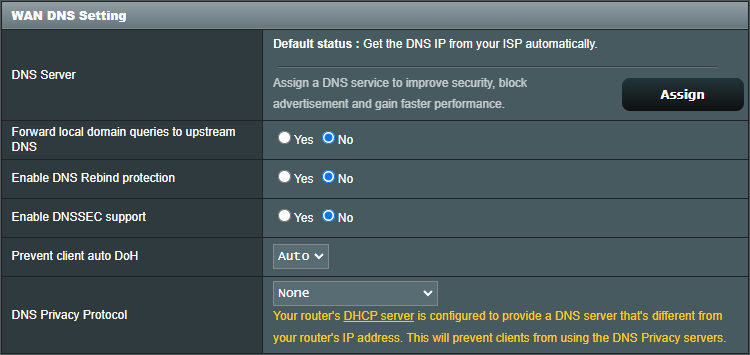
this was the closest thing i could find in regards to dnssec on my router, but it’s not something i’ve touched
root@Pi-hole:~# delv  @1.1.1.1 cyberciti.biz A
; fully validated
cyberciti.biz.          300     IN      A       172.66.40.203
cyberciti.biz.          300     IN      A       172.66.43.53
cyberciti.biz.          300     IN      RRSIG   A 13 2 300 20220928110629 20220926090629 34505 cyberciti.biz. 3uU88iYcOTAcrhXIZrZboWBqeFSw5BBQt/BclSIWjH5vImBiC5so51Bg JFqmxe0jE6kLX41P9BJ+cCjEHmNEwg==
hmm what router model you are using? Maybe we will find something on the web related to DNSSEC.
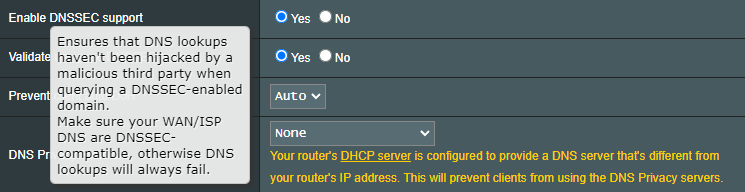
Could you enable DNSSEC within router config? Afterwards we could activate DNSSEC inside Unbound again and check how it behave.
mv /etc/unbound/unbound.conf.d/root-auto-trust-anchor-file.bak /etc/unbound/unbound.conf.d/root-auto-trust-anchor-file.conf
systemctl restart unbound
dig @127.0.0.1 -p 5335 google.com
delv  @127.0.0.1 -p 5335 cyberciti.biz A
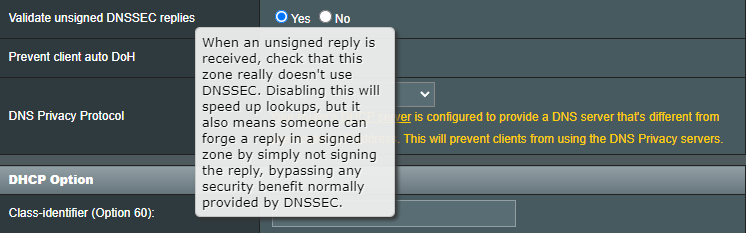
i enabled the last two options and it seems like it’s working now. can you please confirm if it looks right
root@Pi-hole:~# mv /etc/unbound/unbound.conf.d/root-auto-trust-anchor-file.bak /etc/unbound/unbound.conf.d/root-auto-trust-anchor-file.conf
root@Pi-hole:~# systemctl restart unbound
root@Pi-hole:~# dig @127.0.0.1 -p 5335 google.com

; <<>> DiG 9.16.33-Debian <<>> @127.0.0.1 -p 5335 google.com
; (1 server found)
;; global options: +cmd
;; Got answer:
;; ->>HEADER<<- opcode: QUERY, status: NOERROR, id: 3423
;; flags: qr rd ra; QUERY: 1, ANSWER: 1, AUTHORITY: 0, ADDITIONAL: 1

;; OPT PSEUDOSECTION:
; EDNS: version: 0, flags:; udp: 1232
;; QUESTION SECTION:
;google.com.                    IN      A

;; ANSWER SECTION:
google.com.             300     IN      A       142.250.217.78

;; Query time: 80 msec
;; SERVER: 127.0.0.1#5335(127.0.0.1)
;; WHEN: Tue Sep 27 05:42:58 PDT 2022
;; MSG SIZE  rcvd: 55

root@Pi-hole:~# delv  @127.0.0.1 -p 5335 cyberciti.biz A
; fully validated
cyberciti.biz.          300     IN      A       172.66.40.203
cyberciti.biz.          300     IN      A       172.66.43.53
cyberciti.biz.          300     IN      RRSIG   A 13 2 300 20220928134309 20220926114309 34505 cyberciti.biz. vQqx+Twwr1ROVRt6AEUPsHDuZBQOSjaa9X/2VvSf02HxaIvDe1jZ06F1 1+yEu7CZ3Y/oWHWF6N/tUamnkH89Mg==
looks good for now. Let’s revert changes we did for troubleshooting
rm /etc/unbound/unbound.conf.d/dietpi-forward.conf
G_CONFIG_INJECT '        verbosity:' '        verbosity:0' /etc/unbound/unbound.conf.d/dietpi.conf
Reboot the system and have a check on logs
journalctl -u unbound. Service
dig @127.0.0.1 -p 5335 google.com
i think it’s looking good 
root@Pi-hole:~# journalctl -u unbound.service
-- Journal begins at Tue 2022-09-27 06:04:59 PDT, ends at Tue 2022-09-27 06:05:55 PDT. --
Sep 27 06:05:00 Pi-hole systemd[1]: Starting Unbound DNS server...
Sep 27 06:05:01 Pi-hole systemd[1]: Started Unbound DNS server.
Sep 27 06:05:01 Pi-hole unbound[409]: [409:0] info: start of service (unbound 1.13.1).
root@Pi-hole:~# dig @127.0.0.1 -p 5335 google.com

; <<>> DiG 9.16.33-Debian <<>> @127.0.0.1 -p 5335 google.com
; (1 server found)
;; global options: +cmd
;; Got answer:
;; ->>HEADER<<- opcode: QUERY, status: NOERROR, id: 35775
;; flags: qr rd ra; QUERY: 1, ANSWER: 1, AUTHORITY: 0, ADDITIONAL: 1

;; OPT PSEUDOSECTION:
; EDNS: version: 0, flags:; udp: 1232
;; QUESTION SECTION:
;google.com.                    IN      A

;; ANSWER SECTION:
google.com.             300     IN      A       142.251.215.238

;; Query time: 28 msec
;; SERVER: 127.0.0.1#5335(127.0.0.1)
;; WHEN: Tue Sep 27 06:06:19 PDT 2022
;; MSG SIZE  rcvd: 55
if you like, we could try to verify if indeed the router setting was root cause? If yes, reset the values you changed one by one and test again using dig.
i reset both values to what they were before and it’s still working, so now i’m even more boggled to what the root cause was
disabled Validate unsigned DNSSEC replies
root@Pi-hole:~# dig @127.0.0.1 -p 5335 google.com

; <<>> DiG 9.16.33-Debian <<>> @127.0.0.1 -p 5335 google.com
; (1 server found)
;; global options: +cmd
;; Got answer:
;; ->>HEADER<<- opcode: QUERY, status: NOERROR, id: 24819
;; flags: qr rd ra; QUERY: 1, ANSWER: 1, AUTHORITY: 0, ADDITIONAL: 1

;; OPT PSEUDOSECTION:
; EDNS: version: 0, flags:; udp: 1232
;; QUESTION SECTION:
;google.com.                    IN      A

;; ANSWER SECTION:
google.com.             30      IN      A       142.251.215.238

;; Query time: 0 msec
;; SERVER: 127.0.0.1#5335(127.0.0.1)
;; WHEN: Tue Sep 27 13:00:06 PDT 2022
;; MSG SIZE  rcvd: 55
disabled Enable DNSSEC support
root@Pi-hole:~# dig @127.0.0.1 -p 5335 google.com

; <<>> DiG 9.16.33-Debian <<>> @127.0.0.1 -p 5335 google.com
; (1 server found)
;; global options: +cmd
;; Got answer:
;; ->>HEADER<<- opcode: QUERY, status: NOERROR, id: 27201
;; flags: qr rd ra; QUERY: 1, ANSWER: 1, AUTHORITY: 0, ADDITIONAL: 1

;; OPT PSEUDOSECTION:
; EDNS: version: 0, flags:; udp: 1232
;; QUESTION SECTION:
;google.com.                    IN      A

;; ANSWER SECTION:
google.com.             275     IN      A       142.251.215.238

;; Query time: 0 msec
;; SERVER: 127.0.0.1#5335(127.0.0.1)
;; WHEN: Tue Sep 27 13:00:31 PDT 2022
;; MSG SIZE  rcvd: 55
You are running an interesting environment 
Could you try steps described on this post Unbound not working with pi-hole - #45 by Joulinar
Would be interesting to see if all is shown correctly on logs.
For testing you could reboot your router. Maybe it will change something (or maybe not  )
)
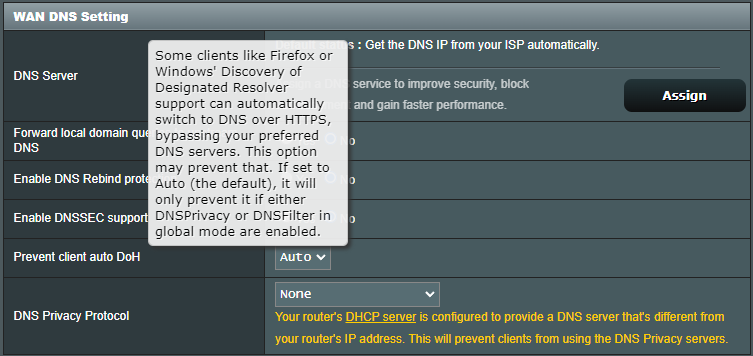
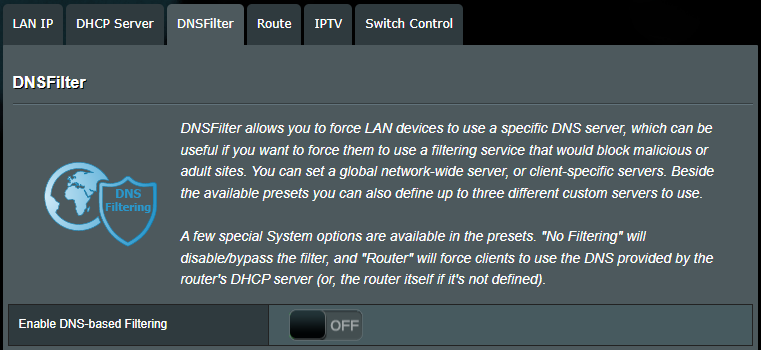
Is this “Prevent client auto DoH” probably catching and redirecting DNS requests and breaking DNSSEC that way?
unfortunately i went with a fresh install shortly after, so whatever we dealt with is no longer there
it’s certainly interesting because i actually did 2-3 fresh installs prior asking for help and still ran into the same issue. it wasn’t until you and i started troubleshooting that i played around with those dietpi/router settings
i’m going to lean towards it having something to do with the router despite multiple reboots before which didn’t change the situation
a big thank you for sticking it out with me 
thanks to all those who chimed in as well
@WarHawk @Jappe @trendy