Hello, I would like to continue the work of @Phillski, @maarten and @Fatguy5150 described on the original post which has already been closed.
It is 2025 2026 and DietPi is based on Buster Bookworm Trixie with kernel 4.x 6.x.
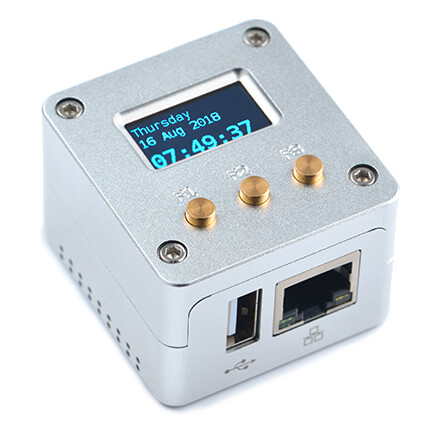
Some modifications were necessary on the latest NanoHatOLED github repository which is already based on Python3.8.
I have removed everything not related to the NanoHatOLED and merged all the modifications from @maarten and @Fatguy5150 described in the original post.
- DietPi or PiHole Logo on boot
- 30 Seconds sleep to avoid OLED Burn-in
- Start-up script on
var/lib/dietpi/postboot.d/ - Latest PiHole 6.x API integration (api.php has been removed)
How to install
- Enable i2c (add to armbianEnv.txt):
overlays=i2c0 usbhost1 usbhost2 - Download NanoHatOLED.tar.gz and copy it on ~/
- apt-get install git build-essential
- Add board information on
/etc/sys_info. The below is an example of a NanoPi NEO1.4. If you have a different board, find the _platform & _board_id information here~/NanoHatOLED/BakeBit/WiringNP/wiringPi/boardtype_friendlyelec.cand the _chipid herenano /proc/cpuinfo. For example, NanoPi NEO Air issunxi_platform: Sun8iw7p1. andsunxi_board_id: 2(0). NanoPI NEO2sunxi_platform: Allwinnersun50iw2Familyandsunxi_board_id: 1(0)Everything else is kindda irrelevant.
/etc/sys_info
sunxi_platform    : Allwinnersun8iFamily
sunxi_secure      : normal
sunxi_chipid      : 2c21020e786746240000540000000000
sunxi_chiptype    : 00000042
sunxi_batchno     : 1
sunxi_board_id    : 1(0)
- tar -pxvzf NanoHatOLED.tar.gz && cd NanoHatOLED && ./install.sh
Troubleshooting:
- Check that after reboot, the binary
./NanoHatOLEDis running inhtop - Check you have a nice reading of all IO when executing command
gpio readall - Check that i2c is enabled by executing command
sudo i2cdetect -y 0 - Finally, check for some errors on the below logs
/tmp/nanoled-python.logor/tmp/nanohat-oled.log
Notes:
- No need for those libraries anymore
libfreetype6-dev libjpeg-dev luma.oled - the flag
--break-system-packagesis used for the -pip libraries to install them on the system level
Currently not working:
gpio readallas it needs the output ‘Family’ fromnano /proc/cpuinfoand upstream Trixie shows less info incpuinfooutput.
*edit1: DietPi is Based on Bookworm.
*edit2: Added PiHole 6.x API integration
*edit3: You can off course run the FriendlyELEC ROM directly instead of using DietPi.
*edit4: Added Fix for GCC v14 errors. Need to add the below flags to CFLAGS to every Makefile
-Wno-error=implicit-function-declaration -Wno-error=return-mismatch
NanoHatOLED.tar.gz (448.5 KB)