Required Information
- DietPi version |
9.17.2 - Distro version |
trixie - Kernel version | Linux m2010-dietpi 6.12.48+deb13-amd64 #1 SMP PREEMPT_DYNAMIC Debian 6.12.48-1 (2025-09-20) x86_64 GNU/Linux
- Architecture |
amd64 - SBC model | Native PC (x86_64)
- Power supply used | internal
- SD card used | internal drive
Additional Information (if applicable)
- Software title | tigervnc, lxqt
- Was the software title installed freshly or updated/migrated? migrated
- Can this issue be replicated on a fresh installation of DietPi? don’t know
← If you sent a “dietpi-bugreport”, please paste the ID here → - Bug report ID |
echo $G_HW_UUID
Steps to reproduce
- access dietpi server using MacOS screensharing
- …
Expected behaviour
- lxqt desktop should appear
Actual behaviour
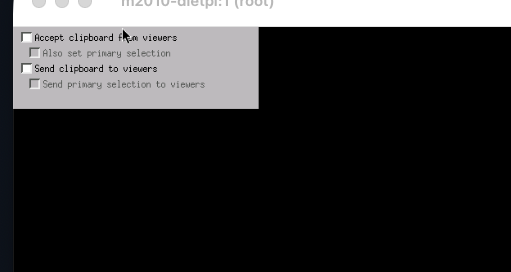
- VNC appears to start, but I get only a black screen with a couple of check boxes. I will try to attach a screenshot
Extra details
- I am running multiple instances on
-
- Mac mini 2007
- Mac mini 2010
- MacBook Pro 2012
- VM on windows 10
- lxqt desktop appears fine on the last two, but shows the black screen on the 2010 and vnc does not connect to the 2007. same version of dietpi on all machines.
any advice would be appreciated
-dvh