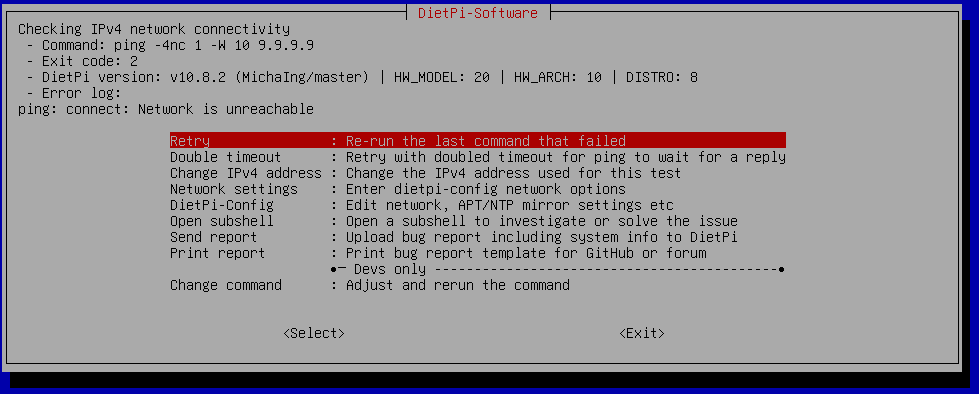
I can not explain how frustrating it is to just download and use DietPi with a simple desktop. All I wanted to do was download dietpi with xfce and keep it simple instead I have been trying to find out why I can not get rid of this page and just see a desktop. PLEASE HELP  I have tried this on my RPi5 and in Windows 10 VirtualBox same thing over and over “Network Unreachable”
Well your system is not able to reach the internet. At least not Quad9. Can you check if you are able to reach 9.9.9.9 from your current windows computer?
Tried from my browser it just says “Unable to find the DNS parameter” but this same grey box menu screen comes up when I try to install on my Raspberry Pi 5 as well. What I’m trying to do is setup DietPi with xfce as an amnesic system to have a Tails like system that is a ultimate privacy setup for my Cyberdeck. Disclaimer: I am a total noob to linux and no nothing about code. I just want one micro sd setup as my retro games (EmulationStation) and one micro sd as my Privacy Computer for browsing and communication.
you are failing on one of the first steps and we would need to find why you are not able to reach a word global DNS provider Quad9. Might be blocked by your ISP or some other geo blocking. Usually depends on your location.
Let’s do this step by step, can you check from your windows PC (CMD Command Prompt)
ping 9.9.9.9
Is this working?
And no, you don’t need any Linux skills. Simply something on your network is blocking the ping test actually. This we use to verify network connectivity and internet access. Nothing we can’t fix together.
Wow thanks for being so kind and helpful.. I just tried the test,
Pinging 9.9.9.9 with 32 bytes of data:
Reply from 9.9.9.9: bytes=32 time=2ms TTL=57
Reply from 9.9.9.9: bytes=32 time=2ms TTL=57
Reply from 9.9.9.9: bytes=32 time=2ms TTL=57
Reply from 9.9.9.9: bytes=32 time=2ms TTL=57

Ping statistics for 9.9.9.9:
Packets: Sent = 4, Received = 4, Lost = 0 (0% loss),
Approximate round trip times in milli-seconds:
Minimum = 2ms, Maximum = 2ms, Average = 2ms
ok this is working. Means it should be working as well on your RPI5. Stupid question, your RPI5 has been connected using network cable to your router?