the copying process was carried out, but afterwards at login: “no route to host”. My hard disks are in an Icy box,
connected to pi via usb. I have now moved the “sdb disk” into the first slot, after which dietpi has booted. After I reintegrated the second disk (which was previously in the first slot) into the second slot, the message “no route to host” appears again. I hope you are not getting dizzy. I am! I think I’ll start from scratch with dietpi, delete everything. I have backed up the data.
is this a self-powered USB hub? Maybe it’s a challenge with power consumption of both HDD during startup?
yes, self-powered usb hub
I restored the old settings, reintegrated the sd card, then booted from sd again
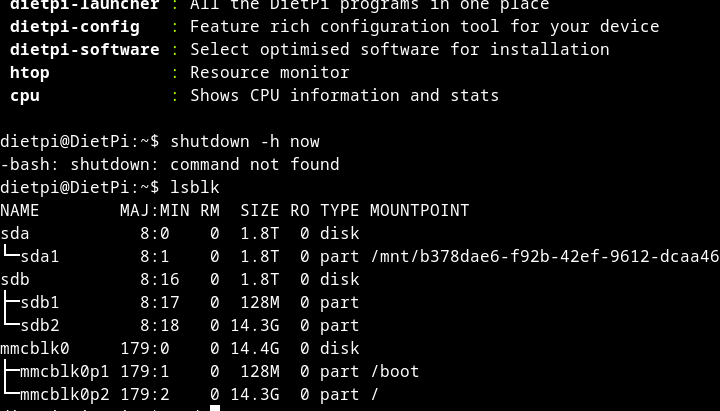
pls use this one. Btw, if you connect via SSH, you should be able to copy/past directly from terminal. It would help to avoid screen prints.
Do you have a screen attached? Maybe it would give an indication on what happen during boot process.
NAME FSTYPE LABEL  SIZE RO TYPE MOUNTPOINT PARTUUID                             UUID
sda                1.8T  0 disk
└─sda1
     ext4          1.8T  0 part /mnt/b378d aca81998-be21-4cc0-8627-945b6928d5c8 b378dae6-f92b-42ef-9612-dcaa46f6b2b0
sdb                1.8T  0 disk
├─sdb1
│    vfat          128M  0 part            727cff46-01                          463B-CEC5
└─sdb2
     ext4         14.3G  0 part            727cff46-02                          dcbd9214-f41c-4689-bd45-cfb04de2204c
mmcblk0
│                 14.4G  0 disk
├─mmcblk0p1
│    vfat          128M  0 part /boot      727cff46-01                          463B-CEC5
└─mmcblk0p2
     ext4         14.3G  0 part /          727cff46-02                          dcbd9214-f41c-4689-bd45-cfb04de2204c
i have no sreen attached, but I can do that, it just takes time
sdb and mmcblk0 are identical and the system should be able to boot from HDD. Which is working as long as the sda is not connected.
For testing, you should be able to connect both HDD to the RPi directly. Or at least the HDD who you like to boot from. Just to exclude challenges with the USB hub
I have attached the monitor. When login in
/boot/dietpi/dietpi-login: line 32: exec: kodi: not found
now i wanted to log in with ssh, the password is no longer correct or it is set to english keyboard. no login. it’s getting annoying. I think I’ll give up. Too much effort. Many thanks for your help
I have started another attempt, dietpi is root mode and I came to dietpi-config
okay pi hangs up. I don’t think it has any value anymore. Thanks again
did you have Kodi installed and should it start automatically?
This topic was automatically closed 180 days after the last reply. New replies are no longer allowed.