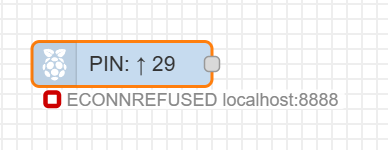
rpi gpio node-red library not work on dietpi bookworm ad trixie?
How solwe this problem?
rpi gpio node-red library not work on dietpi bookworm ad trixie?
How solwe this problem?
What exact issue do you experience?
Do you have some kind of error message?
Since Dietpi Bulseye, when I install Node Red and the rpi-gpio library, the pins on my rpi zero2 are not configured. This is related to the library, I think it was lgpio, which is installed during the installation of Node Red. The old library that was installed with Bulseye was called rpi-gpio or something similar. I’m almost sure that the problem is from changing the libraries, I even commented on it with someone but I never got to the end. Now I have to solve this problem because I can’t run it on Bulseye forever.
https://dietpi.com/forum/t/node-red-node-pi-gpio-library/24578
I guess you would need to migrate your setup to gpiod, legacy RPi.GPIO / sysfs is not supported anymore
I tried what you sent me but it didn’t work. Can you provide a more detailed description of how to properly install this library?
I am also conducting other correspondence on the matter, please take a look.
https://discourse.nodered.org/t/rpi-gpio-library-not-work-with-dietpi-trixie/100595/13
I don’t know what your exact problem is. Our script installs node-red and python3-rpi-lgpio, which uses already gpiod.
If you have an old flow which relied on rpi-gpio you would need to migrate your flows to use the modern gpiod library.
cd /mnt/dietpi_userdata/node-red
npm remove node-red-node-pi-gpio
npm install node-red-node-pi-gpiod
Then migrate your flows
On rpi zero2 I install Dietpi Trixie and then Node Red I install the node-red-node-pi-gpio library but the pins are not configured correctly. Things started to fail since Bookworm. I found out that it was due to replacing the python3-rpi-lgpio library. With Bullseye things are as they should be, but it is not known until when. That is why I am looking for a solution for Trixie.
Yes, node-red-node-pi-gpio is not supported anymore, as already said.
You need node-red-node-pi-gpiod now.
I did a quick test, installed node red, removed node-red-node-pi-gpio and installed node-red-node-pi-gpiod and also gpiod (via apt)
root@TestPi3B:/mnt/dietpi_userdata/node-red# gpioinfo
gpiochip0 - 54 lines:
        line   0:       "ID_SDA"                input
        line   1:       "ID_SCL"                input
        line   2:       "GPIO2"                 input
        line   3:       "GPIO3"                 input
        line   4:       "GPIO4"                 input
        line   5:       "GPIO5"                 input
        line   6:       "GPIO6"                 input
        line   7:       "GPIO7"                 input
        line   8:       "GPIO8"                 input
        line   9:       "GPIO9"                 input
        line  10:       "GPIO10"                input
        line  11:       "GPIO11"                input
        line  12:       "GPIO12"                input
        line  13:       "GPIO13"                input
        line  14:       "GPIO14"                input
        line  15:       "GPIO15"                input
        line  16:       "GPIO16"                input
        line  17:       "GPIO17"                input
        line  18:       "GPIO18"                input
        line  19:       "GPIO19"                input
        line  20:       "GPIO20"                input
        line  21:       "GPIO21"                input
        line  22:       "GPIO22"                input
        line  23:       "GPIO23"                input
        line  24:       "GPIO24"                input
        line  25:       "GPIO25"                input
        line  26:       "GPIO26"                input
        line  27:       "GPIO27"                input
        line  28:       "NC"                    input
        line  29:       "LAN_RUN_BOOT"          input
        line  30:       "CTS0"                  input
        line  31:       "RTS0"                  input
        line  32:       "TXD0"                  input
        line  33:       "RXD0"                  input
        line  34:       "SD1_CLK"               input
        line  35:       "SD1_CMD"               input
        line  36:       "SD1_DATA0"             input
        line  37:       "SD1_DATA1"             input
        line  38:       "SD1_DATA2"             input
        line  39:       "SD1_DATA3"             input
        line  40:       "PWM0_OUT"              input
        line  41:       "PWM1_OUT"              input
        line  42:       "ETH_CLK"               input
        line  43:       "WIFI_CLK"              input
        line  44:       "SDA0"                  input
        line  45:       "SCL0"                  input
        line  46:       "SMPS_SCL"              input
        line  47:       "SMPS_SDA"              output
        line  48:       "SD_CLK_R"              input
        line  49:       "SD_CMD_R"              input
        line  50:       "SD_DATA0_R"            input
        line  51:       "SD_DATA1_R"            input
        line  52:       "SD_DATA2_R"            input
        line  53:       "SD_DATA3_R"            input
gpiochip1 - 2 lines:
        line   0:       unnamed                 output consumer=ACT
        line   1:       unnamed                 input
gpiochip2 - 8 lines:
        line   0:       "BT_ON"                 output consumer="shutdown"
        line   1:       "WL_ON"                 output
        line   2:       "STATUS_LED"            output
        line   3:       "LAN_RUN"               output
        line   4:       "HDMI_HPD_N"            input
        line   5:       "CAM_GPIO0"             output consumer="cam1_regulator"
        line   6:       "CAM_GPIO1"             output
        line   7:       "PWR_LOW_N"             input consumer="PWR"

root@TestPi3B:/mnt/dietpi_userdata/node-red# gpioget --chip gpiochip0 GPIO17 GPIO18
"GPIO17"=inactive "GPIO18"=inactive
I did also a test inside node-red, go to “manage palette” and install node-red-node-pi-gpiod there, you get then the gpiod nodes.
lgpio and gpiod are not the same. When using node-red-node-pi-gpiod, I guess you need:
apt install gpiod
instead of python3-rpi-lgpio.
EDIT: Oh nasty, it does not use the generic gpiod tools and library, but again an RPi-only one: pigpio library
At least available in the RPi repo:
apt install pigpiod
EDIT2: Oh, not available on Trixie anymore  . Deprecated as well in the meantime?
It is available:
https://packages.debian.org/trixie/gpiod
nevermind, I got confused: pigpiod, gpiod, rgpiod 
I’m testing it right now, it’s working fine in node-red.
You can directly manipulate it via exec node (/dev/gpiochip*) or if you want a daemon, you can install rgpiod and rgpiod-tools.
Yes, see my edit above. Another RPi-only trap, the name of this plugin is misleading.
node-red-node-pi-gpio with python3-rpi-lgpio seems to be the only way right now, since for whatever reason no one maintains a generic GPIO plugin which uses the generic libgpiod or lgpio libraries.
if node-red-node-pi-gpio with python3-rpi-lgpio does not work, some log messages would be needed to find out why. But better discuss this in the Node-RED forum. This is not a DietPi issue, but an issue that Node-RED plugins all rely on legacy or unmaintained RPi-only GPIO libraries.
Ok so a workaround is to not use the daemon anymore (because you can’t on trixie) and just use an exec node, which uses libgpio / /dev/gpiochip* under the hood (no deamon needed, we use gpioset, gpioget commands etc.). Here is an example flow for node-red:
[
  {
    "id": "b3f6d9a2d1c0e111",
    "type": "tab",
    "label": "libgpiod exec demo",
    "disabled": false,
    "info": "Simple demo: Set GPIO4 high/low using gpiod tools via Exec.\n\n- Requires: gpiod package (gpioset) and coreutils (timeout).\n- Exec node is configured with Command=timeout and 'append msg.payload'.\n- Two injects send 1 or 0, function converts to args for timeout+gpioset.\n- Debug nodes show the constructed command and any stderr.\n\nAdjust chip/line in the function node if needed."
  },
  {
    "id": "a2f08e6b7d6c1a01",
    "type": "inject",
    "z": "b3f6d9a2d1c0e111",
    "name": "GPIO4 = 1 (200ms)",
    "props": [
      {
        "p": "payload"
      }
    ],
    "repeat": "",
    "crontab": "",
    "once": false,
    "onceDelay": 0.1,
    "topic": "",
    "payload": "1",
    "payloadType": "num",
    "x": 190,
    "y": 140,
    "wires": [
      [
        "c7b2a0c5a44d2b02"
      ]
    ]
  },
  {
    "id": "f5c2e0e3c1a9b903",
    "type": "inject",
    "z": "b3f6d9a2d1c0e111",
    "name": "GPIO4 = 0 (200ms)",
    "props": [
      {
        "p": "payload"
      }
    ],
    "repeat": "",
    "crontab": "",
    "once": false,
    "onceDelay": 0.1,
    "topic": "",
    "payload": "0",
    "payloadType": "num",
    "x": 190,
    "y": 200,
    "wires": [
      [
        "c7b2a0c5a44d2b02"
      ]
    ]
  },
  {
    "id": "c7b2a0c5a44d2b02",
    "type": "function",
    "z": "b3f6d9a2d1c0e111",
    "name": "Build timeout+gpioset args (GPIO4)",
    "func": "const chip = \"gpiochip0\";\nconst line = \"GPIO4\";      // change to \"GPIO17\" etc.\nconst holdSeconds = 0.2;\n\n// Accept 1/0, true/false, \"1\"/\"0\"\nconst v = (msg.payload === true || msg.payload === 1 || msg.payload === \"1\") ? 1 : 0;\n\n// Exec node is configured with Command=\"timeout\" and 'append msg.payload'\nmsg.payload = `${holdSeconds} gpioset --chip ${chip} ${line}=${v}`;\n\n// For human-readable debug output (doesn't affect exec)\nmsg.command = `timeout ${msg.payload}`;\nmsg.gpio = { chip, line, value: v, holdSeconds };\n\nreturn msg;\n",
    "outputs": 1,
    "noerr": 0,
    "initialize": "",
    "finalize": "",
    "libs": [],
    "x": 520,
    "y": 170,
    "wires": [
      [
        "c2c7a4b0c9b3dd04",
        "c0d7ad1f5f7c2e05"
      ]
    ]
  },
  {
    "id": "c2c7a4b0c9b3dd04",
    "type": "exec",
    "z": "b3f6d9a2d1c0e111",
    "command": "timeout",
    "addpay": true,
    "append": "",
    "useSpawn": "false",
    "timer": "",
    "winHide": false,
    "name": "Exec: timeout (append msg.payload)",
    "x": 820,
    "y": 170,
    "wires": [
      [
        "b9a61c7b84d80c06"
      ],
      [
        "e5ac333a4d8e1607"
      ],
      [
        "a64d97d5d7b0be08"
      ]
    ]
  },
  {
    "id": "c0d7ad1f5f7c2e05",
    "type": "debug",
    "z": "b3f6d9a2d1c0e111",
    "name": "Debug: built command",
    "active": true,
    "tosidebar": true,
    "console": false,
    "tostatus": false,
    "complete": "command",
    "targetType": "msg",
    "x": 820,
    "y": 240,
    "wires": []
  },
  {
    "id": "b9a61c7b84d80c06",
    "type": "debug",
    "z": "b3f6d9a2d1c0e111",
    "name": "stdout (usually empty)",
    "active": true,
    "tosidebar": true,
    "console": false,
    "tostatus": false,
    "complete": "payload",
    "targetType": "msg",
    "x": 1060,
    "y": 140,
    "wires": []
  },
  {
    "id": "e5ac333a4d8e1607",
    "type": "debug",
    "z": "b3f6d9a2d1c0e111",
    "name": "stderr (errors show here)",
    "active": true,
    "tosidebar": true,
    "console": false,
    "tostatus": true,
    "complete": "payload",
    "targetType": "msg",
    "x": 1070,
    "y": 170,
    "wires": []
  },
  {
    "id": "a64d97d5d7b0be08",
    "type": "debug",
    "z": "b3f6d9a2d1c0e111",
    "name": "return code (may be undefined)",
    "active": true,
    "tosidebar": true,
    "console": false,
    "tostatus": false,
    "complete": "rc",
    "targetType": "msg",
    "x": 1090,
    "y": 200,
    "wires": []
  }
]
This should fix it:
Will be applied also during next DietPi update.
Thank you.