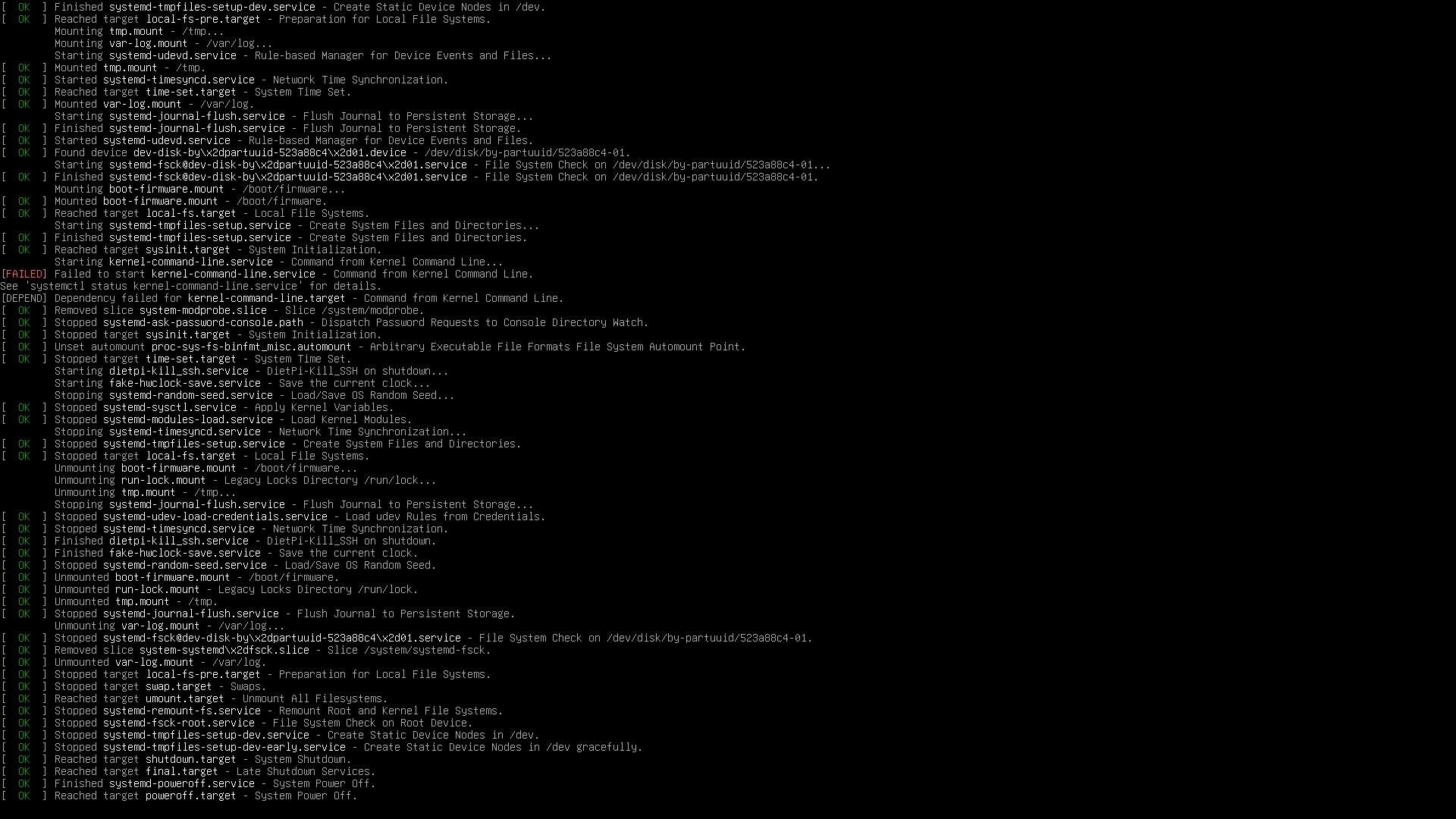
Installed latest DietPi ( updated 15.12.2025 ) on a 1 GB SD card. I watched the boot sequence via HDMI output. Just before the login prompt it says systemd power-off and then shut downs.
Though, the real problem is I believe, it says FAILED for kernel.command-line service. That’s where it goes downhill from there.
There is no kernel command-line service. The kernel command-line arguments from /boot/firmware/cmdline.txt are applied to the kernel by the bootloader, and passed through to the init system (systemd) from there. If it was just before the login prompt, then this is log after the kernel and init system have been loaded.
Maybe you can catch a screenshot, or have a UART adapter to copy&paste the output from the serial console?
Automatic reboot can generally happen in case of insufficient PSU. It has 1.2A or more? Also a low quality cable can lead to significant voltage drop. But if the poweroff.target is invoked, it seems sort of a regular shutdown .
unfortunately, as the pi shuts down straight away, i cant get to the service status to understand more about the failure. If there is any way to prevent the shutdown, or enable extra logging to get more info, i’d be happy to try it.
You cannot use the customization of the RPi imager with anything else but RPi OS. The scripts it tries to load do not exist on DietPi.
EDIT: Okay @ktremain there I see that service I was wondering about, so you used the RPi Imager + customization as well?
Is DietPi already selectable in the RPi Imager (request was done) or did you flash the manually downloaded image? I wished there was some clear warning about its customization options. It is closely tied to RPi OS setup and packages. cloud-init was or maybe is sort of supported as a standard as well, but that certainly does not include all customization options and is not available on DietPi either (while we could think about integrating it on RPi images if this enhances RPi Imager support greatly).
Okay great, DietPi is indeed available directly in the Raspberry Pi Imager now . I also think I found a way to hide the customization options for our images, but am checking back with Tom (responsible for 3rd party OS integration) to be sure.
Found a way to hide/grey out the customization in the RPi imager for DietPi images. It just needed a small adjustment in our JSON file that is pulled by the imager. But they either have a cache or it is pulled on RPi imager update, at least right now for me customization is still offered.
 .
.
 . I also think I found a way to hide the customization options for our images, but am checking back with Tom (responsible for 3rd party OS integration) to be sure.
 .
.