Rock 4C+ USB 3.0 Host port, only 2.0 speeds?

Just got a Rock 4C+ and a Lenovo PS8 Portable SSD, connected to the lower USB 3.0 port (HOST).

For some reason I only get 30mb/s, USB 2.0 speeds.

Is this a known bug? Or what’s the reason I can’t utilize the USB 3.0 speeds on this port?I got a USB A to C 3.0 cable.

Bus 003 Device 002: ID 17ef:455c Lenovo Lenovo  PS8 Portable SSD
Device Descriptor:
  bLength                18
  bDescriptorType         1
  bcdUSB               2.10
  bDeviceClass            0
  bDeviceSubClass         0
  bDeviceProtocol         0
  bMaxPacketSize0        64
  idVendor           0x17ef Lenovo
can't get debug descriptor: Resource temporarily unavailable
can't get device qualifier: Resource temporarily unavailable
can't get debug descriptor: Resource temporarily unavailable

I moved the topic to the troubleshooting category.
Can you run the following on the system and post it here please.

G_BUG_REPORT

Details:

  • Date | 2025-10-23 12:48:57
  • DietPi version | v9.18.1 (MichaIng/master)
  • Distro version | bookworm (ID=7)
  • Kernel version | Linux TeslaUSB 6.12.53-current-rockchip64 #1 SMP PREEMPT Wed Oct 15 10:00:25 UTC 2025 aarch64 GNU/Linux
  • Architecture | arm64
  • Hardware model | ROCK 4 (aarch64) (ID=72)
  • Power supply | (EG: RAVPower 5V 1A)
  • SD card | (EG: SanDisk Ultra 16 GB)

Steps to reproduce:

Connect USB 3.0 drive to USB 3.0 Host port (lower)

Expected behaviour:

Getting USB 3.0 speeds.

Actual behaviour:

Only getting USB 2.0 speeds

Extra details:

None

Additional logs:

What logs are needed to troubleshoot this?

Can you also check

dmesg | grep -i usb3
dmesg | grep -i super
dmesg | grep -i uas

But my guess is that the cable is broken or the external SSD does not get enough power via the USB port.
Does the cable and SSD work correctly on other devices?

dmesg | grep -i usb3
[    2.094170] usb usb3: New USB device found, idVendor=1d6b, idProduct=0002, bc                  dDevice= 6.12
[    2.095091] usb usb3: New USB device strings: Mfr=3, Product=2, SerialNumber=                  1
[    2.095777] usb usb3: Product: xHCI Host Controller
[    2.096226] usb usb3: Manufacturer: Linux 6.12.53-current-rockchip64 xhci-hcd
[    2.096867] usb usb3: SerialNumber: xhci-hcd.7.auto

dmesg | grep -i super
[    2.070388] xhci-hcd xhci-hcd.6.auto: Host supports USB 3.0 SuperSpeed
[    2.093363] xhci-hcd xhci-hcd.7.auto: Host supports USB 3.0 SuperSpeed

dmesg | grep -i uas
[    0.832652] squashfs: version 4.0 (2009/01/31) Phillip Lougher
[    2.524362] scsi host0: uas
[    2.526598] usbcore: registered new interface driver uas

Will test the cable on other devices!

There is no line like

new SuperSpeed USB device number 2 using xhci-hcd

So no handshake made for USB 3.

Yes, let’s see if it’s a hardware issue

It was the cable, even though it was brand new.

I moved the root from the MicroSD to the SSD-disk (USB). I think the bootloader is still on the MicroSD, is there a way to move everything to the SSD? Or do I still need it for the bootloader?
Can I remove everything else on the MicroSD while keeping the bootloader?
How do I do this?

You wanna boot from the SSD or what is your goal?

Yes! Managed to do that by editing dietpiEnv.txtz But the microsd still has the bootloader i think!

As far as I know you need to keep the bootloader on the SD card, because the Rock 4C+ has no internal storage to store the bootloader and USB etc is initialiazed later, so you can not store the bootloader on an external medium.
I suspected that.

Can I clean up the MicroSD only leaving the bootloader somehow?

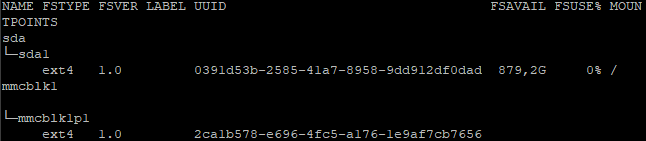
You can delete everything except /boot, but I’m not sure if you have an image whith one partition or still 2, can you show lsblk -f

Is it safe to delete everything but /boot on mmcblklp1?

Just deleted all folders except /boot on mmcblk1p1. This worked great. But then I removed /boot folder from sda1. This gave me an error on boot:

-bash: /boot/dietpi/func/dietpi-globals: File or folder does not exist

Can I create some kind of symlink from the microsd /boot to the ssd?

Better doing this via /etc/fstab to mount /boot from SD to SSD