Creating a bug report/issue
I have searched the existing open and closed issues
Required Information
- DietPi version |
cat /boot/dietpi/.version - Distro version |
echo $G_DISTRO_NAME $G_RASPBIAN - Kernel version |
uname --all - Architecture |
dpkg --print-architecture - SBC model |
echo $G_HW_MODEL_NAMEor (EG: RPi3) - Power supply used | (EG: 5V 1A RAVpower)
- SD card used | (EG: SanDisk ultra)
Additional Information (if applicable)
- Software title | (EG: Nextcloud)
- Was the software title installed freshly or updated/migrated?
- Can this issue be replicated on a fresh installation of DietPi?
← If you sent a “dietpi-bugreport”, please paste the ID here → - Bug report ID |
echo $G_HW_UUID
Description of the problem
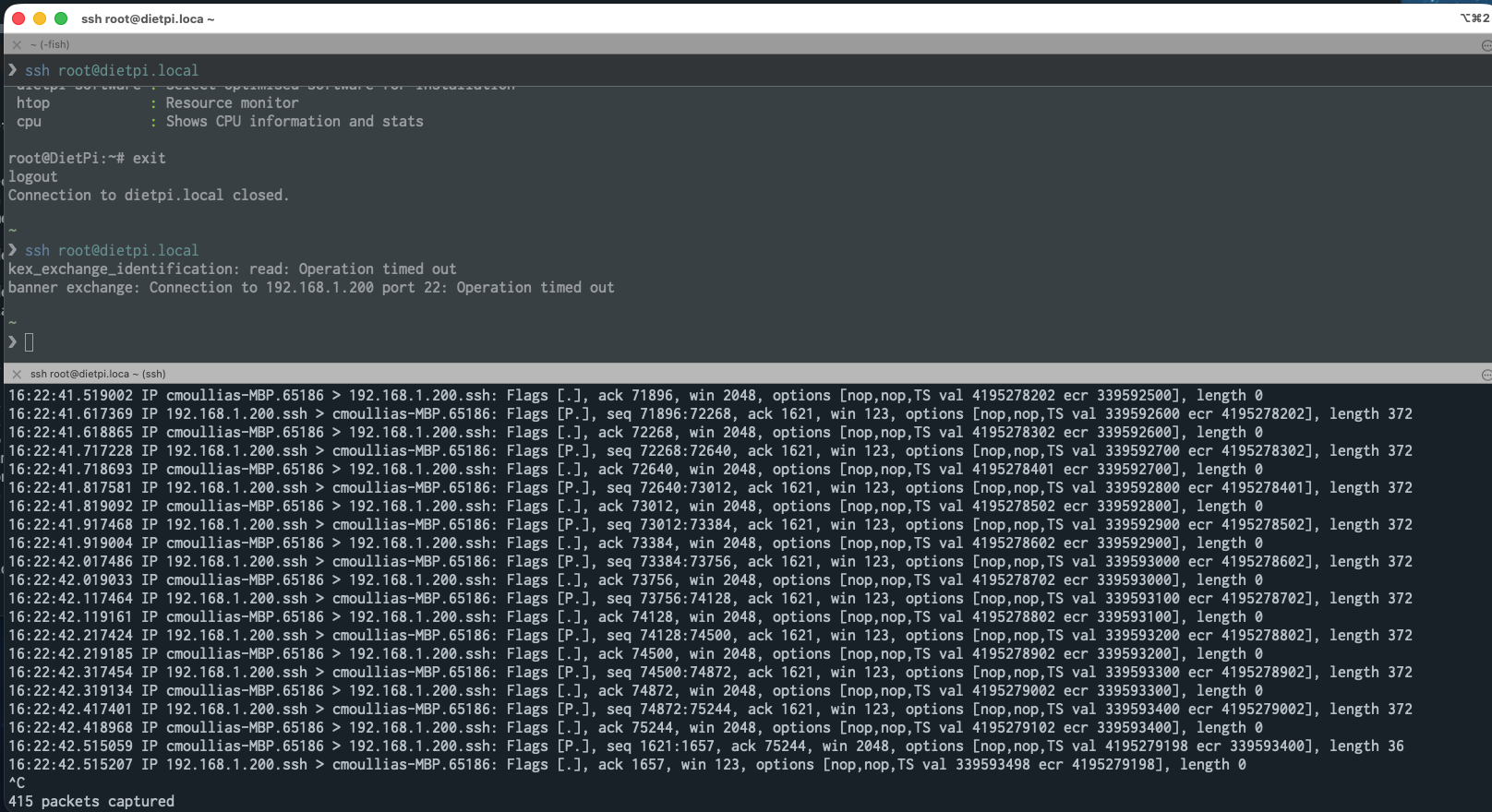
I experiment a very strange issue as I must issue several times the command ssh to access against Dietpi to finally access it.
The RockPro64 machine is not running out of memory and has enough disk space. I run avahi-daemon. The macbook machine accessing it uses a fixed IP address: 192.168.129.0 and dietpi has the IP address: 192.168.1.200
It seemed that this issue is happening since I upgraded Debian to Trixie but I’m not fully sure at 100%.
❯ ssh -o ConnectTimeout=30 -o ServerAliveInterval=15 root@dietpi.local
Linux DietPi 6.18.26-current-rockchip64 #1 SMP PREEMPT Thu Apr 30 09:13:53 UTC 2026 aarch64

The programs included with the Debian GNU/Linux system are free software;
the exact distribution terms for each program are described in the
individual files in /usr/share/doc/*/copyright.

Debian GNU/Linux comes with ABSOLUTELY NO WARRANTY, to the extent
permitted by applicable law.
 ─────────────────────────────────────────────────────
 DietPi v10.3.3 : 13:28 - Wed 05/06/2026
 ─────────────────────────────────────────────────────
 - Device model : ROCKPro64 (aarch64)
 - CPU temp : 36 °C / 96 °F : Cool runnings
 - LAN IP : 192.168.1.200 (eth0)
 - MOTD : Please read this info about mitigating CVE-2026-31431 aka "Copy Fail" on DietPi:
          https://github.com/MichaIng/DietPi/issues/8122
 ─────────────────────────────────────────────────────

 DietPi Team     : https://github.com/MichaIng/DietPi#the-dietpi-project-team
 Image by        : DietPi Core Team (pre-image: Armbian)
 Patreon Legends : ADSB.im, Oliver C. Radke
 Website         : https://dietpi.com/ | https://x.com/DietPi_ | Bsky: @dietpi.com
 Contribute      : https://dietpi.com/contribute.html
 Web Hosting by  : https://login-online.com/

 dietpi-launcher : All the DietPi programs in one place
 dietpi-config   : Feature rich configuration tool for your device
 dietpi-software : Select optimised software for installation
 htop            : Resource monitor
 cpu             : Shows CPU information and stats

root@DietPi:~# df -h
Filesystem      Size  Used Avail Use% Mounted on
udev            1.9G     0  1.9G   0% /dev
tmpfs           386M  5.8M  380M   2% /run
/dev/mmcblk2p1   29G  8.6G   20G  31% /
tmpfs           1.9G  100K  1.9G   1% /dev/shm
tmpfs           5.0M   12K  5.0M   1% /run/lock
tmpfs           1.0M     0  1.0M   0% /run/credentials/systemd-journald.service
tmpfs           1.9G     0  1.9G   0% /tmp
tmpfs            50M   16K   50M   1% /var/log
tmpfs           1.0M     0  1.0M   0% /run/credentials/getty@tty1.service
tmpfs           386M  4.0K  386M   1% /run/user/0
root@DietPi:~# free -m
               total        used        free      shared  buff/cache   available
Mem:            3852         186        3545           5         197        3666
Swap:              0           0           0
root@DietPi:~# exit
logout
Connection to dietpi.local closed.

~/code/_temp/opencode on dev •
❯ ssh -o ConnectTimeout=30 -o ServerAliveInterval=15 root@dietpi.local
kex_exchange_identification: read: Operation timed out
banner exchange: Connection to 192.168.1.200 port 22: Operation timed out

~/code/_temp/opencode on dev •
❯ ssh -o ConnectTimeout=90 -o ServerAliveInterval=15 root@dietpi.local
kex_exchange_identification: read: Operation timed out
banner exchange: Connection to 192.168.1.200 port 22: Operation timed out

~/code/_temp/opencode on dev •
❯ ssh -o ConnectTimeout=300 -o ServerAliveInterval=15 root@dietpi.local
kex_exchange_identification: read: Operation timed out
banner exchange: Connection to 192.168.1.200 port 22: Operation timed out

~/code/_temp/opencode on dev •
❯ ssh -o ConnectTimeout=300 -o ServerAliveInterval=15 root@dietpi.local
kex_exchange_identification: read: Operation timed out
banner exchange: Connection to 192.168.1.200 port 22: Operation timed out

~/code/_temp/opencode on dev •
❯ ssh root@dietpi.local
kex_exchange_identification: read: Operation timed out
banner exchange: Connection to 192.168.1.200 port 22: Operation timed out

~/code/_temp/opencode on dev •
❯ ssh root@dietpi.local
kex_exchange_identification: read: Operation timed out
banner exchange: Connection to 192.168.1.200 port 22: Operation timed out

~/code/_temp/opencode on dev •
❯ ssh root@dietpi.local
Linux DietPi 6.18.26-current-rockchip64 #1 SMP PREEMPT Thu Apr 30 09:13:53 UTC 2026 aarch64

The programs included with the Debian GNU/Linux system are free software;
the exact distribution terms for each program are described in the
individual files in /usr/share/doc/*/copyright.

Debian GNU/Linux comes with ABSOLUTELY NO WARRANTY, to the extent
permitted by applicable law.
Last login: Wed May  6 13:28:54 2026 from 192.168.129.0
 ─────────────────────────────────────────────────────
 DietPi v10.3.3 : 13:34 - Wed 05/06/2026
 ─────────────────────────────────────────────────────
 - Device model : ROCKPro64 (aarch64)
 - CPU temp : 36 °C / 96 °F : Cool runnings
 - LAN IP : 192.168.1.200 (eth0)
 - MOTD : Please read this info about mitigating CVE-2026-31431 aka "Copy Fail" on DietPi:
          https://github.com/MichaIng/DietPi/issues/8122
 ─────────────────────────────────────────────────────

 DietPi Team     : https://github.com/MichaIng/DietPi#the-dietpi-project-team
 Image by        : DietPi Core Team (pre-image: Armbian)
 Patreon Legends : ADSB.im, Oliver C. Radke
 Website         : https://dietpi.com/ | https://x.com/DietPi_ | Bsky: @dietpi.com
 Contribute      : https://dietpi.com/contribute.html
 Web Hosting by  : https://login-online.com/

 dietpi-launcher : All the DietPi programs in one place
 dietpi-config   : Feature rich configuration tool for your device
 dietpi-software : Select optimised software for installation
 htop            : Resource monitor
 cpu             : Shows CPU information and stats