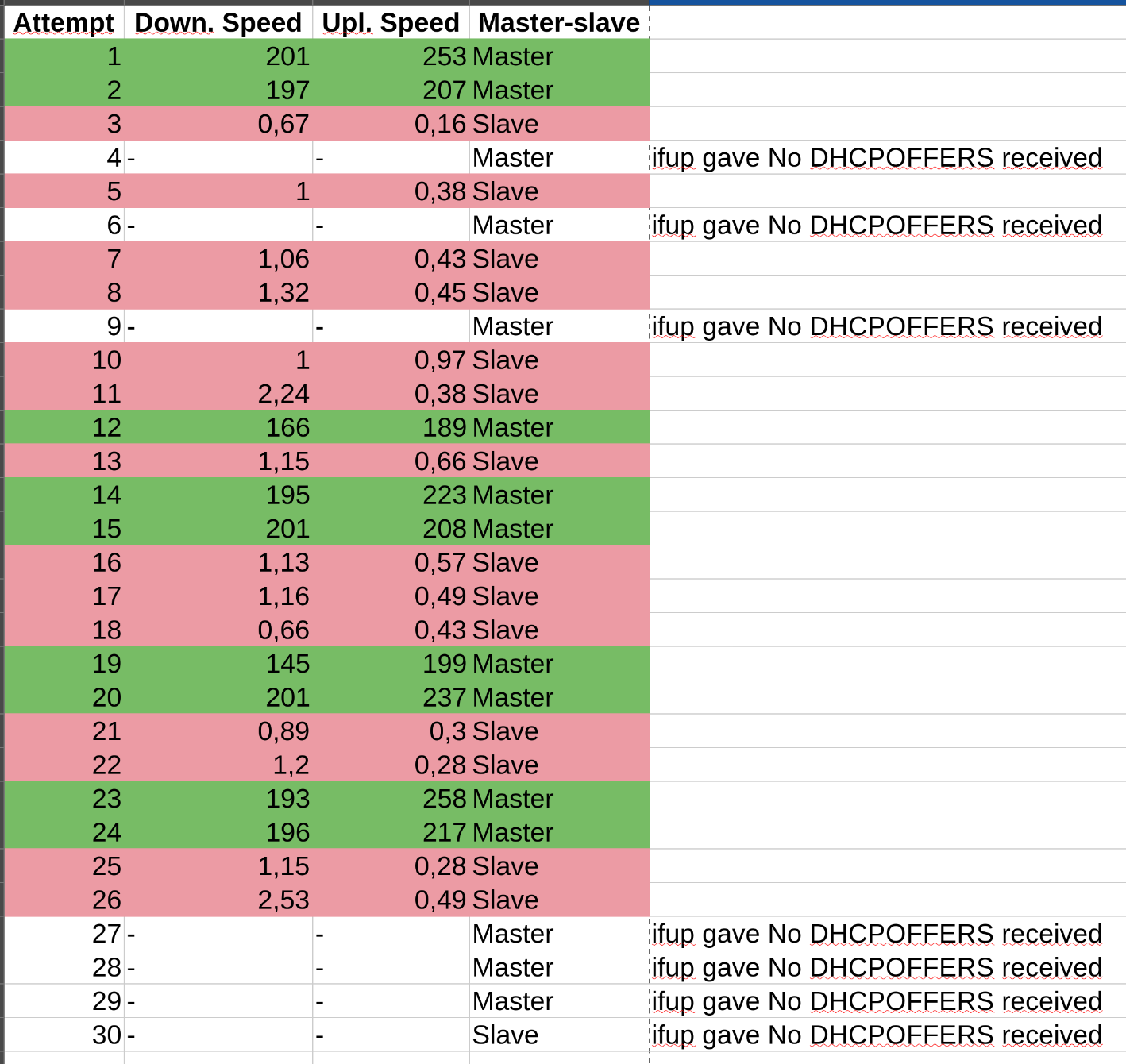
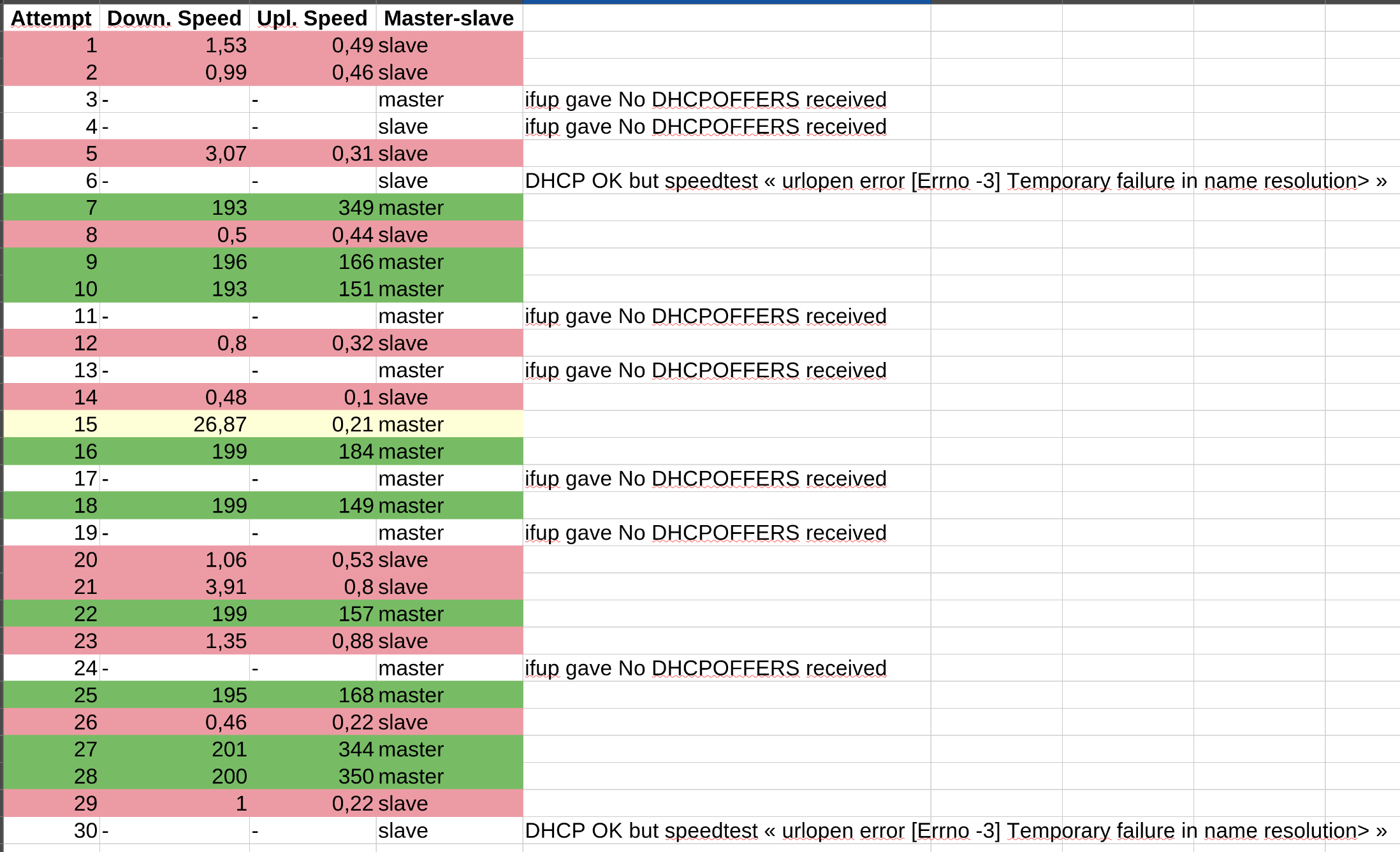
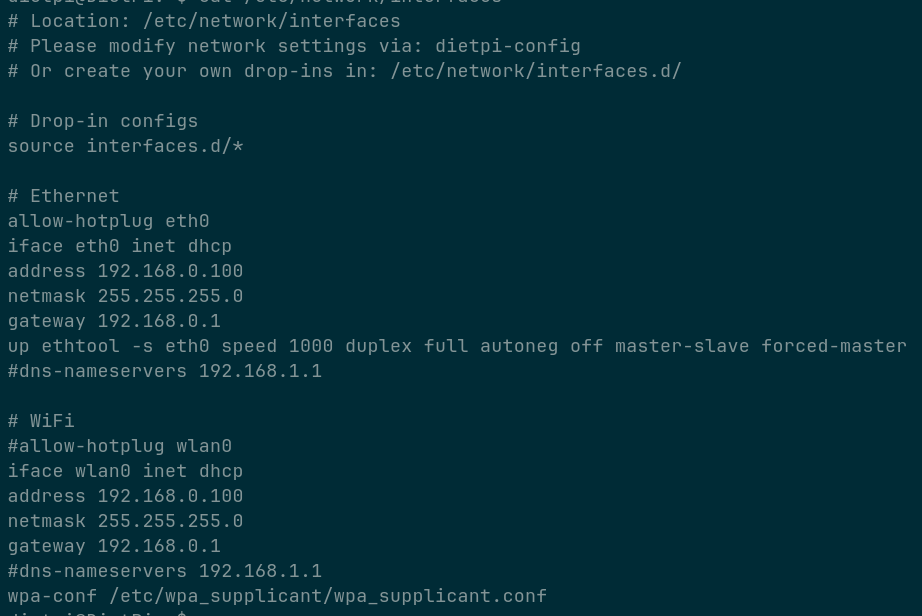
First of all, I just verified that my board connects in slave mode:
master-slave cfg: preferred slave
master-slave status: slave
I guess my router has preferred master, and this should be the most common case.
Switching to master mode worked well:
root@SOQuartz:~# sudo ethtool -s eth0 speed 1000 duplex full autoneg off master-slave forced-master
root@SOQuartz:~# ethtool eth0
Settings for eth0:
        Supported ports: [ TP    MII ]
        Supported link modes:   10baseT/Half 10baseT/Full
                                100baseT/Half 100baseT/Full
                                1000baseT/Full
        Supported pause frame use: Symmetric Receive-only
        Supports auto-negotiation: Yes
        Supported FEC modes: Not reported
        Advertised link modes:  10baseT/Half 10baseT/Full
                                100baseT/Half 100baseT/Full
                                1000baseT/Full
        Advertised pause frame use: Symmetric Receive-only
        Advertised auto-negotiation: No
        Advertised FEC modes: Not reported
        Speed: 1000Mb/s
        Duplex: Full
        Auto-negotiation: off
        master-slave cfg: forced master
        master-slave status: master
        Port: Twisted Pair
        PHYAD: 0
        Transceiver: external
        MDI-X: Unknown
        Supports Wake-on: ug
        Wake-on: d
        Current message level: 0x0000003f (63)
                               drv probe link timer ifdown ifup
        Link detected: yes
This is the SOQuartz again, not the Model A, but it uses the Model A baseboard, i.e. identical Ethernet. To compare the kernel log:
[    2.508226] rk_gmac-dwmac fe010000.ethernet: IRQ sfty not found
[    2.508970] rk_gmac-dwmac fe010000.ethernet: clock input or output? (input).
[    2.509628] rk_gmac-dwmac fe010000.ethernet: TX delay(0x30).
[    2.510133] rk_gmac-dwmac fe010000.ethernet: RX delay(0x10).
[    2.510639] rk_gmac-dwmac fe010000.ethernet: integrated PHY? (no).
[    2.511206] rk_gmac-dwmac fe010000.ethernet: clock input from PHY
[    2.516760] rk_gmac-dwmac fe010000.ethernet: init for RGMII
[    2.518741] rk_gmac-dwmac fe010000.ethernet: User ID: 0x30, Synopsys ID: 0x51
[    2.519379] rk_gmac-dwmac fe010000.ethernet:         DWMAC4/5
[    2.519839] rk_gmac-dwmac fe010000.ethernet: DMA HW capability register supported
[    2.520501] rk_gmac-dwmac fe010000.ethernet: Active PHY interface: RGMII (1)
[    2.521142] rk_gmac-dwmac fe010000.ethernet: RX Checksum Offload Engine supported
[    2.521805] rk_gmac-dwmac fe010000.ethernet: TX Checksum insertion supported
[    2.522426] rk_gmac-dwmac fe010000.ethernet: Wake-Up On Lan supported
[    2.523052] rk_gmac-dwmac fe010000.ethernet: TSO supported
[    2.523541] rk_gmac-dwmac fe010000.ethernet: Enable RX Mitigation via HW Watchdog Timer
[    2.524249] rk_gmac-dwmac fe010000.ethernet: Enabled RFS Flow TC (entries=10)
[    2.524880] rk_gmac-dwmac fe010000.ethernet: TSO feature enabled
[    2.525429] rk_gmac-dwmac fe010000.ethernet: Using 32/32 bits DMA host/device width
[  139.847602] rk_gmac-dwmac fe010000.ethernet eth0: Register MEM_TYPE_PAGE_POOL RxQ-0
[  139.850073] rk_gmac-dwmac fe010000.ethernet eth0: PHY [stmmac-0:00] driver [YT8511 Gigabit Ethernet] (irq=POLL)
[  139.861115] rk_gmac-dwmac fe010000.ethernet eth0: No Safety Features support found
[  139.861610] rk_gmac-dwmac fe010000.ethernet eth0: IEEE 1588-2008 Advanced Timestamp supported
[  139.861950] rk_gmac-dwmac fe010000.ethernet eth0: registered PTP clock
[  139.861966] rk_gmac-dwmac fe010000.ethernet eth0: configuring for phy/rgmii link mode
[  143.946689] rk_gmac-dwmac fe010000.ethernet eth0: Link is Up - 1Gbps/Full - flow control off
[  245.105693] rk_gmac-dwmac fe010000.ethernet eth0: Link is Down
[  249.194488] rk_gmac-dwmac fe010000.ethernet eth0: Link is Up - 1Gbps/Full - flow control off
Most of my test devices use WiFi for network access, Ethernet has been connected later, an ip l s eth0 up to bring up the interface at 139s, the switch no slave mode at 245s, which seems to imply a reconfiguration of the interface. Obviously, no IP is assigned, no DHCP used on that interface, aside of SLAAC IPv6 LLA and GUA.
Maybe start similarly, with Ethernet deconfigured entirely at boot, just to rule out that the configuration/DHCP somehow cause changes to fail afterwards.
I don’t know for sure. But you say you tested it with two different routers, I do not believe that a cable damage can cause these symptoms with transfer speeds depending on master vs slave mode, and it works well here with the same SBC, kernel, and userland.
Ah, btw the link needs to be up to change operation mode. So if you did ifdown eth0 or so before attempting this, bring the base link power back up with ip l s eth0 up.