when i change the default save path of downloaded files to my external drive at /mnt/elements all the downloads will fail with the log printing “error: Permission denied”. the default save path of /mnt/dietpi_userdata/downloads works with no issues. i’m assuming that i’m missing some permissions for qbit to able to write onto the external drive, but have no idea how to fix this.
Can you share the path you are trying to use. And following would be interesting as well.
lsblk -o name,fstype,label,size,ro,type,mountpoint,partuuid,uuid
the default save path is set to /mnt/elements/downloads
here’s the output of the lsblk command:

here’s what qbit prints in the log when i try to add a torrent: File error alert. Torrent:
“archlinux-2026.01.01-x86_64.iso”. File: “/mnt/elements/downloads/archlinux-2026.01.01-x86_64.iso”. Reason: “archlinux-2026.01.01-x86_64.iso file_open (/mnt/elements/downloads/archlinux-2026.01.01-x86_64.iso) error: Permission denied”
Pls share following in addition
ls -la /mnt/elements/
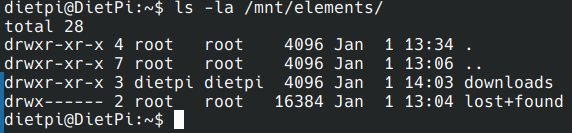
There is no need to do screen prints. Simply copy /paste content from SSH terminal directly.
Is the download folder used for something else or Qbit only?
qbit only, it’s empty currently as i only just formatted the drive.
try following
chown -R qbittorrent:dietpi /mnt/elements/
that worked!