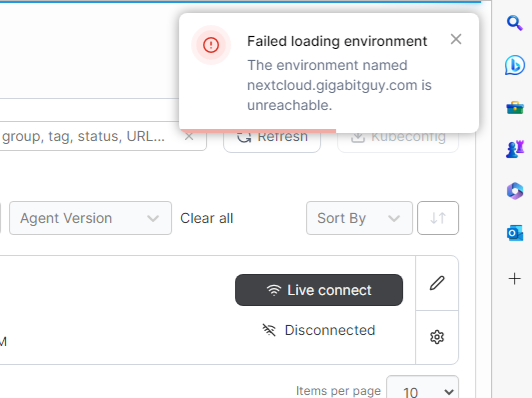
Hello, I reinstalled my Raspberry Pi 4 today with the latest DietPi firmware because I was having problems with Portainer after the last updates. Now I’ve discovered that a clean installation produces the same error. When I enter IPaddress.local:9002/, I see the dashboard (after login) and my envoirement, which shows “Up.” But when I try to access it, the icon changes from “Up” to “Down,” and I see an error in the upper right corner: “Failed loading environment. The environment named local is unreachable.” Several users on GitHub are also reporting this problem. Is there already a solution, or what can I do?
Reference?
Solution found here in the forum
This is unrelated to DietPi. It’s Portainer using an old Docker API
Hello,
Here is a discussion about this issue :
thx for sharing @vincentcw
Here the official announcement with all possible workarounds:
This is an issue of portainer itself and not related to the operating system
You mean Portainer in Docker v29.0.4.
Btw, Portainer 2.33.5 was just released, which fixes the issue:
They did not fix it as elegantly as Traefik, which did it with automatic client-server API version negotiation. Portainer just raised the static API version:
Hence everyone can now update their Portainer image and remove the workaround.
Shouldn’t
dietpi-software reinstall 185
also update Portainer to 2.33.5?
For me it doesn’t.
It stays on 2.33.2.
Yes it should. Can you paste the output of the dietpi-software run? Maybe we need to define @latest tag explicitly.
root@mini14:~# dietpi-software reinstall 185
[  OK  ] DietPi-Software | Initialised database
[  OK  ] DietPi-Software | Reading database

 DietPi-Software
─────────────────────────────────────────────────────
 Mode: Automated reinstall

[  OK  ] DietPi-Software | Reinstalling Portainer: Simplifies container management in Docker (standalone host)
[  OK  ] DietPi-Software | DietPi-Userdata validation: /mnt/dietpi_userdata

 DietPi-Software
─────────────────────────────────────────────────────
 Step: Checking for conflicts and missing inputs


 DietPi-Software
─────────────────────────────────────────────────────
 Step: Checking for prerequisite software

[ INFO ] DietPi-Software | Docker will be reinstalled
[  OK  ] DietPi-Software | mkdir -p /mnt/dietpi_userdata/Music /mnt/dietpi_userdata/Pictures /mnt/dietpi_userdata/Video /mnt/dietpi_userdata/downloads /var/www /opt /usr/local/bin
[  OK  ] DietPi-Software | chown dietpi:dietpi /mnt/dietpi_userdata/Music /mnt/dietpi_userdata/Pictures /mnt/dietpi_userdata/Video /mnt/dietpi_userdata/downloads
[  OK  ] DietPi-Software | chmod 0775 /mnt/dietpi_userdata/Music /mnt/dietpi_userdata/Pictures /mnt/dietpi_userdata/Video /mnt/dietpi_userdata/downloads
[ SUB1 ] DietPi-Services > stop
[  OK  ] DietPi-Services | stop : cron
[  OK  ] DietPi-Services | stop : docker
[  OK  ] DietPi-Services | stop : home-assistant
[  OK  ] DietPi-Services | stop : filebrowser
[  OK  ] DietPi-Services | stop : jellyfin
[  OK  ] DietPi-Services | stop : lighttpd
[  OK  ] DietPi-Services | stop : php8.2-fpm
[  OK  ] DietPi-Services | stop : mariadb
[  OK  ] DietPi-Services | stop : redis-server
[ INFO ] DietPi-Software | Skipping APT update, as last call was less than an hour ago and neither sources lists nor architectures changed since.

 DietPi-Software
─────────────────────────────────────────────────────
 Step: Installing Docker: Build, ship, and run distributed applications

[  OK  ] DietPi-Software | Checking URL: https://download.docker.com/linux/debian/gpg
[  OK  ] DietPi-Software | eval curl -sSfL 'https://download.docker.com/linux/debian/gpg' | gpg --dearmor -o /etc/apt/trusted.gpg.d/dietpi-docker.gpg --yes
[  OK  ] DietPi-Software | eval echo 'deb https://download.docker.com/linux/debian bookworm stable' > /etc/apt/sources.list.d/docker.list
[ INFO ] DietPi-Software | APT update, please wait...
Hit:2 https://download.docker.com/linux/debian bookworm InRelease
Hit:1 https://linux-packages.resilio.com/resilio-sync/deb resilio-sync InRelease
Hit:3 https://dietpi.com/apt bookworm InRelease
Hit:4 https://deb.debian.org/debian bookworm InRelease
Hit:5 https://deb.debian.org/debian bookworm-updates InRelease
Hit:6 https://deb.debian.org/debian-security bookworm-security InRelease
Hit:7 https://deb.debian.org/debian bookworm-backports InRelease
Get:8 https://repo.jellyfin.org/debian bookworm InRelease [10.6 kB]
Fetched 10.6 kB in 2s (4984 B/s)
Reading package lists...
[  OK  ] DietPi-Software | APT update
[  OK  ] DietPi-Software | systemctl mask --now docker
[ INFO ] DietPi-Software | APT install docker-ce, please wait...
Reading package lists...
Building dependency tree...
Reading state information...
docker-ce is already the newest version (5:29.1.0-1~debian.12~bookworm).
0 upgraded, 0 newly installed, 0 to remove and 0 not upgraded.
[  OK  ] DietPi-Software | APT install docker-ce
[  OK  ] DietPi-Software | systemctl unmask docker
[  OK  ] DietPi-Software | systemctl start docker.socket
[  OK  ] DietPi-Software | mkdir -p /lib/systemd/system/docker.service.d
[  OK  ] DietPi-Software | eval echo -e '[Service]\nType=simple' > /lib/systemd/system/docker.service.d/dietpi-simple.conf
[  OK  ] DietPi-Software | mkdir -p /mnt/dietpi_userdata/docker-data
[  OK  ] DietPi-Software | Current setting in /etc/docker/daemon.json will be preserved:     "data-root": "/mnt/dietpi_userdata/docker-data",
[  OK  ] DietPi-Software | Current setting in /etc/docker/daemon.json will be preserved:     "log-driver": "journald",
[  OK  ] DietPi-Software | Current setting in /etc/docker/daemon.json will be preserved:     "log-level": "warn",
[  OK  ] DietPi-Software | Current setting in /etc/docker/daemon.json will be preserved:     "debug": false
[  OK  ] DietPi-Software | Desired setting in /etc/containerd/config.toml was already set: [debug]
[  OK  ] DietPi-Software | Current setting in /etc/containerd/config.toml will be preserved:   level = "warn"
[  OK  ] DietPi-Software | update-alternatives --set iptables /usr/sbin/iptables-nft
[  OK  ] DietPi-Software | update-alternatives --set ip6tables /usr/sbin/ip6tables-nft

 DietPi-Software
─────────────────────────────────────────────────────
 Step: Installing Portainer: Simplifies container management in Docker (standalone host)

[  OK  ] DietPi-Software | docker container rm -f 530404f0bf9e
WARNING: This output is designed for human readability. For machine-readable output, please use --format.
[ INFO ] DietPi-Software | Portainer will be deployed now. This could take a while...
[ INFO ] DietPi-Software | docker run -d -p 9002:9000 -p 9442:9443 --name=portainer --restart=always -v /run/docker.sock:/var/run/docker.sock -v /etc/ssl/certs/ca-certificates.crt:/etc/ssl/certs/ca-certificates.crt:ro -v portainer_data:/data portainer/portainer-ce, please wait...
021bd91a8b05c9de0584ecb6011a897235cf11c7003381d01508ab3fd29ad6b9
[  OK  ] DietPi-Software | docker run -d -p 9002:9000 -p 9442:9443 --name=portainer --restart=always -v /run/docker.sock:/var/run/docker.sock -v /etc/ssl/certs/ca-certificates.crt:/etc/ssl/certs/ca-certificates.crt:ro -v portainer_data:/data portainer/portainer-ce

 DietPi-Software
─────────────────────────────────────────────────────
 Step: Finalising install

[ INFO ] DietPi-Software | Enabling installed services
[  OK  ] DietPi-Software | systemctl --no-reload enable docker
[  OK  ] DietPi-Software | systemctl daemon-reload
2025-11-27 19:07:31 [ INFO ] DietPi-RAMlog | Storing /var/log to /var/tmp/dietpi/logs/dietpi-ramlog_store...
2025-11-27 19:07:31 [  OK  ] DietPi-RAMlog | Stored /var/log to /var/tmp/dietpi/logs/dietpi-ramlog_store.

 DietPi-Software
─────────────────────────────────────────────────────
 Step: Install completed

[  OK  ] DietPi-Survey | Sending survey data
[ SUB1 ] DietPi-Services > restart
[  OK  ] DietPi-Services | restart : redis-server
[  OK  ] DietPi-Services | restart : mariadb
[  OK  ] DietPi-Services | restart : php8.2-fpm
[  OK  ] DietPi-Services | restart : lighttpd
[  OK  ] DietPi-Services | restart : jellyfin
[  OK  ] DietPi-Services | restart : filebrowser
[  OK  ] DietPi-Services | restart : home-assistant
[  OK  ] DietPi-Services | restart : docker
[  OK  ] DietPi-Services | restart : cron
It doesn’t remove the image at all.
Can share
docker container ls
docker image ls
root@mini14:~# docker container ls
CONTAINER ID   IMAGE                                                            COMMAND                  CREATED          STATUS                    PORTS                                                                                                NAMES
021bd91a8b05   portainer/portainer-ce                                           "/portainer"             43 minutes ago   Up 43 minutes             8000/tcp, 0.0.0.0:9002->9000/tcp, [::]:9002->9000/tcp, 0.0.0.0:9442->9443/tcp, [::]:9442->9443/tcp   portainer
f43e7207b7e8   ghcr.io/immich-app/immich-server:release                         "tini -- /bin/bash -…"   6 weeks ago      Up 43 minutes (healthy)   0.0.0.0:2283->2283/tcp, [::]:2283->2283/tcp                                                          immich_server
c8526efbcbd0   ghcr.io/immich-app/postgres:14-vectorchord0.4.3-pgvectors0.2.0   "/usr/local/bin/immi…"   6 weeks ago      Up 43 minutes (healthy)   5432/tcp                                                                                             immich_postgres
6e8bd04f8b57   ghcr.io/immich-app/immich-machine-learning:release               "tini -- python -m i…"   6 weeks ago      Up 43 minutes (healthy)                                                                                                        immich_machine_learning
2b60c7575456   valkey/valkey:8-bookworm                                         "docker-entrypoint.s…"   4 months ago     Up 43 minutes (healthy)   6379/tcp                                                                                             immich_redis
7bf40b2c26d0   ghcr.io/paperless-ngx/paperless-ngx:latest                       "/init"                  4 months ago     Up 43 minutes (healthy)   0.0.0.0:8061->8000/tcp, [::]:8061->8000/tcp                                                          paperless-webserver-1
17e9f41472d6   postgres:17                                                      "docker-entrypoint.s…"   4 months ago     Up 43 minutes             5432/tcp                                                                                             paperless-db-1
2f24e93db879   redis:8                                                          "docker-entrypoint.s…"   4 months ago     Up 43 minutes             6379/tcp                                                                                             paperless-broker-1
f5862edfe676   owntone/owntone:latest                                           "/sbin/init"             5 months ago     Up 43 minutes (healthy)                                                                                                        OwnTone
root@mini14:~# docker image ls
                                                                                                                                                                                                                                                                              i Info →   U  In Use
IMAGE                                                            ID             DISK USAGE   CONTENT SIZE   EXTRA
ghcr.io/immich-app/immich-machine-learning:release               9007cc2391cf        947MB             0B    U
ghcr.io/immich-app/immich-server:release                         db67b06ea5bb       1.71GB             0B    U
ghcr.io/immich-app/postgres:14-vectorchord0.4.3-pgvectors0.2.0   178719aeb38d        756MB             0B    U
ghcr.io/paperless-ngx/paperless-ngx:latest                       85f4675bb05f       1.37GB             0B    U
mongo:6.0                                                        7ba17b94771e        758MB             0B
owntone/owntone:latest                                           343a13217f25        161MB             0B    U
portainer/portainer-ce:latest                                    e6b0d4bc3234        186MB             0B    U
postgres:17                                                      445ed93b882f        438MB             0B    U
redis:8                                                          f2cd22713a18        128MB             0B    U
sanjeet990/astroluma:latest                                      65760ae92db8       2.11GB             0B
sissbruecker/linkding:latest                                     cccb10946a43        482MB             0B
This command does not work anymore, hence the image is never removed:
docker image ls -a | mawk '/portainer\/portainer(-ce)?( |$)/{print $3;exit}'
Looks like this commit which was meant as enhancement to support Portainer BE upgrades, turned now into a bug fix at the same time: dietpi-software: Portainer: handle BE correctly by MichaIng · Pull Request #7832 · MichaIng/DietPi · GitHub
When I implemented this, the previous command still worked. What changed it:
- The image name is now suffixed with the version/tag.
- The image ID is now 2nd field instead of 3rd
Funnily I implemented exactly what they suggest now, before this warning was even emitted: using the --format option, as well as the --filter/-f one, instead of using mawk  .
.
@Pi-Rate try this, the code a reinstall will run next DietPi version:
# Remove existing container and image, including CE, BE, and old v1, and store image repo in variable to preserve BE instances
container=$(docker container ls -aqf 'ancestor=portainer/portainer' -f 'ancestor=portainer/portainer-ce' -f 'ancestor=portainer/portainer-ee')
[[ $container ]] && G_EXEC docker container rm -f "$container"
read -r image repo < <(docker image ls -af 'reference=portainer/portainer' -f 'reference=portainer/portainer-ce' -f 'reference=portainer/portainer-ee' --format '{{.ID}} {{.Repository}}')
[[ $image ]] && G_EXEC docker image rm "$image"

# Create volume if it does not exist yet
[[ $(docker volume ls -qf 'name=^portainer_data$') ]] || G_EXEC docker volume create portainer_data

# Deploy new Portainer container, migrate v1 to CE and preserve BE
[[ $repo == 'portainer/portainer-ee' ]] || repo='portainer/portainer-ce'
G_EXEC_OUTPUT=1 G_EXEC docker run -d -p '9002:9000' -p '9442:9443' --name=portainer --restart=always -v '/run/docker.sock:/var/run/docker.sock' -v '/etc/ssl/certs/ca-certificates.crt:/etc/ssl/certs/ca-certificates.crt:ro' -v 'portainer_data:/data' "$repo"
Fantastic, that did it.
 I guess it was the Docker update from 2 hours ago: Release v29.1.0 · moby/moby · GitHub