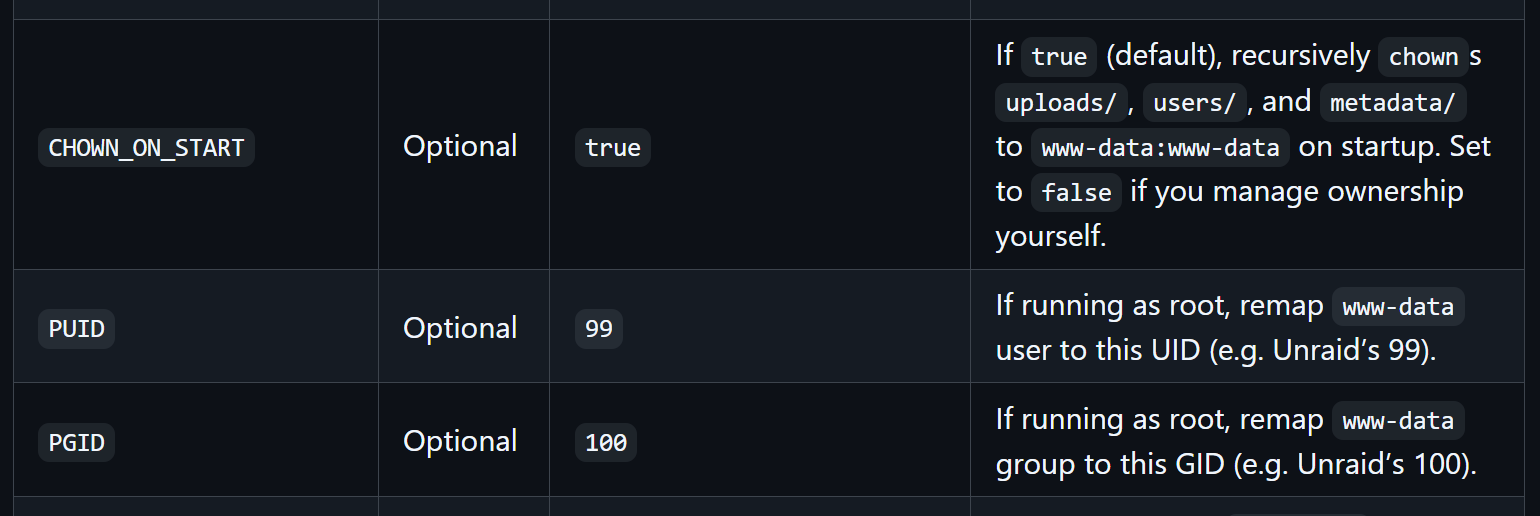
TLDR edit for future viewers:
I had a docker container editing file permissions on startup.
Creating a bug report/issue
I have searched the existing open and closed issues
I am experiencing 2 problems and I’m unsure if they’re related but as far as I can tell they started happening at the same time.
- My mounted drive’s permissions keep getting reset
- My jellyfin plugins configurations will not save
Required Information
- DietPi version
❯ cat /boot/dietpi/.version
G_DIETPI_VERSION_CORE=9
G_DIETPI_VERSION_SUB=19
G_DIETPI_VERSION_RC=2
G_GITBRANCH='master'
G_GITOWNER='MichaIng'
- Distro version
echo $G_DISTRO_NAME $G_RASPBIAN
- Kernel version
❯ uname --all
Linux Tui 6.12.47+rpt-rpi-v8 #1 SMP PREEMPT Debian 1:6.12.47-1+rpt1~bookworm (2025-09-16) aarch64 GNU/Linux
- Architecture
❯ dpkg --print-architecture
arm64
- SBC model RPi4 (
echo $G_HW_MODEL_NAME→ blank) - Power supply used unknown
- SD card used unknown
Additional Information (if applicable)
Something keeps changing my file permissions on my mounted drive and all subdirectories to 99 / users and it’s breaking permissions for my services
❯ ls -l /mnt/drive
total 56
drwxrwsr-x+ 10 99 users  4096 Dec  6 01:54 Anime
drwxrwsr-x+  2 99 users 16384 Aug  4  2022 lost+found
drwxrwsr-x+ 28 99 users  4096 Dec  6 01:54 movies
drwxrwsr-x+  2 99 users  4096 Sep 22  2022 other
drwxrwsr-x+ 22 99 users  4096 Dec  9 00:16 television
drwxrwsr-x+  5 99 users  4096 Dec  9 00:14 temp
When I save my jellyfin settings, one directory gets the new saved file but the other does not
❯ ls -l /mnt/dietpi_userdata/jellyfin/plugins/configurations/
total 12
-rw-r--r-- 1 jellyfin jellyfin 3899 Dec  9 01:59 IntroSkipper.xml
-rw-r--r-- 1 jellyfin jellyfin  299 Dec  9 01:59 Jellyfin.Plugin.MusicBrainz.xml
-rw-r--r-- 1 jellyfin jellyfin  565 Dec  9 01:59 Jellyfin.Plugin.Tmdb.xml
❯ ls -l /mnt/dietpi_userdata/jellyfin/data/plugins
total 0
Steps to reproduce
the mounted subdirectories just intermittently change, some times it happens on reboot and sometimes it seems to happen later
Expected behaviour
I run these
sudo chown -R jellyfin:jellyfin /mnt/drive
sudo chmod 2775 /mnt/drive
sudo find /mnt/drive-type d -exec chmod 2775 {} +
sudo setfacl -R -m g:jellyfin:rwx /mnt/drive
sudo setfacl -d -m g:jellyfin:rwx /mnt/drive
file permissions should change?
For jellyfin, when i save settings, they should be saved to both
/mnt/dietpi_userdata/jellyfin/plugins/configurations/
/mnt/dietpi_userdata/jellyfin/data/plugins
Actual behaviour
- mounted drive permissions get reset
- jellyfin settings only save to
/mnt/dietpi_userdata/jellyfin/plugins/configurations/and they get deleted upon jellyfin restarting (which is expected behaviour for jellyfin I believe)
Extra details
- As far as I can tell jellyfin has all the permissions it needs for the plugin directories
Here is my fstab
❯ cat /etc/fstab
# You can use "dietpi-drive_manager" to setup mounts.
# NB: It overwrites and re-creates physical drive mount entries on use.
#----------------------------------------------------------------
# NETWORK
#----------------------------------------------------------------


#----------------------------------------------------------------
# TMPFS
#----------------------------------------------------------------
tmpfs /tmp tmpfs size=1922M,noatime,lazytime,nodev,nosuid,mode=1777

#----------------------------------------------------------------
# MISC: ecryptfs, vboxsf, glusterfs, mergerfs, bind, Btrfs subvolume
#----------------------------------------------------------------


#----------------------------------------------------------------
# SWAP SPACE
#----------------------------------------------------------------


#----------------------------------------------------------------
# PHYSICAL DRIVES
#----------------------------------------------------------------
PARTUUID=28a6ec92-02 / ext4 noatime,lazytime,rw 0 1
PARTUUID=28a6ec92-01 /boot/firmware vfat noatime,lazytime,rw 0 2
UUID=92a6518d-ef2a-4442-9de1-84e3fdba5c60 /mnt/drive ext4 noatime,lazytime,rw,noauto,x-systemd.automount