Creating a bug report/issue
I have searched the existing open and closed issues
Required Information
-
DietPi version |
cat /boot/dietpi/.version
G_DIETPI_VERSION_CORE=10
G_DIETPI_VERSION_SUB=0
G_DIETPI_VERSION_RC=1
G_GITBRANCH=‘master’
G_GITOWNER=‘MichaIng’ -
Distro version |
echo $G_DISTRO_NAME $G_RASPBIAN
trixie -
Kernel version |
uname --all
Linux DietPi 6.1.115-vendor-rk35xx #1 SMP Wed Dec 24 10:54:39 UTC 2025 aarch64 GNU/Linux -
Architecture |
dpkg --print-architecture
arm64 -
SBC model |
echo $G_HW_MODEL_NAMEor (EG: RPi3)
Orange Pi 5 (aarch64) -
Power supply used | (EG: 5V 1A RAVpower)
5V 4A ~20W -
SD card used | (EG: SanDisk ultra)
none
Additional Information (if applicable)
- before using RAID it ran fine
- recently setting up RAID and have a problem it won’t boot after a reboot/poweroff if RAID disks is being attached.
- using this SATA to NVME (5 ports)
- i have couples of SSD/HDD
- SSD 128GB SATA (OS) - Port 1
- HDD 1TB XFS (RAID0) - Port 2 - separated PSU
- HDD 1TB XFS (RAID0) - Port 3 - separated PSU
- HDD 1TB EXT4 (NO RAID) - USB A 3.0 Port
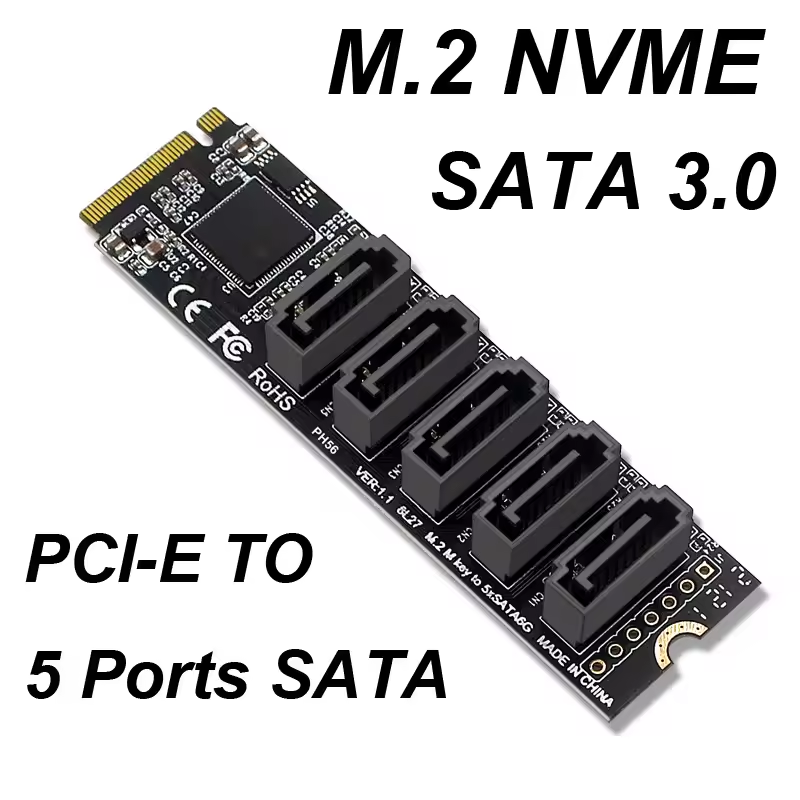
Steps to reproduce
- Reboot/Poweroff
- not BOOTING (connect to Display, seems can’t even reach the first bootlog)
Expected behaviour
- Booting
Actual behaviour
- powered off
- unplug SATA Port 2 and 3 (RAID Disks)
- turn ON OPi5
- Replug SATA after booted and remount
Extra details
root@DietPi:~# lsblk
NAME      MAJ:MIN RM   SIZE RO TYPE  MOUNTPOINTS
sda         8:0    0 111.8G  0 disk
└─sda1      8:1    0 111.8G  0 part  /              - PORT 1 SATA to NVME
sdb         8:16   0 931.5G  0 disk
└─sdb1      8:17   0 931.5G  0 part  /var/www/hd1   - USB A 3 Port
                                     /mnt/hd1
sdc         8:32   0 931.5G  0 disk
└─md0       9:0    0   2.7T  0 raid0
  └─md0p1 259:0    0   2.7T  0 part  /var/www/hd2   - PORT 2 SATA to NVME
                                     /mnt/hd2
sdd         8:48   0   1.8T  0 disk
└─md0       9:0    0   2.7T  0 raid0
  └─md0p1 259:0    0   2.7T  0 part  /var/www/hd2   - PORT 3 SATA to NVME
                                     /mnt/hd2
mtdblock0  31:0    0    16M  0 disk
root@DietPi:~# blkid
/dev/sda1: UUID="b5ffad73-5909-4c89-b018-6b27f752e4b4" BLOCK_SIZE="4096" TYPE="ext4" PARTLABEL="root" PARTUUID="0d4393da-6a40-45b3-8d2a-95821c4320cb"
/dev/sdb1: UUID="66a22db6-65c2-47ac-93d8-da5b9e101fa4" BLOCK_SIZE="4096" TYPE="ext4" PARTLABEL="primary" PARTUUID="2e533825-70fd-48bd-93eb-be1dd986c533"
/dev/md0p1: UUID="87c2d1d7-a035-4d20-ba26-1b3a02832576" BLOCK_SIZE="4096" TYPE="xfs" PARTLABEL="primary" PARTUUID="0ff5ca6e-ab5f-4b2d-bfb1-dbf0b827abab"
/dev/sdd: UUID="56f3927c-77f7-5be2-8c31-53ffa7fc328b" UUID_SUB="63173827-4bf9-808d-91f7-13fd90a1e8f6" LABEL="DietPi:0" TYPE="linux_raid_member"
/dev/sdc: UUID="56f3927c-77f7-5be2-8c31-53ffa7fc328b" UUID_SUB="a89a3bab-ed58-122d-ec56-f630e771bd72" LABEL="DietPi:0" TYPE="linux_raid_member"

root@DietPi:~# cat /boot/dietpiEnv.txt
rootdev=UUID=b5ffad73-5909-4c89-b018-6b27f752e4b4
rootfstype=ext4
# The init system logs to the console defined last.
consoleargs=console=tty1
extraargs=fsck.repair=yes net.ifnames=0
docker_optimizations=off
overlay_path=rockchip
# Multiple prefixes are supported separated by space
overlay_prefix=orangepi-5 rockchip-rk3588 rk3588 rockchip
overlays=dwc3-host
user_overlays=

