Good evening everyone,
And a special hello to @MichaIng. I’ve had this idea in the back of my mind for a while, and the holidays provided the perfect opportunity to give it a try.
So, the initial idea was to get a commercially available SBC—something other than the ubiquitous Raspberry Pi—up and running as a high-quality audio server using a PCM5122 DAC. I found that the kernels available in DietPi for the RK3566 included the necessary pcm5122*.ko files, so I decided to go for it. An Orange Pi 3B SBC and a PiFi DAC+ fit the bill perfectly.
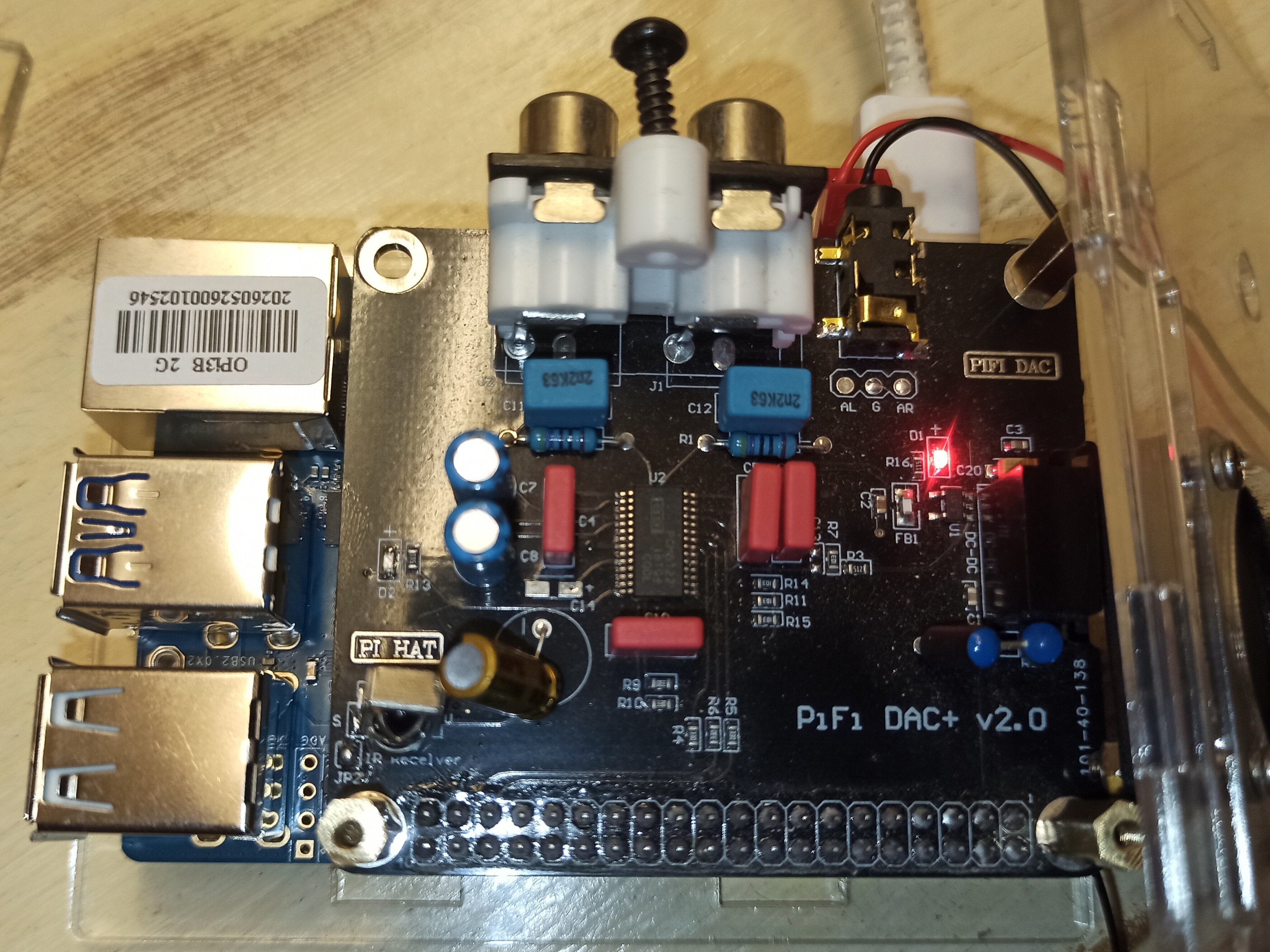
It wasn’t easy, but after many hours of research and various tests, I managed to get sound out of the PCM5122—something I believe hasn’t been done elsewhere.
To achieve this, I compiled all the steps into the script provided below. It handles enabling the I2S1 and I2C2 pins, configuring the PCM5122 chip via the I2C bus, and creating the service that manages this configuration when DietPi boots up. The script deploys everything needed in just a few command lines.
First, creating the script:
nano deploy_pcm5122.sh
Copy and paste this
#!/bin/bash
# ==============================================================================
# SCRIPT DE DÉPLOIEMENT UNIQUE AUTOMATISÉ : PCM5122 + I2C2-M1 FUSIONNÉS
# NÉCESSITE LES DROITS ROOT
# ==============================================================================

if [ "$EUID" -ne 0 ]; then
  echo "Erreur : Veuillez exécuter ce script en tant que root (sudo)."
  exit 1
fi

echo "--- [1/6] Installation des dépendances (i2c-tools & compiler) ---"
apt install -y i2c-tools device-tree-compiler

# Création et bascule dans le répertoire utilisateur
mkdir -p /boot/overlay-user
cd /boot/overlay-user
# Create the overlay source file
echo "--- [2/6] Création du fichier source unique (pcm5122.dts) ---"
cat << '_EOF_' > pcm5122.dts
/dts-v1/;
/plugin/;
/ {
   compatible = "rockchip,rk3566";

   fragment@0 {
        target-path = "/";
        __overlay__ {
                my_soundcard {
                    compatible = "simple-audio-card";
                    simple-audio-card,name = "PCM5122NoMCLK";
                    simple-audio-card,format = "i2s";
                    status="okay";

                   simple-audio-card,cpu {
                        sound-dai = <&i2s1_8ch>;
                        dai-tdm-slot-num = <2>;
                        dai-tdm-slot-width = <16>;
                   };
                   simple-audio-card,codec {
                        sound-dai = <&codec_dummy>;
                   };
                };
                codec_dummy: codec_dummy {
                compatible = "rockchip,dummy-codec";
                #sound-dai-cells = <0>;
                status = "okay";
            };
        };
    };

    fragment@1 {
        target = <&i2s1_8ch>;
        __overlay__ {
            #sound-dai-cells = <0>;
            rockchip,clk-trcm = <1>;
            pinctrl-0 = <&i2s1m1_sclktx &i2s1m1_lrcktx &i2s1m1_sdo0 &i2s1m1_sdi0>;
            rockchip,playback-channels = <2>;
            rockchip,capture-channels = <2>;
            rockchip,bclk-fs = <32>;
            status = "okay";
        };
    };

    fragment@2 { target = <&i2s2_2ch>; __overlay__ { status = "disabled"; }; };
    fragment@3 { target-path = "/"; __overlay__ { hdmi-sound { status = "disabled"; }; }; };
    fragment@4 { target-path = "/"; __overlay__ { sound { compatible = "simple-audio-card"; simple-audio-card,name = "PCM5122NoMCLK"; }; }; };

    /* INTEGRATION CRUCIALE : i2c2 fusionné avec affectation des broches m1 (Pin 3 et 5) */
    fragment@5 {
        target = <&i2c2>;
        __overlay__ {
            #address-cells = <1>;
            #size-cells = <0>;
            pinctrl-names = "default";
            pinctrl-0 = <&i2c2m1_xfer>; /* Active physiquement les broches I2C2 multiplexage m1 */
            status = "okay";
        };
    };
};
_EOF_

echo "--- [3/6] Compilation de l'overlay unique (pcm5122.dtbo) ---"
dtc -I dts -O dtb -o pcm5122.dtbo -@ pcm5122.dts

echo "--- [4/6] Vérification du binaire via fdtdump ---"
fdtdump pcm5122.dtbo

echo "--- [5/6] Génération et enregistrement de l'initialisation I2C ---"
cat << '_EOF_' > /boot/overlay-user/init_dac.sh
#!/bin/bash
# Reset logiciel du DAC
sudo i2cset -y 2 0x4d 0x01 0x11
sleep 0.2

# Configuration des registres pour mode esclave PLL (BCLK 16-bits strict)
sudo i2cset -y 2 0x4d 0x02 0x10
sudo i2cset -y 2 0x4d 0x25 0x08
sudo i2cset -y 2 0x4d 0x0d 0x10
sudo i2cset -y 2 0x4d 0x26 0x10
sudo i2cset -y 2 0x4d 0x41 0x00

# Passage en mode actif et volume numérique à 100% (0 dB)
sudo i2cset -y 2 0x4d 0x02 0x00
sudo i2cset -y 2 0x4d 0x03 0x00
sudo i2cset -y 2 0x4d 0x3d 0x30
sudo i2cset -y 2 0x4d 0x3e 0x30
_EOF_

chmod +x /boot/overlay-user/init_dac.sh
sed -i '/snd_soc_pcm512x/d' /etc/modules

# Création du service d'initialisation au démarrage de la carte
cat << '_EOF_' > /etc/systemd/system/init-dac.service
[Unit]
Description=Initialisation automatique du DAC PCM5122 sans MCLK
After=sound.target i2c-dev.target
DefaultDependencies=no

[Service]
Type=oneshot
ExecStart=/boot/overlay-user/init_dac.sh
RemainAfterExit=yes

[Install]
WantedBy=sysinit.target
_EOF_

systemctl daemon-reload
systemctl enable init-dac.service

echo "--- [6/6] Enregistrement du fichier overlay spécifique dans dietpiEnv.txt ---"
# On injecte proprement la ligne unique pour l'overlay utilisateur
    sed -i '/user_overlays=/d' /boot/dietpiEnv.txt
    echo "user_overlays=pcm5122" >> /boot/dietpiEnv.txt


echo "=============================================================================="
echo " NETTOYAGE ET FUSION TERMINÉS AVEC SUCCÈS !"
echo " Le bus I2C2-M1 fait maintenant partie intégrante de l'overlay pcm5122."
echo " Votre fichier dietpiEnv.txt a été nettoyé de la ligne overlays=i2c2-m1."
echo " Redémarrez une dernière fois votre Orange Pi 3B : 'sudo reboot'"
echo "=============================================================================="
EOF
Deploy it with
sh deploy_pcm5122.sh
and reboot
reboot
Enjoy, and let me know if it works for you too.
I’m switching to a Radxa Zero 3W—using the same RK3566 chip—to build an ultra-compact audio server with a Waveshare PCM5122 “Zero-format” board for my upcoming projects.