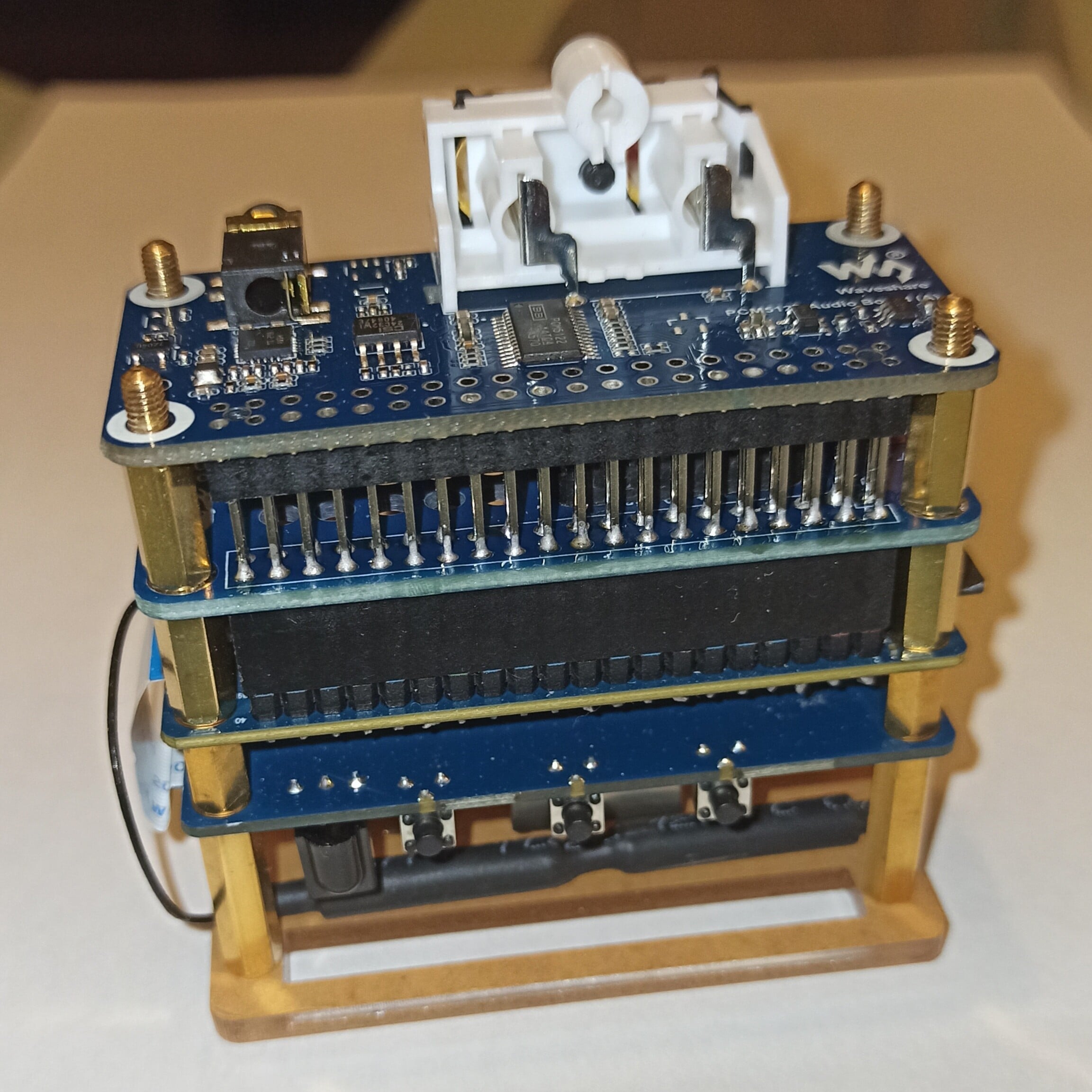
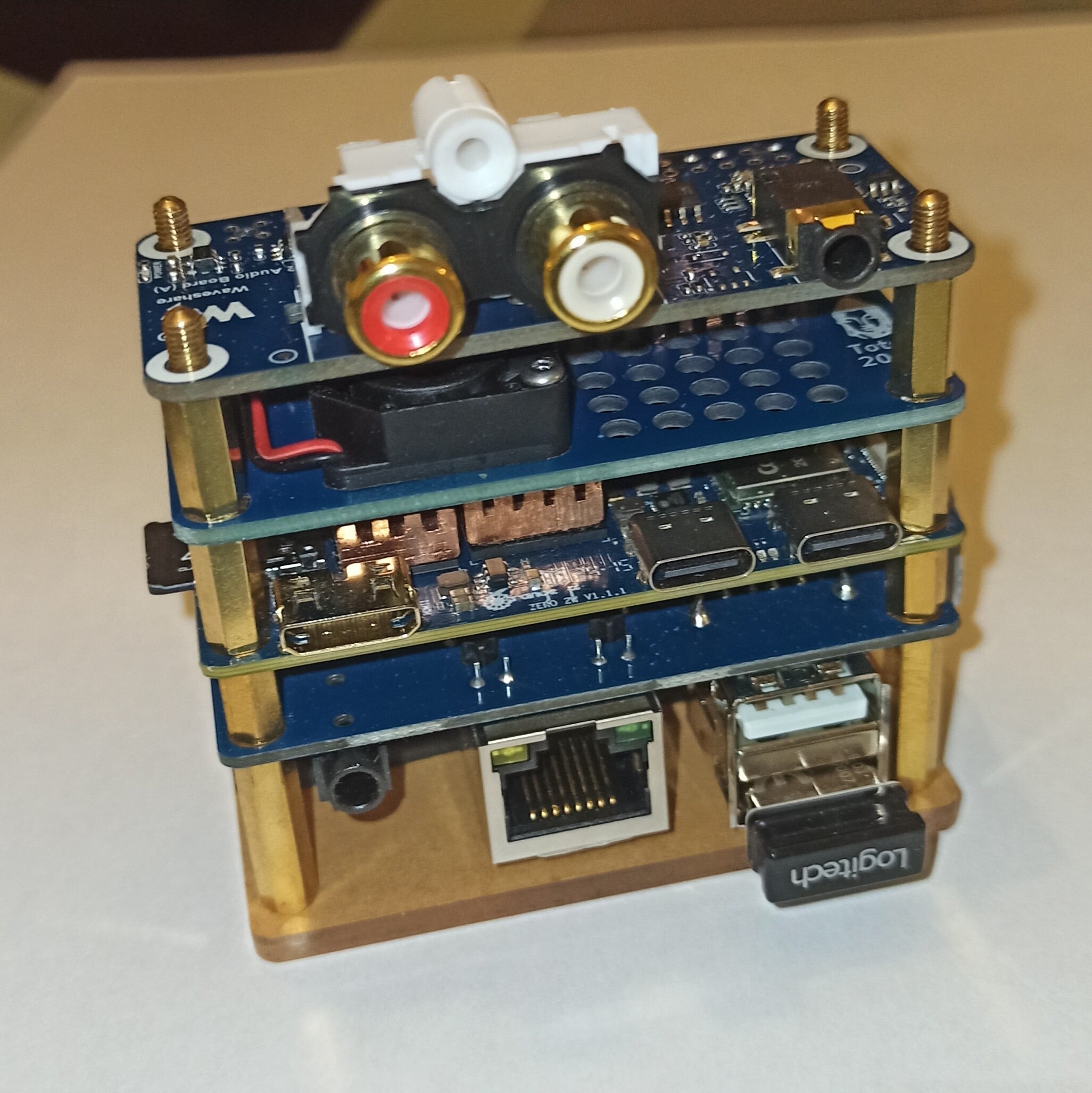
Orange Pi Zero 2W with PCM5122 work together

@MichaIng and everyone

It’s a great day for me !!! :heart_eyes:

For a long time, I’ve been listening to music using LMS and Squeezelite on an Orange Pi Zero 2W paired with its USB/Ethernet expansion board and a DIY PCM5102A-based DAC
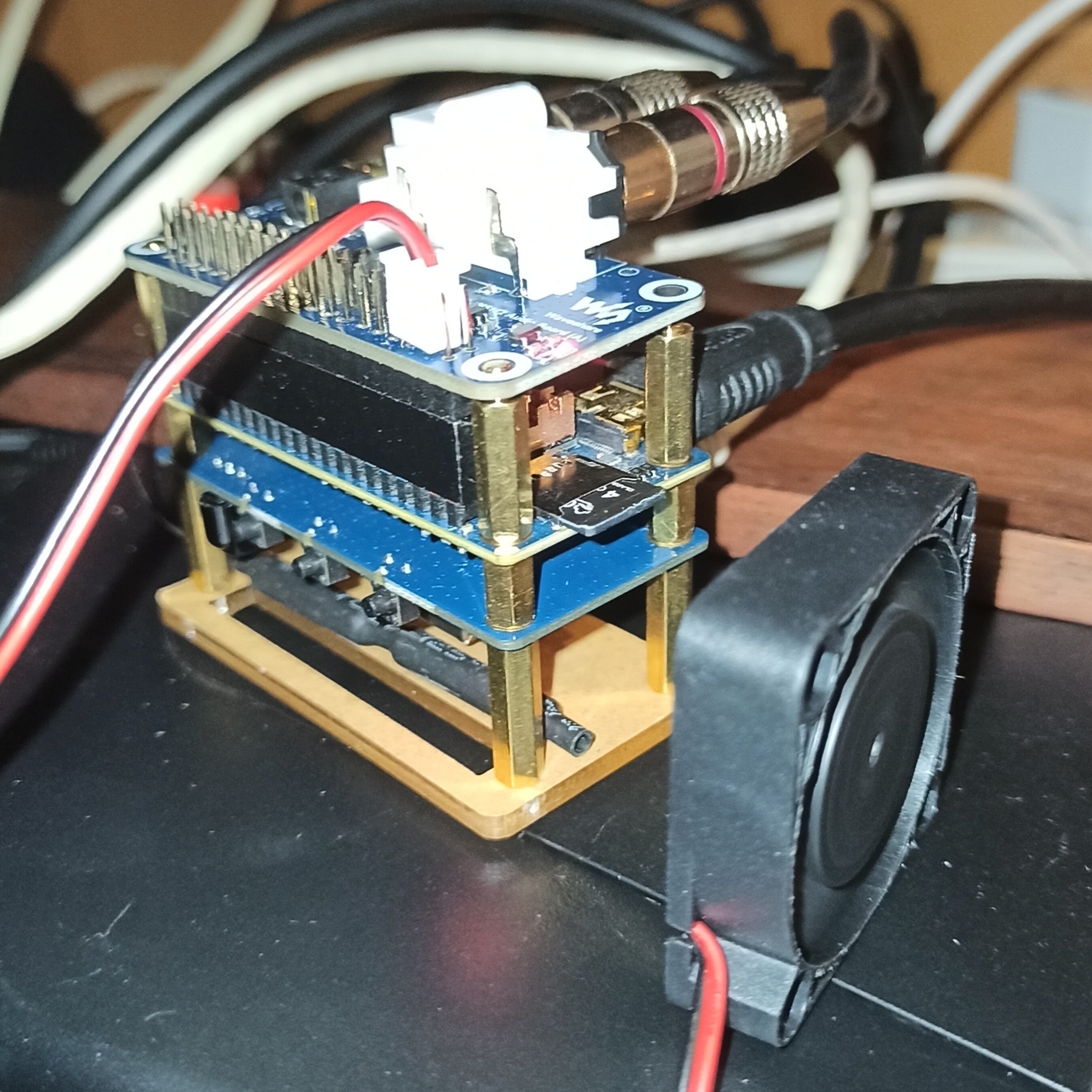
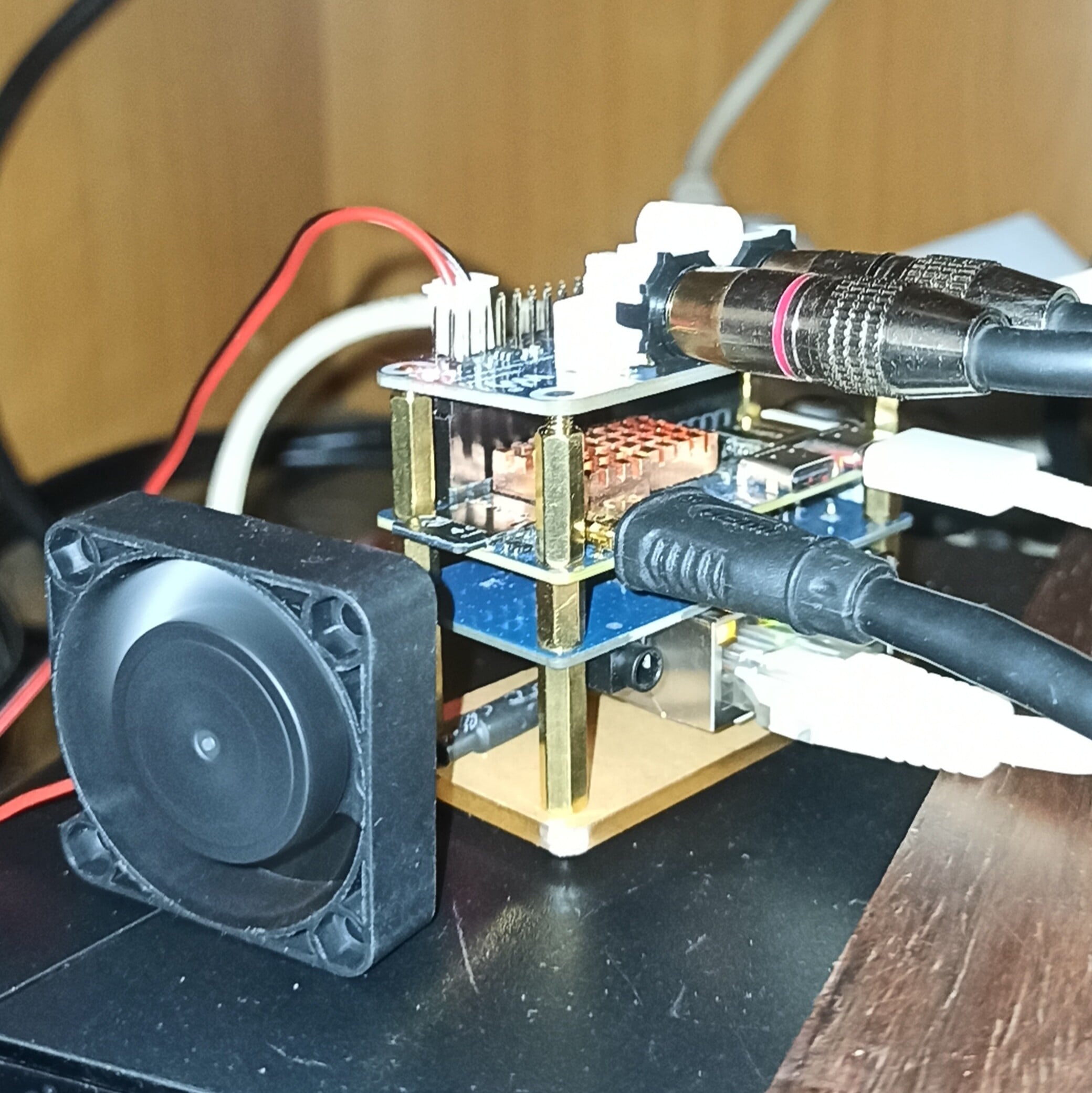
but I’ve always wanted to add a PCM5122 DAC, and I finally got that done this afternoon. I used off-the-shelf components: the board itself, its expansion board, and a PiFi DAC , that will very soon be replaced by a PCM5122 board.
Like this
The test bench
Below is the script to deploy the DAC using I2S0 and I2C1, along with the service that initializes the DAC via I2C when the board boots up.

At the end of the script, you will find the commands to create and deploy it.

A reboot is all that remains, and the PCM5122 DAC should be ready to play music once connected to your hi-fi system.

#!/bin/bash
# ==============================================================================
# SCRIPT DE DÉPLOIEMENT UNIQUE AUTOMATISÉ : PCM5122 + I2C1-PI FUSIONNÉS (COMPATIBLE)
# ==============================================================================

echo "--- [1/6] Installation des dépendances (i2c-tools & compiler) ---"
apt update && apt install -y i2c-tools device-tree-compiler

# Création et bascule dans le répertoire utilisateur
mkdir -p /boot/overlay-user
cd /boot/overlay-user

# Create the overlay source file
echo "--- [2/6] Création du fichier source unique sécurisé (pcm5122.dts) ---"
cat << '_EOF_' > pcm5122.dts
/dts-v1/;
/plugin/;

/ {
	compatible = "allwinner,sun50i-h618";

	fragment@0 {
		target = <&pio>;
		__overlay__ {
			ahub_daudio0_pins_d: ahub_daudio0_sleep {
				pins = "PI0", "PI1", "PI2", "PI3", "PI4";
				function = "gpio_in";
				drive-strength = <20>;
				bias-disable;
			};
			ahub_daudio0_pins_a: ahub_daudio0@0 {
				pins = "PI0", "PI1", "PI2";
				function = "i2s0";
				drive-strength = <20>;
				bias-disable;
			};
			ahub_daudio0_pins_b: ahub_daudio0@1 {
				pins = "PI3";
				function = "i2s0_dout0";
				drive-strength = <20>;
				bias-disable;
			};
			ahub_daudio0_pins_c: ahub_daudio0@2 {
				pins = "PI4";
				function = "i2s0_din0";
				drive-strength = <20>;
				bias-disable;
			};
		};
	};

	fragment@1 {
		target-path = "/soc";
		__overlay__ {
			ahub0_plat: ahub0_plat {
				#sound-dai-cells = <0>;
				compatible = "allwinner,sunxi-snd-plat-ahub";
				apb_num = <0>;
				dmas = <&dma 3>, <&dma 3>;
				dma-names = "tx", "rx";
				playback_cma = <128>;
				capture_cma = <128>;
				tx_fifo_size = <128>;
				rx_fifo_size = <128>;
				tdm_num         = <0>;
				tx_pin          = <0>;
				rx_pin          = <0>;
				pinctrl-names = "default", "sleep";
				pinctrl_used;
				pinctrl-0 = <&ahub_daudio0_pins_a>, <&ahub_daudio0_pins_b>, <&ahub_daudio0_pins_c>;
				pinctrl-1 = <&ahub_daudio0_pins_d>;
				status = "okay";
			};
			ahub0_mach: ahub0_mach {
				compatible = "allwinner,sunxi-snd-mach";
				soundcard-mach,name = "soundbox";
				soundcard-mach,format = "i2s";
				soundcard-mach,frame-master = <&ahub0_cpu>;
				soundcard-mach,bitclock-master = <&ahub0_cpu>;
				soundcard-mach,slot-num = <2>;
				soundcard-mach,slot-width = <32>;
				status = "okay";

				ahub0_cpu: soundcard-mach,cpu {
					sound-dai = <&ahub0_plat>;
					soundcard-mach,pll-fs = <4>;
					soundcard-mach,mclk-fs = <0>;
				};

				soundcard-mach,codec {
				};
			};
			codec: codec {
				compatible = "allwinner,sun50i-h616-codec";
				status = "disable";
				allwinner,audio-routing = "Line Out", "LINEOUT";
			};
			ahub_dam_plat: ahub_dam_plat {
				compatible = "allwinner,sunxi-snd-plat-ahub_dam";
				status = "okay";
			};
			ahub1_plat: ahub1_plat {
				compatible = "allwinner,sunxi-snd-plat-ahub";
				#sound-dai-cells = <0>;
				status = "okay";
			};
			ahub1_mach: ahub1_mach {
				compatible = "allwinner,sunxi-snd-mach";
				soundcard-mach,name = "HDMI";
				soundcard-mach,format = "i2s";
				status = "disable";

				soundcard-mach,cpu {
					sound-dai = <&ahub1_plat>;
				};

				soundcard-mach,codec {
				};
			};
			gpu: gpu {
				compatible = "allwinner,sun50i-h616-mali", "arm,mali-bifrost";
				status = "okay";
			};
		};
	};

	fragment@2 {
		target = <&i2c1>;
		__overlay__ {
			#address-cells = <1>;
			#size-cells = <0>;
			pinctrl-names = "default";
			pinctrl-0 = <&i2c1_pi_pins>;
			clock-frequency = <400000>;
			status = "okay";
		};
	};
};
_EOF_

echo "--- [3/6] Compilation de l'overlay unique (pcm5122.dtbo) ---"
dtc -I dts -O dtb -@ -o pcm5122.dtbo pcm5122.dts

echo "--- [4/6] Vérification du binaire via fdtdump ---"
fdtdump pcm5122.dtbo | head -n 20

echo "--- [5/6] Génération et enregistrement de l'initialisation I2C2 ---"
cat << '_EOF_' > /boot/overlay-user/init_dac.sh
#!/bin/bash
for i in {1..10}; do
    if [ -e /dev/i2c-2 ]; then break; fi
    sleep 0.5
done

i2cset -y 2 0x4d 0x01 0x11
sleep 0.2

i2cset -y 2 0x4d 0x02 0x10
i2cset -y 2 0x4d 0x25 0x08
i2cset -y 2 0x4d 0x0d 0x10
i2cset -y 2 0x4d 0x26 0x10
i2cset -y 2 0x4d 0x41 0x00

i2cset -y 2 0x4d 0x02 0x00
i2cset -y 2 0x4d 0x03 0x00
i2cset -y 2 0x4d 0x3d 0x30
i2cset -y 2 0x4d 0x3e 0x30
_EOF_

chmod +x /boot/overlay-user/init_dac.sh
sed -i '/snd_soc_pcm512x/d' /etc/modules

# Création du service d'initialisation au démarrage de la carte
cat << '_EOF_' > /etc/systemd/system/init-dac.service
[Unit]
Description=Initialisation automatique du DAC PCM5122 sur I2C-2 (i2c1-pi) sans MCLK
After=sound.target i2c-dev.target
DefaultDependencies=no

[Service]
Type=oneshot
ExecStart=/boot/overlay-user/init_dac.sh
RemainAfterExit=yes

[Install]
WantedBy=sysinit.target
_EOF_

systemctl daemon-reload
systemctl enable init-dac.service

echo "--- [6/6] Enregistrement du fichier overlay spécifique dans dietpiEnv.txt ---"
sed -i '/user_overlays=/d' /boot/dietpiEnv.txt
echo "user_overlays=pcm5122" >> /boot/dietpiEnv.txt

echo "=============================================================================="
echo " La carte Orangepi zero 2w ne supporte pas la syntaxe moderne pour le .dts    "
echo " La structure en fragments compatibles a été restaurée                        "  
echo " Le bus I2C1 configurer en vitesse personnalisée à 400kHz (100Khz en standard)"
echo " Relancez la carte pour retrouver votre soundbox : 'reboot'                   "
echo "=============================================================================="


# ==============================================================================
# pour l'activer 
# nano deploy_pcm5122.sh
# ctrl +o et ctrl +x
# puis
# bash deploy_pcm5122.sh
# ==============================================================================

For the pcm5122.dts part, I am using the old syntax because an attempt to use the modern syntax was rejected by the compiler. I could look into that further, but I can always modify my script later to fix this.

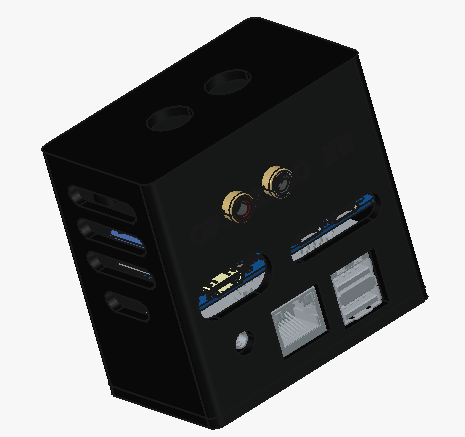
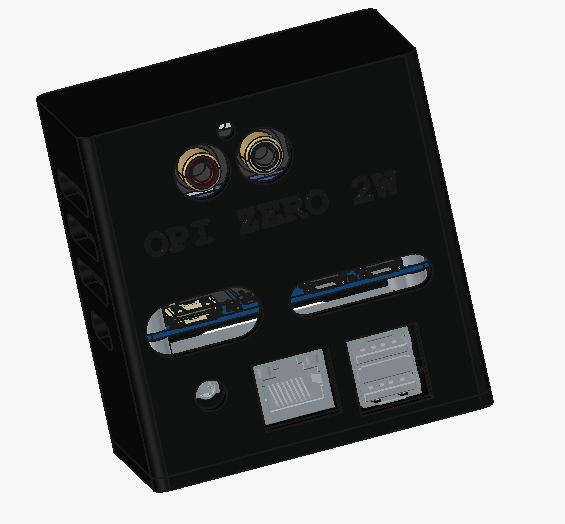
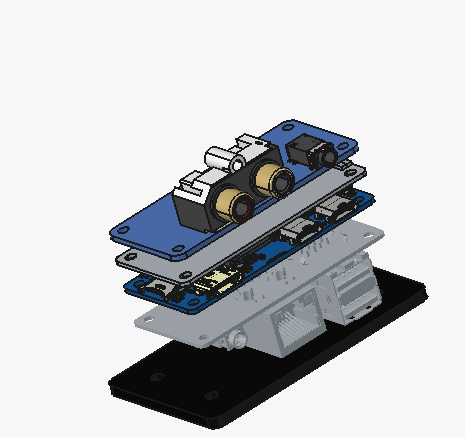
This script is fully functional and has been verified on my setup. The next step is to create a 3D case to house this ultra-compact assembly;

I’ll post images as the project progresses.

This is where things stand for now.

Awesome, and I am so happy that the Zero 2W generally runs stable again. And great that you did it with an overlay. I’ll also try to convert it to the modern syntax later, to compact it a bit.

Would be still also great to have a functional overlay for the PCM5102A on the expansion board :winking_face_with_tongue:.

Moved to community tutorials.

Hello @MichaIng

In fact with the overlay for the pcm5122, the PCM 5102a also work without modification, on the opi zéro 2w and opi 3b
Because the script activate the i2s bus

Oh that is great, so both HATs use the same pins? Would it make sense to name the overlay pcm51xx then (if we add it to our kernel package)?

Perhaps called the overlay pcm5122-pcm5102a

Yess it’s the same pinout that rpi also, it’s intentionnaly made by orangepi

Hehe, a bit long :face_with_tongue:. We could specify it in a readme and the dietpi-config dialogue. We have per-overlay readmes in our kernel builds now :slightly_smiling_face:.

Hello

I rebuild the case

Good evening everyone,
@MichaIng

I’ve installed my Waveshare PCM5122 audio board onto my Orange Pi Zero 2W and its expansion board.


Consequently, I rewrote the deployment script to automatically detect the I2C address—whether it’s the Waveshare board (0x4c), the PiFi DAC+ (0x4d), or the PCM5102A (which only requires the I2S bus). You can find the comprehensive v2 script below.

#!/bin/bash
# ==============================================================================
# SCRIPT DE DÉPLOIEMENT UNIQUE AUTOMATISÉ : PCM5122 + I2C1-PI FUSIONNÉS (COMPATIBLE)
# ==============================================================================

echo "--- [1/6] Installation des dépendances (i2c-tools & compiler) ---"
apt update && apt install -y i2c-tools device-tree-compiler

# Création et bascule dans le répertoire utilisateur
mkdir -p /boot/overlay-user
cd /boot/overlay-user

# Create the overlay source file
echo "--- [2/6] Création du fichier source unique sécurisé (pcm5122.dts) ---"
cat << '_EOF_' > pcm5122.dts
/dts-v1/;
/plugin/;

/ {
	compatible = "allwinner,sun50i-h618";

	fragment@0 {
		target = <&pio>;
		__overlay__ {
			ahub_daudio0_pins_d: ahub_daudio0_sleep {
				pins = "PI0", "PI1", "PI2", "PI3", "PI4";
				function = "gpio_in";
				drive-strength = <20>;
				bias-disable;
			};
			ahub_daudio0_pins_a: ahub_daudio0@0 {
				pins = "PI0", "PI1", "PI2";
				function = "i2s0";
				drive-strength = <20>;
				bias-disable;
			};
			ahub_daudio0_pins_b: ahub_daudio0@1 {
				pins = "PI3";
				function = "i2s0_dout0";
				drive-strength = <20>;
				bias-disable;
			};
			ahub_daudio0_pins_c: ahub_daudio0@2 {
				pins = "PI4";
				function = "i2s0_din0";
				drive-strength = <20>;
				bias-disable;
			};
		};
	};

	fragment@1 {
		target-path = "/soc";
		__overlay__ {
			ahub0_plat: ahub0_plat {
				#sound-dai-cells = <0>;
				compatible = "allwinner,sunxi-snd-plat-ahub";
				apb_num = <0>;
				dmas = <&dma 3>, <&dma 3>;
				dma-names = "tx", "rx";
				playback_cma = <128>;
				capture_cma = <128>;
				tx_fifo_size = <128>;
				rx_fifo_size = <128>;
				tdm_num         = <0>;
				tx_pin          = <0>;
				rx_pin          = <0>;
				pinctrl-names = "default", "sleep";
				pinctrl_used;
				pinctrl-0 = <&ahub_daudio0_pins_a>, <&ahub_daudio0_pins_b>, <&ahub_daudio0_pins_c>;
				pinctrl-1 = <&ahub_daudio0_pins_d>;
				status = "okay";
			};
			ahub0_mach: ahub0_mach {
				compatible = "allwinner,sunxi-snd-mach";
				soundcard-mach,name = "soundbox";
				soundcard-mach,format = "i2s";
				soundcard-mach,frame-master = <&ahub0_cpu>;
				soundcard-mach,bitclock-master = <&ahub0_cpu>;
				soundcard-mach,slot-num = <2>;
				soundcard-mach,slot-width = <32>;
				status = "okay";

				ahub0_cpu: soundcard-mach,cpu {
					sound-dai = <&ahub0_plat>;
					soundcard-mach,pll-fs = <4>;
					soundcard-mach,mclk-fs = <0>;
				};

				soundcard-mach,codec {
				};
			};
			codec: codec {
				compatible = "allwinner,sun50i-h616-codec";
				status = "disable";
				allwinner,audio-routing = "Line Out", "LINEOUT";
			};
			ahub_dam_plat: ahub_dam_plat {
				compatible = "allwinner,sunxi-snd-plat-ahub_dam";
				status = "okay";
			};
			ahub1_plat: ahub1_plat {
				compatible = "allwinner,sunxi-snd-plat-ahub";
				#sound-dai-cells = <0>;
				status = "okay";
			};
			ahub1_mach: ahub1_mach {
				compatible = "allwinner,sunxi-snd-mach";
				soundcard-mach,name = "HDMI";
				soundcard-mach,format = "i2s";
				status = "disable";

				soundcard-mach,cpu {
					sound-dai = <&ahub1_plat>;
				};

				soundcard-mach,codec {
				};
			};
		};
	};

	fragment@2 {
		target = <&i2c1>;
		__overlay__ {
			#address-cells = <1>;
			#size-cells = <0>;
			pinctrl-names = "default";
			pinctrl-0 = <&i2c1_pi_pins>;
			clock-frequency = <400000>;
			status = "okay";
		};
	};
	/* NOUVEAU FRAGMENT POUR ACTIVER LE GPU D'ORIGINE DE LA CARTE */
	fragment@3 {
		target = <&gpu>;
		__overlay__ {
			status = "okay";
		};
	};
};
_EOF_

echo "--- [3/6] Compilation de l'overlay unique (pcm5122.dtbo) ---"
dtc -I dts -O dtb -@ -o pcm5122.dtbo pcm5122.dts

echo "--- [4/6] Vérification du binaire via fdtdump ---"
fdtdump pcm5122.dtbo | head -n 20

echo "--- [5/6] Génération et enregistrement de l'initialisation I2C2 (Multi-cartes : PCM5122 & PCM5102A) ---"
cat << '_EOF_' > /boot/overlay-user/init_dac.sh
#!/bin/bash

# Attente de la disponibilité du bus i2c-2
for i in {1..10}; do
    if [ -e /dev/i2c-2 ]; then break; fi
    sleep 0.5
done

# Détection automatique de la carte présente
if i2cdetect -y 2 | grep -q "4c"; then
    TARGET_ADDR="0x4c"
    echo "DAC PCM5122 détecté à l'adresse 0x4c (Waveshare)"
elif i2cdetect -y 2 | grep -q "4d"; then
    TARGET_ADDR="0x4d"
    echo "DAC PCM5122 détecté à l'adresse 0x4d (PiFi DAC+)"
else
    # Cas du PCM5102A ou absence de carte I2C
    echo "Aucun DAC I2C détecté. Mode standard I2S uniquement (PCM5102A)."
    exit 0
fi

# Application de la séquence d'initialisation (uniquement pour PCM5122 0x4c/0x4d)
i2cset -y 2 $TARGET_ADDR 0x01 0x11
sleep 0.2

i2cset -y 2 $TARGET_ADDR 0x02 0x10
i2cset -y 2 $TARGET_ADDR 0x25 0x08
i2cset -y 2 $TARGET_ADDR 0x0d 0x10
i2cset -y 2 $TARGET_ADDR 0x26 0x10
i2cset -y 2 $TARGET_ADDR 0x41 0x00

i2cset -y 2 $TARGET_ADDR 0x02 0x00
i2cset -y 2 $TARGET_ADDR 0x03 0x00
i2cset -y 2 $TARGET_ADDR 0x3d 0x30
i2cset -y 2 $TARGET_ADDR 0x3e 0x30

echo "Initialisation matérielle réussie pour le DAC $TARGET_ADDR"
_EOF_

chmod +x /boot/overlay-user/init_dac.sh
sed -i '/snd_soc_pcm512x/d' /etc/modules


# Création du service d'initialisation au démarrage de la carte
cat << '_EOF_' > /etc/systemd/system/init-dac.service
[Unit]
Description=Initialisation automatique du DAC PCM5122 sur I2C-2 (i2c1-pi) sans MCLK
After=sound.target i2c-dev.target
DefaultDependencies=no

[Service]
Type=oneshot
ExecStart=/boot/overlay-user/init_dac.sh
RemainAfterExit=yes

[Install]
WantedBy=sysinit.target
_EOF_

systemctl daemon-reload
systemctl enable init-dac.service

echo "--- [6/6] Enregistrement du fichier overlay spécifique dans dietpiEnv.txt ---"
sed -i '/user_overlays=/d' /boot/dietpiEnv.txt
echo "user_overlays=pcm5122" >> /boot/dietpiEnv.txt

echo "=============================================================================="
echo " La carte Orangepi zero 2w ne supporte pas la syntaxe moderne pour le .dts    "
echo " La structure en fragments compatibles a été restaurée                        "  
echo " Le bus I2C1 configurer en vitesse personnalisée à 400kHz (100Khz en standard)"
echo " Relancez la carte pour retrouver votre soundbox : 'reboot'                   "
echo "=============================================================================="


# ==============================================================================
# pour l'activer 
# nano deploy_pcm5122.sh
# ctrl +o et ctrl +x
# puis
# bash deploy_pcm5122.sh
# ==============================================================================

Just as I did for my Orange Pi 3B, I also created a script to diagnose the DAC via the I2C bus; it’s a bit of a novelty, but it could prove useful when working with a new PCM5122-based board. Here is the check_dac script.

#!/bin/bash
# ==============================================================================
# SCRIPT DE DÉPLOIEMENT DU DIAGNOSTIC AUDIO - SÉCURISÉ & ALLEGÉ (V3.1)
# À SAUVEGARDER SUR VOTRE DISQUE DUR POUR RÉINSTALLATION ÉVENTUELLE
# ==============================================================================

echo "--- [1/4] Vérification et installation des dépendances I2C ---"
# Seul i2c-tools est vérifié ici (device-tree-compiler étant géré par le script global)
if ! command -v i2cdetect &> /dev/null; then
    echo "DÉPENDANCE MANQUANTE : Installation de i2c-tools en cours..."
    apt update && apt install -y i2c-tools
else
    echo "[OK] Les outils I2C (i2c-tools) sont déjà installés."
fi

echo "--- [2/4] Création du script de diagnostic dans /boot/overlay-user ---"
mkdir -p /boot/overlay-user

cat << '_EOF_' > /boot/overlay-user/diag_dac.sh
#!/bin/bash
# ==============================================================================
# OUTIL DE DIAGNOSTIC AVANCÉ (V3) - ORANGE PI ZERO 2W (LOGIQUE REGISTRES CORRIGÉE)
# ==============================================================================

VERT='\033[0;32m'
ROUGE='\033[0;31m'
JAUNE='\033[1;33m'
BLEU='\033[0;34m'
NEUTRE='\033[0m'

BUS_I2C=2

clear
echo -e "${BLEU}======================================================================${NEUTRE}"
echo -e "${BLEU}      DIAGNOSTIC AVANCÉ - SYSTÈME AUDIO ORANGE PI ZERO 2W            ${NEUTRE}"
echo -e "${BLEU}======================================================================${NEUTRE}"

# 1. Détection automatique de la carte présente sur le bus I2C-2
TARGET_ADDR=""
NOM_DAC=""

if [ -e "/dev/i2c-$BUS_I2C" ]; then
    if i2cdetect -y $BUS_I2C 2>/dev/null | grep -q "4c"; then
        TARGET_ADDR="0x4c"
        NOM_DAC="PCM5122 (Waveshare Audio Board A)"
    elif i2cdetect -y $BUS_I2C 2>/dev/null | grep -q "4d"; then
        TARGET_ADDR="0x4d"
        NOM_DAC="PCM5122 (PiFi DAC+ v2.0)"
    fi
fi

# 2. Gestion de la carte PCM5102A (Aucun composant I2C détecté)
if [ -z "$TARGET_ADDR" ]; then
    echo -e "${JAUNE}[INFO] Aucun composant de contrôle I2C détecté sur le bus I2C-$BUS_I2C.${NEUTRE}"
    echo -e "  -> Statut matériel : ${VERT}Mode I2S Pur actif (Compatible PCM5102A)${NEUTRE}"
    echo -e "  -> Note : Le PCM5102A fonctionne en direct sans registres de configuration."
    echo -e "${BLEU}======================================================================${NEUTRE}"
    exit 0
fi

# 3. Lecture et analyse des registres si une carte PCM5122 est détectée
echo -e "Carte détectée : ${VERT}$NOM_DAC${NEUTRE}"
echo -e "Bus utilisé    : ${VERT}I2C-$BUS_I2C à l'adresse $TARGET_ADDR${NEUTRE}"

REG_02=$(i2cget -y $BUS_I2C $TARGET_ADDR 0x02 b 2>/dev/null)
REG_6C=$(i2cget -y $BUS_I2C $TARGET_ADDR 0x6c b 2>/dev/null)
REG_77=$(i2cget -y $BUS_I2C $TARGET_ADDR 0x77 b 2>/dev/null)

if [ -z "$REG_02" ] || [ "$REG_02" = "Error:" ]; then
    echo -e "${ROUGE}[ERREUR] Le PCM5122 ne répond pas aux requêtes de lecture de registres.${NEUTRE}"
    exit 1
fi

VAL_02=$((REG_02))
BIT_STBY=$(( (VAL_02 >> 4) & 1 ))
BIT_PDN=$(( VAL_02 & 1 ))

echo -e "\n${JAUNE}[1/3] ÉTAT DE L'ALIMENTATION GÉNÉRALE (Reg 0x02 : $REG_02)${NEUTRE}"
if [ "$BIT_PDN" -eq 1 ]; then
    echo -e "  -> Statut global : ${ROUGE}ÉTEINT COMPLET (Powerdown actif)${NEUTRE}"
elif [ "$BIT_STBY" -eq 1 ]; then
    echo -e "  -> Statut global : ${JAUNE}MODE VEILLE (Standby actif)${NEUTRE}"
else
    echo -e "  -> Statut global : ${VERT}ACTIF (Prêt à fonctionner)${NEUTRE}"
fi

VAL_6C=$((REG_6C))
if [ "$VAL_6C" -eq 0 ]; then
    echo -e "\n${JAUNE}[2/3] ÉTAT DES AMPLIFICATEURS DE SORTIE (Reg 0x6C : $REG_6C)${NEUTRE}"
    echo -e "  -> Amplis Gauche & Droit : ${ROUGE}MUTÉS EXTÉRIEUREMENT / SILENCE${NEUTRE}"
else
    echo -e "\n${JAUNE}[2/3] ÉTAT DES AMPLIFICATEURS DE SORTIE (Reg 0x6C : $REG_6C)${NEUTRE}"
    echo -e "  -> Amplis Gauche & Droit : ${VERT}OUVERTS & OPÉRATIONNELS (Sortie Audio Active)${NEUTRE}"
fi

VAL_77=$((REG_77))
BIT_POMPE=$(( (VAL_77 >> 4) & 1 ))
echo -e "\n${JAUNE}[3/3] ÉTAT DE LA POMPE DE CHARGE INTERNE (Reg 0x77 : $REG_77)${NEUTRE}"
if [ "$BIT_POMPE" -eq 1 ] || [ "$VAL_77" -ne 0 ]; then
    echo -e "  -> Pompe de charge : ${VERT}ACTIVE & STABLE (Tension négative OK)${NEUTRE}"
else
    echo -e "  -> Pompe de charge : ${ROUGE}INACTIVE / ÉTEINTE${NEUTRE}"
fi

echo -e "\n${BLEU}======================================================================${NEUTRE}"
_EOF_

echo "--- [3/4] Application des permissions d'exécution (chmod) ---"
chmod +x /boot/overlay-user/diag_dac.sh

echo "--- [4/4] Création de l'appel système global 'check_dac' ---"
ln -sf /boot/overlay-user/diag_dac.sh /usr/local/bin/check_dac

# Nettoyage historique des configurations automatiques au démarrage
sed -i '/diag_dac.sh/d' /root/.bashrc
sed -i '/check_dac/d' /root/.bashrc

echo "======================================================================"
echo " Déploiement terminé !                                                "
echo " L'outil est optimisé pour votre environnement existant.               "
echo " Lancez votre diagnostic manuel en tapant : check_dac                 "
echo "======================================================================"

Now all that’s left is to listen to my music with my PeppyMeter VU meters.

Good evening everyone,
@MichaIng

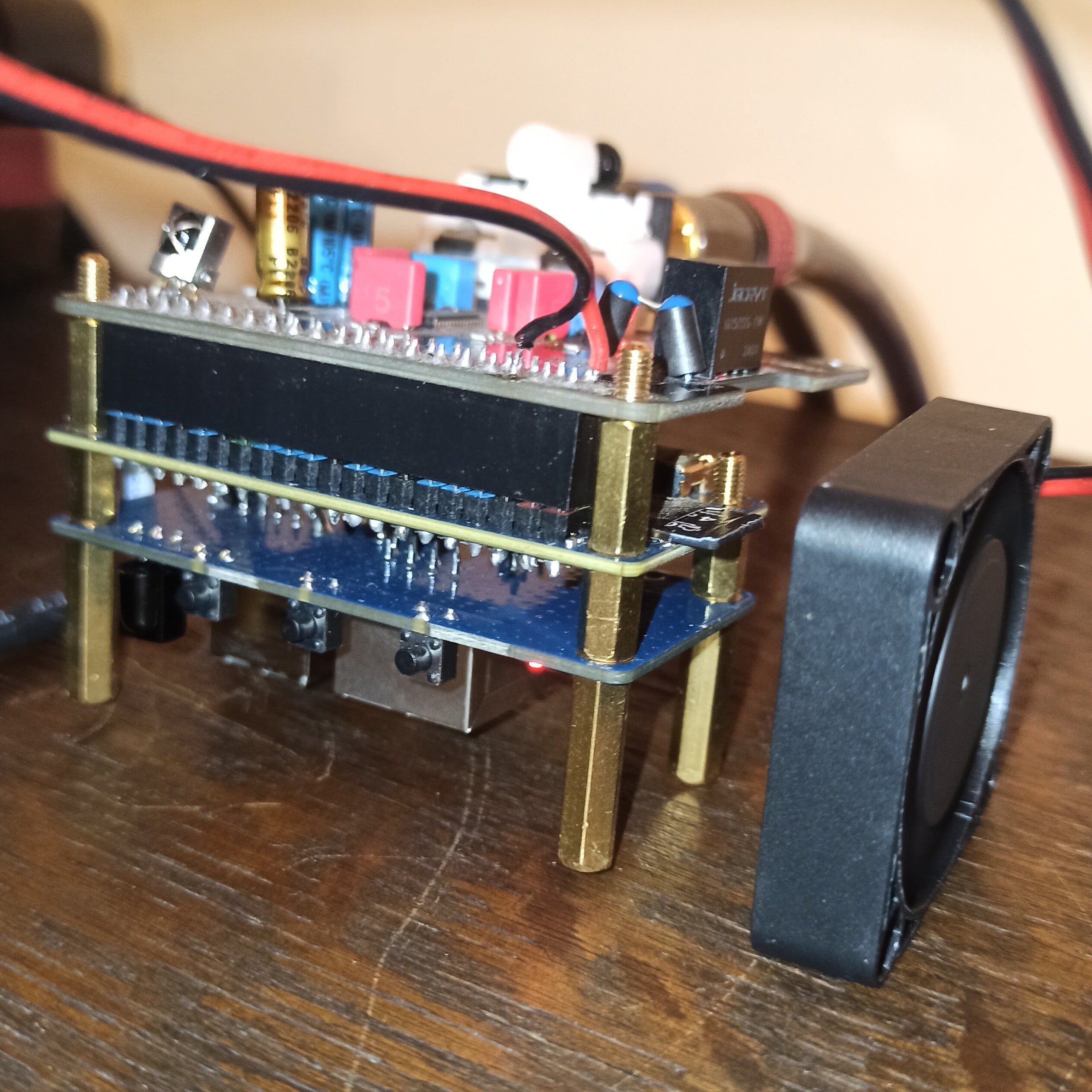
I’ve received the small PCB that holds the 5V 2006 fan for cooling the H618 and includes a connector for stacking with the Waveshare PCM5122 board.
The assembly is compact—see below.


I’m going to revise the 3D-printed case design; since the stack is more compact than anticipated, the case won’t need to be as tall.