Which shouldn’t be needed. At least my OPi5 is booting from nvme directly.
yeah it used to boot from NVME previously for me too. I am also stuck in Armbian for now, not sure how to get this resolved
Sorry for the late reply. I just successfully booted from USB, with U-Boot from 2025-10-12 on the bootloader on SPI flash.
But reboots did not work well, it always ended before starting the init system somehow. Last serial console output:
[   35.104626] scsi 0:0:0:0: Direct-Access     Corsair  Voyager 3.0      000A PQ: 0 ANSI: 6
[   35.105746] sd 0:0:0:0: Attached scsi generic sg0 type 0
[   35.153204] sd 0:0:0:0: [sda] 62554112 512-byte logical blocks: (32.0 GB/29.8 GiB)
[   35.155231] sd 0:0:0:0: [sda] Write Protect is off
[   35.156794] sd 0:0:0:0: [sda] Write cache: disabled, read cache: enabled, doesn't support DPO or FUA
[   35.182062]  sda: sda1
[   35.182726] sd 0:0:0:0: [sda] Attached SCSI removable disk
[   35.592762] rk-pcie fe190000.pcie: PCIe Link Fail, LTSSM is 0x3, hw_retries=0
[   35.733328] EXT4-fs (sda1): mounting with "discard" option, but the device does not support discard
[   35.733399] EXT4-fs (sda1): mounted filesystem without journal. Quota mode: none.
[   36.045600] systemd[1]: System time advanced to built-in epoch: Wed 2025-09-03 18:38:20 UTC
[   36.118509] NET: Registered PF_INET6 protocol family
[   36.119613] Segment Routing with IPv6
[   36.119637] In-situ OAM (IOAM) with IPv6
[   35.005101] scsi 0:0:0:0: Direct-Access     Corsair  Voyager 3.0      000A PQ: 0 ANSI: 6
[   35.006661] sd 0:0:0:0: Attached scsi generic sg0 type 0
[   35.071009] sd 0:0:0:0: [sda] 62554112 512-byte logical blocks: (32.0 GB/29.8 GiB)
[   35.073186] sd 0:0:0:0: [sda] Write Protect is off
[   35.075180] sd 0:0:0:0: [sda] Write cache: disabled, read cache: enabled, doesn't support DPO or FUA
[   35.103739]  sda: sda1
[   35.104548] sd 0:0:0:0: [sda] Attached SCSI removable disk
[   35.529828] rk-pcie fe190000.pcie: PCIe Link Fail, LTSSM is 0x3, hw_retries=0
[   36.439461] EXT4-fs (sda1): mounting with "discard" option, but the device does not support discard
[   36.439508] EXT4-fs (sda1): mounted filesystem with ordered data mode. Quota mode: none.
[   36.742124] systemd[1]: System time advanced to built-in epoch: Wed 2025-09-03 18:38:20 UTC
[   36.796966] NET: Registered PF_INET6 protocol family
[   36.798092] Segment Routing with IPv6
[   36.798118] In-situ OAM (IOAM) with IPv6
[   36.811327] vendor storage:20190527 ret = -1
Two reboots, nearly identical, just last line came on top on second reboot.
Next, my USB WiFi dongle did not work on the vertical USB 2.0 port (the storage dongle is attached to the upper USB 3.0 port). No device is detected at all, as if it is not powered.
… okay, it shares the controller with the USB-C port. Adding the dwc3-host overlay makes it functional. New images will ship with this overlay enabled by default: Orange Pi 5: switch USB-C + vertical USB 2.0 port to host mode · MichaIng/DietPi@592a56d · GitHub
If you are bugged by this:
G_SUDO G_CONFIG_INJECT 'overlays=' 'overlays=dwc3-host' /boot/dietpiEnv.txt
or add dwc3-host separated by space to this line, if you have another overlay enabled already.
Now trying to update the SPI bootloader via dietpi-config > Advanced Options > Flash SPI bootloader. Relevant for your case, select the bottom option for NVMe, since the upper one is for SATA M.2 SSDs. But I see from earlier posts you did that.
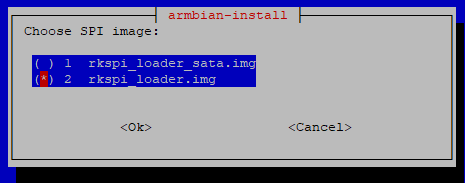
I am no friend of these radiolists. A --menu would make more sense, where one does not need the extra backspace hit to toggle an entry. I’ll change this in our fork. I’ll also see whether I can give the second option an _nvme suffix, to make the difference clearer.
The reboot issue is probably specific to USB boot or my USB dongle, it remains. I always need to power cycle to get post the point. The two error message from PCIe and vendor storage appear as well on successful boot, the first surely since no card is attached to the M.2 socket. The rootfs gets successfully mounted, no other error message, hence no idea why it does just not load the init system  .
.
In your case, the initramfs indeed failed to mount the rootfs, based on your screenshots above. To compare, here again a failing boot in my case with serial console as primary console, to contain everything you see on HDMI:
Begin: Loading essential drivers ... done.
Begin: Running /scripts/init-premount ... done.
Begin: Mounting root file system ... Begin: Running /scripts/local-top ... done.
Begin: Running /scripts/local-premount ... done.
Begin: Waiting for root file system ... [   64.435720] scsi 0:0:0:0: Direct-Access     Corsair  Voyager 3.0      000A PQ: 0 ANSI: 6
[   64.437145] sd 0:0:0:0: Attached scsi generic sg0 type 0
[   64.549907] sd 0:0:0:0: [sda] 62554112 512-byte logical blocks: (32.0 GB/29.8 GiB)
[   64.552269] sd 0:0:0:0: [sda] Write Protect is off
[   64.554158] sd 0:0:0:0: [sda] Write cache: disabled, read cache: enabled, doesn't support DPO or FUA
[   64.575122]  sda: sda1
[   64.575948] sd 0:0:0:0: [sda] Attached SCSI removable disk
[   64.912567] rk-pcie fe190000.pcie: PCIe Link Fail, LTSSM is 0x3, hw_retries=0
Begin: Running /scripts/local-block ... done.
done.
Begin: Will now check root file system ... fsck from util-linux 2.41
[/sbin/fsck.ext4 (1) -- /dev/sda1] fsck.ext4 -y -C0 /dev/sda1
e2fsck 1.47.2 (1-Jan-2025)
/dev/sda1: clean, 19206/1835520 files, 423951/7815163 blocks
done.
[   65.071895] EXT4-fs (sda1): mounting with "discard" option, but the device does not support discard
done.
[   65.071933] EXT4-fs (sda1): mounted filesystem with ordered data mode. Quota mode: none.
Begin: Running /scripts/local-bottom ... done.
Begin: Running /scripts/init-bottom ... done.
[   65.435711] NET: Registered PF_INET6 protocol family
[   65.437984] Segment Routing with IPv6
[   65.438057] In-situ OAM (IOAM) with IPv6
I have “mounted filesystem”, you have “No such device” and “Failed to mount”, weirdly after fsck successfully checked this very same device. So U-Boot found the NVMe, the initamfs did so, but after fsck, it fails to actually mount it.
The thing is, the bootloader should be moreless the same since a long time. Though Radxa is doing quite some commits. I do not see something related to PCIe from that time around, but very recently (not in our U-Boot build yet), they added a new Rockchip PCIe controller driver. But is is not used by RK3588 boards, but only by the ROCK 4 ones which explicitly enable this driver in their build config: Commits · radxa/u-boot · GitHub
And for RK3399 SBCs, we do not use the Radxa sources anyway, but mainline U-Boot.
Armbian did not change Orange Pi 5 (U-Boot) config or device tree or patches for this board either: build/patch/u-boot/legacy/u-boot-radxa-rk35xx at main · armbian/build · GitHub
Regarding reboot vs power cycle: Our filesystem expansion script sadly needs to reboot 2 times on GPT partitioned images: once after expanding the last partition, which the kernel cannot be informed about while the filesystem is mounted (even R/O), and once after the ext4 journal has been created in case the image uses an initramfs, since otherwise its fsck on next reboot causes a filesystem corruption, requiring another power cycle to solve. Normally this would be a problem, but on the one hand, at least USB (3.0) boot in my case is veeery slow, as can be seen from the logs above the bootloader requires ~30 seconds before loading the kernel, and ~60 seconds after I enabled the USB host mode overlay, no idea how this has such an effect. I hope it is faster on NVMe. But probably you have the same reboot issue right now? Do you have a UART adapter to check serial console output? If you see LEDs indicating activity at first, but then it stays at solid red and no green blinking, after 1 minute or so, power cycle. Then, if the same happens again, power cycle again. So you would have worked around the reboot issue for the two expected reboots, after which it would boot up into first run setup and network.
… one more thing, when you say
dietpi-config → Advanced Options → Update SPI bootloader → rkspi_loader.img
You really toggled rkspi_loader.img with backspace, so it has this asterisk?

Because if not, if you just hit return when it is highlighted, it would pick the first one, which annoyingly is the SATA image. Not sure about the impact in that case, whether it would not detect the SSD at all, or whether it can result in your case of boot into initramfs + fsck but failing mount.
I just extended a commit in our fork to also switch this to a menu, which makes the selection easier and less error-prone: rockchip64: prevent SPI flash from exiting parent shell · MichaIng/build@98c77b4 · GitHub
EDIT: Oh while testing the new menu, I recognized that Armbian switched to mainline U-Boot for this board, just a week ago:
Testing that one, with our menu vs radiolist:
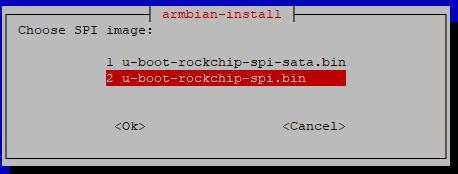
One key less to type. The benefit of the new U-Boot binary vs prior image is that it does not flash the whole 16 MiB via dd, but only the ~1.6 MiB binary,via flashcp, with is much faster. Let’s see whether it solves the reboot issue and/or boots faster …
Haha yeah both:
- Boots after 11 seconds into kernel vs 61 seconds before
- Does not hang at reboot
Merging this build now … done.
@Renoria now I am kinda certain this will solve your issue as well, but Armbian most likely did not update the U-Boot package within the last week? You can try it like that in case:
cd /tmp
wget https://dietpi.com/downloads/binaries/linux-u-boot-orangepi5-vendor.deb
sudo dpkg -i linux-u-boot-orangepi5-vendor.deb
Then flash the SPI bootloader the common way on Armbian, AFAIK with armbian-install. To actually test it, with your current setup, you would need to copy the /boot directory from the SD card into the /boot dir on the NVMe. For this, however umount the bind mount that is currently there. Should be this, but not 100% sure about the mountpoint:
sudo umount /boot
sudo cp -a /mnt/sdcard/. /boot/
Shutdown, remove SD card, boot. It will fail to mount the SD card, of course, but that should not prevent boot or be at a point where you know whether it generally works. If so, you can remove the SD card and bind mount entires from /etc/fstab, or, flash again a DietPi image.