OPI zero 2w, Ethernet doesn't work after upgrade to v10.2.3

Creating a bug report/issue

I have searched the existing open and closed issues

Required Information

  • DietPi version | G_DIETPI_VERSION_CORE=10 G_DIETPI_VERSION_SUB=2 G_DIETPI_VERSION_RC=3 G_GITBRANCH='master' G_GITOWNER='MichaIng'
  • Distro version | trixie
  • Kernel version | Linux DietPi 6.18.21-current-sunxi64 #1 SMP PREEMPT Thu Apr 2 11:23:33 UTC 2026 aarch64 GNU/Linux
  • Architecture | arm64
  • SBC model | Orange Pi Zero 2W (aarch64)
  • Power supply used | ‘5V 3A RAVpower’
  • SD card used | ‘Cloudisk 4go’

Steps to reproduce

  1. Before upgrade my setup was connected via Eth0
  2. After upgrade no ethernet adaptateur present in Dietpi-config
  3. The expansion board is connected as before

Expected behaviour

Actual behaviour

  • Ethernet doesn’t work

Extra details

  • I have a look to the kernell et dtb file because both change, it seems that the dtb file is the same for the ethernet part ( two block in the tree) but i don’t find an issue with Dietpi-config to re-activate the ethernet adaptateur
  • The SBC was connected via wifi for this time
    All idea are welcome

Just for your info:

Torben

don’t think this is related. We stopped shipping udhcpc a while ago.

In fact after some test , it’s all the function of the expansion board wich is deactivated
the usb and the jack doesn’t work too
I reinstall my last functionnal version et upgrade to see if the expansion board works
for the usb and jack

Nothing to do, after upgrade the eth0 doesn’t work

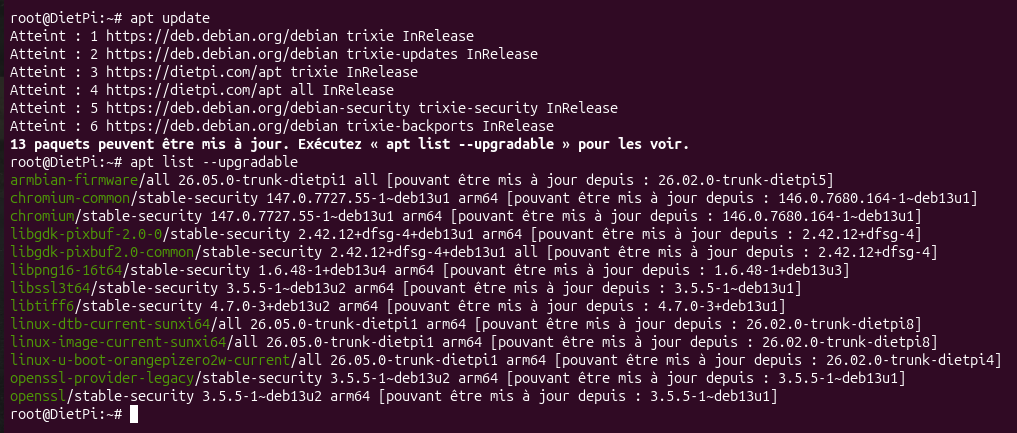
I start from the DietPi v10.2.3 and apt update and the list upgradable below

I try to fix with the tips mentionned by Torben without success

So the last functionnal kernell with eth0 is below
Capture d’écran du 2026-04-12 17-11-37

I found difference between the two dtb file in the section ethernet@5030000
This doesn’t work

ethernet@5030000 {
			compatible = "allwinner,sunxi-gmac";
			reg = <0x5030000 0x10000 0x3000034 0x04>;
			reg-names = "gmac1_reg", "ephy_reg";
			interrupts = <0x00 0x0f 0x04>;
			interrupt-names = "gmacirq";
			resets = <0x02 0x1f>;
			reset-names = "stmmaceth";
			clocks = <0x02 0x53 0x02 0x51>;
			clock-names = "bus-emac1", "emac-25m";
			pinctrl-0 = <0x2f>;
			pinctrl-names = "default";
			tx-delay = <0x07>;
			rx-delay = <0x1f>;
			phy-rst;
			gmac-power0;
			gmac-power1;
			gmac-power2;
			status = "okay";
			phy-mode = "rmii";
			phy-handle = <0x30>;
			phy-supply = <0x1d>;
			allwinner,rx-delay-ps = <0xc1c>;
			allwinner,tx-delay-ps = <0x2bc>;
			phandle = <0x93>;

			mdio {
				compatible = "ethernet-phy-ieee802.3-c22";
				#address-cells = <0x01>;
				#size-cells = <0x00>;
				phandle = <0x94>;

				ethernet-phy@1 {
					compatible = "ethernet-phy-ieee802.3-c22";
					reg = <0x01>;
					phandle = <0x30>;
				};
			};
		};

This work

ethernet@5030000 {
			compatible = "allwinner,sunxi-gmac";
			reg = <0x5030000 0x10000 0x3000034 0x04>;
			reg-names = "gmac1_reg", "ephy_reg";
			interrupts = <0x00 0x0f 0x04>;
			interrupt-names = "gmacirq";
			resets = <0x02 0x1f>;
			reset-names = "stmmaceth";
			clocks = <0x02 0x53 0x02 0x51>;
			clock-names = "bus-emac1", "emac-25m";
			pinctrl-0 = <0x2c>;
			pinctrl-names = "default";
			tx-delay = <0x07>;
			rx-delay = <0x1f>;
			phy-rst;
			gmac-power0;
			gmac-power1;
			gmac-power2;
			status = "okay";
			phy-mode = "rmii";
			phy-handle = <0x2d>;
			phy-supply = <0x13>;
			allwinner,rx-delay-ps = <0xc1c>;
			allwinner,tx-delay-ps = <0x2bc>;
			phandle = <0x88>;

			mdio {
				compatible = "ethernet-phy-ieee802.3-c22";
				#address-cells = <0x01>;
				#size-cells = <0x00>;
				phandle = <0x89>;

				ethernet-phy@1 {
					compatible = "ethernet-phy-ieee802.3-c22";
					reg = <0x01>;
					phandle = <0x2d>;
				};
			};
		};

Just a quick tip, or rather a request. If possible, please try to avoid using screenshots in future. It should be possible to copy all the information directly from the SSH terminal window. This generally makes the text easier to read.

I am experiencing a similar critical issue with the same kernel version (6.18.21-current-sunxi64) on my Orange Pi Zero 2W.

In my case, the system boots but crashes shortly after any network activity. I managed to capture a Kernel Panic (Internal error: Oops) on my monitor. The crash is caused by the sprdwl_ng module (Wi-Fi/BT driver).

Error details:

Comm: SPRDWL_TX_QUEUE

Reason: Data abort / level 3 translation fault

Symptoms: The status LED stops blinking (heartbeat freezes), and the board starts overheating rapidly after the crash.

I can confirm that rolling back to kernel 6.12.76-current-sunxi64 (package version 26.02.0-trunk-dietpi8) completely resolves the issue. The system is stable again and temperature is back to normal.

It seems this kernel build has a major regression for the Orange Pi Zero 2W network drivers (both for the expansion board Ethernet and the built-in Wi-Fi module).

I m agree, the New kernell is probably
In default, i found less driver for the audio part too
But for me just Ethernet doesn’t work
Wi-Fi work correctly

Hello all

@MichaIng , it’s possible to downgrade the kernell version for this upgrade
After some test yesterday i confirm some problem of stability with Kodi like
ximikavt says with video playing , with LMS and music no problem except the
ethernet who doesn’t work

Thanks for all

Sure. Check available versions with

apt policy linux-image-current-sunxi64

Be sure to downgrade the linux-dtb-current-sunxi64 package along with it.

I’ll have a look into this later today.

I try to connect via wifi but it doesn’t want Tuesday ans yesterday

I Re upgrade my last fonctionnal backup tonight and make upgrade and apply your command line
If wifi work again afer I tell you for the kernell Version avalable

:winking_face_with_tongue:

Hi MichaIng

After some starting i can connect via wifi , below the result

root@DietPi:~# apt policy linux-image-current-sunxi64
linux-image-current-sunxi64:
  Installé : 26.05.0-trunk-dietpi1
  Candidat : 26.05.0-trunk-dietpi1
 Table de version :
 *** 26.05.0-trunk-dietpi1 500
        500 https://dietpi.com/apt all/orangepizero2w arm64 Packages
        100 /var/lib/dpkg/status
     26.02.0-trunk-dietpi8 500
        500 https://dietpi.com/apt all/orangepizero2w arm64 Packages
     26.02.0-trunk-dietpi7 500
        500 https://dietpi.com/apt all/orangepizero2w arm64 Packages
     26.02.0-trunk-dietpi6 500
        500 https://dietpi.com/apt all/orangepizero2w arm64 Packages
     26.02.0-trunk-dietpi5 500
        500 https://dietpi.com/apt all/orangepizero2w arm64 Packages
     26.02.0-trunk-dietpi4 500
        500 https://dietpi.com/apt all/orangepizero2w arm64 Packages
     26.02.0-trunk-dietpi3 500
        500 https://dietpi.com/apt all/orangepizero2w arm64 Packages
     26.02.0-trunk-dietpi2 500
        500 https://dietpi.com/apt all/orangepizero2w arm64 Packages
     26.02.0-trunk-dietpi1 500
        500 https://dietpi.com/apt all/orangepizero2w arm64 Packages
     25.11.0-trunk-dietpi3 500
        500 https://dietpi.com/apt all/orangepizero2w arm64 Packages
     25.11.0-trunk-dietpi2 500
        500 https://dietpi.com/apt all/orangepizero2w arm64 Packages
     25.11.0-trunk-dietpi1 500
        500 https://dietpi.com/apt all/orangepizero2w arm64 Packages
     25.08.0-trunk-dietpi1 500
        500 https://dietpi.com/apt all/orangepizero2w arm64 Packages
root@DietPi:~# 


To downgrade to the 2nd last version:

apt install linux-{image,dtb}-current-sunxi64=26.02.0-trunk-dietpi8

However, let’s see why support for the extension board has been gone with Linux 6.18:

I did not compare everything in detail, but generally the nodes for WiFi, audio, and other expansion board features seem to be there. And the audio drivers are enabled in the kernel config: build/config/kernel/linux-sunxi64-current.config at e2b90659ec7a10b643281dd7965a05d3a68e2f4f · armbian/build · GitHub

So the WiFi driver again causes some crashes. That it loads before cpufreq-dt cannot be the reason anymore, since that driver is now builtin. On Orange Pi 4 LTS, the same has been reported: Image | Orange Pi 4 LTS · MichaIng/DietPi · Discussion #5893 · GitHub
As always, I cannot replicate it on Orange Pi Zero 3 :disappointed_face:. Something to test when enabling WiFi:

echo -e 'sprdbt_tty\nsprdwl_ng' | sudo tee /etc/modules-load.d/dietpi-enable_wifi.conf
sudo update-initramfs -u

Background is that, I remember some longer time in the past, the WiFi driver failed to load if the Bluetooth driver was not loaded before, or maybe it was the other way round. And it adds both drivers to the initramfs. This is how Armbian images are shipped, and on Orange Pi 4 LTS that seems to work, maybe it does here as well.

Regarding Ethernet on the expansion board: @Totof you compared the Ethernet nodes in the device tree, but they seem identical? Only references to other nodes differ, but those phandle and node IDs are assigned serially, so they will refer to the same nodes.

Is the Ethernet adapter detected at all?

ip l

Else kernel errors?

dmesg -l 0,1,2,3

I’ll skip audio here, since this has been an issue long before on Orange Pi Zero 2W, and I do not find the time to fiddle with this for now, without the board + expansion board at hand.

Thanks a lot MichaIngi have a look after, and read in detail this week-end

I can test with my board and expansion board :folded_hands:

Hi again
for the command “ip l”

root@DietPi:~# ip l
1: lo: <LOOPBACK,UP,LOWER_UP> mtu 65536 qdisc noqueue state UNKNOWN mode DEFAULT group default qlen 1000
    link/loopback 00:00:00:00:00:00 brd 00:00:00:00:00:00
2: wlan0: <BROADCAST,MULTICAST,UP,LOWER_UP> mtu 1500 qdisc pfifo_fast state UP mode DORMANT group default qlen 1000
    link/ether f4:e4:dc:4d:b4:4b brd ff:ff:ff:ff:ff:ff
root@DietPi:~# 

The ethernet connector is isn’t detected

and for the command “dmesg -l 0,1,2,3”

root@DietPi:~# dmesg -l 0,1,2,3
[    0.353070] dw-apb-uart 5000000.serial: Error applying setting, reverse things back
[    0.353655] sun6i-spi 5010000.spi: Error applying setting, reverse things back
[    0.361335] sunxi-mmc 4020000.mmc: Error applying setting, reverse things back
[    0.361339] sunxi-mmc 4021000.mmc: Error applying setting, reverse things back
[    0.361889] dw-apb-uart 5000000.serial: Error applying setting, reverse things back
[    0.852345] WCN_ERR: dts node for bt_wake not found
[    8.324303] wifi ini path = /lib/firmware/wifi_2355b001_1ant.ini
[    8.349716] sprdwl:sprdwl_get_fw_info length mismatch: len_count=83, r_len=89
[    8.356720] sprdwl:sprdwl_get_fw_info, drv_version=1, fw_version=2, compat_ver=0
[    8.356735] sprdwl:chip_model:0x2355, chip_ver:0x0
[    8.356739] sprdwl:fw_ver:0, fw_std:0x7f, fw_capa:0x120f7f
[    8.356743] sprdwl:mac_addr:5c:8a:ae:32:dc:77
[    8.376894] sprdwl:credit_capa:TX_WITH_CREDIT
[    8.376903] sprdwl:ott support:0
root@DietPi:~# 


With the command “echo -e ‘sprdbt_tty\nsprdwl_ng’ | sudo tee /etc/modules-load.d/dietpi-enable_wifi.conf
sudo update-initramfs -u” the wifi work but no more than with the normal upgrade

With the dowgrade command “apt install linux-{image,dtb}-current-sunxi64=26.02.0-trunk-dietpi8” everything work as expected, wifi and ethernet via the expansion board
Audio via I2S works too

I think about something , i try this weekend to read a maximum of your link

So the Ethernet adapter is not detected at all, and does not throw any kernel errors either, as if the node were not enabled. But is it, right?

cat /proc/device-tree/soc/ethernet@5030000/status; echo

I compared the two patches, and the related MAC and PHY nodes are identical. Also in mainline Linux there were no related changes. The new patch misses a larger number of PWM, HDMI, and other nodes, but this does not look related, more like a reasonable cleanup to reduce the patch to locally tested features. And some other changes were done due to some dropped restructure, like the dedicated regulators dtsi patched into Linux 6.12: build/patch/kernel/archive/sunxi-6.12/patches.armbian/arm64-dts-add-sun50i-h618-cpu-dvfs.dtsi.patch at ef5966af47bda682e68555c120df3429fa253bae · armbian/build · GitHub

Most likely assumption for now is that no driver is matches. Can you check again for any Ethernet related kernel messages:

dmesg | grep -E 'eth|mac|phy|5030000'

… Copilot agrees with my assumption, going more into detail. It tends to generally agree more often than it should, but let me verify with emac0, worth to test that on emac1:

Your assumption is correct. Here’s the full picture:

Linux 6.12 (Armbian patch): allwinner,sunxi-gmac

The 6.12 Armbian patch replaces the mainline compatible with a BSP/vendor driver string:

compatible = "allwinner,sunxi-gmac";

This matches the out-of-tree sunxi-gmac driver carried in the Armbian 6.12 kernel tree — a legacy Allwinner vendor driver, not the mainline dwmac-sun8i stmmac glue layer.

Linux 6.18 (Armbian patch): allwinner,sun50i-h616-emacno driver match

The 6.18 patch uses:

compatible = "allwinner,sun50i-h616-emac";

But the mainline dwmac-sun8i.c match table (as of current mainline, which 6.18 tracks) is:

static const struct of_device_id sun8i_dwmac_match[] = {
    { .compatible = "allwinner,sun8i-h3-emac",   .data = &emac_variant_h3  },
    { .compatible = "allwinner,sun8i-v3s-emac",  .data = &emac_variant_v3s },
    { .compatible = "allwinner,sun8i-a83t-emac", .data = &emac_variant_a83t },
    { .compatible = "allwinner,sun8i-r40-gmac",  .data = &emac_variant_r40 },
    { .compatible = "allwinner,sun50i-a64-emac", .data = &emac_variant_a64 },
    { .compatible = "allwinner,sun50i-h6-emac",  .data = &emac_variant_h6  },
    { }
};

allwinner,sun50i-h616-emac is absent — hence no driver binds, no interface appears, and no errors are logged (the node is simply ignored).

Why emac0 works but emac1 doesn’t

Interestingly, emac0 in the upstream sun50i-h616.dtsi already handles this correctly by providing a fallback compatible:

compatible = "allwinner,sun50i-h616-emac0",
             "allwinner,sun50i-a64-emac";   ← this fallback IS in the match table

The emac1 patch for 6.18 has no such fallback.

Fix

The 6.18 patch needs either:

  1. A fallback compatible string in the DTS node (the simplest fix, matching how emac0 is done):

    - compatible = "allwinner,sun50i-h616-emac";
    + compatible = "allwinner,sun50i-h616-emac",
    +              "allwinner,sun50i-h6-emac";
    

    The emac_variant_h6 config is appropriate for H616 EMAC1 — it has soc_has_internal_phy = false (the PHY is on the external AC200 chip, same situation as H6), and supports MII/RMII/RGMII with delay tuning.

  2. Or add allwinner,sun50i-h616-emac to dwmac-sun8i.c’s match table upstream — the proper long-term fix, but requires a kernel patch submission.

Option 1 is the right Armbian-local fix for the 6.18 patch file.

@Totof before I adjust the patch, can you verify by loading the respective driver manually?

lsmod # verify that dwmac-sun8i is not loaded.
modprobe dwmac-sun8i
ip l

EDIT: I just see that the sunxi-gmac driver is still patched into the kernel: https://github.com/armbian/build/blob/ef5966af47bda682e68555c120df3429fa253bae/patch/kernel/archive/sunxi-6.18/patches.armbian/drv-net-stmmac-sun8i-add-h618-emac.patch
But it is not enabled anymore in the Linux 6.18 kernel config. So if the mainline driver does not work, or does not work well, we can instead test to enable CONFIG_SUNXI_GMAC=m, like it was the case with Linux 6.12. But I’d prefer a mainline driver over a patched driver, and whether it actually compiles on Linux 6.18 is also uncertain, since obviously this has never been tested.

Hello MichaIng thanks a lot for your search , i’ve just comeback home soi try your suggestion and tell you

First of all

root@DietPi:~# cat /proc/device-tree/soc/ethernet@5030000/status; echo
okay

The second

root@DietPi:~# dmesg | grep -E 'eth|mac|phy|5030000'
[    0.000000] Booting Linux on physical CPU 0x0000000000 [0x410fd034]
[    0.000000] psci: probing for conduit method from DT.
[    0.000000] arch_timer: cp15 timer running at 24.00MHz (phys).
[    3.191304] usb_phy_generic usb_phy_generic.3.auto: dummy supplies not allowed for exclusive requests (id=vbus)
[    6.126074] systemd[1]: systemd-pcrmachine.service - TPM PCR Machine ID Measurement was skipped because of an unmet condition check (ConditionSecurity=measured-uki).
[    8.224315] sprdwl:mac_addr:5c:8a:ae:32:dc:77
root@DietPi:~# 

The third

root@DietPi:~# lsmod # verify that dwmac-sun8i is not loaded.
modprobe dwmac-sun8i
Module                  Size  Used by
8021q                  32768  0
garp                   12288  1 8021q
mrp                    16384  1 8021q
snd_soc_hdmi_codec     16384  0
binfmt_misc            16384  1
sun50i_h6_prcm_ppu     12288  0
dw_hdmi_cec            12288  0
dw_hdmi_i2s_audio      12288  0
panfrost               73728  2
governor_simpleondemand    12288  0
drm_shmem_helper       24576  1 panfrost
gpu_sched              45056  1 panfrost
sun8i_ce               36864  0
crypto_engine          12288  1 sun8i_ce
display_connector      12288  0
sprdwl_ng             335872  0
sunxi_addr             16384  1 sprdwl_ng
cfg80211              806912  1 sprdwl_ng
rfkill                 24576  4 cfg80211
fuse                  159744  1
configfs               40960  1
nfnetlink              16384  1
ip_tables              24576  0
x_tables               28672  1 ip_tables
sunxi                  16384  0
musb_hdrc             114688  1 sunxi
phy_generic            12288  2 sunxi
pwm_sunxi_enhance      16384  1
clk_pwm                12288  0

and finaly without succes

root@DietPi:~# ip l
1: lo: <LOOPBACK,UP,LOWER_UP> mtu 65536 qdisc noqueue state UNKNOWN mode DEFAULT group default qlen 1000
    link/loopback 00:00:00:00:00:00 brd 00:00:00:00:00:00
2: wlan0: <BROADCAST,MULTICAST,UP,LOWER_UP> mtu 1500 qdisc pfifo_fast state UP mode DORMANT group default qlen 1000
    link/ether f4:e4:dc:4d:b4:4b brd ff:ff:ff:ff:ff:ff

I read your link after eating

Has the driver actually been loaded, or any related kernel errors?

lsmod | grep dwmac-sun8i
dmesg | tail -10

Just to rule it out, I triggered a kernel build with the minimal change to match that driver in the device tree:

root@DietPi:~# lsmod | grep dwmac-sun8i
root@DietPi:~# dmesg | tail -10
[    8.262405] wifi ini path = /lib/firmware/wifi_2355b001_1ant.ini
[    8.287853] sprdwl:sprdwl_get_fw_info length mismatch: len_count=83, r_len=89
[    8.294821] sprdwl:sprdwl_get_fw_info, drv_version=1, fw_version=2, compat_ver=0
[    8.302080] sprdwl:chip_model:0x2355, chip_ver:0x0
[    8.302087] sprdwl:fw_ver:0, fw_std:0x7f, fw_capa:0x120f7f
[    8.302092] sprdwl:mac_addr:5c:8a:ae:32:dc:77
[    8.316153] sprdwl:credit_capa:TX_WITH_CREDIT
[    8.316159] sprdwl:ott support:0
[    8.354075] unisoc_wifi unisoc_wifi wlan0: mixed HW and IP checksum settings.
[    9.950032] 8021q: 802.1Q VLAN Support v1.8

at this time

i re-load my backup with dietpi8 ( kernel 6.12) to re-upgrade later when
your second link is done if i well understand :wink:

Did you run

modprobe dwmac-sun8i

?

AFAIK it is not possible that a module is not loaded without any kernel or console error about it. Ah, or it contains underscore instead of dash:

lsmod | grep dwmac_sun8i

Right, there is always this inconsistency between module name in code => name.ko, and what lsmod returns with all underscore.

The kernel build finished, hence you can test it with

G_DEV_TEST_FIRMWARE