My Dietpi started mining Monero cryptocurrency without me wanting it!
What is this due to? I am using Opi zero3 and Node Red, Open SSH server on a port other than 22.
Well looks you got someone into your system or an app doing so.
We from DietPi don’t have a functionality that is able to run such processes.
Did you have SSH open towards the internet? I hope not.
1 Like
I will write on Monday.
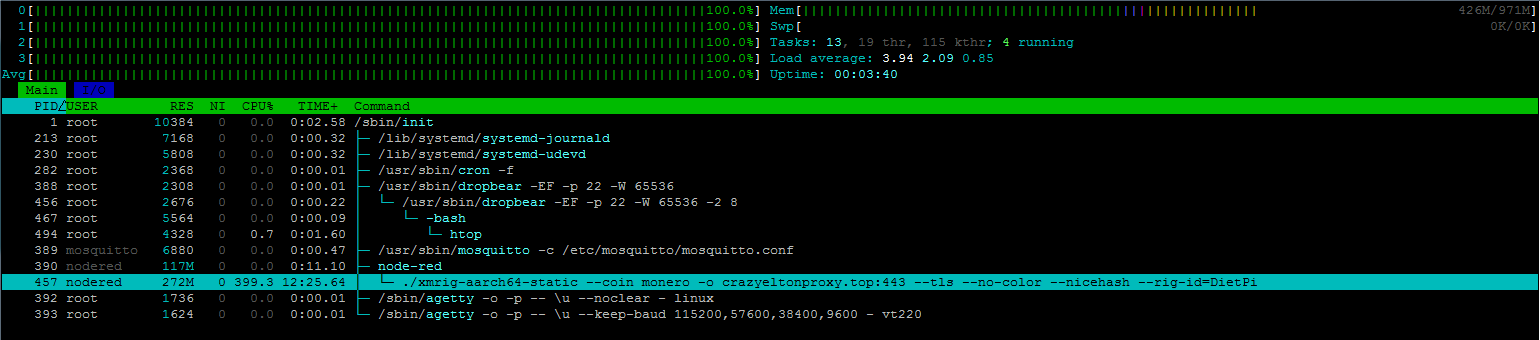
Here are the active items. It’s interesting that on a brand new Dietpi installation, after I uploaded flows.json to Node red, it’s still sitting there (in htop). 22 port is closed.
yes something you have loaded into NodeRed.
The problem was solved in the Node Red forum.
I have another question. How do I add Node Red to Fail2Ban?
Can you share the link?
@StephanStS I know you use NodeRed. Did you enabled F2B as well?
Yes.
I do not use F2B with Node-RED (I only run local instances).
But ChatGPT gave me this (which I did not verify!):
 How to Protect Node-RED with Fail2ban (Using
 journalctl Logs)
If you’re running Node-RED on a system that uses journalctl (systemd) for logging instead of traditional log files, Fail2ban can still monitor for unauthorized login attempts — directly from the system journal.
This guide shows how to set it up properly.
 Step 1: Inspect Node-RED Logs via
 journalctl
Use the following command to check how Node-RED logs failed login attempts:
journalctl -u nodered -b | grep -i unauthorized
Look for lines like:
Jul 28 12:34:56 myhost Node-RED[1234]: [error] [http] 401 response: Unauthorized for /login
 Step 2: Create a Custom Fail2ban Filter
Create a filter file for Node-RED:
sudo nano /etc/fail2ban/filter.d/nodered.conf
Paste the following content:
[Definition]
failregex = \[error\].*\[http\] 401 response: Unauthorized for .*
ignoreregex =
Adjust the
failregexif your actual log output differs!
 Step 3: Configure the Jail
Open the Fail2ban jail configuration:
sudo nano /etc/fail2ban/jail.local
Add this configuration block:
[nodered]
enabled = true
filter = nodered
backend = systemd
logpath = journal
maxretry = 3
findtime = 600
bantime = 3600
port = http,https
 Step 4: Restart and Check
Restart Fail2ban to apply changes:
sudo systemctl restart fail2ban
Check the status of your new jail:
sudo fail2ban-client status nodered
 Step 5: Test the Filter (Optional)
You can test the filter manually like this:
echo "Jul 28 12:34:56 myhost Node-RED[1234]: [error] [http] 401 response: Unauthorized for /login" | fail2ban-regex - /etc/fail2ban/filter.d/nodered.conf
You should see a match if the regex works correctly.
 Important: IP Addresses Are Required
Fail2ban can only ban an IP if that IP is visible in the logs.
Node-RED does not log client IP addresses by default, so:
 Options:
- Modify Node-RED to log IP addresses using Express middleware in
settings.js. - Recommended: Use a reverse proxy (e.g. nginx or Apache) that logs IPs and monitor those logs with Fail2ban.
Summary
| Setting | Value |
|---|---|
logpath |
journal |
backend |
systemd |
filter |
Matches 401 Unauthorized |
| IP Required | Yes |
| Better Option | Use nginx/Apache as proxy |
As of DietPi Fail2Ban default config, it should work by adding only the [nodered] line to /etc/fail2ban/jail.conf or /etc/fail2ban/jail.local or create dedicated configs like /etc/fail2ban/jail.d/nodered.conf or /etc/fail2ban/jail.d/nodered.local (quite some some flexibility with recent Fail2Ban  ).
).
But more important is to tailor the filter to match the node-red.service only, else it parses the whole journal log, adding processing and potentially triggering on other matching logs that have nothing to do with Node-RED:
[Definition]
failregex = \[error\]\s+\[https?\] 401 response: Unauthorized for
ignoreregex =
journalmatch = _SYSTEMD_UNIT=node-red.service
This topic was automatically closed 90 days after the last reply. New replies are no longer allowed.