Multiple service start failures after installing DietPi and rebooting

Creating a bug report/issue

I have searched the existing open and closed issues

Required Information

  • DietPi version | G_DIETPI_VERSION_CORE = 10, G_DIETPI_VERSION_SUB=3, G_DIETPI_VERSION_RC=3
    G_GITBRANCH=‘master’
    G_GITOWNER=‘Michalng’’
  • Distro version | echo $G_DISTRO_NAME $G_RASPBIAN

trixie 0

  • Kernel version | uname --all

Linux DietPi 6.12.75+rpt-rpi-v8 #1 SMP PREEMPT Debian 1:6.12.75+rpt1 (2026-03-11) aarch64 GNU/Linux

  • Architecture | dpkg --print-architecture

arm64

  • SBC model | echo $G_HW_MODEL_NAME or (EG: RPi3)

RPi Zero 2 W (aarch64)

  • VILROS adapter (5v 2.5A)
  • radioshack generic sd card (I have tried other SD cards, all of them had the same issue)

Additional Information (if applicable)

  • Software title | OpenBox
  • Was the software title installed freshly or updated/migrated? Installed freshly
  • Can this issue be replicated on a fresh installation of DietPi? Unlikely

Steps to reproduce

  1. Format SD card with DISKPART (Fat32s)
  2. Use Balena Etcher to flash “DietPi_RPi234-ARMv8-Trixie.img” into the SD card
  3. Place SD card into the RPi Pico
  4. Log in as root using password “dietpi”
  5. Setup fails due to timeout
  6. Go into network settings, enable wifi
  7. In wifi settings, I connect to my network
  8. Exit both menus and click “Retry” on the failed step
  9. Wait for the keyboard select screen, select US.
  10. On the root and dietpi password change, put my password (no symbols like @, /, etc.)
  11. On the software install password, put my password (no symbols like @, /, etc.)
  12. Install dietpi as a pure minimal image
  13. OPT OUT and purge data
  14. sudo apt update
  15. sudo apt upgrade
  16. sudo reboot
  17. congrats

Expected behaviour

  • …system reboots into the terminal

Actual behaviour

  • …im stuck on the blinking underscore on the top left corner of the screen. several services failed to load.

Extra details

  • …ive verified my power supply, my sd card, and added a heatsink.

Did you tried to power cycle?

BTW, point 1 is not needed. The whole driver will be overwritten anyway while flashing the image

yup. did not fix it. also, sorry if my post is unclear.

edit: i ssh’d into the pi and i found this in the boot logs:

root@DietPi:~# journalctl -b -p 3 --no-pager
Apr 20 01:53:01 DietPi kernel: Bluetooth: hci0: BCM: firmware Patch file not found, tried:
Apr 20 01:53:01 DietPi kernel: Bluetooth: hci0: BCM: ‘brcm/BCM43430A1.raspberrypi,model-zero-2-w.hcd’`
Apr 20 01:53:01 DietPi kernel: Bluetooth: hci0: BCM: ‘brcm/BCM43430A1.hcd’
Apr 20 01:53:01 DietPi kernel: Bluetooth: hci0: BCM: ‘brcm/BCM.raspberrypi,model-zero-2-w.hcd’
Apr 20 01:53:01 DietPi kernel: Bluetooth: hci0: BCM: ‘brcm/BCM.hcd’
Apr 20 01:53:17 DietPi dhclient[1040]: Failed to get interface index: No such device
Apr 20 01:53:17 DietPi dhclient[1040]:
Apr 20 01:53:17 DietPi dhclient[1040]: If you think you have received this message due to a bug rather
Apr 20 01:53:17 DietPi dhclient[1040]: than a configuration issue please read the section on submitting
Apr 20 01:53:17 DietPi dhclient[1040]: bugs on either our web page at ``www.isc.org`` or in the README file
Apr 20 01:53:17 DietPi dhclient[1040]: before submitting a bug.  These pages explain the proper
Apr 20 01:53:17 DietPi dhclient[1040]: process and the information we find helpful for debugging.
Apr 20 01:53:17 DietPi dhclient[1040]:
Apr 20 01:53:17 DietPi dhclient[1040]: exiting.
Apr 20 01:56:52 DietPi wpa_supplicant[1741]: nl80211: kernel reports: Registration to specific type not supported
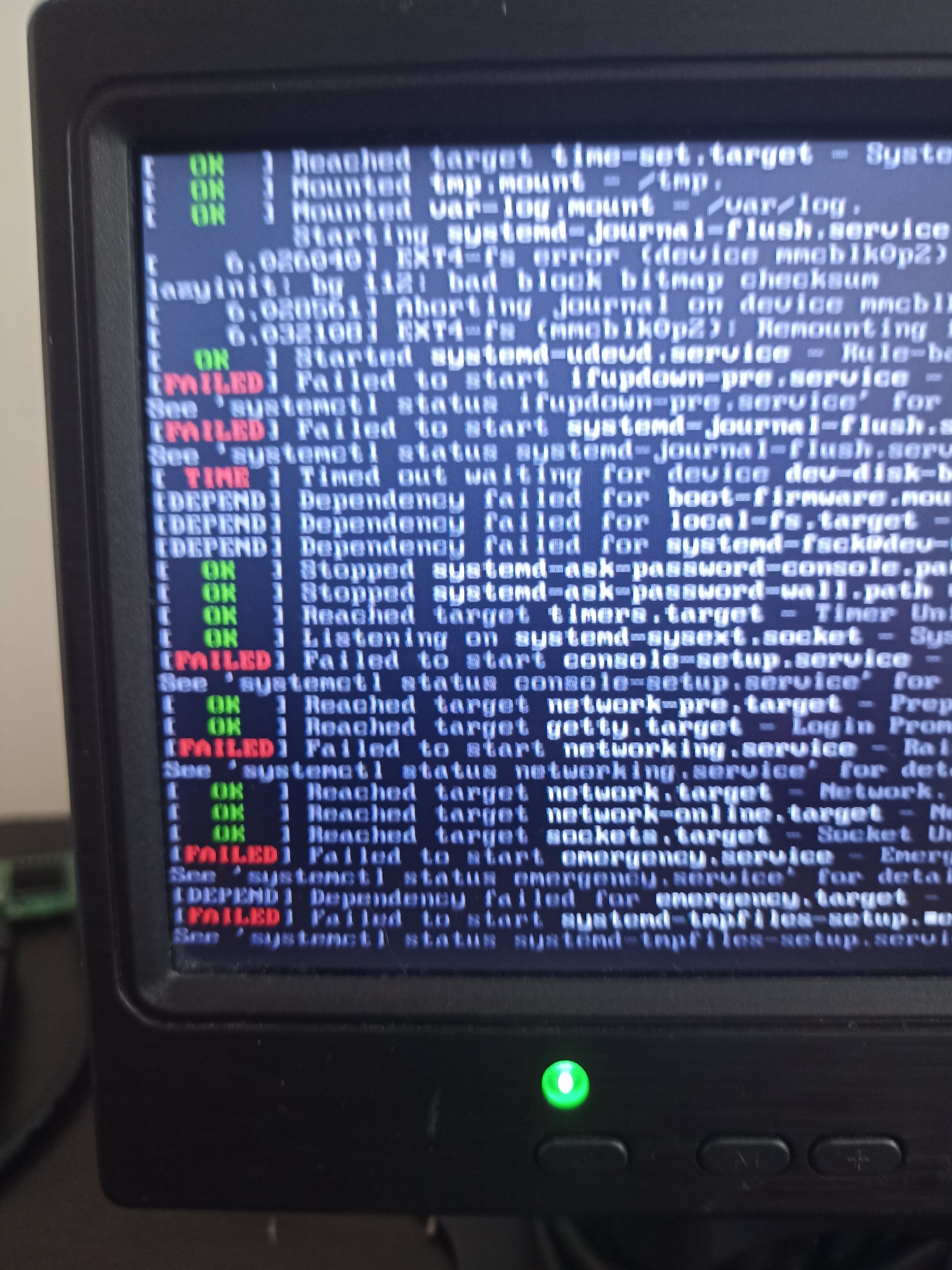
Sorry for the jse of images. I don’t have a capture card or anything to copy the errors

Looks the SD card has some issues as I see file system issue on your screen print. Maybe try another high quality one.

I’ll get one and get back to you :stuck_out_tongue:

Thank you, by the way!

btw these steps can be skipped if your pre configure WiFi before first initial boot. This way the RPi Zero 2W can connect to WiFi automatically.