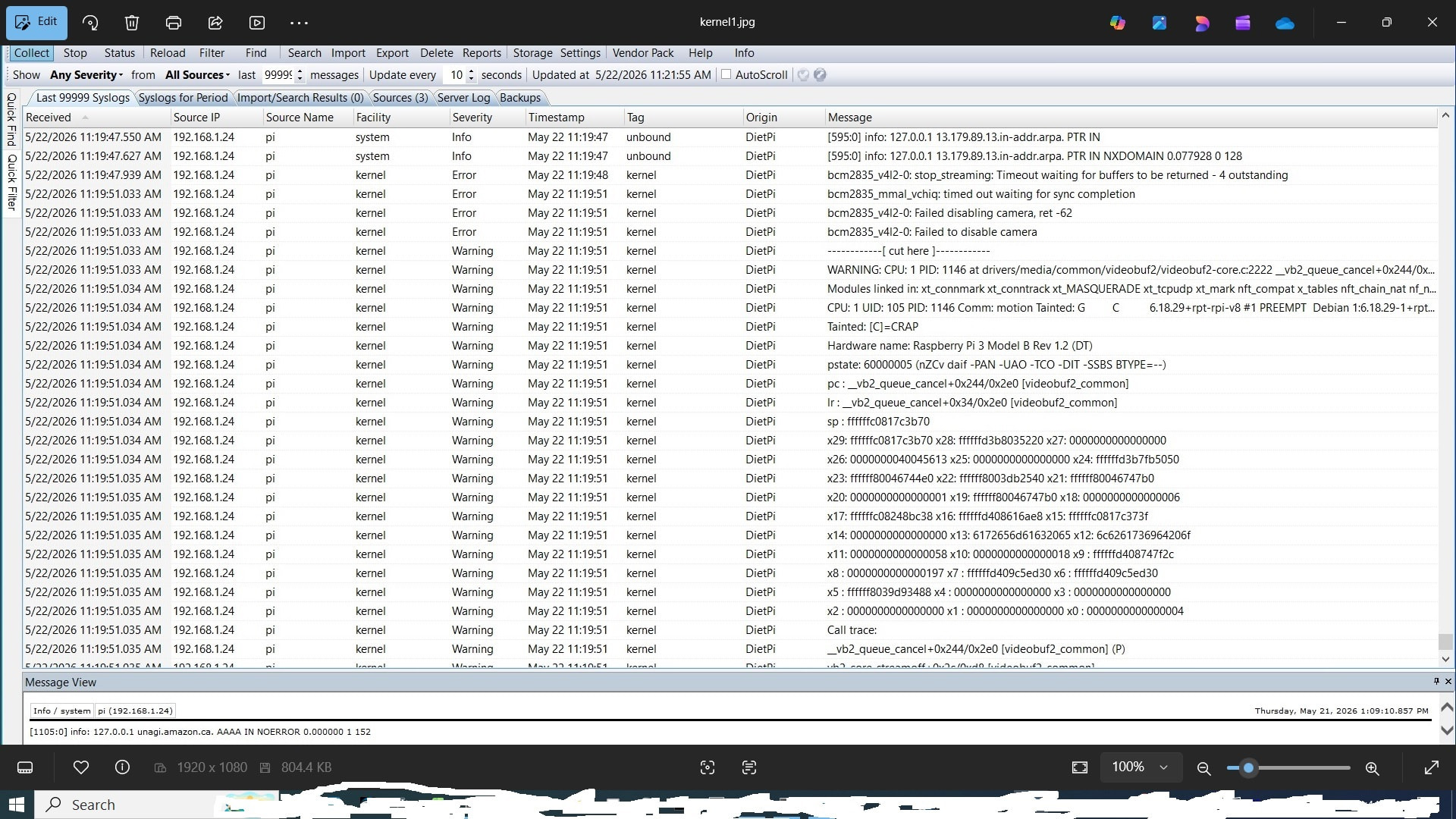
This is primary for information if someone else has this problem.
It looks like after updating from v10.4.1 to v10.4.2 the legacy Raspi-Camera does not work anymore (Pi Zero 2W).
The Log shows this:
[   25.679081] bcm2835_mmal_vchiq: buffer_to_host_work_cb: ctx: 00000000601d07eb, vchiq_bulk_receive failed -22
[   25.682573] bcm2835_mmal_vchiq: buffer_to_host_work_cb: ctx: 0000000021197984, vchiq_bulk_receive failed -22
[   25.716793] bcm2835_mmal_vchiq: buffer_to_host_work_cb: ctx: 000000006930c017, vchiq_bulk_receive failed -22
[   25.747769] bcm2835_mmal_vchiq: buffer_to_host_work_cb: ctx: 000000001ce54d90, vchiq_bulk_receive failed -22
[  109.224560] bcm2835_mmal_vchiq: timed out waiting for sync completion
[  110.248593] bcm2835_v4l2-0: stop_streaming: Timeout waiting for buffers to be returned - 4 outstanding
[  113.320567] bcm2835_mmal_vchiq: timed out waiting for sync completion
[  113.320726] bcm2835_v4l2-0: Failed disabling camera, ret -62
[  113.320815] bcm2835_v4l2-0: Failed to disable camera
And then a kernel dump.
I think this is not a dietpi related issue, i think it was caused by an update to the Debian packages. But which one?
Is there a way to “downgrade”?
I still have a working version which i can get a backup and then “try and error” to find which package causes this problem. But it will took some time.
This is already broken since maybe 2 years: RPi removed the legacy MMAL userland library from their kernel package a longer while ago, also retrospectively for Bookworm.
Though, maybe the Linux 6.18 package removed some kernel-side features/drivers as well.
Is there a way to “downgrade”?
If it was the kernel. Check for available versions:
apt policy linux-image-rpi-v6
then install e.g. the latest v6.12 version with
sudo apt install linux-image-rpi-v6=<version>
BUT, please not that the older kernel re-introduces the Copy Fail and Dirty Frag vulnerabilities, which allows any user with console access to get root access without authentication. If there is any other way, avoid the downgrade. Otherwise, assure the affected kernel modules can never load:
printf 'install algif_aead /bin/false\nblacklist algif_aead\n' | sudo tee /etc/modprobe.d/copyfail.conf
printf 'install esp4 /bin/false\ninstall esp6 /bin/false\ninstall rxrpc /bin/false\n' | sudo tee /etc/modprobe.d/dirtyfrag.conf
printf 'blacklist esp4\nblacklist esp6\nblacklist rxrpc\n' | sudo tee -a /etc/modprobe.d/dirtyfrag.conf
sudo modprobe -r algif_aead esp4 esp6 rxrpc
echo 3 | sudo tee /proc/sys/vm/drop_caches
Using the modern camera driver with libcamera interface does not work for you? Can be done like this:
Thank you so much Michalng for the nice answer. I will try and report of course!
I’ve tried switching to libcamera many times, but I’ve always failed. As far as I remember, the first problem was that the image would sometimes turn “blue.” I suspect this is due to a missing dtoverlay. The second problem was that many features no longer work with libcamera. For example, I can’t adjust the brightness and contrast, rotate the image, or activate night mode (infrared).
But let me try a few things and see if it works now.
Indeed there are/were some issues and limitations. Let me check about the blue color thing, I remember this was solvable.
EDIT: Hmm, I cannot find it anymore. I remember either here or on motionEye we discussed such case. At motionEye, I found some issues with color artifacts, which were however related to the libmicrohttp library used by motion. But there was another issue IIRC.
Anyway, worth to retry, and browse the related documentation pages:
Here are my initial findings (tested and verified):
The update was from v10.3.3 → v10.4.2 (and not from 10.4.1 as mentioned above)
It works with kernel “6.12.75+rpt-rpi-v8”
As I (and you Michalng) suspected, it has nothing to do with dietpi. It’s due to kernel update to “6.18.29+rpt-rpi-v8”.
I set this package on hold and this way it works. But it is a quick and dirty fix of course.
I will now look for other solutions. Maybe it’s just a bug and will be fixed in the future?
Edit1:
It looks like there are other problems with kernel 6.18.29+rpt-rpi-v8. Some users report network problems on Pi4. I found also some peoples who report that overlay files not working with this kernel.
Edit2:
I have problems to downgrade to the old kernel. I was able to install the old kernel with “apt install linux-image-6.12.75+rpt-rpi-v8”. But i am unable to switch to this kernel.
Edit3:
I could downgrade to 6.12.75, but only with copying “/boot/vmlinuz-6.12.75+rpt-rpi-v8” over “/boot/firmware/kernel8.img” which is very ugly i think.
And the camera is working again!
Migrated dietpi from VM to Rpi 3B with pi-hole, unbound , tailsacle & X installed. To make the Rpi Camera V2.1 as CCTV, I installed MotionEye. Everything was working fine.
Then run dietpi-update from V10.3.3 → V10.4.2. Motioneye broke and got the same error msg
"bcm2835_mmal_vchiq: timed out waiting for sync completion".
So does it mean that the following two commands will fix my MotionEye problem.
Perfect! Someone mentioned that there’s a firmware update and that it makes things run “more stable”. But I’m too scared to install the update!
Edit1:
Okay, I’ll put on my helmet and jump off the cliff…
Edit2:
That was a really stupid idea. No, it doesn’t work even with the updated “raspi-firmware.”
Edit3:
Don’t worry, I’m still alive—the cliff was only 15 cm high!
I tried to switch do modern rpi-camera. But it looks not really good.
rpicam-hello looks not good:
[0:13:56.217684046] [2730]  INFO Camera camera_manager.cpp:340 libcamera v0.7.1+rpt20260429
[0:13:56.259649880] [2733]  INFO RPI pipeline_base.cpp:1123 Using configuration file '/usr/share/libcamera/pipeline/rpi/vc4/rpi_apps.yaml'
[0:13:56.343087171] [2733]  INFO IPAProxy ipa_proxy.cpp:184 Using tuning file /usr/share/libcamera/ipa/rpi/vc4/ov5647.json
[0:13:56.364247432] [2733]  INFO Camera camera_manager.cpp:223 Adding camera '/base/soc/i2c0mux/i2c@1/ov5647@36' for pipeline handler rpi/vc4
[0:13:56.364431338] [2733]  INFO RPI vc4.cpp:445 Registered camera /base/soc/i2c0mux/i2c@1/ov5647@36 to Unicam device /dev/media2 and ISP device /dev/media0
Bus-Zugriffsfehler
Not sure why i get a bus error? And then motion does also not work because it does not find /dev/video0. But I think that’s a follow-up error.
Edit1:
I get always “Segmentationfault” with rpicam. I have absolutely no idea why. I wonder if it’s because it’s a v7 installation (and not a v8 → 64bit).
Edit2:
Tested with another PiZero2W which is running with aarch64 and it works! So it looks like something is wrong with v7. I will reinstall the v7 with aarch64 and do more tests.