Cool, I installed it and it runs - however it doesn’t update for some reason, so it’s about 114 commits behind the current version at present.
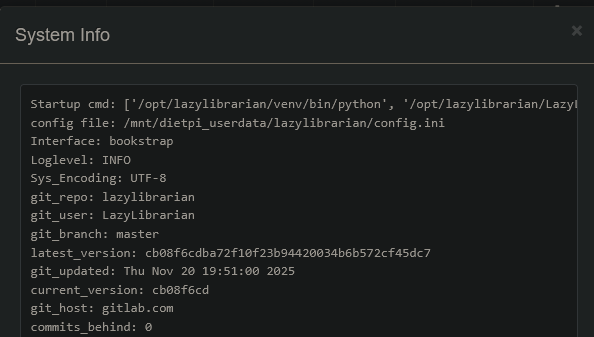
I am running DietPi 9.19.2 on a mini PC with a 1GB NVME boot drive, 16GB RAM, and an Intel N100 CPU. There is no other version of LL running on it. (I used to run it set up manually with DietPi on a RPi5 but I use that RPi for other stuff now, and the aforementioned PC is the only DietPi machine I have now.) I just installed LL from the DietPi-Software list, and did nothing else other than connect it to Prowlarr for indexer sync, and set up the downloaders myself. It is on Debian 12 however, I haven’t upgraded it to 13 yet.
Debian 12 shouldn’t be a problem, LL wants at least python 3.7 and Debian 12 comes with Python 3.11.
And when you click on “check version” in the LL dashboard, what does it show?
And what happens when you try to update: dietpi-software reinstall 169
Oh, it seems I missed to grant it permissions to do that, when splitting the install dir to /opt/lazylibarian. But it really does have an internal updater, not just an update checker, right? Because in our docs we suggest dietpi-software reinstall 169.
But on the other hand, we manually pull and store the used commit, to prevent an unnecessary update attempt on first service start, unless I meant the update checker with this. Weird, swiss cheese memory about this part.
Anyway, try this:
sudo chown -R lazylibrarian /opt/lazylibrarian
That directory contains the Python venv as well, let’s hope, the updater does not remove it, in case. Otherwise we’d need to move that to /mnt/dietpi_userdata/lazylibrarian/venv instead.
Yes, it has. It updates via git (pull --no-rebase origin {branch}), but the user could also use the internal REST API.
I used dietpi-software reinstall 169 and it is now up to date.
But git can be and is used only if it was installed via git clone in the first place:
if CONFIG['INSTALL_TYPE'] == 'git':
But it has a
elif CONFIG['INSTALL_TYPE'] == 'source':
section as well, where it downloads the tarball, extracts it into a dedicated update directory, and then copies in place file by file. So this does not break the venv. Hence
sudo chown -R lazylibrarian /opt/lazylibrarian
should indeed make the internal updater functional. I’ll test this.
EDIT: Ahh, now I remember:
- The update is not possible via web UI. There the version is checked, but there is no update button or any way to trigger it.
- There is the
--updateCLI option, but it triggers an automatic update on every service start, which AFAIK is not great by default. There should still be a way for users to decide whether and when they want to update. Especially since it does not use releases/versions, but just commits on the single master branch, this would trigger updates on system/service restarts every few hours, with full archive downloads and installs for possibly tiny changes. E.g. last commit isMinor changes, updated unittests, i.e. updated tests which does not even affect the LazyLibrarian server at all. - Then there is the REST HTTP API indeed. But it needs to be enabled first, and an API key needs to be created and used. We do not enable the API on install since usually only a rare number of users use it, and others would then have an unknown admin access channel open, probably not even knowing about it, and probably with some default password.
- This is why I did not make if functional. The
dietpi-software reinstall 169is easy enough and documented in our docs. - Once they implement an actual update button into the GUI, we can adjust things to make that functional.
There is also another quirk:
When restarting the service via the LL web panel the service does not come up again. Probably because we start it as a systemd service?!
Hmm yeah, the service has no restart handling. The service they use is 8 years old and uses the init.d service: init/lazylibrarian.service · master · LazyLibrarian / LazyLibrarian · GitLab
But it has KillMode=process and GuessMainPID=no as Type=forking (needed to work with the init.d service). So it basically has no idea which process the true process is and RemainAfterExit=yes anyway, leaving LL to do whatever it wants and never disturbs it.
We have a true systemd service which starts LL as foreground service. As usual, once the foreground process stops, systemd sends SIGTERM and in case finally SIGKILL to the whole control group. This makes internal restarts impossible, and also some kinds of internal updaters.
In such cases, this usually works:
KillMode=process
Restart=on-failure
So if it detects the foreground service has stopped, it does not send SIGTERM to the whole control group. Also when stopping the service SIGTERM is sent to the foreground service only, no child processes, which means that one needs to stop all other possibly running processes on its own. And if the exit code was non-zero or it as some external signal, the service is automatically restarted.
We only need to verify that a restart from web UI triggers an error or abnormal exit code, or that LL execv itself. Will test.
EDIT:
Nov 23 23:03:45 VM-Trixie systemd[1]: lazylibrarian.service: Deactivated successfully.
Nov 23 23:03:45 VM-Trixie systemd[1]: lazylibrarian.service: Consumed 8.676s CPU time, 208.2M memory peak.
No “failure”. So Restart=on-failure has no effect here. Also, KillMode=process allows LL to start back up, but it does not use execv, hence it really forks a child, and that child then kills the parent, after which systemd assumes the service ended. It can be combined with RemainAfterExit=yes in which case it always assumes the service is still up, also when using the “Shutdown” button from UI. Also STDOUT is detached, systemctl stop lazylibrarian will not kill the child and consecutive systemctl restart/start lazylibrarian will run into an error as the port is blocked. So that is a bad solution, systemd must be able to kill the child on explicit restart/stop, else havoc is programmed.
Another way would be Restart=on-success or Restart=always. This works fine for “Restart”. It kills the internally forked child and triggers a new instance, but in logs I do not see anything of this, since the child’s STDOUT is detached. So while there is some unnecessary processing, it is not visible at least. However, the “Shutdown” button results in a restart as well. LL returns the same exit code 0 in both cases, no way to know from that whether a restart is wanted or not. Other processes use a special exit code for those cases which can then be configured in systemd, or they use execv to replace the old process without changing PID or detaching STDOUT, which is the cleanest way.
But hey, I found something new: systemd.service
ExecType=cgroup makes it keeping the service active on “Restart” since the child from the same cgroup is there. Yeah, best solution so far:
- “Restart” works
- “Shutdown” works
systemctl stop/restart lazylibrariandoes not break after “Restart” since it does send SIGTERM to the child.- Only minor issue is that the child’s STDOUT is detached, so logs from the process startup, before the config file is parsed, are not visible anymore. But aside after that, the common operation logs are done to syslog explicitly, hence still shown in
journalctl -u lazylibrarian, and other specific logs to/var/log/lazylibrarian. So it really is only those logs before the config file is parsed, acceptable.
Fixed with: dietpi-software: LazyLibrarian: fix web UI "Restart" button · MichaIng/DietPi@77e6c78 · GitHub
G_SUDO G_CONFIG_INJECT 'ExitType=' 'ExitType=cgroup' /etc/systemd/system/lazylibrarian.service '\[Service\]'
sudo systemctl daemon-reload
Maybe needed once if the service is currently up, not sure:
sudo systemctl restart lazylibrarian