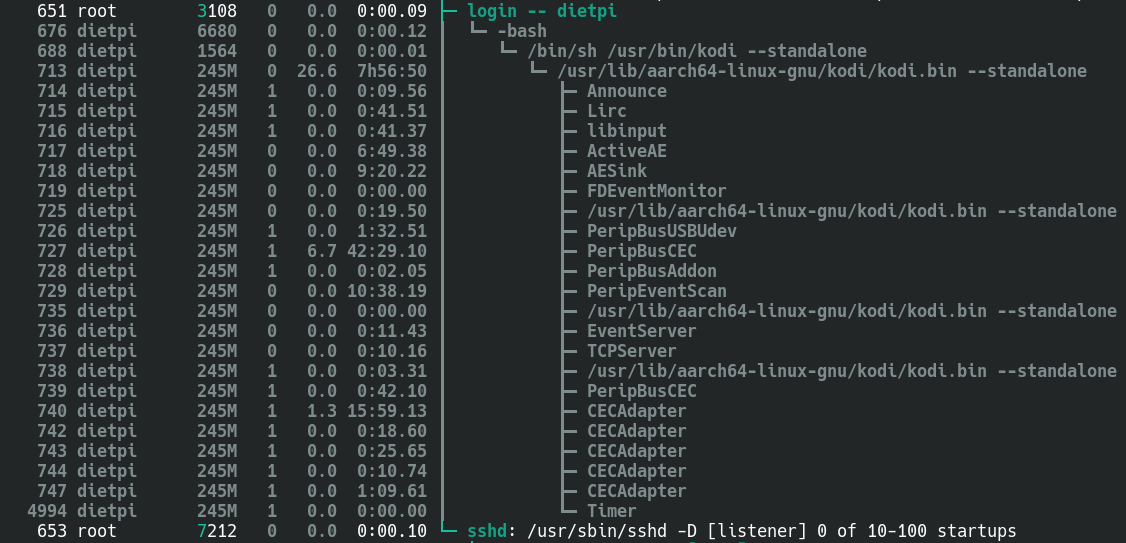
apparently this is normal, but i’m curious as to why kodi.bin is using significant cpu when idling (nothing playing, kodi home screen)? according to ps aux, it’s using around 20% (on 1 core i assume)
kodi installed from dietpi
governor: schedutil
Good question, not sure either. Is hardware acceleration working? Which hardware?
In htop you can change options to show userland threads. Maybe Kodi uses some threads with meaningful names which reveal the component that causes the load.
hardware is a Pi 3b + TV and the Pi is hard-wired to my router
i don’t know whether hardware accel is working
i’ve seen several posts elsewhere that said that seeing high CPU is normal when the schedutil governor is being used (default in my case), but i’m not seeing high CPU in other processes and changing the gov. to powersave produces a higher CPU readout
in userland space (and thanks for suggesting that) with custom names enabled in htop, there’s a couple of threads that spike every second or so, the PeripBusCEC being the highest in CPU, but it uses less than 7% - total threads CPU is probably less than 9%
in any case, it seems like there’s something goofy - i don’t know why kodi would be doing anything at all when it’s “idle” and there’s no scraping or anything else going on
On a Raspberry Pi it will be. You are on Debian Trixie already or is it a Bookworm instance?
echo $G_DISTRO_NAME
Should be Kodi 21 in both cases, but the Bookworm package was built with different tools.
I am actually not sure whether/how much idle CPU load is common. I will test it on a VM just to see how much idle load the plain Debian package has. On RPi it is from RPi Ltd => archive.raspberrypi.com APT repository.
trixie - and kodi was installed from the dietpi package manager - i’m only using it in what i suppose is ‘file’ mode (no scraping, no metadata) … which begs the question; is there a lighter weight alternative to kodi that has all the codecs? i know there’s a few in the dietpi repo, but i’ve no idea what might be ‘best’
It seems like this base load is expected. I just installed it on a NanoPi R6C which has slightly better performance than RPi 5 across 8 cores, but not so good hardware acceleration support, and idle Kodi load is ~22% of one core. I have no HDMI screen (am on a conference), so there is not even something it needs to draw, hence I guess this is some background processing not related to actual graphics or video stuff. Might be something to ask in the Kodi community: Kodi Community Forum
I don’t think so. This is default Kodi build close to upstream, no extra stuff pre-installed, so i don’t think there is a lighter way. Older Kodi versions might be lighter, but also … older.