Improved OPI zero 2w sound script?

Hi Totof,

I have been tinkering with a bigger OPI zero 2w setup script for my “2005” TV streaming setup, including; xfce, pulseaudio, pavucontrol, x11vnc, Chromium adblock extension moonlight qt and a lot more!

To get to the point, I wanted it all automated. The injection sadly broke the automation and I asked AI how it could be done differently.

Not sure if the sleep is necessary, but it works for me every single time :slight_smile:

— Wait for /boot/dietpiEnv.txt to be ready —

echo “Waiting for /boot/dietpiEnv.txt to be ready…”
while [ ! -r /boot/dietpiEnv.txt ]; do
sleep 1
done
sleep 2 # extra buffer time

sed -i ‘s/^user_overlays=.*/user_overlays=sound-hdmi-jack-i2s0-hat/’ /boot/dietpiEnv.txt

Cheers,

Arrafar

Hello Arrafar

Good idea but have you try the sed command for a fresh install

I think the command G-config-inject of Dietpi is neccessary for the first time

Possible to try next week
:winking_face_with_tongue:

Hello Arrafar

IA is a bad companion for who search to go further :blush:

If you have a look at the end of the Dietpi-globals function, you can
understand why it’s better to use G-config-inject function for login
and password instead to use the sed command
see here for more detail dietpi-globals on github’s Michaing

The question is how implement the G-* command in your script
i search for mine too

You would need to source DietPi globals script into yours. This should allow using DietPi commands, hopefully.

Hi Joulinar

Thanks for your answer
How to source it explicitly ?, please

This is an example of an own script that I use to create and update a Docker container using some DietPi global functions.

#!/bin/bash
. /boot/dietpi/func/dietpi-globals

# Check for existing NginxProxyManager container
eval container=$(docker container ls -a | mawk '/jc21\/nginx-proxy-manager/{print $1;exit}')
[[ $container ]] && G_EXEC docker container rm -f "$container"
eval image=$(docker image ls -a | mawk '/jc21\/nginx-proxy-manager/{print $3;exit}')
[[ $image ]] && G_EXEC docker image rm "$image"
docker volume ls -q | grep -xq 'npm_data' || G_EXEC docker volume create npm_data

# Deploy the NginxProxyManager container
G_DIETPI-NOTIFY 2 'NginxProxyManager will be deployed now. This could take a while...'
#G_EXEC_OUTPUT=1 G_EXEC docker run -d -p '80:80' -p '443:443' -p '81:81' --name=npm --restart=always --env 'DB_SQLITE_FILE=/data/database.sqlite' -v 'npm_data:/data' -v '/mnt/dietpi_userdata/docker-data/volumes/npm_data/_data/_hsts_map.conf:/app/templates/_hsts_map.conf' -v 'npm_data:/etc/letsencrypt'  'jc21/nginx-proxy-manager'
G_EXEC_OUTPUT=1 G_EXEC docker run -d --dns 192.168.0.11 -p '80:80' -p '443:443' -p '81:81' --name=npm --restart=always --env 'DB_SQLITE_FILE=/data/database.sqlite' -v 'npm_data:/data' -v 'npm_data:/etc/letsencrypt'  'jc21/nginx-proxy-manager'
root@DietPiProd:~#

Hi again

I try with this two line at the top of the script or the end

#!/bin/bash
. /boot/dietpi/func/dietpi-globals

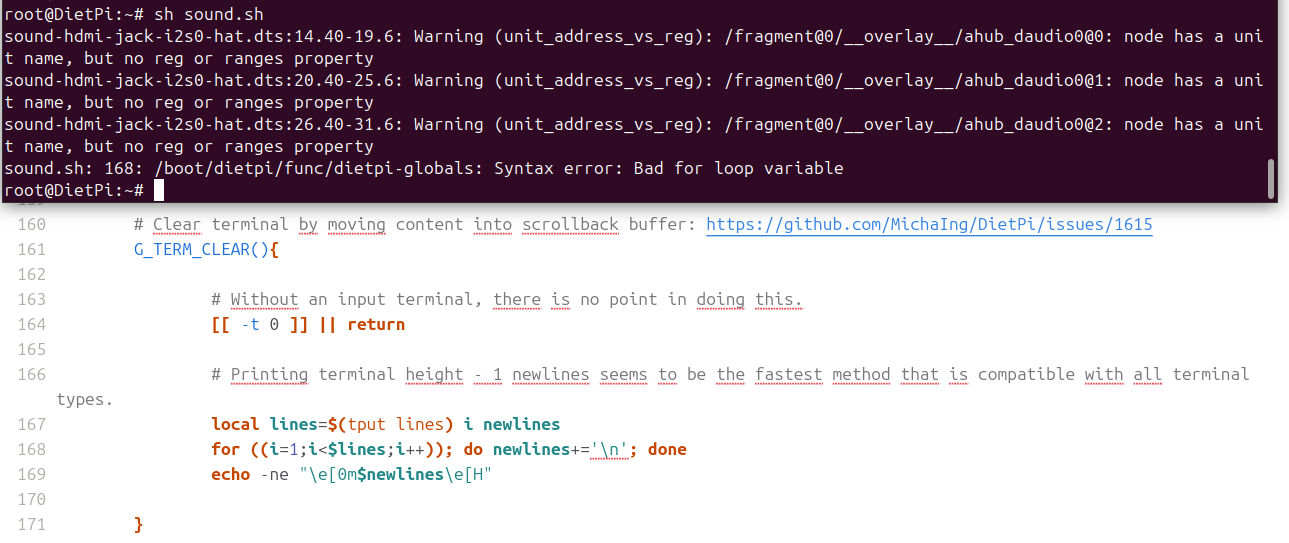
But i have an error at the line 168 of the dietpi-globals file
in this capture , the terminal and a view of the line 168

I search why ?? :blush: :blush:

I need to remove the last line of the file dietpiEnv.txt with the old
line “user_overlays=sound-hdmi-jack-i2s0-hat”

Should be at the beginning of your script

I have the error with the two line at the top of the script :roll_eyes:

Something @MichaIng would need to have a look into

It is a bash script, so you need to execute it with bash. sh is bourne shell, dash practically on Debian.

Or you just add a shebang #!/bin/bash as first line, make it executable, and execute it directly.

Btw, at which point is this script needed? /boot/dietpiEnv.txt should always exist :thinking:.

G_CONFIG_INJECT is mainly useful in cases where you do not know whether the setting key is present in a config file already or not, or whether it is commented:

  • If the setting is present already, it just updates it.
  • If the setting is present, but commented, like #user_overlays=foo, it us uncommented and updated.
  • If the setting is not present, it is added to the end of the file, optionally after a specific line matched with an optional 4th argument.
  • And it has some more options, e.g. to mask passwords from terminal output, which it produces about what is done, useful for our scripts for transparency.

In this particular case: user_overlays is present in all recent DietPi images, to a sed like you did should work as well.

Thanks MichaIng

So the sed command can replace and be usefull to expand the script

I try latter, to hot now in South of France :zany_face: