Creating a software or image request, pls use GitHub
I would like the ability to rename backups and see the meaningful name in dietpi restore
you are free to name a backup on your wish already. You can choose path and name of a backup using dietpi-backup
I guess you mean to name the individual iterations of a backup when keeping multiple backups? These are currently currently just serially named data, data_2, data_3, …? That would require a rework of how iterations are rotated right now.
Though, I could think of something like a “custom”/“extra” backup option, which creates a separate iteration with custom dir name within the chosen parent location, which prompts for the custom name. That would just remain next to the serially named dirs, and would never be removed by the backup rotation. So you’d have something like:
data
data_2
data_3
data_before-beta-test
However, what is already possible now is to temporarily switch to a new backup location, to keep an extra backup with custom (parent) directory name. Hence for me, this has low priority at the moment, as there are more urgent things to tackle. PRs are always welcome, of course.
A long-term idea for a better rotation that does not depend on specific naming, and would generally allow to keep a separate number of weekly and monthly backups (an existing feature request), is to do it based on the modification date of the contained stats file (EDIT: I mixed it up, there is no individual stats/log per iteration, only for the whole backup dir, hence we’d need to get a correct date from elsewhere, probably by assuring the data_* dir itself has it updated when a backup runs.). So a logic might be roughly like this:
data_* dirs) by the mdate of their stats/log fileWell what I was hoping for would be the ability to name a backup as well as the date of the backup something like:-
openclaw-with agent-withdate
openclaw-with-2 agents-withdate
etc
because at the moment if you manually rename a backup it is not displayed when using restore
Usually you can search for existing backups even if they rename
This does not work in my use case and additionally it is not what I requested
We are trying to show you ways how to achieve what you need with the current dietpi-backup, since adding this feature natively is currently not on someones ToDo/low priority.
A misunderstanding is that you are AFAIU you are renaming a single data_* iteration within a backup location, not the whole backup location. But only the latter will currently work:
Both paths can be found with the “Search” option as well now, since they are independant backup locations. Keep in mind that, if enabled, the daily backup runs on the currently selected location.
Well thank you for trying to help, however I already know I could use different locations and in my use case I am doing just that, I am using an NMVe drive partitioned to include a separate backup partition ,what I would like, if it is possible, is to be able to have whatever name I choose in that backup partition even if it meant manually renaming the particular backup. however if I do rename the backup it is not seen by restore.
Can you give an example what you do to rename things
Yes, I have a partition on my MVNe drive 3 partitions partition 3 being dedicated to saving backups.
/0930973233100979743/dietpi-backup/data data_2 data_3
if for example I manually change the name of /data_2 to say ‘openclaw’ restore does not see it anymore
It would be very good if restore was able to see the changed name.
root@DietPi:~# ls /mnt/6d8eb091-e2c4-4bf8-b0d4-61c618c713f1/dietpi-backup/
data data_2 data_3 dietpi-backup.log
To something like ls /mnt/6d8eb091-e2c4-4bf8-b0d4-61c618c713f1/dietpi-backup/
data data_2 openclaw dietpi-backup.log
And for restore to actually see openclaw so it could be restored
root@DietPi:~#
Would you expect that backup iteration to be rotated like the others, i.e. that it is overwritten when it is the oldest, and you reached the max amount of backups to keep?
Or shall such custom named backup remain forever, until you remove it manually, and just appear in the restore menu?
Honestly I don’t understand the use case. These are daily backups that you manually rename? Why?
Yea okay, changing names of automatically created iterations is currently not supported by the script, but could possibly be achived with an extra menu entry which let you rename it and the correct order for restoration is determined by the date of the iterations. Or maybe save the order of iterations as a list in an extra file 
But as a workaround my method would work, but you will create a full backup every time, without the advantage of having increments.
for my use case I use full backups, I am experimenting with complex versions of openclaw so I might have a version which does x y and z and another which incorporates substantial modifications so I just want to name the backups so I remember what each does and then to be able to restore them with restore
You would need to rename the dietpi-backup folder, not the data folder.
This sounds like you do not want them to be rotated? The oldest interation of a backup is lost when the amount limit is reached. So the way these iterations are designed, and their original purpose, does not match the use case of a permanent backup that was created as a certain state to preserve. We could theoretically relax the condition for listing backup interations in the menu, but I feel it contradicts the aim.
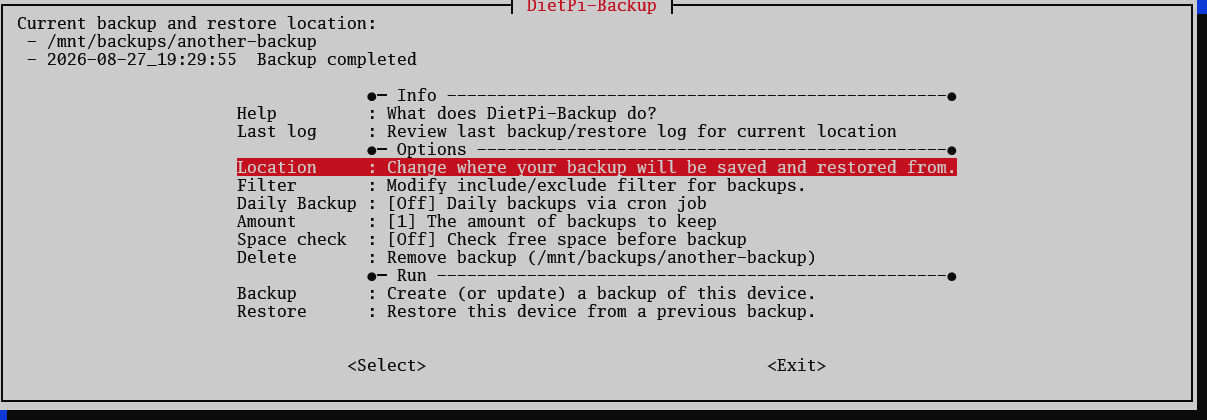
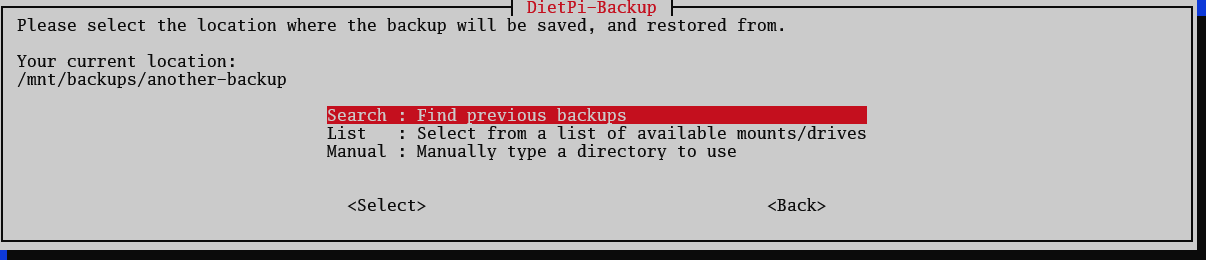
What seems to better match your use case is to be able to manage multiple backup locations more seamlessly than searching or typing the paths via “Location” menu each time:
Just an idea, but maybe I am also thinking too complex. A separate option to create an extra backup that is just not rotated, but still listed for restore, might be sufficient.
Good afternoon, either of your suggestions would help me and perhaps option 2
“A separate option to create an extra backup that is just not rotated, but still listed for restore, might be sufficient.”
Would as you say be sufficient at least for now, thank you.