Kernel version | Linux Control-Unit 6.12.75+rpt-rpi-v8 #1 SMP PREEMPT Debian 1:6.12.75-1+rpt1 (2026-03-11) aarch64 GNU/Linux
Architecture | arm64
SBC model | RPi 4 Model B (aarch64)
Power supply used | RPi-PoE-Hat
SD card used | SanDisk ultra
Additional Information (if applicable)
Software title | X11 - XFCE
Was the software title installed freshly or updated/migrated? Fresh install
Can this issue be replicated on a fresh installation of DietPi? Yes
← If you sent a “dietpi-bugreport”, please paste the ID here →
Bug report ID | d18a2b3d-186c-4aab-b5d9-7fee3d16653b
Steps to reproduce
Install Dietpi
Install X11 (XFCE)
Expected behaviour
Automatic boot via lightdm in to x11
Actual behaviour
Console Login and no X11
Extra details
I discovered that lightdm has an error “Error getting user list from org.freedesktop.Accounts: GDBus.Error:org.freedesktop.DBus.Error.ServiceUnknown: The name org.freedesktop.Accounts was not provided by any .service files” so i installed the package “accountsservice” and this error was gone but still no x11.
Then i discovered that it is not possible to “startx”. There was an error (can’t remember exactly what) that it can not connect to dbus. So i installed the package “dbus-x11”.
Now i can run “startx” and X11 is starting, but it does not start automatically
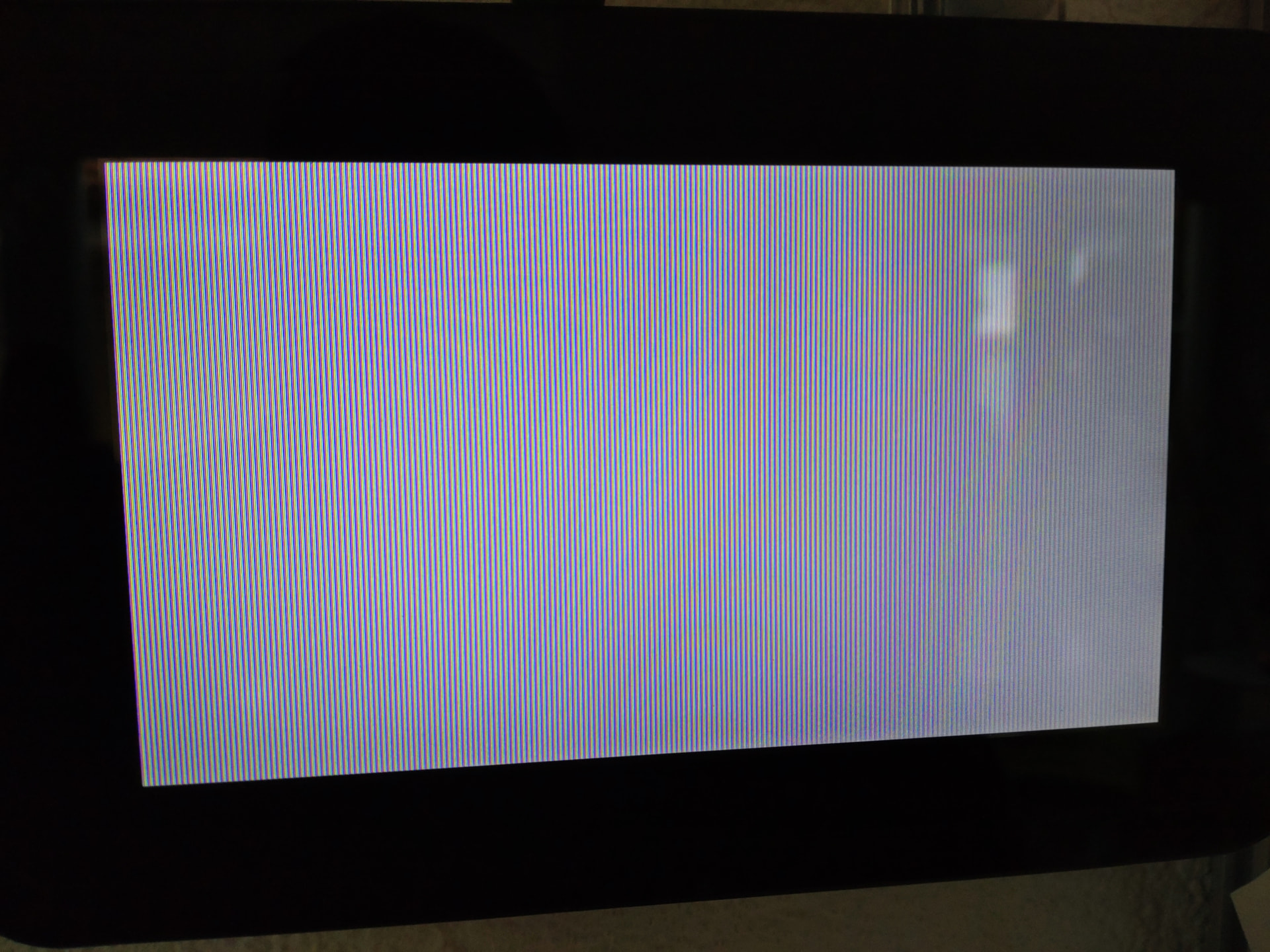
I also discovered that if “dtoverlay=vc4-kms-v3d” is set in “config.txt” the 7” Display only shows white stripes and no picture (also no cli login screen)
Unfortunately, I don’t know how to investigate this further.
And somehow I seem to remember that we’ve had this problem before, but I can’t remember the solution.
Yes, option is now set to “2” login with user “dietpi”. I tried now with user “root” and it works!!!
So it looks like it is a permission problem.
Interesting:
If i enable “dtoverlay=vc4-kms-v3d” in “/boot/firmware/config.txt” i always only see this screen on the 7” Original RPI-Display over DSI (It doesn’t matter whether I choose cli or x11 to start.):
Yes, it is set to “RPi Touchscreen : 800x480” which should match i think.
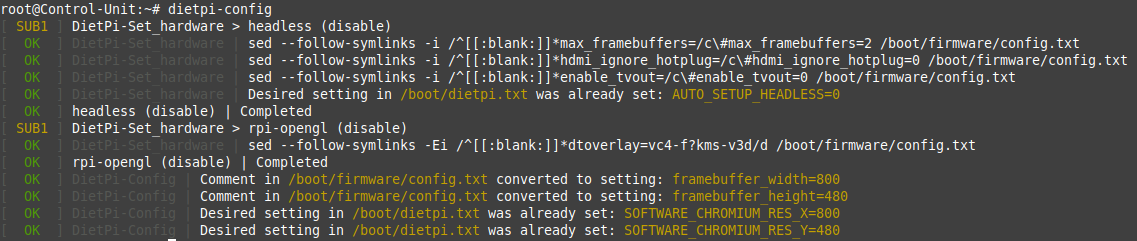
It looks like it sets:
framebuffer_width=800
framebuffer_height=480
dtoverlay=vc4-kms-v3d
The first two are not a problem, but as soon as “dtoverlay=vc4-kms-v3d” is set the screen has only white stripes.
Edit:
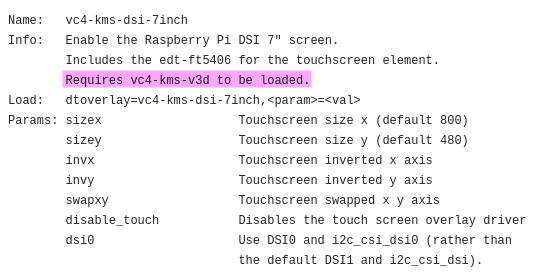
Also tried “dtoverlay=vc4-kms-dsi-7inch” but to no avail.
Edit2:
Ah, i think now i understand that thing. Looks like both options must be enabled!
dtoverlay=vc4-kms-v3d
dtoverlay=vc4-kms-dsi-7inch
Now the display stripes are gone and it works! So one problem found and solved.
But i think it needs to be done by dietpi-config if “RPi Touchscreen” is set. I have Touchscreen v1 i think. Not sure if v2 is the same (needs the same options?).
Edit3:
Ahm… Now also autologin with user “dietpi” to x11 is working! ATM it looks like for 7” Display the only thing that it is needed are this two options in config.txt.
But i have now done a lot of “things” and i like to reflash and test fro scratch.
Edit4:
I tested it again from scratch and yes, it “just” needs “dtoverlay=vc4-kms-v3d” and “dtoverlay=vc4-kms-dsi-7inch” and all works fine.
Next, I’m going to try what I actually set out to do: Upgrading from Debian 12 to Debian 13. Since that didn’t work, I ended up reinstalling the whole system and ran into this bug.
Edit5:
Update Debian 12 → 13 has worked and after add both dtoverlays all is fine. Unbelievable!
The solution is simple:
It “just” needs “dtoverlay=vc4-kms-v3d” and “dtoverlay=vc4-kms-dsi-7inch” for 7” RPi-Touch DSI-Display.
So i think on Debian 13 it is needed to add them both if “RPi Touchscreen” is selected from dietpi-config.
If “dtoverlay=vc4-kms-v3d” is missing then x11 does not start with user dietpi. And if it is there the 7” Display does only show white stripes. Only if both options are there all is good and working.
Correct.
If you select “7” Touch Display” in dietpi-conf, it only sets “dtoverlay=vc4-kms-v3d” but it should also set “dtoverlay=vc4-kms-dsi-7inch”. Both entrys in config.txt are needed.
Basically dietpi-config requires a major rework to remove all legacy (non-DRM/KMS) graphics options, which means that almost all LCD options are removed as well. Instead, there is the generic display_auto_detect=1 to enable supported overlays automatically based on detected hardware. Does this work as well instead of vc4-kms-dsi-7inch? vc4-kms-v3d needs to remain, of course.
With which dietpi.txt setting or which dietpi-config option? A valid 7" DSI display option does not exist, and vc4-kms-v3d is only enabled when selecting the respective resolution entry (or when installing software which requires KMS/DRM).
It removesvc4-kms-v3d, as this way of setting the resolution only works with legacy graphics. Also, this menu is/was really only supposed to set the resolution, not to enable DSI display support. With legacy framebuffer driver, there were overlaps, but the DSI displays (compared to HDMI) usually require some additional changes done via device tree overlay, or scripts/services.
This all needs to be removed from dietpi-config, in favor our dietpi-display to set the resolution with KMS/DRM, and a generic LCD support toggle which sets display_auto_detect=1.
OffTopic:
It seems to be a bit of a mess, just like with libcamera and the GPIO pins (a lot of legacy stuff). It varies depending on the Debian version you’re using (legacy/new style). This “problem” here was first introduced in Debian 13.
This has nothing to do with Debian, but is entirely RPi-only closed source Broadcom/vendor => mainline Linux driver and library transition:
RPi legacy GPU driver => KMS/DRM
RPi legacy camera driver => libcamera (sadly still pretty much RPi-only, instead of generic V4L2)
RPi legacy GPIO interface => generic libgpiod, lgpio and other libraries
And also RPi OS Bookworm repositories retrospectively removed a lot of these library blobs for MMAL, DispmanX, and others, all which were previously located below /opt/vc.
Of course that’s true, but for me as an “end user,” it depends on which version of Debian is installed. If I have an old version 10, I have to do it one way; with version 12, another way; and with version 13, yet another way. That’s what I meant.
And that’s a bit annoying.
You can use the new methods on Debian 10 as well. The old ones were mostly deprecated a long time ago, just the removal happened in preparation for RPi 5 Trixie (RPi OS) images and retrospectively for Bookworm.
Update with bad news:
I’ve just realized that the display works with “display_auto_detect=1”, but the touchscreen isn’t responding!
For the 7" RPi-TouchDisplay it needs:
dtoverlay=vc4-kms-dsi-7inch
dtoverlay=vc4-kms-v3d
That’s a very fitting and insightful article you’ve written. Changes are good, of course, but constantly changing things is bad. Especially because it consumes a lot of resources (especially for developers like you).
BTW: There are still things that don’t work with libcamera or are very cumbersome. The same applies to libgpiod. Developers really don’t have it easy.