Date | 2026-02-07 15:19:24
Program name | DietPi-Drive_Manager
Command | mount -o noatime,lazytime,rw,permissions,big_writes /dev/sda4 /mnt/F40E7C7B0E7C3926
Exit code | 255
DietPi version | v10.0.1 (MichaIng/master)
Distro version | bookworm (ID=7,RASPBIAN=0)
Kernel version | Linux HarderPi 6.12.62+rpt-rpi-2712 #1 SMP PREEMPT Debian 1:6.12.62-1+rpt1~bookworm (2026-01-19) aarch64 GNU/Linux
Architecture | arm64
Hardware model | RPi 5 Model B (aarch64) (ID=5)
Power supply | (EG: RAVPower 5V 1A)
SD card | (EG: SanDisk Ultra 16 GB)
Update from 9.x to 10.0.1
reboot
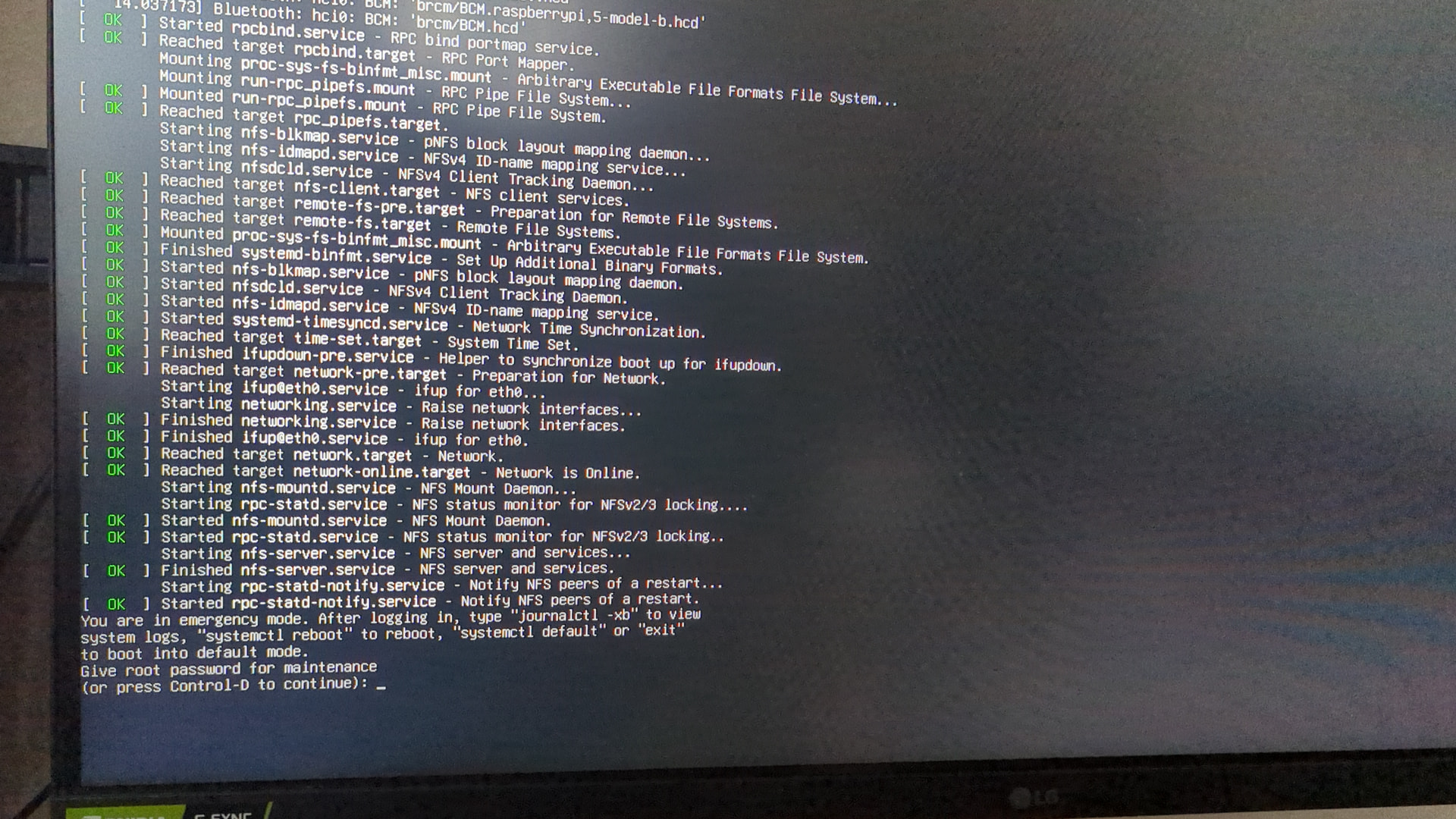
get notice about maintance mode (see Help with booting problem Rpi4 and Ssd )
continue with Ctrl-D
try to mount drives with Drive_Manager
after reboot it should start normally and auto login without me going to raspi and manually put the device out of maintance mode
auto mount drives without problems
after reboot my pi tells me that it started in maintance mode
drives can’t be mounted, nor with Drive Manger, nor per command line
I have paperless and ownfoil running as docker service by other user
Can you share a picture or error message? DietPi don’t have a maintenance mode. Mean’s, it’s something else.
https://photos.app.goo.gl/wvkN1C1oFP83NoPk6 (with videos)
P.S. i have missspelled, not maintaince but emergency mode
are there any red / failed messaged above? Probably there are issues to read the external drive, hence system is not able to boot up correctly
i had unplugged all drives and rebooted - same behavior.
but this ist the failed line:failed to start systemd-fsck-root.service - File System Check on Root Device
Details:
root@HarderPi:~# systemctl status systemd-fsck-root.service
× systemd-fsck-root.service - File System Check on Root Device
     Loaded: loaded (/lib/systemd/system/systemd-fsck-root.service; enabled-runtime; preset: enabled)
     Active: failed (Result: exit-code) since Thu 2025-06-26 16:58:50 CEST; 7 months 12 days ago
  Condition: start condition failed at Sat 2026-02-07 16:11:47 CET; 47min ago
             └─ ConditionPathIsReadWrite=!/ was not met
       Docs: man:systemd-fsck-root.service(8)
   Main PID: 172 (code=exited, status=1/FAILURE)
        CPU: 393ms

Jun 26 16:58:48 HarderPi systemd-fsck[196]: /dev/mmcblk0p2 contains a file system with errors, check forced.
Jun 26 16:58:50 HarderPi systemd-fsck[196]: /dev/mmcblk0p2: Inodes that were part of a corrupted orphan linked list found.
Jun 26 16:58:50 HarderPi systemd-fsck[196]: /dev/mmcblk0p2: UNEXPECTED INCONSISTENCY; RUN fsck MANUALLY.
Jun 26 16:58:50 HarderPi systemd-fsck[196]:         (i.e., without -a or -p options)
Jun 26 16:58:50 HarderPi systemd-fsck[172]: fsck failed with exit status 4.
Jun 26 16:58:50 HarderPi systemd[1]: systemd-fsck-root.service: Main process exited, code=exited, status=1/FAILURE
Jun 26 16:58:50 HarderPi systemd[1]: systemd-fsck-root.service: Failed with result 'exit-code'.
Jun 26 16:58:50 HarderPi systemd[1]: Failed to start systemd-fsck-root.service - File System Check on Root Device.
Jun 26 16:58:50 HarderPi systemd[1]: systemd-fsck-root.service: Triggering OnFailure= dependencies.
Feb 07 16:11:47 HarderPi systemd[1]: systemd-fsck-root.service - File System Check on Root Device was skipped because of an unmet condition check (ConditionPathIsReadWrite=!/).
and sometimes i had the issue that even basic commands got an error: bash: /usr/bin/ls: Input/Output error. i had to pull power cable cus i couldn’t reboot it with command
you are using SD card to boot the system? Looks like this one has some damage
You can check for kernel error messages
dmesg -l 0,1,2,3
root@HarderPi:~# dmesg -l 0,1,2,3
[   13.709496] Bluetooth: hci0: BCM: firmware Patch file not found, tried:
[   13.709507] Bluetooth: hci0: BCM: 'brcm/BCM4345C0.raspberrypi,5-model-b.hcd'
[   13.709510] Bluetooth: hci0: BCM: 'brcm/BCM4345C0.hcd'
[   13.709512] Bluetooth: hci0: BCM: 'brcm/BCM.raspberrypi,5-model-b.hcd'
[   13.709515] Bluetooth: hci0: BCM: 'brcm/BCM.hcd'
yes
should be able to run fsck on the SD partition from that root loginsudo fsck -y /dev/sd*
or if you have a separate running linux machine, put the SD card into that…then use gparted to scan the linux formatted partition and fix any errors
https://linuxconfig.org/welcome-to-emergency-mode-boot-error-understanding-and-resolving-fsck-issues
This works for almost all linux systems if something during boot is borked
I couldn’t
fdisk output
 fdisk -l
Disk /dev/ram0: 4 MiB, 4194304 bytes, 8192 sectors
Units: sectors of 1 * 512 = 512 bytes
Sector size (logical/physical): 512 bytes / 16384 bytes
I/O size (minimum/optimal): 16384 bytes / 16384 bytes


Disk /dev/ram1: 4 MiB, 4194304 bytes, 8192 sectors
Units: sectors of 1 * 512 = 512 bytes
Sector size (logical/physical): 512 bytes / 16384 bytes
I/O size (minimum/optimal): 16384 bytes / 16384 bytes


Disk /dev/ram2: 4 MiB, 4194304 bytes, 8192 sectors
Units: sectors of 1 * 512 = 512 bytes
Sector size (logical/physical): 512 bytes / 16384 bytes
I/O size (minimum/optimal): 16384 bytes / 16384 bytes


Disk /dev/ram3: 4 MiB, 4194304 bytes, 8192 sectors
Units: sectors of 1 * 512 = 512 bytes
Sector size (logical/physical): 512 bytes / 16384 bytes
I/O size (minimum/optimal): 16384 bytes / 16384 bytes


Disk /dev/ram4: 4 MiB, 4194304 bytes, 8192 sectors
Units: sectors of 1 * 512 = 512 bytes
Sector size (logical/physical): 512 bytes / 16384 bytes
I/O size (minimum/optimal): 16384 bytes / 16384 bytes


Disk /dev/ram5: 4 MiB, 4194304 bytes, 8192 sectors
Units: sectors of 1 * 512 = 512 bytes
Sector size (logical/physical): 512 bytes / 16384 bytes
I/O size (minimum/optimal): 16384 bytes / 16384 bytes


Disk /dev/ram6: 4 MiB, 4194304 bytes, 8192 sectors
Units: sectors of 1 * 512 = 512 bytes
Sector size (logical/physical): 512 bytes / 16384 bytes
I/O size (minimum/optimal): 16384 bytes / 16384 bytes


Disk /dev/ram7: 4 MiB, 4194304 bytes, 8192 sectors
Units: sectors of 1 * 512 = 512 bytes
Sector size (logical/physical): 512 bytes / 16384 bytes
I/O size (minimum/optimal): 16384 bytes / 16384 bytes


Disk /dev/ram8: 4 MiB, 4194304 bytes, 8192 sectors
Units: sectors of 1 * 512 = 512 bytes
Sector size (logical/physical): 512 bytes / 16384 bytes
I/O size (minimum/optimal): 16384 bytes / 16384 bytes


Disk /dev/ram9: 4 MiB, 4194304 bytes, 8192 sectors
Units: sectors of 1 * 512 = 512 bytes
Sector size (logical/physical): 512 bytes / 16384 bytes
I/O size (minimum/optimal): 16384 bytes / 16384 bytes


Disk /dev/ram10: 4 MiB, 4194304 bytes, 8192 sectors
Units: sectors of 1 * 512 = 512 bytes
Sector size (logical/physical): 512 bytes / 16384 bytes
I/O size (minimum/optimal): 16384 bytes / 16384 bytes


Disk /dev/ram11: 4 MiB, 4194304 bytes, 8192 sectors
Units: sectors of 1 * 512 = 512 bytes
Sector size (logical/physical): 512 bytes / 16384 bytes
I/O size (minimum/optimal): 16384 bytes / 16384 bytes


Disk /dev/ram12: 4 MiB, 4194304 bytes, 8192 sectors
Units: sectors of 1 * 512 = 512 bytes
Sector size (logical/physical): 512 bytes / 16384 bytes
I/O size (minimum/optimal): 16384 bytes / 16384 bytes


Disk /dev/ram13: 4 MiB, 4194304 bytes, 8192 sectors
Units: sectors of 1 * 512 = 512 bytes
Sector size (logical/physical): 512 bytes / 16384 bytes
I/O size (minimum/optimal): 16384 bytes / 16384 bytes


Disk /dev/ram14: 4 MiB, 4194304 bytes, 8192 sectors
Units: sectors of 1 * 512 = 512 bytes
Sector size (logical/physical): 512 bytes / 16384 bytes
I/O size (minimum/optimal): 16384 bytes / 16384 bytes


Disk /dev/ram15: 4 MiB, 4194304 bytes, 8192 sectors
Units: sectors of 1 * 512 = 512 bytes
Sector size (logical/physical): 512 bytes / 16384 bytes
I/O size (minimum/optimal): 16384 bytes / 16384 bytes


Disk /dev/mmcblk0: 116,48 GiB, 125069950976 bytes, 244277248 sectors
Units: sectors of 1 * 512 = 512 bytes
Sector size (logical/physical): 512 bytes / 512 bytes
I/O size (minimum/optimal): 512 bytes / 512 bytes
Disklabel type: dos
Disk identifier: 0xe7672f1c

Device         Boot  Start       End   Sectors   Size Id Type
/dev/mmcblk0p1 *      2048    264191    262144   128M  c W95 FAT32 (LBA)
/dev/mmcblk0p2      264192 244277247 244013056 116,4G 83 Linux


Disk /dev/sda: 931,51 GiB, 1000204886016 bytes, 1953525168 sectors
Disk model: Super Speed
Units: sectors of 1 * 512 = 512 bytes
Sector size (logical/physical): 512 bytes / 4096 bytes
I/O size (minimum/optimal): 4096 bytes / 4096 bytes
Disklabel type: gpt
Disk identifier: 6DFCEAB3-3499-4A81-9296-6DD456D19C99

Device       Start        End    Sectors   Size Type
/dev/sda1     2048    1023999    1021952   499M Windows recovery environment
/dev/sda2  1024000    1228799     204800   100M EFI System
/dev/sda3  1228800    1261567      32768    16M Microsoft reserved
/dev/sda4  1261568 1953523711 1952262144 930,9G Microsoft basic data


Disk /dev/sdb: 931,51 GiB, 1000204886016 bytes, 1953525168 sectors
Disk model: Super Speed
Units: sectors of 1 * 512 = 512 bytes
Sector size (logical/physical): 512 bytes / 4096 bytes
I/O size (minimum/optimal): 4096 bytes / 4096 bytes
Disklabel type: gpt
Disk identifier: 08DB7B4F-79B6-4509-A538-8A6D2D907BB0

Device          Start        End    Sectors   Size Type
/dev/sdb1        2048     206847     204800   100M EFI System
/dev/sdb2      206848     239615      32768    16M Microsoft reserved
/dev/sdb3      239616 1952284671 1952045056 930,8G Microsoft basic data
/dev/sdb4  1952284672 1953521663    1236992   604M Windows recovery environment


Disk /dev/sdc: 931,51 GiB, 1000204886016 bytes, 1953525168 sectors
Disk model: External USB 3.0
Units: sectors of 1 * 512 = 512 bytes
Sector size (logical/physical): 512 bytes / 4096 bytes
I/O size (minimum/optimal): 4096 bytes / 4096 bytes
Disklabel type: gpt
Disk identifier: 2CBEF941-4200-4D70-BC09-D2951AF2CDA7

Device     Start        End    Sectors   Size Type
/dev/sdc1   2048 1953523711 1953521664 931,5G Microsoft basic data
root@HarderPi:~# sudo fsck -y /dev/mmcblk0
fsck from util-linux 2.38.1
e2fsck 1.47.0 (5-Feb-2023)
/dev/mmcblk0 is in use.
e2fsck: Cannot continue, aborting.


root@HarderPi:~# sudo fsck -y /dev/mmcblk0p2
fsck from util-linux 2.38.1
e2fsck 1.47.0 (5-Feb-2023)
/dev/mmcblk0p2 is mounted.
e2fsck: Cannot continue, aborting.


root@HarderPi:~#
i will try to check to do the check on wsl
unmount first, fsck cannot run on mounted unless you -f (force) which is not safe to do…unmount first
sudo umount /dev/mmcblk0p2
sudo fsck -y /dev/mmcblk0p2
sudo reboot
This is your SD card
Disk /dev/mmcblk0: 116,48 GiB, 125069950976 bytes, 244277248 sectors
Device Boot Start End Sectors Size Id Type
root@HarderPi:~# sudo umount /dev/mmcblk0p2
umount: /: target is busy.
i can’t locate sd card with wsl or vmbox…
i will try to load debian with live image
So it’s not a bare metal setup (aka dietpi is running on a SBC or in a virtualbox setup?
These commands are for bare metal…in a virtualbox…unknown…sorry
WarHawk:
a bare metal setup
it’s running on sd card. i tried to locate this card on my windows through wsl and vmbox with debian), but i couldn’t. i will try now with live image of debian on my separate notebook to see if i can get it worked
Defective SD card…wipe, and re-flash…
SD cards are ubiquitous in modern computing, used in a wide range of devices such as cameras, smartphones, and single-board computers like the Raspberry Pi. Over time, these cards can experience wear and tear, which may lead to data loss or system...
It’s a Sandisk…should be a good card..unless it was sold as a sandisk but is a cheap chinese clone in disugise (it does happen)
I will get a new one from seller. only 6 months of working 24/7… i will separate some services to my old notebook as homeserver
Fresh reinstalled and checked - no problems so far