External USB blocks ssh access

Hi folks

I experiment a strange issue when I connect an external USB HD to a RockPro64 running DietPi: v10.4.2.
The linux version is : Linux DietPi 6.18.29-current-rockchip64 #1 SMP PREEMPT Mon May 11 06:20:52 UTC 2026 aarch64

When I ssh and plug the HD, everything is working fine

Before

NAME         FSTYPE LABEL   SIZE RO TYPE MOUNTPOINT PARTUUID                             UUID
mtdblock0                    16M  0 disk
mmcblk2                    29.1G  0 disk
└─mmcblk2p1  ext4          29.1G  0 part /          0db3c612-01                          16fd56b1-1af3-4832-b584-e15c71d16b10
mmcblk2boot0                  4M  1 disk
mmcblk2boot1                  4M  1 disk
zram0        swap           1.9G  0 disk \[SWAP\]                                          071aa062-818d-4e6f-905d-a2678b4a4ea7
nvme0n1      ext4         931.5G  0 disk /mnt/dabou                                      2e0b34b5-bdd1-4f5d-bc7c-8af0fb1879c0
>
/dev/nvme0n1: UUID="2e0b34b5-bdd1-4f5d-bc7c-8af0fb1879c0" BLOCK_SIZE="4096" TYPE="ext4"
/dev/mmcblk2p1: UUID="16fd56b1-1af3-4832-b584-e15c71d16b10" BLOCK_SIZE="4096" TYPE="ext4" PARTUUID="0db3c612-01"
/dev/zram0: UUID="071aa062-818d-4e6f-905d-a2678b4a4ea7" TYPE="swap"

When plugged

NAME         FSTYPE LABEL   SIZE RO TYPE MOUNTPOINT PARTUUID                             UUID
sda                         1.8T  0 disk
└─sda1       ext4           1.8T  0 part                                                 2ce7a6c3-e2d4-41cd-a44b-8fdb73007400
mtdblock0                    16M  0 disk
mmcblk2                    29.1G  0 disk
└─mmcblk2p1  ext4          29.1G  0 part /          0db3c612-01                          16fd56b1-1af3-4832-b584-e15c71d16b10
mmcblk2boot0                  4M  1 disk
mmcblk2boot1                  4M  1 disk
zram0        swap           1.9G  0 disk \[SWAP\]                                          071aa062-818d-4e6f-905d-a2678b4a4ea7
nvme0n1      ext4         931.5G  0 disk /mnt/dabou                                      2e0b34b5-bdd1-4f5d-bc7c-8af0fb1879c0

/dev/nvme0n1: UUID="2e0b34b5-bdd1-4f5d-bc7c-8af0fb1879c0" BLOCK_SIZE="4096" TYPE="ext4"
/dev/mmcblk2p1: UUID="16fd56b1-1af3-4832-b584-e15c71d16b10" BLOCK_SIZE="4096" TYPE="ext4" PARTUUID="0db3c612-01"
/dev/zram0: UUID="071aa062-818d-4e6f-905d-a2678b4a4ea7" TYPE="swap"
/dev/sda1: UUID="2ce7a6c3-e2d4-41cd-a44b-8fdb73007400" BLOCK_SIZE="4096" TYPE="ext4"

I can mount it

root@DietPi:\~# mount -a
root@DietPi:\~# ls -la /mnt/dabou-ext
total 36
drwxr-xr-x 6 dietpi dietpi  4096 Dec  9  2021 .
drwxr-xr-x 8 root   root    4096 May 19 18:32 ..
drwxr-xr-x 3 root   root    4096 Dec  9  2021 dietpi-backup
drwxr-xr-x 6 dietpi dietpi  4096 May  5 09:11 dietpi-sync
drwx------ 2 dietpi dietpi 16384 Dec  9  2021 lost+found
drwxrwxrwx 2 dietpi dietpi  4096 Dec 10  2021 nfs

Here is the content /etc/fstab

PHYSICAL DRIVES


UUID=16fd56b1-1af3-4832-b584-e15c71d16b10 / ext4 noatime,lazytime,rw 0 1
UUID=2e0b34b5-bdd1-4f5d-bc7c-8af0fb1879c0 /mnt/dabou ext4 noatime,lazytime,rw,noauto,x-systemd.automount
#UUID=7FFE-6C17 /mnt/dabou-usb exfat defaults,nofail,flush,uid=1000,gid=1000 0 0
UUID=2ce7a6c3-e2d4-41cd-a44b-8fdb73007400 /mnt/dabou-ext ext4 noatime,lazytime,rw,noauto,x-systemd.automount=5s 0 2

Unfortunately, If I reboot the RockPro64 and tries to ssh, than I cannot and it is needed that I unplug the HDD and that I remove the power cable, etc

What is then the issue and how to fix it ?

Cheers

Charles M.
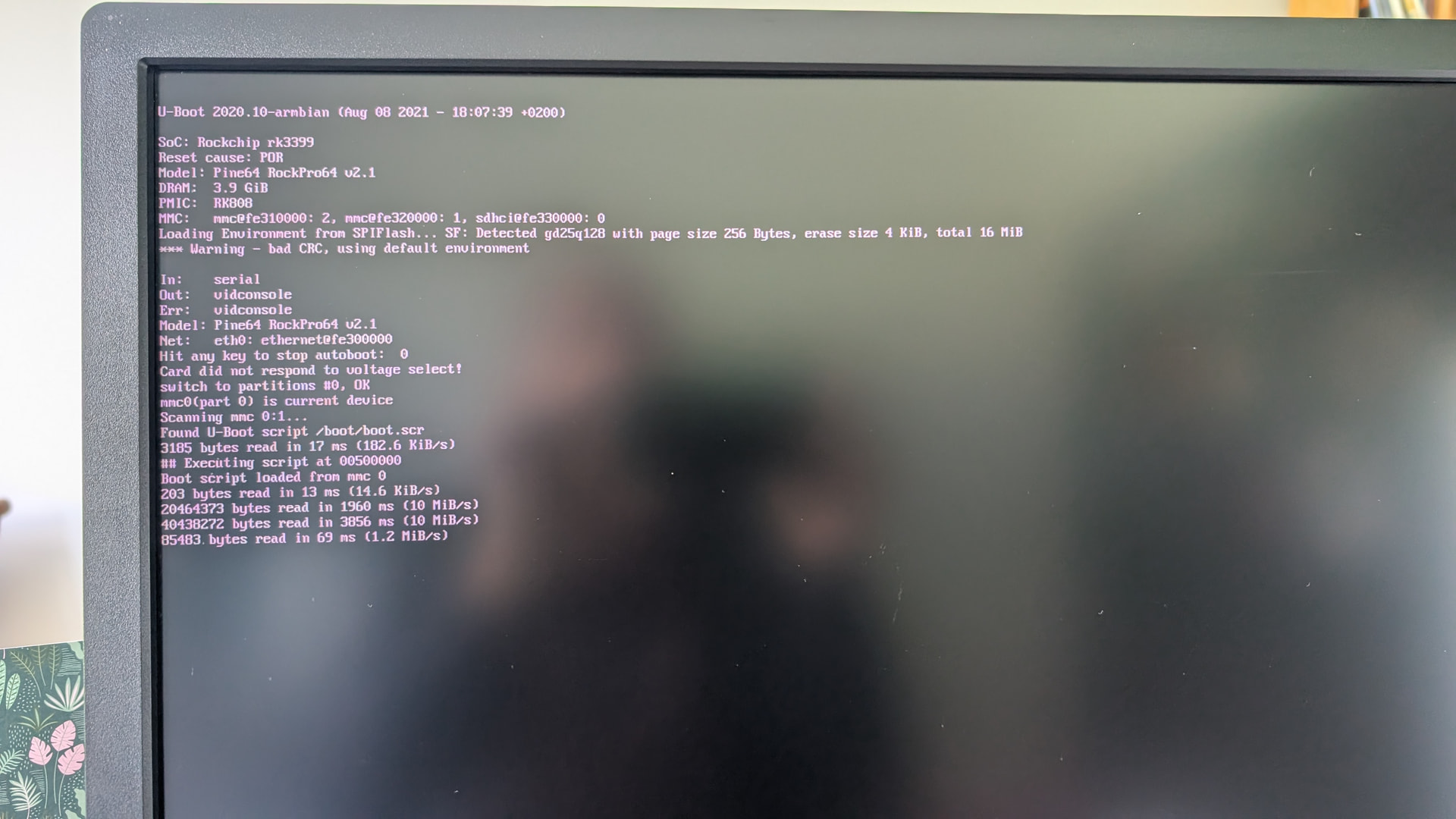
Can you verify that the system is booting when the HDD is connected, via UART or a connected monitor?

Is the USB HDD only powered via USB? If this is the case it is probably a power issue.

It’s also possible that it’s trying to boot via USB when the HDD is connected.

The system is booting but after a few seconds, screen freeze and I don’t see anything else. From what I see on the screen (see picture), the system boots using mmc

Most likely case so far.

Also, with the trailing 0 2 in /etc/fstab you trigger fsck on that filesystem at boot, if it has a dirty bit set. Not necessarily a problem, but can take a while on large drives.

x-systemd.automount=5s

That is interesting: Does this override the timeout for the automount, when accessing the mountpoint? That this is 90 seconds by default is quite annoying for network drives (if unreachable) or when unplugging external drives without explicitly removing the automount/fstab entry. If anything tries to access the mountpoint, 90 seconds full hang, in case repeatedly on repeated access attempts, is annoying. If =5s sets that to 5 seconds for this particular automount unit, that would be a much better workaround than overriding the general systemd unit startup timeout.

I replaced “0 2” with “0 0” and removed the x-systemd.automount but still no luck

UUID=2ce7a6c3-e2d4-41cd-a44b-8fdb73007400 /mnt/dabou-ext ext4 noatime,lazytime,rw,nofail,noauto 0 0

x-systemd.automount is needed to get it mounted at all, or noauto needs to be removed. Anyway, this is not causing the issue, I was interested about the =5, as if this works, we might let the drive manager apply maybe =10 for a 10 seconds timeout by default.

Is that drive powered solely via USB? Then this is most likely the issue.

Yes. If this is an issue then I don’t understand why when the system has finished to boot I can plug, mount and use the external USB HDD

During boot when all hardware devices/features are powered up, probed, initialized, there can be quite a power draw peak. Also, kernel-wise the regulators might not yet be fully setup, and e.g. MMC (SD card and eMMC) usually start at 3.3V, then switch to 1.8V and in some cases even 1.2V for final HS200/HS400/DDR mode. And every external drive has a powerup peak as well. If this overlaps during boot, the SBC PSU might not be able to provide sufficient power for a short period, resulting in some stuck device initialization and boot.

If you do have a self-powered USB hub or docking station, try with that, then you know for sure. Else, a stronger PSU might help. Though sometimes, the USB port itself has limited output. Not sure in case of ROCKPro64, but on Raspberry Pi up to RPi 4, 2.5" drives (HDD as well as SSD) never reliably worked when powered solely via USB. And even on the RPi 5, which provides a bit more USB power in combination with a 5A PSU, there is no guarantee it works, or it may fail randomly, or after a kernel upgrade, when some slightly changed device initialization order/timing results in a higher peak.

I will then avoid to have the USB HDD plugged when I reboot it.

Last question: Do you think that a tool like GitHub - mvp/uhubctl: uhubctl - USB hub per-port power control · GitHub could help to by example poweroff the USB ports when we reboot ?

No, this tool works with smart hubs, not for onboard USB ports. And no userland tool can control USB power during early boot stages.

Generally, I strongly advice against such kind of workaround, if you store any meaningful data on that drive: When powering is an issue at boot, it is unstable in general, and can crash or have I/O issues any time in operation, potentially causing data loss. What you most likely need is an external power source.

That is, if powering really is the issue: not guaranteed yet, but high likely.

EDIT: Schematics say 5V 1A limit on each USB port. I’d not run any 2.5" drive on that port for a production system.

My power supply is 12V and 3A

You need a powered case for your HDD. Powering the HDD via USB only is the problem, no matter how good the power supply of the SBC is.

Something like this: Powered USB Hub, RSHTECH USB 3.2/USB C Hub with 7 Ports with 3 x 10Gbps Data Port (USB-A, 2 x USB-C), 4 x 5Gbps USB 3.0 Ports, Touch Switch, 2-in-1 Data Cable (100 cm), 5V Power Adapter, RSH-ST07C : Amazon.fr: Computers

Many thanks for your help folks and great explanations :slight_smile:

I use something like this, where it can be connected directly via SATA
https://www.amazon.de/Inateck-Konverter-Adapter-Laufwerke-Netzteil/dp/B00N4JLNXM?dib=eyJ2IjoiMSJ9.wSkQQPlVrzIkc3r2AgpOBCWw6cX4E6wauODB_D8RA670Zn2o9lYovYlkSedoCY5JZ_J_tf3mvFikf_HuaZp_GB-Kt4w6le-H_W2gwVDK485nZ9KJYQxPw0pOSS-ZdOfD5KEa4YibI2EcgshpGI5boRY_hw4Xm1DDhhvdl_cF_FRATZU9gQVw9xpWEfyRj5sY25f3aIG8WWUdNoy8jj-eVIIH8ZFWG7SCnBPQGKCfty8.n0rtM-JM-HTRZ9ndsIZheHaE16jAmDtj7Cy0J52wsn8&dib_tag=se&keywords=usb+sata+powered&qid=1779461234&sr=8-4

I’m not using a SATA HDD but SDD Storage “My Password” :wink:

So it’s a USB to M.2/NVME adapter?
Probably hard to find this kind with it’s own power supply.

No an external storage disk connected to USB3 port. See here

There is probably an SATA SSD inside that case. But at least for warranty, not a good idea to take it out. So yeah, such a powered USB hub should solve it. There will be cheaper/simpler ones, but a more flexible one with on/off switches might come in handy in other situations.

Btw, this might then work with the uhubctl tool you found above.

I finally fixed the issue and can now reboot even if the USB Storage device is attached to the machine.

I’m not fully sure about what fixed the problem but I commented under this file the line

vi /etc/udev/rules.d/99-usb-late-boot.rules
#SUBSYSTEM=="usb", KERNEL=="4-1", ATTR{authorized}="0"

Executed several times this command

udevadm trigger --action=add --subsystem-match=block -v
...
/sys/devices/platform/usb@fe900000/fe900000.usb/xhci-hcd.1.auto/usb4/4-1/4-1:1.0/host0/target0:0:0/0:0:0:0/block/sda
/sys/devices/platform/usb@fe900000/fe900000.usb/xhci-hcd.1.auto/usb4/4-1/4-1:1.0/host0/target0:0:0/0:0:0:0/block/sda/sda1

and added a “usbstoragequirks” here for “0x1058:0x2627:u” which corresponds to my external storage

[ 56.776174] usb 4-1: New USB device found, idVendor=1058, idProduct=2627, bcdDevice=40.08

root@DietPi:~# cat /boot/armbianEnv.txt
verbosity=4
bootlogo=false
overlay_prefix=rockchip
rootdev=UUID=16fd56b1-1af3-4832-b584-e15c71d16b10
rootfstype=ext4
usbstoragequirks=0x2537:0x1066:u,0x2537:0x1068:u,0x1058:0x2627:u
extraargs=net.ifnames=0
console=none

Don’t blame me as I’m not a HW specialist and cannot really explain why that works now vs not before

I had a discussion with the RockPro64 community where they asked to share the dmesg file: gist:d34cf1b79ae7b847031b8c74484709f3 · GitHub

According to them, it seems something is still adjusting the value of the “authorized” flag for this USB device, which is probably triggering something that causes it not to be properly detected
[I] <d​simic> to clarify, something is setting the “authorized” flag to 0 somewhere. perhaps something inside the initrd? or maybe DietPi includes some kernel patch that does it internally? just guessing

They propose me to do this "it seems that DietPi sets the CONFIG_USB_DEFAULT_AUTHORIZATION_MODE kernel configuration parameter to a non-default value, which can be adjusted by adding “usbcore.authorized_default=1” to the kernel command line

<d​simic> so, please try adding that, and let’s see will the USB HDD end up being detected properly"

Can we do that and how using dietpi ?