hiya I was recently given a pi 5. i tried to boot from a nvme and it seems i need to update my eeprom. It doesn’t seem like its working.. I’m getting a error saying WARNING: flashrom not found. Setting RPI_EEPROM_IMMEDIATE_UPDATE to 0.
To update the EEPROM bootloader directly, you need to install flashrom. Otherwise, it is updated on next reboot by the bootloader itself.
If you want to mute the warning permanently, either sudo apt install flashrom, or sudo rpi-eeprom-config -e, and add RPI_EEPROM_IMMEDIATE_UPDATE=0 to disabled immediate updates explicitly.
Note that generally, you do not need to care about EEPROM updates at all. A boot service checks for and applies updates automatically on every boot. All you need to do it keeping the rpi-eeprom package up-to-date along with other APT packages via apt upgrade. These apply “default” builds, while there are “latest” builds which can optionally be flashed. But as long as the vendor of this M.2 HAT or SSD does not say so, you shouldn’t touch the default branch.
If boot from that NVMe keeps failing, have a look at the bootloader output: Does it detect the SSD at all, or does it fail to detect a bootable partition on it, or other kind of probe or I/O error? You should generally see the output on HDMI, but easier to copy&paste is it when using a UART adapter, so see all output on the serial console.
Does the SSD show up, and can be mounted/accessed, when you boot from SD card?
Also, do you use the official RPi PSU, or some other/noname 5V5A adapter? Insufficient voltage is a common issue, and 3rd party adapter can have issues providing stable voltage when power draw fluctuates.
I only cared about eeprom because the raspberry said it wasn’t booting and it says in config it needs a update. how do i install flashrom?
welp I swapped the ssd hat i was using and it is detected..i still kind of need to know how to update eeprom though..also i connected a fan and it doesn’t seem to turn on the fan..
EDIT: oh also no the ssd wasnt detected at all using that 4in1. the only error that was showing was the need for a update to the eeprom/usbvlsomething
editedit: also I’m using a rastech powersupply it seems good. oh hmm you said it needs 5v.5a? hmm i think mine is 5.1v.. i may need a different psu. but i also have the psu that came with the hat that didn’t work. its..12v4a. did that send me the wrong cable? so i need a 5v5amps..
What does rpi-eeprom-update return? It should not show anything about the VL805 on the RPi 5, and does not do so in my case. But maybe that message was just a generic one, which did not mean the VLI firmware in particular, but just an EEPROM update in general, which can include bootloader as well as VLI USB firmware, if that has an EEPROM as well. In any case, rpi-eeprom-update should tell you whether a bootloader firmware is available. If so, rpi-eeprom-update -a can be used to apply it.
I just see, the rpi-eeprom.service adds the -s flag as well, which skips the update, as long as the current version is not below BOOTLOADER_AUTO_UPDATE_MIN_VERSION, which currently defaults to 1746713597: rpi-eeprom/rpi-eeprom-update at 8f9ecc498a09aed0c39c085f87519a9075edd70e · raspberrypi/rpi-eeprom · GitHub
This was the reason that I needed to run rpi-eeprom-update -a manually once, to apply version 1779807685. Now, a reboot later, there is no update available anymore. No flashrom needed.
this is different than what it was showing me before.
BOOTLOADER: up to date
CURRENT: Tue May 26 15:01:25 UTC 2026 (1779807685)
LATEST: Tue May 26 15:01:25 UTC 2026 (1779807685)
RELEASE: default (/usr/lib/firmware/raspberrypi/bootloader-2712/default)
Use raspi-config to change the release.
root@dietpipii:~#
So your EEPROM bootloader is now up-to-date, and as expected, the VLI USB EEPROM does not exist. Problematic, if it still appears in some output somewhere. Even on the old RPi 4 revisions, which do have that EEPROM, it is not used anymore. Reminds me to remove it from dietpi-config as well. Though, I am better making sure about this: https://forums.raspberrypi.com/viewtopic.php?t=400026
EDIT: Okay, the older RPi 4 models, resp. the VL805 chip itself, still load the firmware from the dedicated EEPROM, if present. So it is still relevant for USB boot there. But as there was no update for 3 years, unlikely to be any, there is less reason to show its version in dietpi-config advanced options, showing “N/A” on most RPi 4/5 boards.
Whether PSUs show 5.0V or 5.1V or just 5V is just marketing. Showing 5.1V aims to give the impression that it would be able to keep the 5V USB specifications even with bad cables and fluctuations. But whether it theoretically gives 5.0V or 5.1V or 4.9V peak or whatever does not say much. It is much more important that it can keep the desired voltage within narrow ranges, even when input and power draw fluctuate. Even a 4.8V PSU with bad cable would run an SBC stable, if there are no negative spikes. Since this quality cannot be seen from the specs, and Amazon ratings are not 100% reliable, a safe bank is to use the official RPi 5 PSU.
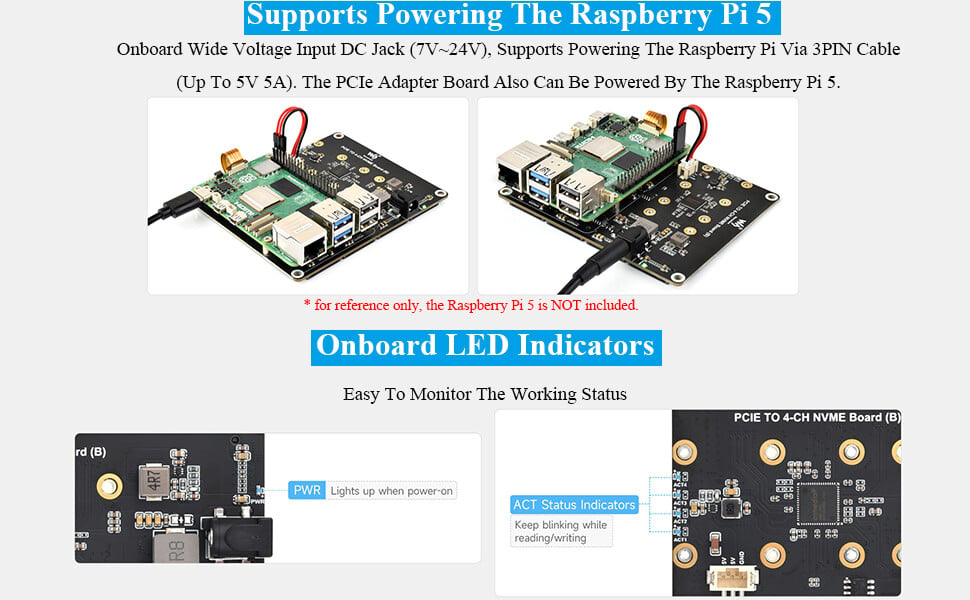
The other aspect are the 5A. I don’t know how much the power the M.2 board and SSD draw. But if you power the M.2 board from the RPi 5 (hence with 5V), like on the left picture (below), less than 5A seems too tight. Doing it the other way round, powering the RPi 5 from the M.2 board, via its 12V4A PSU, gives a lot more power:
Power via RPi 5: 5V * 5A = 25W
Power via M.2 board: 12V * 4A = 48W
So to rule out a powering issue, I’d go with the 2nd option as in the right picture.
k I’ll try out the barrel powersupply with that weird board later when I have the time. also at the moment my pi is working normally and booting nvme from a hat. just that board wont boot. the one with the anime character on it. thanks for the info
I’m guessing the small cable was defective making the nvme not show up or the nvme board itself or even my lower amp powersupply. I’m receiving a new cable and a better usbc powersupply. I’ll also try the barrel powesupply sometime tomorrow. thank you for the info about how its booting.
The flashrom not found message doesnt necessarily mean the EEPROM update itself failed. It means DietPi couldnt use flashrom for the immediate update. For a Pi 5, first boot normally from the SD card, make sure the system packages are up to date, then update the EEPROM from Raspberry Pi OS or the supported rpi-eeprom-update tools. After reboot, check the EEPROM version and boot order with rpi-eeprom-update / rpi-eeprom-config. Also make sure your NVMe adapter is actually compatible with the Pi 5 PCIe interface. Once the EEPROM is current, you can set NVMe/PCIe before SD in the boot order.
Or from DietPi, which ships exactly the same tools from the same repo. But we ruled out the bootloader version to be the culprit already. Essentially, this is generally something one needs to almost never care about, all critical updates are done automatically, on DietPi same as on RPi OS.
That would indeed explain both symptoms very well: that the SSD is not detected, as well as that the 12V4A PSU to power the RPi 5 through the extension board does not work. Let’s hope the replacement cable solves this.
Tried the barrel PSU and it didn’t work so I’ll try a different small pcie cable and see if that’s the reason. If not I will then try a different barrel PSU with more amps and a different USBC cable with more amps (5 amps instead of 4).
If none of that works I’ll just have to send the board back as these boards can easily be defective.
I mostly wanted the 4 nvme/m.2 slots to have 2 separate ssds apart from the 1st main ssd that contains dietpi install and maybe one of those sata adapters to use one or two sata ssd drives.
So you did exchange the 3-pins cable which connects extension board power with RPi pins 2+4+6? That cable being damaged or falsely attached would explain things best.
yeah I saw multiple people say that. it could be because of lots of bad power supplies or this company is bad at sourcing parts or even their fabrication of parts is bad or the shipper damages parts. last one would be stupid customers but i doubt that one.. I haven’t received my replacement pcie cable yet it will get to me about 2 to 4 days. I’ll know the part is bad when i test the board with this replacement part. at the moment i think its the pcie cable because it has a weird defect in it.
EDIT: 3 pins cable? you mean this one? i don’t have another one of those. maybe i will look for another one of those before tossing the board back at amazon.
Right, that one. The 12V4A PSU should be more than powerful enough. Even if the PCIe cable was damaged, it should boot the RPi 5. If it does not do that at all, possible that due to damage or connectivity of this 3-pins cable, power is just not transferred between board and RPi 5 (in both directions, depending on which PSU you use).
 . Here it is: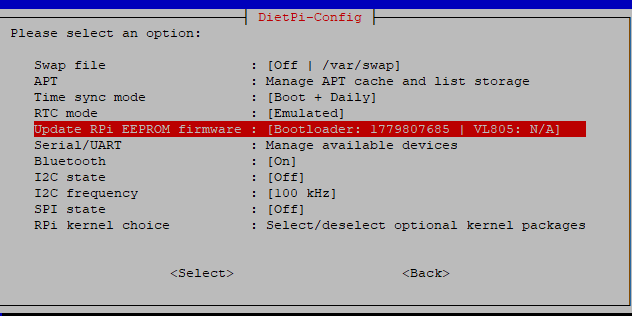
 even a few power supplies that are official are 5.1.