Hence CONTAINERD_DISABLE_PIGZ=1 would now be needed in the containerd.service, it seems. But always apply such with an override config, else it is lost with every package upgrade:
However, pigz (and unpigz) is only used if installed. Hence apt autopurge pigz would do as well, if nothing else explicitly depends on it.
If parallel decompression causes an issue, probably memory usage is the issue? You could monitor it on a separate SSH session via htop -d 2 or so, while pulling an image with pigz installed and used by Docker. If decompression fails due to insufficient memory, the swapfile size could be raised, e.g.
/boot/dietpi/func/dietpi-set_swapfile 4096
for 4 GiB additional memory. Can be narrowed down, of course. But I wouldn’t recommend using a swap file only to save some seconds of decompression time, when pulling/updating a Docker image. So purging pigz or using CONTAINERD_DISABLE_PIGZ=1 seems to be the right way to go then.
Thank you so much @MichaIng for working this out and sharing - I would never have been able to do that myself - especially as I recognise it is not a DietPi related issue.
Update: Unfortunately that didn’t work; I tried twice and got two different error (below).
I used `htop` and found that memory used was never exceeded 1.5Gb (of 3.95gB available) and was typically around 1.25Gb.
This is what I got in my terminal:
root@PetitPois:/mnt/dietpi_userdata# docker compose pull homeassistant
[+] pull 20/22
 ⠼ Image ghcr.io/home-assistant/home-a... [⣿⣿⣿⣿⣿⣿⣿⣿⣿⣿⣿⣿⣿⣿⣿⣿⣿⣿⣿⣿⣿] Pulling 111.4s
failed to extract layer (application/vnd.oci.image.layer.v1.tar+zstd sha256:7073e8e8aea79ec107111aaf19805fa979f60e2a902f3687923f23ffe8f6896a) to overlayfs as "extract-175992725-8JHq sha256:1b8f59e1cb560764e7141e24687d424861cc30b0f765e1d576c87dfa6331229b": output bigger than max block size (131072)

root@PetitPois:/mnt/dietpi_userdata# !!
docker compose pull homeassistant
[+] pull 20/22
 ⠇ Image ghcr.io/home-assistant/home-assistant:stable [⣿⣿⣿⣿⣿⣿⣿⣿⣿⣿⣿⣿⣿⣿⣿⣿⣿⣿⣿⣿⣿] 599.9MB / 604.1MB Pulling                     113.8s
failed to extract layer (application/vnd.oci.image.layer.v1.tar+zstd sha256:7073e8e8aea79ec107111aaf19805fa979f60e2a902f3687923f23ffe8f6896a) to overlayfs as "extract-945442644--QVZ sha256:1b8f59e1cb560764e7141e24687d424861cc30b0f765e1d576c87dfa6331229b": corruption detected: stream overrun 4
root@PetitPois:/mnt/dietpi_userdata#
So it pumps more output at once than the buffer can hold? Weird. My browser plugin also fails to download the tarball for the home-assistant container image, from Docker Hub, as well as from Package home-assistant · GitHub. The Uptime Kuma container e.g. however works, as well as linuxserver/homeassistant - Docker Image. So maybe there is something different with the original Home Assistant container.
Are other containers affected for you as well? Maybe something to report to Issues · moby/moby · GitHub, to at least get a hint about how this could fail, or how to debug.
Identical means identical hardware and identical DietPi/Debian version at least? Otherwise it may be possible to pin-point the relevant difference.
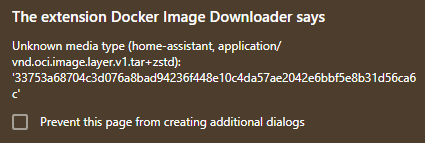
So in any case, the HA container seems to have a relevant difference. As said, it is also the only one which returns an unknown media type error in my browser plugin:
I do not see gzip vs zstd in the content-type header of the involved network requests, so I think it is the compression type of the layer in metadata. And indeed the container images I just test-downloaded contain gzip-compressed layers within the wrapping plain .tar. Might it be the simple dumb fact that no zstd decompressor is installed which tar can use internally? The expectations and error thrown by Docker/containerd would be off then, but wouldn’t be the first time that Docker went through a change which caused havoc among the user base.