I’m doing a fresh install on an orange pi 3 lts. The only thing I modify is the fixed ip.
It boots normally and I can log in, the it starts the update process, after finishing it, starts a shutdown process, after that it won’t turn on anymore.
I have to copy the image again to start it over again. But I’m stuck on the same issue, what I’m doing wrong? What can I do?
I am having the same issue with may Nanopi R2S. I reinstalled a fresh image and started the update process and it won’t boot up. stuck in blinking red light. I’ve done this 4 times in a row already and same result happens.
The Rockchip kernel (NanoPi R2S) got a major update from 6.12 to 6.18, but I tested it on several SBCs and did not face an issue. However, I did not test it on the R2S, will do that now.
The Allwinner kernel (Orange Pi 3 LTS) however got a minor update only, still on 6.12 . Sadly, I have no Orange Pi 3 LTS to test, just tested the kernel on Orange Pi Zero 3, which however has a different chip.
… eh wow, I see the issue now: rewrite everything · armbian/build@ee4c79b · GitHub
When the patch which adds the device tree was rebased, the device tree got lost from the Makefile Will fix that quickly and inform the Armbian maintainer.
Checking Rockchip now, maybe something similar happened there.
EDIT: Nope, Rockchip device trees seem to be all there, at least the R2S ones (there are two stacked onto each other).
@GodChryz
NanoPi R2S boots normally with the new kernel for me, apart of the fact that CPUFreq is not ready yet when our script runs, hence it falls back to ondemand (a separate issue which affects a few older SBCs):
root@DietPi:~# uname -a
Linux DietPi 6.18.5-current-rockchip64 #1 SMP PREEMPT Sun Jan 11 14:26:20 UTC 2026 aarch64 GNU/Linux
root@DietPi:~# cpu

 ─────────────────────────────────────────────────────
 DietPi CPU Info
 Use dietpi-config to change CPU / performance options
 ─────────────────────────────────────────────────────
 Architecture |     aarch64
 Temperature  |     44 °C / 111 °F : Optimal temperature
 Governor     |     ondemand
 Throttle up  |     50% CPU usage

                 Current Freq    Min Freq   Max Freq
 CPU0         |      1296 MHz      408 MHz    1296 MHz
 CPU1         |      1008 MHz      408 MHz    1296 MHz
 CPU2         |      1008 MHz      408 MHz    1296 MHz
 CPU3         |      1008 MHz      408 MHz    1296 MHz

[ INFO ] DietPi-CPU_info | The current CPU frequency may be affected by processing this script itself.

root@DietPi:~# cat /proc/device-tree/model
FriendlyElec NanoPi R2S
Blinking red lights actually mean it did load the kernel, and the kernel did not panic or crash.
… um wait, I see now that mine has a single Ethernet interface visible only. It is the WAN port, while the LAN port is missing . If you do not use both, maybe switching the Ethernet cable solves it for you for now.
It is not explicitly defined in the device tree (or includes), hence I am not sure how to check whether anything about that changed between 6.12 and 6.18.
A problem is that the R2 device trees are rather complex:
Armbian however adds a bunch of more NanoPi revisions which reuse the R2S device tree. When Linux split them into 3, this patch became very difficult to overview. A lot of it is redundant, just changing lines up and down, or renaming nodes, which does not change functionality, but probably other patches/dtbs which include it depend on those changed node names: build/patch/kernel/archive/rockchip64-6.18/board-nanopi-r2s.patch at 77dc5f71548d4b41751f382b6c9215aa4085ce92 · armbian/build · GitHub. And on top of that, Armbian adds another final device tree for for R2S on top of the one that exists already: build/patch/kernel/archive/rockchip64-6.18/dt/rk3328-nanopi-r2-rev00.dts at 77dc5f71548d4b41751f382b6c9215aa4085ce92 · armbian/build · GitHub. I guess, since some other added device trees include the rk3328-nanopi-r2s.dts at Armbian, rk3328-nanopi-r2-rev00.dts cannot be merged. But this whole mess makes it very difficult to get a clean overview of what has been changed, and compare this with the patches at Linux 6.12 (to see whether there was something missed when the patches were rewritten for Linux 6.18).
On some best efforts review, I did not see any obvious mistake, related to those Ethernet LAN port and related USB nodes, but as of mentioned complexity, this does not mean much. Before I invest more time into this, @GodChryz please verify whether also in your case only the LAN port is non-functional/missing in ip l, while otherwise the board boots fine, with functional WAN port.
EDIT: Yes, indeed this is the culprit. But also on NanoPi NEO3, which includes the same device tree, the USB port is broken, hence the new driver either generally does not work with Linux 6.18, or at least it does not work with those SBCs which use or include the R2S device tree. I’ll hence implemented the removal differently to fix things for the NEO3 as well: nanopi-r2s: fix LAN port · MichaIng/build@1c1b0cd · GitHub
We’ll see whether we get reports from ROCK64 users (same SoC).
My R2S now is up again! Thank you so much @MichaIng your the man!
 ─────────────────────────────────────────────────────
 DietPi v9.20.1 : 10:21 - Tue 01/13/26
 ─────────────────────────────────────────────────────
 - Device model : NanoPi R2S (aarch64)
 - CPU temp : 51 °C / 123 °F : Running warm, but safe
 - LAN IP : 192.168.1.2 (eth1)
 - MOTD : Open Beta v10.0 | Please help testing our upcoming release:
          https://github.com/MichaIng/DietPi/issues/7899
 ─────────────────────────────────────────────────────

 DietPi Team     : https://github.com/MichaIng/DietPi#the-dietpi-project-team
 Patreon Legends : Chris Gelatt, ADSB.im
 Website         : https://dietpi.com/ | https://x.com/DietPi_ | Bsky: @dietpi.com
 Contribute      : https://dietpi.com/contribute.html
 Web Hosting by  : https://login-online.com/

 dietpi-launcher : All the DietPi programs in one place
 dietpi-config   : Feature rich configuration tool for your device
 dietpi-software : Select optimised software for installation
 htop            : Resource monitor
 cpu             : Shows CPU information and stats

root@DietPi:~#
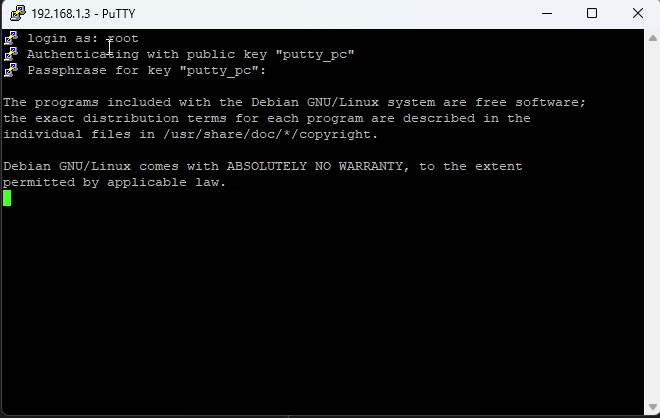
This morning I update my Odroid HC4, firmware, uboot and other 2 things related to kernel I think, and I can reboot, but when I SSH the terminal stays like this:
Yeah I pushed the Rockchip kernel late night, glad the two issues are solved now.
@amibumpin that looks like the shell is hanging at one of its init scripts. /etc/motd is shown, but no command prompt. Does CTRL+C work to get a command prompt? AFAIK also shell init scripts like ~/.bashrc etc can be interrupted like that. Can be also one of ours, like /etc/bashrd.d/dietpi.bash or /boot/dietpi/dietpi-login (called by the former).
 . Sadly, I have no Orange Pi 3 LTS to test, just tested the kernel on Orange Pi Zero 3, which however has a different chip.
 Will fix that quickly and inform the Armbian maintainer.