DietPI doesn't Boot on Radxa 3E

Creating a bug report/issue

I have searched the existing open and closed issues

Required Information

  • DietPi version | Latest Version available to download at website
  • Since it doesn’t even boot, I don’t have any info requested on the fields i removed here.
  • SBC model | Radxa 3E
  • Power supply used | 5V 2A
  • SD card used | Toshiba Exceria

Steps to reproduce

  1. Download the Latest build available on the DietPI website for Radxa 3E
  2. Boot the build using rufus/etcher/disk imager, both compressed and uncompressed files,
  3. Put the SD card in, provide power and connect the ethernet cable
  4. Nothing happens, the green LED lights up and stays still, doesn’t blink, no display output, no IP assigned on router (did the static setting on dietpi.txt on another install too)

Expected behaviour

  • It should be booting.

Extra details

  • The last build(installed 20 days ago maybe) before this was running fine on my SD card, but the old SD card I used was some no name cheap copy so I got rid of it, and downloaded the current build, flashed and tried, it didn’t work, I don’t have the previous buold file to test if its the current build thats not working too, Is there a way i can get the previous build? I couldn’t find it on the website.
  • Yes my radxa and my SD card and powersupply everything is fine, i could get into ubuntu rockchip and it worked, dietPI didn’t.
You can find the bookworm image and also a trixie mainline image here:
https://dietpi.com/downloads/images/

Hey, thanks, I will try both of them and see if they boot on my radxa, also, is there a FAQ or a place to find out the difference between the image provided on the downloads of the website and the “mainline” image found on the link you have provided me with?

The mainline images using the mainline kernel - the kernel provided by Debian. Non-mainline use the vendor kernel (from Radxa, which get the base from Rockchip) which probably has some extra patches and other optimizations and changes.
For maintainability the mainline image is easier for us, but maybe some specific functions of your SBC will not work correctly. For the vendor image it’s the opposite.

@MichaIng can provide a more detailed answer if you want.

Hey, thanks for the explaination, I understand the differences now.

Coming back to the original problem, the radxa still doesn’t boot, tried both bookworm and mainline images too, seems these were also built on 11-16-2025, none of the 3 builds work.

Is there a way to get older builds? That i could try to make sure these builds are the problems for now, and wait for maintainers to fix it somehow maybe?

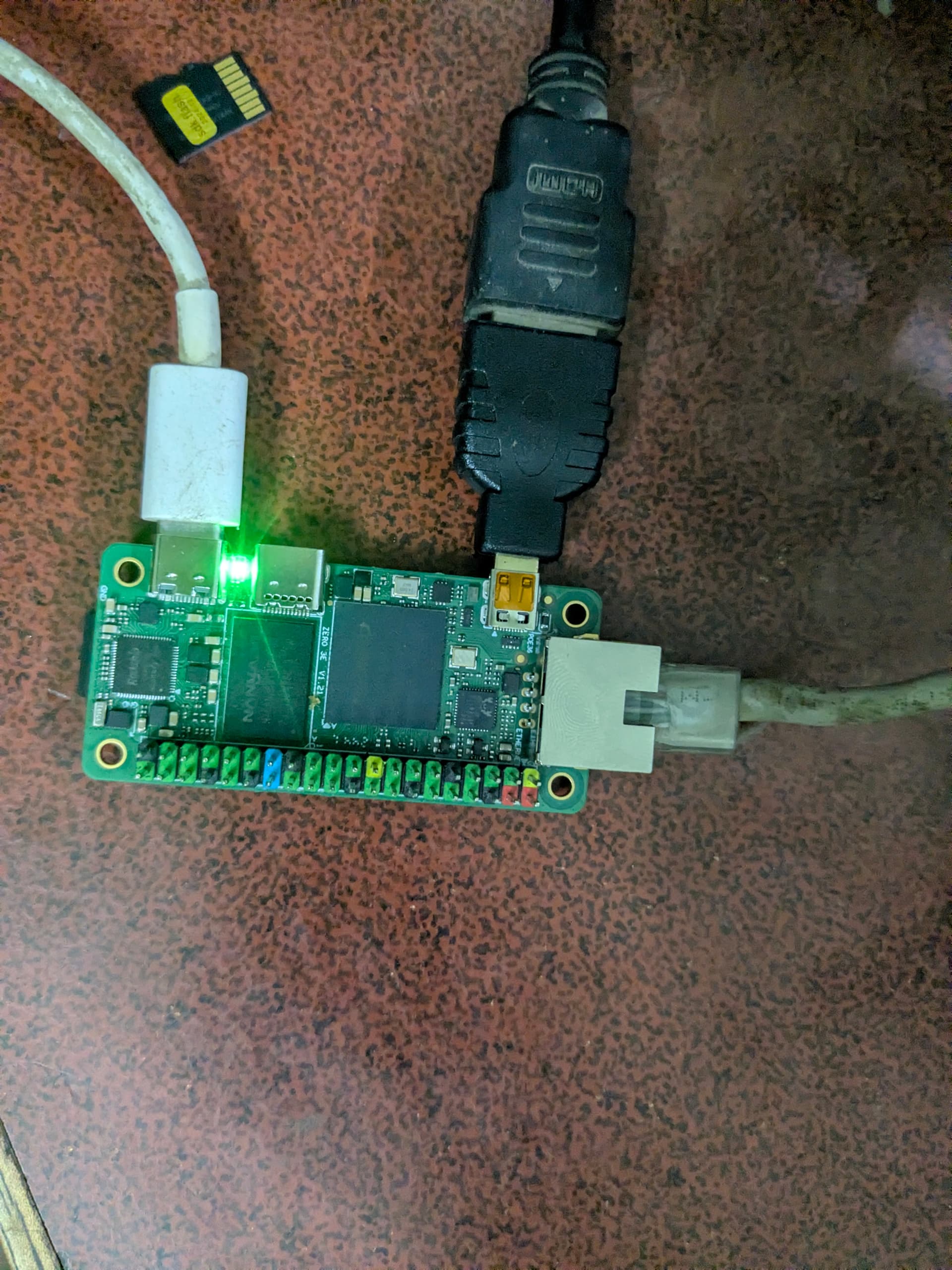
This is how the radxa is right now,
The led is constant and not blinking, it used to blink when i installed dietPI before as far as i can remember.

EDIT: The radxa is warm to touch as it would when it was booting to linux, and the SD card next to it on picture has the mainline linux, the sd card currently inserted had bookworm version.

@MichaIng can you have a look please.

Generally, for any other SBCs than Raspberry Pi (and PC/VM images), no need to test Bookworm (or Forky) images if Trixie images do not work. They use distro version-agnostic kernel and bootloader pages. So of one does not work, the others do neither.

The “mainline” images indeed use a different kernel and often also a different bootloader. Those are provided for all SBCs which are currently shipped with the Rockchip vendor kernel and often vendor bootloader version. This includes all RK3588, RK3576, and Radxa ZERO 3 as only RK356x exception, since IIRC HDMI was not working with the mainline Linux. Time to test again @StephanStS (if you find time), since the vendor kernel otherwise has almost only downsides. Will spin mine up now.

An issue with this board both of us recognized, and a bunch of other users reported as well on the Radxa forum, is the very fragil SD slot. At one side, it has these metal contacts that should touch each other when an SD card is inserted. In some cases they do not, in other cases the electric contact is too weak despite them touching each other. I usually need to insert the SD card several times before it is actually detected, even after carefully bending inside the outer one. I guess cleaning them and/or using some contact spray can help, but the latter may cause a short circuit elsewhere :smile:. @wrenchy maybe this is also the issue in your case? https://forum.radxa.com/t/27348

A UART adapter to check serial console output works best to know whether the SD card is detected at all: if so, there will be some output on the serial console, which would also help to diagnose the issue. If the SD card is generally detected but boot fails at a later stage, then the mainline image is worth a shot.

EDIT: Okay, issue this time is our end. The bootloader is looking for the non-existing 3E/3W specific device tree. We actually have a patch in place to adjust this, but probably the patch dir has changed. I’ll look into it and redo builds.

EDIT2: Jep, related to recent switch to mainline U-Boot also with vendor kernel:

So we need to define the device tree explicitly for the vendor kernel builds now. However, instead I’ll test the mainline kernel build now. Better to drop vendor builds entirely if mainline works well.

So the mainline image works pretty well here and has HDMI output. @StephanStS do you remember another issue we had with mainline kernel?

No, I only remember the fragile contact of the SD card holder. It was a benefit that I had two 3E SBCs, one of them worked. So I found out the problem by chance.

Maybe something in this topic area: RK3399 HDMI output and USB 3.0 not working with Linux 6.1 - #73 by MichaIng (i.e., editing the extraargs line in the /boot/dietpiEnv.txt file)

During this RK3399 HDMI problem I also “experimented” with dietpi-display which also changes values within dietpiEnv.txt.

1 Like

Hey, Thanks for this, Learned a New thing that might come to use in future when it doesn’t detect sd card in future, tho this wasn’t my issue on my case, as I have bought 7 3E right now and am planning to get a few 3Ws too, and i tested the SD cards on 2 of them during my testing mentioned above.

A UART adapter to check serial console output works best to know whether the SD card is detected at all:

I am new to hardware, do you have any suggestions on what should i get? or I could get anything that comes up on a google search and that should work?

So the mainline image works pretty well here and has HDMI output.

Mainline published on https://dietpi.com/downloads/images/ ? I did try those too, it didn’t work for me, or do you mean mainline images from somewhere else than this link? I could also give them a try. :slight_smile:

Oh and also, since I have hands on multiple 3E right now, is there any way I could help with new builds maybe? like testing them beforehand or things like that? If I can. then I would love to

1 Like

This one I mean: https://dietpi.com/downloads/images/DietPi_RadxaZERO3-ARMv8-Trixie_mainline.img.xz

Thr one without the *_mainline suffix fails indeed as of the U-Boot change, but the linked one boots fine on my 3E.

Much appreciated. If there are no other issues, I’ll generate new images with LTS mainline kernel. The linked one is with edge branch, but I’ll use current=LTS branch then for regular new images. They have no NPU driver for RK35xx yet, but less risk that updates ship an unnoticed bug/breaking change.

Hey just tried this and it boots, i changed Set dhcp to static=1 and ssh server to openssh on dietpi.txt and changed absolutely nothing else, but it seems the CPU is clocked to only 1416 instead of 1.8GHz on last build/ on ubuntu rockchip and armbian

It was 1.8 GHz for me. Check with cpu command.

What I did recognize was this issue:

Will try to fix this for next release. But default governor is ondemand, hence it still clocks up to max, even faster, but a little less energy efficient.

hey, i did use the cpu command and also stressed all 4 cores at once to make it go as high as it can “technically should only go to max limit, which is shown as 1416MHz”
here is the response of CPU command

root@DietPi:~# cpu

─────────────────────────────────────────────────────
DietPi CPU Info
Use dietpi-config to change CPU / performance options
─────────────────────────────────────────────────────
Architecture | aarch64
Temperature | 56 °C / 132 °F : Running warm, but safe
Governor | ondemand
Throttle up | 50% CPU usage

 Current Freq    Min Freq   Max Freq

CPU0 | 1416 MHz 408 MHz 1416 MHz
CPU1 | 1416 MHz 408 MHz 1416 MHz
CPU2 | 1416 MHz 408 MHz 1416 MHz
CPU3 | 1416 MHz 408 MHz 1416 MHz

[ INFO ] DietPi-CPU_info | The current CPU frequency may be affected by processing this script itself.

and on dietpi-config, i can see that i can set a max of 1.4GHz too and not 1.8GHz

EDIT: Tried on 2 radxa to absolutely eleminate any hardware level error too.

Hmm:

 ─────────────────────────────────────────────────────
 DietPi CPU Info
 Use dietpi-config to change CPU / performance options
 ─────────────────────────────────────────────────────
 Architecture |     aarch64
 Temperature  |     36 °C / 96 °F : Cool runnings
 Governor     |     schedutil

                 Current Freq    Min Freq   Max Freq
 CPU0         |      1608 MHz      408 MHz    1800 MHz
 CPU1         |      1608 MHz      408 MHz    1800 MHz
 CPU2         |      1608 MHz      408 MHz    1800 MHz
 CPU3         |      1608 MHz      408 MHz    1800 MHz

[ INFO ] DietPi-CPU_info | The current CPU frequency may be affected by processing this script itself.

But this is with LTS kernel:

apt install linux-{image,dtb}-current-rockchip64

Just tested edge again … oh right, there 1416 MHz is max. Would be easy to apply the 1.8 GHz patch to edge as well, but we’ll use LTS builds anyway.

EDIT: Also the CPU governor issue seems to affect the edge kernel only, or it was coincidence with this 2x2 boots. But it is a race condition we need to fix anyway.

HDMI works for you as well? There seem to be some cases (like what Stephan linked above) where the kernel/driver fails to read the EDID/supported HDMI screen modes, or does not support the native mode provided by the screen, in which case dietpi-display can help to select the correct mode explicitly. But at least my 1440p screen was used correctly with all 3 kernel builds: vendor, current, and edge

Hey, I can’t test that right now, since I don’t have a monitor with me, I will report about that tomorrow.

btw, do you have a ETA on when the new builds will be ready? I am not in a hurry, just wanting to know when I can expect a new build to drop. :slight_smile:

Ready in 10 minutes or so: DietPi-Build · MichaIng/DietPi@a36fd0f · GitHub
Will appear here once done: Index of /downloads/images/testing

I did another change, switching from GPT to MBR partition table, which means one less reboot after partition expansion on first boot. Should work with mainline U-Boot, but the Rockchip vendor U-Boot supported GPT partition table only.

EDIT: Done

Hey, tested the image, boots and works fine, HDMI output is fine too, and yes, this image did clock upto 1.8GHz.

I tried changing the CPU governer but that unfortunately didn’t work, it still defaults back to ondemand, I am going to let it run overnight today.

Oh by the way, I wanted to ask, on the DietPIENV, I found there is a setting “docker_optimizations=off”
What does this setting do? I mean, what will happen if i turn it back on? I searched the docs, but couldn’t find a reference regarding that.

Would you like me to test anything else?

1 Like

Okay, so it was a coincident my end, and the race condition still causes random behavior on this one. However, not related to any particular hardware but simply a missing After= ordering directive for our dietpi-preboot.service.

It toggles the memory cgroup, used by Docker and other container engines to optionally monitor and limit memory usage for each container. Docker at least throws warnings if that cgroup is not available, IIRC. It theoretically has a little performance drawback, hence is not enabled OOTB. Practically it adds cgroup_enable=memory to the kernel-command line. You can check /boot/boot.cmd about this.

… though I just checked, and the memory cgroup seems to be enabled OOTB. Need to check all kernel configs, but at least in most cases the setting seems redundant, probably we can remove it entirely.

@MichaIng The DietPi_RadxaZERO3-ARMv8 Bookworm & Forky images have last modified data as 2025-11-26 16:58 where as the Trixie one is old 2025-11-25 21:51
Can i presume that changes meant for Bookworm aren’t applicable to Trixie image ?