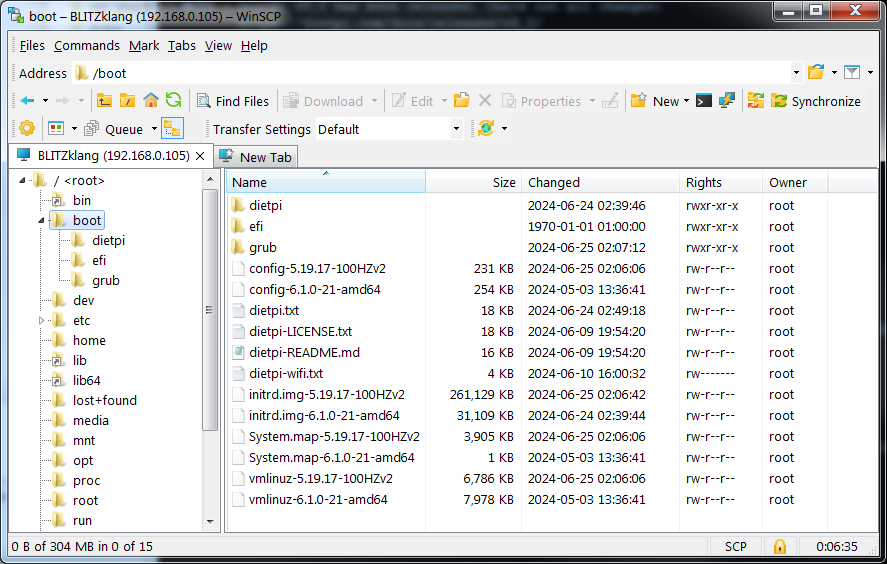
your new kernel is present in /boot ?
As well /boot/grub/grub.cfg is having correct entries? usually this should be done by update-grub??
your new kernel is present in /boot ?
As well /boot/grub/grub.cfg is having correct entries? usually this should be done by update-grub??
@Joulinar: “new” kernel is 5.19.17-100HZv2. It appears in /boot…
and is referenced in /boot/grub/grub.cfg
> #
> # DO NOT EDIT THIS FILE
> #
> # It is automatically generated by grub-mkconfig using templates
> # from /etc/grub.d and settings from /etc/default/grub
> #
>
> ### BEGIN /etc/grub.d/00_header ###
> if [ -s $prefix/grubenv ]; then
>   set have_grubenv=true
>   load_env
> fi
> if [ "${next_entry}" ] ; then
>    set default="${next_entry}"
>    set next_entry=
>    save_env next_entry
>    set boot_once=true
> else
>    set default="0"
> fi
>
> if [ x"${feature_menuentry_id}" = xy ]; then
>   menuentry_id_option="--id"
> else
>   menuentry_id_option=""
> fi
>
> export menuentry_id_option
>
> if [ "${prev_saved_entry}" ]; then
>   set saved_entry="${prev_saved_entry}"
>   save_env saved_entry
>   set prev_saved_entry=
>   save_env prev_saved_entry
>   set boot_once=true
> fi
>
> function savedefault {
>   if [ -z "${boot_once}" ]; then
>     saved_entry="${chosen}"
>     save_env saved_entry
>   fi
> }
> function load_video {
>   if [ x$feature_all_video_module = xy ]; then
>     insmod all_video
>   else
>     insmod efi_gop
>     insmod efi_uga
>     insmod ieee1275_fb
>     insmod vbe
>     insmod vga
>     insmod video_bochs
>     insmod video_cirrus
>   fi
> }
>
> if [ x$feature_default_font_path = xy ] ; then
>    font=unicode
> else
> insmod part_gpt
> insmod ext2
> set root='hd0,gpt2'
> if [ x$feature_platform_search_hint = xy ]; then
>   search --no-floppy --fs-uuid --set=root --hint-bios=hd0,gpt2 --hint-efi=hd0,gpt2 --hint-baremetal=ahci0,gpt2  83728969-54d5-4eb3-8d9c-064d4bcabe0d
> else
>   search --no-floppy --fs-uuid --set=root 83728969-54d5-4eb3-8d9c-064d4bcabe0d
> fi
>     font="/usr/share/grub/unicode.pf2"
> fi
>
> if loadfont $font ; then
>   set gfxmode=auto
>   load_video
>   insmod gfxterm
>   set locale_dir=$prefix/locale
>   set lang=C
>   insmod gettext
> fi
> terminal_output gfxterm
> if [ "${recordfail}" = 1 ] ; then
>   set timeout=30
> else
>   if [ x$feature_timeout_style = xy ] ; then
>     set timeout_style=menu
>     set timeout=0
>   # Fallback normal timeout code in case the timeout_style feature is
>   # unavailable.
>   else
>     set timeout=0
>   fi
> fi
> ### END /etc/grub.d/00_header ###
>
> ### BEGIN /etc/grub.d/05_debian_theme ###
> set menu_color_normal=cyan/blue
> set menu_color_highlight=white/blue
> ### END /etc/grub.d/05_debian_theme ###
>
> ### BEGIN /etc/grub.d/10_linux ###
> function gfxmode {
> 	set gfxpayload="${1}"
> }
> set linux_gfx_mode=
> export linux_gfx_mode
> menuentry 'Debian GNU/Linux' --class debian --class gnu-linux --class gnu --class os $menuentry_id_option 'gnulinux-simple-83728969-54d5-4eb3-8d9c-064d4bcabe0d' {
> 	load_video
> 	insmod gzio
> 	if [ x$grub_platform = xxen ]; then insmod xzio; insmod lzopio; fi
> 	insmod part_gpt
> 	insmod ext2
> 	set root='hd0,gpt2'
> 	if [ x$feature_platform_search_hint = xy ]; then
> 	  search --no-floppy --fs-uuid --set=root --hint-bios=hd0,gpt2 --hint-efi=hd0,gpt2 --hint-baremetal=ahci0,gpt2  83728969-54d5-4eb3-8d9c-064d4bcabe0d
> 	else
> 	  search --no-floppy --fs-uuid --set=root 83728969-54d5-4eb3-8d9c-064d4bcabe0d
> 	fi
> 	echo	'Loading Linux 6.1.0-21-amd64 ...'
> 	linux	/boot/vmlinuz-6.1.0-21-amd64 root=UUID=83728969-54d5-4eb3-8d9c-064d4bcabe0d ro net.ifnames=0 consoleblank=0
> 	echo	'Loading initial ramdisk ...'
> 	initrd	/boot/initrd.img-6.1.0-21-amd64
> }
> submenu 'Advanced options for Debian GNU/Linux' $menuentry_id_option 'gnulinux-advanced-83728969-54d5-4eb3-8d9c-064d4bcabe0d' {
> 	menuentry 'Debian GNU/Linux, with Linux 6.1.0-21-amd64' --class debian --class gnu-linux --class gnu --class os $menuentry_id_option 'gnulinux-6.1.0-21-amd64-advanced-83728969-54d5-4eb3-8d9c-064d4bcabe0d' {
> 		load_video
> 		insmod gzio
> 		if [ x$grub_platform = xxen ]; then insmod xzio; insmod lzopio; fi
> 		insmod part_gpt
> 		insmod ext2
> 		set root='hd0,gpt2'
> 		if [ x$feature_platform_search_hint = xy ]; then
> 		  search --no-floppy --fs-uuid --set=root --hint-bios=hd0,gpt2 --hint-efi=hd0,gpt2 --hint-baremetal=ahci0,gpt2  83728969-54d5-4eb3-8d9c-064d4bcabe0d
> 		else
> 		  search --no-floppy --fs-uuid --set=root 83728969-54d5-4eb3-8d9c-064d4bcabe0d
> 		fi
> 		echo	'Loading Linux 6.1.0-21-amd64 ...'
> 		linux	/boot/vmlinuz-6.1.0-21-amd64 root=UUID=83728969-54d5-4eb3-8d9c-064d4bcabe0d ro net.ifnames=0 consoleblank=0
> 		echo	'Loading initial ramdisk ...'
> 		initrd	/boot/initrd.img-6.1.0-21-amd64
> 	}
> 	menuentry 'Debian GNU/Linux, with Linux 6.1.0-21-amd64 (recovery mode)' --class debian --class gnu-linux --class gnu --class os $menuentry_id_option 'gnulinux-6.1.0-21-amd64-recovery-83728969-54d5-4eb3-8d9c-064d4bcabe0d' {
> 		load_video
> 		insmod gzio
> 		if [ x$grub_platform = xxen ]; then insmod xzio; insmod lzopio; fi
> 		insmod part_gpt
> 		insmod ext2
> 		set root='hd0,gpt2'
> 		if [ x$feature_platform_search_hint = xy ]; then
> 		  search --no-floppy --fs-uuid --set=root --hint-bios=hd0,gpt2 --hint-efi=hd0,gpt2 --hint-baremetal=ahci0,gpt2  83728969-54d5-4eb3-8d9c-064d4bcabe0d
> 		else
> 		  search --no-floppy --fs-uuid --set=root 83728969-54d5-4eb3-8d9c-064d4bcabe0d
> 		fi
> 		echo	'Loading Linux 6.1.0-21-amd64 ...'
> 		linux	/boot/vmlinuz-6.1.0-21-amd64 root=UUID=83728969-54d5-4eb3-8d9c-064d4bcabe0d ro single net.ifnames=0
> 		echo	'Loading initial ramdisk ...'
> 		initrd	/boot/initrd.img-6.1.0-21-amd64
> 	}
> 	menuentry 'Debian GNU/Linux, with Linux 5.19.17-100HZv2' --class debian --class gnu-linux --class gnu --class os $menuentry_id_option 'gnulinux-5.19.17-100HZv2-advanced-83728969-54d5-4eb3-8d9c-064d4bcabe0d' {
> 		load_video
> 		insmod gzio
> 		if [ x$grub_platform = xxen ]; then insmod xzio; insmod lzopio; fi
> 		insmod part_gpt
> 		insmod ext2
> 		set root='hd0,gpt2'
> 		if [ x$feature_platform_search_hint = xy ]; then
> 		  search --no-floppy --fs-uuid --set=root --hint-bios=hd0,gpt2 --hint-efi=hd0,gpt2 --hint-baremetal=ahci0,gpt2  83728969-54d5-4eb3-8d9c-064d4bcabe0d
> 		else
> 		  search --no-floppy --fs-uuid --set=root 83728969-54d5-4eb3-8d9c-064d4bcabe0d
> 		fi
> 		echo	'Loading Linux 5.19.17-100HZv2 ...'
> 		linux	/boot/vmlinuz-5.19.17-100HZv2 root=UUID=83728969-54d5-4eb3-8d9c-064d4bcabe0d ro net.ifnames=0 consoleblank=0
> 		echo	'Loading initial ramdisk ...'
> 		initrd	/boot/initrd.img-5.19.17-100HZv2
> 	}
> 	menuentry 'Debian GNU/Linux, with Linux 5.19.17-100HZv2 (recovery mode)' --class debian --class gnu-linux --class gnu --class os $menuentry_id_option 'gnulinux-5.19.17-100HZv2-recovery-83728969-54d5-4eb3-8d9c-064d4bcabe0d' {
> 		load_video
> 		insmod gzio
> 		if [ x$grub_platform = xxen ]; then insmod xzio; insmod lzopio; fi
> 		insmod part_gpt
> 		insmod ext2
> 		set root='hd0,gpt2'
> 		if [ x$feature_platform_search_hint = xy ]; then
> 		  search --no-floppy --fs-uuid --set=root --hint-bios=hd0,gpt2 --hint-efi=hd0,gpt2 --hint-baremetal=ahci0,gpt2  83728969-54d5-4eb3-8d9c-064d4bcabe0d
> 		else
> 		  search --no-floppy --fs-uuid --set=root 83728969-54d5-4eb3-8d9c-064d4bcabe0d
> 		fi
> 		echo	'Loading Linux 5.19.17-100HZv2 ...'
> 		linux	/boot/vmlinuz-5.19.17-100HZv2 root=UUID=83728969-54d5-4eb3-8d9c-064d4bcabe0d ro single net.ifnames=0
> 		echo	'Loading initial ramdisk ...'
> 		initrd	/boot/initrd.img-5.19.17-100HZv2
> 	}
> }
>
> ### END /etc/grub.d/10_linux ###
>
> ### BEGIN /etc/grub.d/20_linux_xen ###
>
> ### END /etc/grub.d/20_linux_xen ###
>
> ### BEGIN /etc/grub.d/30_os-prober ###
> ### END /etc/grub.d/30_os-prober ###
>
> ### BEGIN /etc/grub.d/30_uefi-firmware ###
> menuentry 'UEFI Firmware Settings' $menuentry_id_option 'uefi-firmware' {
> 	fwsetup
> }
> ### END /etc/grub.d/30_uefi-firmware ###
>
> ### BEGIN /etc/grub.d/40_custom ###
> # This file provides an easy way to add custom menu entries.  Simply type the
> # menu entries you want to add after this comment.  Be careful not to change
> # the 'exec tail' line above.
> ### END /etc/grub.d/40_custom ###
>
> ### BEGIN /etc/grub.d/41_custom ###
> if [ -f  ${config_directory}/custom.cfg ]; then
>   source ${config_directory}/custom.cfg
> elif [ -z "${config_directory}" -a -f  $prefix/custom.cfg ]; then
>   source $prefix/custom.cfg
> fi
> ### END /etc/grub.d/41_custom ###
and yet this is the result of this inquiry…
root@DietPi:~# uname -a
Linux DietPi 6.1.0-21-amd64 #1 SMP PREEMPT_DYNAMIC Debian 6.1.90-1 (2024-05-03) x86_64 GNU/Linux
root@DietPi:~#
Thanks for looking 
Grub seems to have entries for both. Maybe you can try modifying the boot options
@Joulinar: Yes, both entries struck me as odd when I looked into the file.
WHY… I have no idea how it got updated that way. “Last time” I followed this procedure, it switched kernels without incident. Is it unusual/ wrong to have more than one kernel referenced here ?
HOW… to modify/change this time, to use the Linux 5.19.17-100HZv2 eludes me, even after some hours of searching & reading stuff (above my general understanding of Linux).
Heh-heh… one step away from success (maybe).
UPDATE: Hmmm - when I do this…
root@DietPi:~# dpkg -l | grep linux-image | awk ‘{print$2}’
linux-image-6.1.0-21-amd64
linux-image-amd64
root@DietPi:~#
…it only shows the one kernel is installed. Could my make install have failed without issuing a warning ?
Well your own kernel has not been installed using debian package manager. Therefore it is not shown by dpkg
Ah, a red herring ! On my, I have a lot to learn and understand !  !
!
Which file do I edit to alter the boot options (…and what do I do to make a safety before I destroy something unwittingly) ?
BTW, I really do appreciate your help and patience…
UPDATE: this adventure has gone way beyond the original question in my first post. THAT point has been clearly answered, and I will open a new topic to deal with my outstanding issue.
This topic was automatically closed 90 days after the last reply. New replies are no longer allowed.