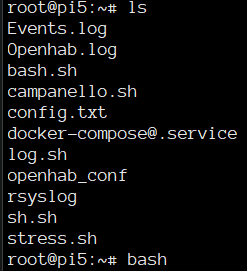
My .profile is the same as yours, yet .bashrc it’s not loaded.
I tried adding a simple. ~/.bashrc at the beginning of the file, skipping the two if altogether, yet nothing changed. I guess .profile is also not loaded?
While normally I might be the one to mess around I actually took great care NOT to mess with this system at all: this raspberry is only used to host docker containers, it has basically no package installed, and its kept constantly (monthly?) updated. I did skip 10.0.0 but I made the jump to 10 at the first minor release.
Yes, looks fine to me too: No .bash_profile which could interfere, also session started in interactive mode. ALso right shell and user, I have no idea why it’s failing
What is also weird is that your first ls output lists one file per line, but without the mode/owner/size stuff ls -l would list. So that shell seems to have some alias already.
Which SSH server and which SSH client do you use? Do you face the same when logging in at local console?
Also, do SSH logins show the DietPi banner? That would at least indicate /etc/bash.bashrc is loaded.
These commands should give some clarification:
env
alias
You could also set a test variable in ~/.profile to see whether it is loaded or not. Ah, and a more explicit test, whether it is a login shell:
However, this affects /etc/profile and ~/.profile loading only. In an interactive non-login shell, /etc/bash.bashrc and ~/.bashrc would be loaded regardless.
I apologize for the delay in my reply. The banner IS displayed and the behaviour is client-agnostic: it’s the same from basic cli ssh in my mac as with putty on windows or even normal ssh from another linux machine.
I just get weird one-line black and white ls even if env and aliases are loaded. Until typing “bash”, then all is fine.
root@pi5:\~# alias
alias 1337=‘echo “Indeed, you are =)”’
alias cpu=‘/boot/dietpi/dietpi-cpuinfo’
alias dietpi-autostart=‘/boot/dietpi/dietpi-autostart’
alias dietpi-backup=‘/boot/dietpi/dietpi-backup’
alias dietpi-banner=‘/boot/dietpi/func/dietpi-banner’
alias dietpi-benchmark=‘/boot/dietpi/dietpi-benchmark’
alias dietpi-bugreport=‘/boot/dietpi/dietpi-bugreport’
alias dietpi-cleaner=‘/boot/dietpi/dietpi-cleaner’
alias dietpi-cloudshell=‘/boot/dietpi/dietpi-cloudshell’
alias dietpi-config=‘/boot/dietpi/dietpi-config’
alias dietpi-cron=‘/boot/dietpi/dietpi-cron’
alias dietpi-ddns=‘/boot/dietpi/dietpi-ddns’
alias dietpi-display=‘/boot/dietpi/dietpi-display’
alias dietpi-drive_manager=‘/boot/dietpi/dietpi-drive_manager’
alias dietpi-explorer=‘/boot/dietpi/dietpi-explorer’
alias dietpi-justboom=‘/boot/dietpi/misc/dietpi-justboom’
alias dietpi-launcher=‘/boot/dietpi/dietpi-launcher’
alias dietpi-led_control=‘/boot/dietpi/dietpi-led_control’
alias dietpi-letsencrypt=‘/boot/dietpi/dietpi-letsencrypt’
alias dietpi-logclear=‘/boot/dietpi/func/dietpi-logclear’
alias dietpi-morsecode=‘/boot/dietpi/dietpi-morsecode’
alias dietpi-optimal_mtu=‘/boot/dietpi/func/dietpi-optimal_mtu’
alias dietpi-services=‘/boot/dietpi/dietpi-services’
alias dietpi-software=‘/boot/dietpi/dietpi-software’
alias dietpi-survey=‘/boot/dietpi/dietpi-survey’
alias dietpi-sync=‘/boot/dietpi/dietpi-sync’
alias dietpi-update=‘/boot/dietpi/dietpi-update’
alias dietpi-vpn=‘/boot/dietpi/dietpi-vpn’
alias dietpi-wifidb=‘/boot/dietpi/func/dietpi-wifidb’
alias l=‘ls $LS_OPTIONS -lA’
alias ll=‘ls $LS_OPTIONS -l’
alias ls=‘ls $LS_OPTIONS’
alias openhab-cli=‘docker exec -it openhab5 /openhab/runtime/bin/client’
alias sudo='sudo ’
root@pi5:\~#
So that was before running bash? So everything is defined as expected, ls color option, the colors themselves, no single file per line in any ls alias, which would be the ls -1 option (“one”, not “L”).
So the environment looks all as expected, the .bashrc is not the issue. But can you compare the output of the commands after running bash? It should not be a login shell anymore and have SHLVL=2, but otherwise should be pretty much the same.
However, aside of the environment, also the terminal and shell can be configured. So comparing these might also give a hint: