I’m running into problems when installing via dietpi.txt automatic install.
I do not have the issues without the custom automatic setup.
I am not sure at what point the PI should be reachable via ethernet, but I cannot see or ping it
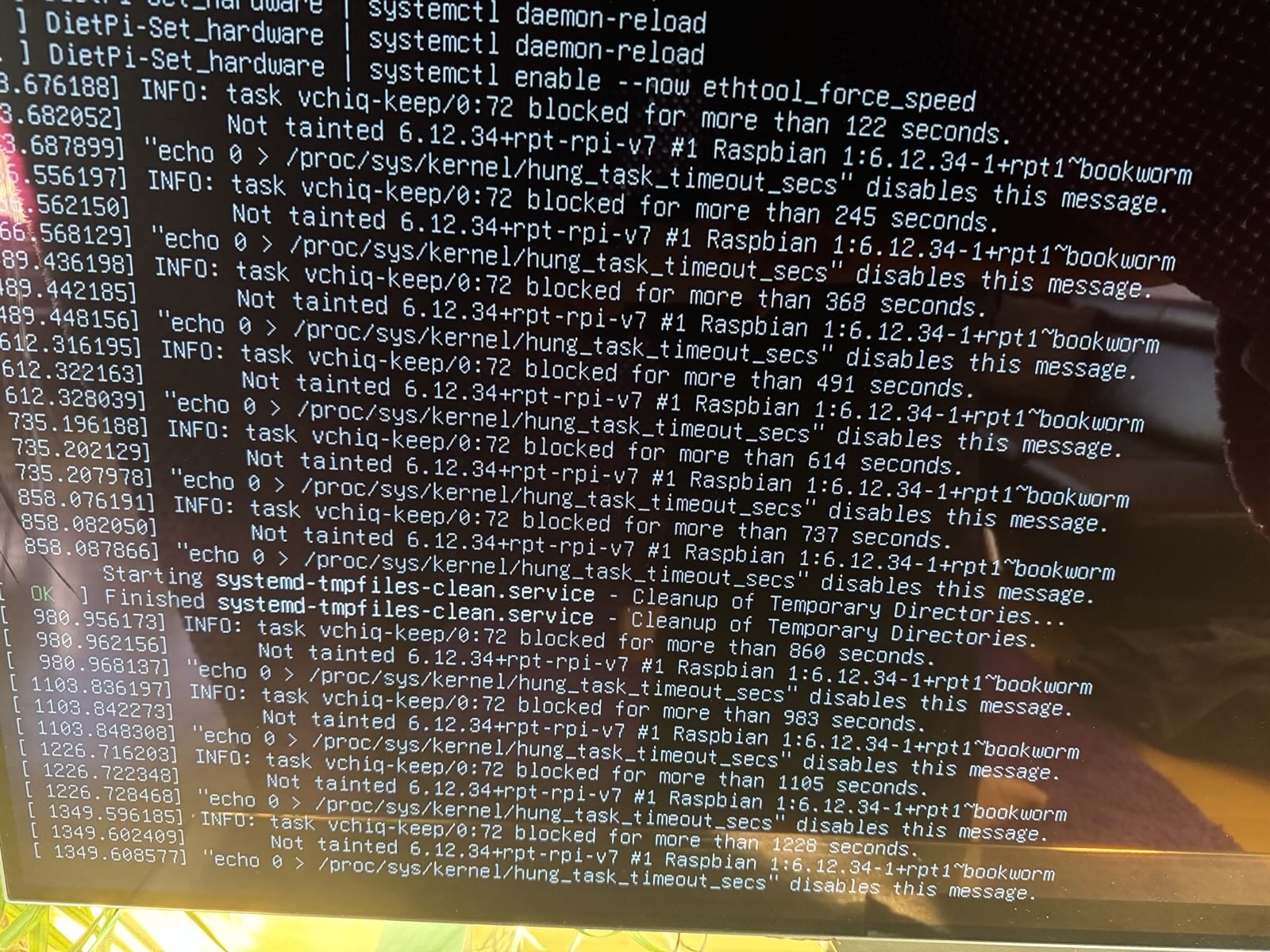
Here is the output of my PI where it hangs/is stuck, and my file
Sorry what is an SBC?
It is a raspberry pi 2 B, if that is what you mean. And yes ofc, latest version
But I am starting to think it is defective as I cannot get it to boot at all anymore
I don’t have any custom script. All I did was modify the dietpi.txt so it would do an automatic setup.
Also one more question: after flashing the image to the SD card with balenaEtcher on Windows I can only access one of the partitions as I don’t have any linux filesystem drivers installed.
# Custom Script (post-networking and post-DietPi install)
# - Allows you to automatically execute a custom script at the end of DietPi install.
# - Option 0 = Copy your script to /boot/Automation_Custom_Script.sh and it will be executed automatically.
# - Option 1 = Host your script online, then use e.g. AUTO_SETUP_CUSTOM_SCRIPT_EXEC=https://myweb.com/myscript.sh and it will be downloaded and executed automatically.
# - Executed script log: /var/tmp/dietpi/logs/dietpi-automation_custom_script.log
AUTO_SETUP_CUSTOM_SCRIPT_EXEC=0
AUTO_SETUP_CUSTOM_SCRIPT_EXEC=0 requires a custom script at the boot partition.
This option is not needed if you don’t plan to use an own script.
and following might not work either
# - This user must exist before firstrun installs, otherwise it will be reverted to root.
# - Applies to all autostart options but: 0, 6, 14 and 16
AUTO_SETUP_AUTOSTART_LOGIN_USER=cars11
I doubt you will have this user created automatically?, do you?
What did you exspect from this user? You don’t have any desktop or other GUI app installed.
The vchiq-keep hung task message is unrelated, it is actually hanging here
Or more precisely at this command it seems:
ethtool -s eth0 speed 100 duplex full autoneg off
assuming you are aiming to enforce 100 Mbit link speed. This means you set AUTO_SETUP_NET_ETH_FORCE_SPEED=100 in dietpi.txt.
Note that this is not needed in your case. The reason and only case I know about where this was needed, was a certain SBC with 1000 Mbit Ethernet, but using it was very unstable, and much better when limiting the speed to 100 Mbit instead. We should probably enhance the description in dietpi.txt and dietpi-config about this.
However, it should not hang, of course, and especially it should stop hanging at latest when the default systemd unit startup time has been reached. Looks like aiming to set the link speed like this hangs the kernel at some lower level, somehow.
Which RPi 2 revision is it? PCB v1.1 or PCB v1.2? I could try to replicate it in the first case. Since first run setup never finished, you could just edit dietpi.txt and set AUTO_SETUP_NET_ETH_FORCE_SPEED=0 again, which leads to the removal of this hanging service, in case I do not misinterpret the logs. Then above command could be tested to narrow it down.
I tried a setup without the automatic setup/dietpi.txt and ran into the same issue, but only after setting my ethernet interface to static and restarting it. then it stopped responding and i saw the some error/info on the screen with vchiq-keep.
and now it won’t boot at all anymore for some reason after reflashing and trying so many times
i’ve been trying the raspi 1 dietpi image (with armv6 in the name) and that is what is not booting at all for me. the armv7 image at least boots occasionally.
now after messing around with it many more times, I think it is my SD card reader, my SD card, or my image that has died/ is dying.
every flash now fails to verify. and all the files have hieroglyphs for names.
So I moved to my iMac and tried it on its internal card reader. same result. So I then I downloaded the image again on the mac and it finally flashed. With so many variables, I have no idea what is at fault.
Safe to say, it must have something to do with my setup, as it is working now.
My gut feeling is I downloaded a corrupt image (despite re-downloading it 3 times!) or my SSD on my PC corrupted it somehow.
Eitherway, flashing it from my mac and commenting out the lines you guys suggested has it working again.
All good with =0 does mean off. If a custom script has been manually added it is executed, but otherwise this setting can be used to load a custom script from an URL.
Okay, then I can test with mine, having the same.
As far as I can see, the issue has nothing to do with automatic setup, since it hangs when the dietpi-firstboot script runs, which is way before the automated setup/login happens. So did you set AUTO_SETUP_NET_ETH_FORCE_SPEED to something other than 0? Not to confuse with the custom script setting that you were talking about .
Yes that is expected, since it contains the ARMv6 kernel only. The RPi 2 requires the ARMv7 kernel. I just recognized that our info in this regards is wrong on the download page. On the RPi 1 image it still says at the bottom line “compatible with all RPi models”, which was true with the old combined kernel packages. The new kernel packages are much more tailored for specific RPi SoCs.
Oh my god. I have been tearing my hair out all night because I thought my RPi is defective and I kept using that version because it said compatible and because I couldn’t understand why I was having problems with the new one.
Oh well, at least one good thing came of all this. Hopefully no one else will run into that issue now that you fixed the description
But even if it was compatible, why would you use an ARMv6 image intended for RPi 1 and Zero models on an RPi 2, while there is an explicit image intended for RPi 2?
Because i was having problems and was trying to rule things out. There being a new special image just for the rpi2 is a new variable. And i knew the old image file never gave me any problems
The RPi 2 v1.1 image really is the only one which works on this model, being also the only RPi model with BCM2709 (BCM2836) SoC, the only true ARMv7 RPi. I learned just now that a Compute Module 2 based on this SoC was designed, but never released. But a Chinese manufacturer sold fake CM2s instead .

 .
.