Auto-mount USB Storage over Samba

Hi, I’ve set up a basic file server running samba over dietpi. The standard mount points work perfectly and the use of dietpi-drive_manger makes mounting and unmounting a drive a breeze.

However, I want the system to auto-mount any USB device and remove it from the path even if removed insecurely. I have searched the forum regarding this and did find this script that to most part, works well.

The issues I’m facing are:

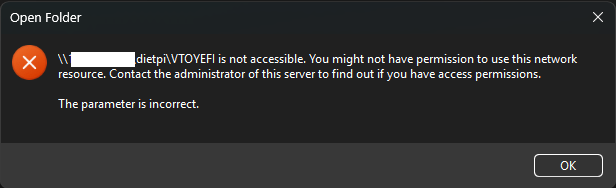
  1. I keep getting the following error message while navigating the directories on Windows 11. Usually, once a directory is entered, or exited.
  2. I cannot write to the drive.

I have set “path = /ZFSpoolMirrored/public/automount/” in smb.conf. This is the only variable changed in that file.

The script in use is below.

## https://www.lytning.org/blog/2023/linux_01_automount_usb.html

KERNEL!="sd*", GOTO="media_by_label_auto_mount_end"
ENV{ID_TYPE}!="disk", GOTO="media_by_label_auto_mount_end"
# Import FS infos
IMPORT{program}="/sbin/blkid -o udev -p %N"
ENV{ID_FS_TYPE}=="", GOTO="media_by_label_auto_mount_end"
ENV{ID_FS_LABEL}!="", ENV{dir_name}="%E{ID_FS_LABEL}"
ENV{ID_FS_LABEL}=="", ENV{dir_name}="%E{ID_FS_UUID}"

# FAT* / exFAT / NTFS don't support Unix directory permissions, so set the mount directory to `nobody:nogroup` and make R+W for those users, read-only for everyone else
ACTION=="add", SUBSYSTEMS=="usb", SUBSYSTEM=="block", ENV{ID_FS_TYPE}=="vfat|exfat|ntfs", RUN{program}+="/usr/bin/systemd-mount --owner=nobody --options=rw,umask=002 --no-block --automount=yes --collect /dev/%k /ZFSpoolMirrored/public/automount/%E{dir_name}"

# Most other common filesystem types do support Unix directory permissions, so set the mount directory to `nobody:users` with 755 permissions
ACTION=="add", SUBSYSTEMS=="usb", SUBSYSTEM=="block", ENV{ID_FS_USAGE}=="filesystem", ENV{ID_FS_TYPE}!="vfat", ENV{ID_FS_TYPE}!="exfat", ENV{ID_FS_TYPE}!="ntfs", RUN{program}+="/usr/bin/systemd-mount --options=X-mount.mode=1775,X-mount.owner=nobody,X-mount.group=users --no-block --automount=yes --collect /dev/%k /ZFSpoolMirrored/public/automount/%E{dir_name}"

# Clean up after removal
ACTION=="remove", SUBSYSTEMS=="usb", SUBSYSTEM=="block", ENV{ID_FS_USAGE}=="filesystem", ENV{dir_name}!="", RUN{program}+="/usr/bin/systemd-umount /ZFSpoolMirrored/public/automount/%E{dir_name}", RUN{program}+="/bin/rmdir /ZFSpoolMirrored/public/automount/%E{dir_name}"
# Exit
LABEL="media_by_label_auto_mount_end"

Please help me resolve this issue. My understanding of Linux is elementary.

EDIT: updated information.

Can you share your smb.conf please

Thank you for taking out time to help.

Here’s the content of smb.conf


[global]

        workgroup = WORKGROUP
        server string = %h server
        dns proxy = no
        log file = /var/log/samba/log.%m
        max log size = 1000
        logging = syslog@1

        panic action = /usr/share/samba/panic-action %d

        security = user
        passdb backend = tdbsam
        obey pam restrictions = yes
        unix password sync = yes

        passwd program = /usr/bin/passwd %u
        passwd chat = *Enter\snew\s*\spassword:* %n\n *Retype\snew\s*\spassword>
        pam password change = yes
        map to guest = bad user

        load printers = no
        printcap name = /dev/null
        disable spoolss = yes

[DietPi]
        comment = DietPi Share
        path = /ZFSpoolMirrored/public/automount
        browseable = yes
        create mask = 0664
        directory mask = 0775
        valid users = samba
        writeable = yes
        max connections = 8


before running in the wrong direction with SAMBA, I ask Gemini on the error message above to understood why there are permission issues on VTOYEFI

This is the answer

If you see a partition or drive labeled VTOYEFI , it means you (or someone else) have used a tool called Ventoy to create a bootable USB drive.

VTOYEFI is the secondary, hidden partition that Ventoy creates to handle the technical “handshake” between your computer’s hardware and the software on the stick.

:magnifying_glass_tilted_left: What exactly is it?

When Ventoy prepares a USB drive, it splits it into two parts:

  1. Ventoy Partition: This is the large part you usually see. It’s where you drop your ISO files (like Windows or Linux installers).
  2. VTOYEFI Partition: This is a tiny (usually ~32MB) FAT32 partition. It contains the EFI bootloader files required for your computer to recognize the USB stick as a bootable device in modern UEFI mode.

Does this ring a bell? Maybe something you have done to the usb device before?

1 Like

Ok, can you please suggest what changes to be made to resolve it, because the issue is there with any drive. It’s only by coincidence that the Ventoy drive was plugged in during the screenshot. The windows error accessing the drive in the screenshot is intermittent. However, I cannot write to the any USB mounted using the script shared in the fist post.

On a side note, when a drive is mounted using dietpi-drive_manger, there are no access warnings, and the drive is writable. But it seems drive_manager does not have an option for auto-mount. This led me to search for other options within my purview of understanding of Linux.

So the scripts mounts as user “nobody” but your samba share you set valid users = samba. That’s the permission issue.

Then I guess the error you see in Windows comes from --automount=yes. Set it to no so it’s mounted when plugged in, and not only when a file is requested.

1 Like

Yes mounting as user and group nobody isn’t that good of an idea. Which file system format the usb drives have?

@Jappe Thanks a lot! This indeed was the core of the issue. So I learnt that ‘nobody’ has limited privileges and I infer that filesystem write access perhaps is one of the restrictions. The --automount=no has also resolved the intermittent access issue in Windows explorer. I thought automount=yes is the actual instruction to automatically mount the filesystem once a USB drive is inserted into the port.

Thanks for the help!

Err. It seems like I’m facing a related issue. Thankfully the drives are writable. But in case the disk is removed without being unmounted, the directory with it’s respective name remains at the mount point location. Which, I learnt can be removed by unmounting the mount point first (sudo umount -l) and later deleting the directory (sudo rm -d). I tried to add the udev rule as (I have changed the mount point since the it’s use in the first post as ZFSpoolMirrored/public/automount/ was preference of the author of the script) :

ACTION==“remove”, RUN+="/bin/umount -l /mnt/shared/automount/%E{dir_name}”, RUN+=“/bin/rm -d /mnt/shared/automount/%E{dir_name}”

However, this does not unmount the drive and delete it’s directory. I may have assumed many things here and made grave error. Looking for guidance again!

Thanks!