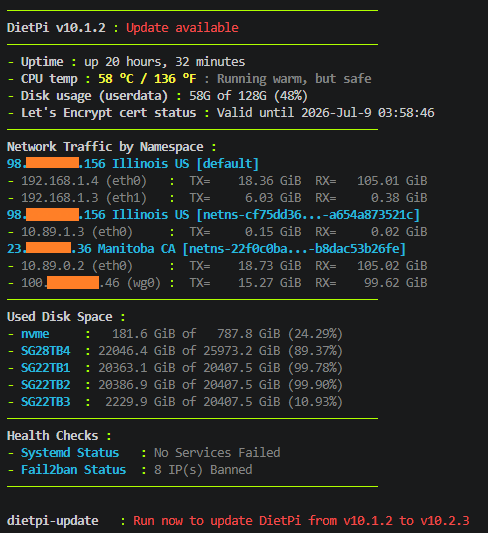
I made a script to extend the banner functionality. Curious if anyone would find it useful. If so, I will look at starting a feature/pull request.
The script is run as a custom entry in dietpi-banner. It reports:
1.network traffic inside dynamically discovered network namespaces (ip netns), useful if you run containers (I have podman pods, so containers are aggregated into combined netns’s)
2.used space in dynamically discovered filesystems (user can specify glob or regex matching)
Right now I have it as a separate script. It is far from ready for integration/distribution, but is functional. It should survive dietpi-update without issue (depends where you put the script).
Enter it as a custom entry in dietpi-banner. When dietpi-banner asks for the command:
Prefix re: makes that pattern interpret as a regex. Without it, the pattern is interpreted as a glob. The above will report the space for filesystem / and filesystems found under /mnt/ that has subdirectory names of length { 4 - 16 }.
You will probably have to chmod +x the script. I run this stuff as root, access to network namespace info won’t typically be available to other users (obviously this needs improvement).
Link here . Don’t clone the whole repo, there is a ton of unrelated stuff there.
@MichaIng I want to work on a pull request to integrate this stuff directly into dietpi-banner, but have a couple questions
Is there a good way to run the banner or sub-commands with root access, even under dietpi user? netns, letsencrypt, systemd, fail2ban (iptables) functions need root access or at least permissions different than the default in order to work under non-root users
Any reason not to use ‘printf’? I use it mainly for consistent formatting/spacing, which would be time consuming to reproduce with ‘echo’
No problem using printf, to make use of its formatting abilities.
Generally, try to keep it modular and implemented as close as possible to the other options. Regarding the disk usage: Since there are two similar entries already, for rootfs and userdata, maybe it makes sense to combine these in a consistent way, like:
A single “disk usage” option.
If enabled, a submenu to toggle from a list of: rootfs, userdata, a somewhat filtered findmnt -rno TARGET output (maybe with --real), and a custom filter inputbox as your script supports it. Output could then be single line like before, if only one mount was selected, or with your Used Disk Space : header + mount list format, if multiple drives (or a custom filter) were selected.
I started a fork for my dietpi-banner upgrades. I am not great with the collaboration tools on github, I know an issue/pull request would need to be done eventually, but this is very much ‘in progress’ and it is on the DEV branch (unstable).
If anyone wants to test or help out, from my fork you just need dietpi-globals and dietpi-banner. Note that the fork is from the dev branch, so there might be other unrelated changes.