# Wireguard did not "survive" DietPi upgrade?
**URL:** https://dietpi.com/forum/t/wireguard-did-not-survive-dietpi-upgrade/15085
**Category:** General Discussion
**Created:** [27 November 2022 20:03 UTC](https://dietpi.com/forum/t/wireguard-did-not-survive-dietpi-upgrade/15085 "2022-11-27T20:03:58Z")
**Posts on this page:** 7
**Page:** 1
### Author:  [@naddel91](https://dietpi.com/forum/u/naddel91)
#### Post date: [27 November 2022 20:03 UTC](https://dietpi.com/forum/t/wireguard-did-not-survive-dietpi-upgrade/15085/1 "2022-11-27T20:03:59Z")
Hi at all,
I just noticed “wg” or “wgshow” does nothing, although wireguard was successfully installed and worked fine a few days before.
Is there a way to check for errors when those commands don’t work? or do I have to uninstall/reinstall WireGuard?
best wishes!
EDIT: Reboot fixed it, I can connect, but no data is sent back to the client. port tells me “closed” when using web scanner, although router tells it is opened (green).
Is this here still a thing?
" **IP forwarding is disabled by default** on Raspbian so it’s extremely important to enable it for any of the `iptables` rules to work.
Enable IP forwarding in the Linux kernel by uncommenting or adding (uncommenting) `net.ipv4.ip_forward = 1` to `/etc/sysctl.conf` to persist the setting between system restarts. Use `sysctl -w net.ipv4.ip_forward=1` to enable IP forwarding immediately without having to reboot."
---
### Author:  [@MichaIng](https://dietpi.com/forum/u/MichaIng)
#### Post date: [27 November 2022 20:37 UTC](https://dietpi.com/forum/t/wireguard-did-not-survive-dietpi-upgrade/15085/2 "2022-11-27T20:37:17Z")
When a kernel upgrade is done, a reboot is mandatory for WireGuard to work, since it’s a kernel module.
The `/etc/wireguard/wg0.conf` shipped with our install option should enable IP forwarding automatically once the interface is brought up 🤔.
---
### Author:  [@naddel91](https://dietpi.com/forum/u/naddel91)
#### Post date: [27 November 2022 20:39 UTC](https://dietpi.com/forum/t/wireguard-did-not-survive-dietpi-upgrade/15085/3 "2022-11-27T20:39:10Z")
scrap all that. client’s “nameserver” was misconfigured.
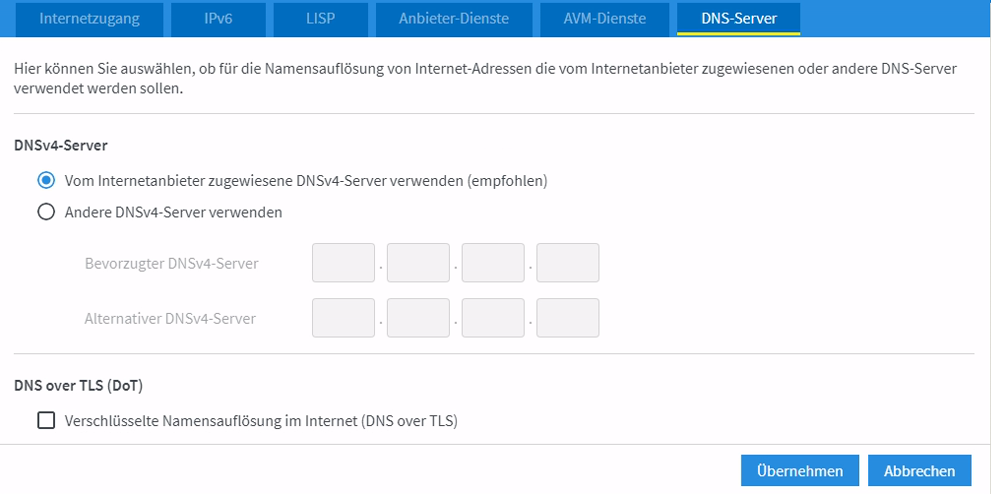
I told the client to use the wireguard/pihole IP as nameserver in order to block ads immediately. but unfortunately I have to use the routers IP which does not seem to use pihole as first DNS, but instead shows ads.
I think it is because wg network (10.x.x.x) is NOT “home network” (192.x.x.x) as my router uses. so that traffic is NOT put through pihole, right?

---
### Author:  [@MichaIng](https://dietpi.com/forum/u/MichaIng)
#### Post date: [27 November 2022 21:26 UTC](https://dietpi.com/forum/t/wireguard-did-not-survive-dietpi-upgrade/15085/4 "2022-11-27T21:26:13Z")
If I’m not mistaken, when you setup the NAT iptables rules to forward traffic between VPN and local network (also part of our `wg0.conf`), you can use the Pi-hole’s internal IP address as client’s DNS. If the Pi-hole host is the VPN server as well, you can definitely use the VPN IP (`10.*`).
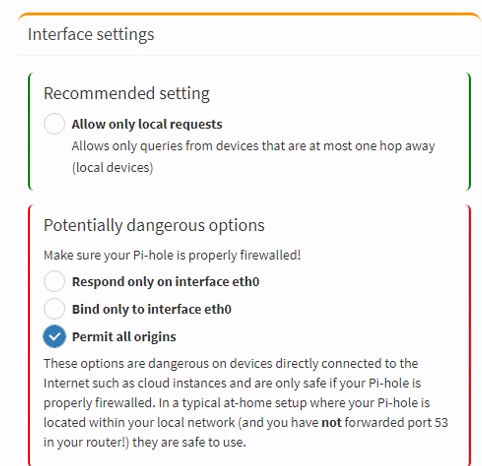
EDIT: Ah, but Pi-hole needs to be configured to allow DNS requests from all origins, else it allows those from LAN hosts only and blocks those from VPN attached hosts by default.
---
### Author:  [@Joulinar](https://dietpi.com/forum/u/Joulinar)
#### Post date: [27 November 2022 21:35 UTC](https://dietpi.com/forum/t/wireguard-did-not-survive-dietpi-upgrade/15085/5 "2022-11-27T21:35:50Z")
> [@MichaIng](#):
>
> EDIT: Ah, but Pi-hole needs to be configured to allow DNS requests from all origins
yes correct. You need to `Permit all origins` within PiHole settings if using a VPN IP address 10.x.x.x for PiHole DNS
---
### Author:  [@naddel91](https://dietpi.com/forum/u/naddel91)
#### Post date: [27 November 2022 22:21 UTC](https://dietpi.com/forum/t/wireguard-did-not-survive-dietpi-upgrade/15085/6 "2022-11-27T22:21:18Z")
changed it and will test. I noticed there is a “new option” I did not remember from first setting up pihole. it is now the recommended option for all devices only 1 hop away which would be true for local if on another network, right?
EDIT: works fine now when using PiHole IP as nameserver! Thanks!!!
---
### Author:  [@trendy](https://dietpi.com/forum/u/trendy)
#### Post date: [28 November 2022 11:15 UTC](https://dietpi.com/forum/t/wireguard-did-not-survive-dietpi-upgrade/15085/7 "2022-11-28T11:15:02Z")
> [@naddel91](#):
>
> port tells me “closed” when using web scanner
Don’t trust that. WG is udp and it won’t respond to probes, if the packet is not correct.