# V8.21: Cannot ssh via dropbear or openssh!
**URL:** https://dietpi.com/forum/t/v8-21-cannot-ssh-via-dropbear-or-openssh/17781
**Category:** Troubleshooting
**Created:** [30 August 2023 04:51 UTC](https://dietpi.com/forum/t/v8-21-cannot-ssh-via-dropbear-or-openssh/17781 "2023-08-30T04:51:03Z")
**Posts on this page:** 16
**Page:** 1
### Author:  [@siliconhippy](https://dietpi.com/forum/u/siliconhippy)
#### Post date: [30 August 2023 04:51 UTC](https://dietpi.com/forum/t/v8-21-cannot-ssh-via-dropbear-or-openssh/17781/1 "2023-08-30T04:51:04Z")
I looked at this and other threads:
> [@Can't connect via SSH after replacing Dropbear with OpenSSH](https://dietpi.com/forum/t/cant-connect-via-ssh-after-replacing-dropbear-with-openssh/14386):
>
> Had been connecting fine with the default SSH client using root@ and a customized password. After replacing Dropbear with OpenSSH using dietpi-software, the same credentials no longer work and result in “permission denied, please try again” error. I’ve tried many other default credentials too but none work.
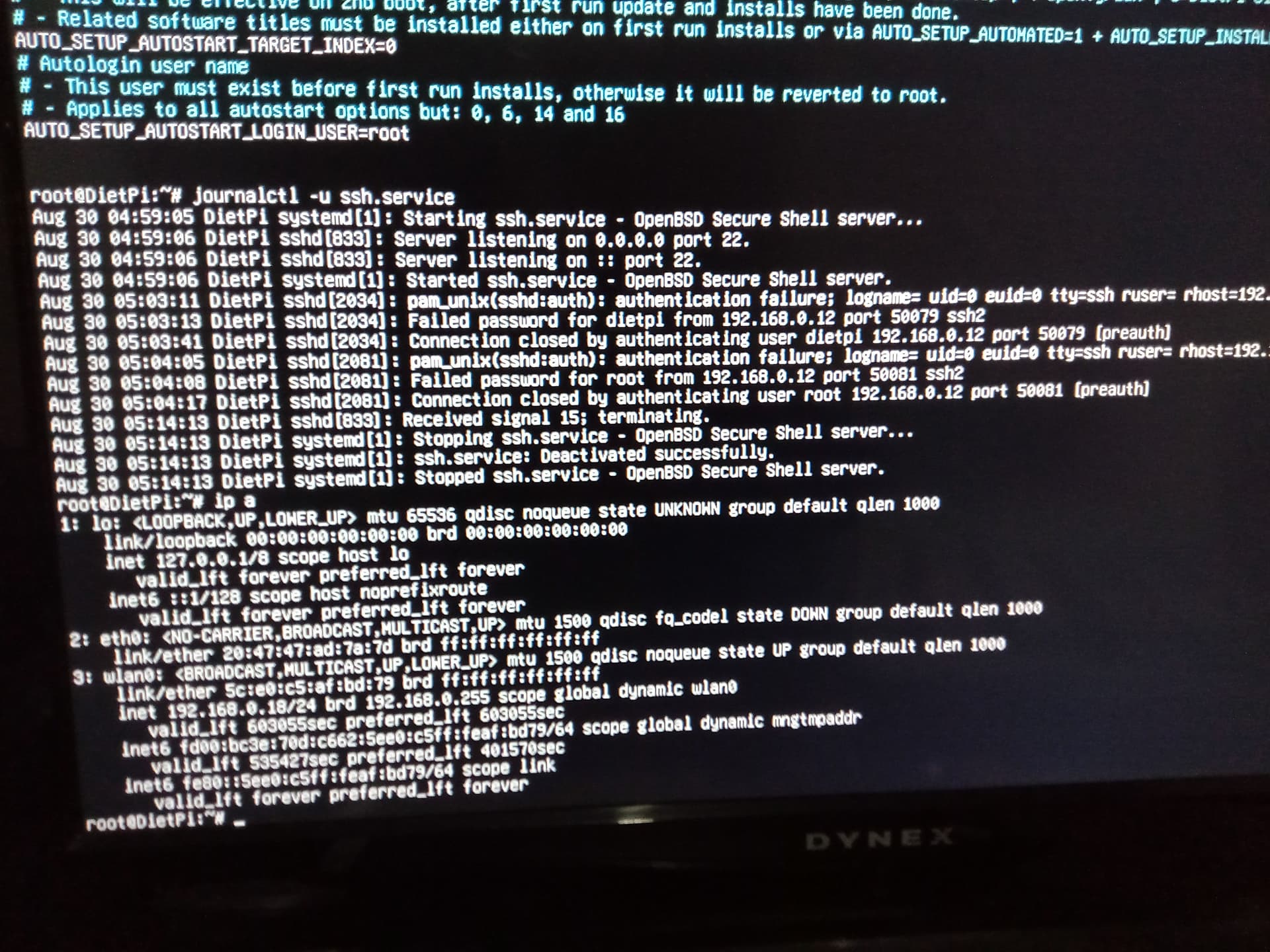
1. I made a fresh boot of the latest v8.21 on my i5 laptop with the PC BIOS/CSM distribution in server mode.
The install was actually done on a 2nd USB stick from an i5 mini PC, from the first Rufus USB installing stick, of course also on this mini PC.
(Then the 2nd USB stick with the installed DietPi was used to boot the i5 laptop.)
1. Things went fine- wifi worked, software installs ( Jellyfin, midnight commander, Dashboard , etc) and deletes ( vnc, x11, LXDE) were fine, and after a couple reboots, and custom password setup, …
2. I tried SSH from another Windows machine via PuTTY ( and Windows command line, and winscp) with the default Dropbear SSH server. Got denied root or DietPi user access.
3. Changed over to openssh server and then back to dropbear with no luck, and several reboots.
Pic above shows #journalctl -u ssh.service
and
#ip a.
Funny enough my actual DietPi IP is 192.168.0.18, not .12 that journalctl output shows ! I also had both WiFi and Ethernet enabled, but used WiFi ( eth not available.)
Also I had made updates to the DietPi.txt file, to have the correct -2 for openssh when it showed -1; and then back to -1 for Dropbear when it still showed -2 after reboot, once I had switched back.
The # cat ~dietpi.conf did correctly show as in the link above.
Noticed that the time zone was still at the default utc ( London) after reboot even though I had changed the time zone to an Asia city !
So somethings are just wrong with DietPi configuration!
Please help with SSH ! 🙈
---
### Author:  [@Jappe](https://dietpi.com/forum/u/Jappe)
#### Post date: [30 August 2023 06:57 UTC](https://dietpi.com/forum/t/v8-21-cannot-ssh-via-dropbear-or-openssh/17781/2 "2023-08-30T06:57:39Z")
> [@siliconhippy](#):
>
> Funny enough my actual DietPi IP is 192.168.0.18, not .12 that journalctl output shows
This output shows which IP tried to connect via SSH to your device, it is not the device IP itself.
Can you try to login locally and chagne the SSH password?
Is it also possible that you run the first boot setuo locally and on SSH you use a different keyboard layout (and bc of this you type a flase password)?
---
### Author:  [@siliconhippy](https://dietpi.com/forum/u/siliconhippy)
#### Post date: [30 August 2023 14:23 UTC](https://dietpi.com/forum/t/v8-21-cannot-ssh-via-dropbear-or-openssh/17781/3 "2023-08-30T14:23:57Z")
@Jappe
Thanks for the response…
1. What does it mean to say SSH IP is different? Sorry bit of a Linux noob here 😕
2. Isn’t the SSH password the same as the root or DietPi password ( all same in my case, including the global password: changed as usual from the menu when prompted during setup.)
3. Yes my setup as I said was on a different PC with a different keyboard. But I did check both PC keyboards ( one K400+ and the other a Bluetooth mini keyboard): same keys, same password as I typed in notepad++ to confirm.
So looks like the issues might have arisen from install on one PC, and then subsequent boot and setup on another…but this is quite common, and this should not occur !
I will keep trying …🙈
---
### Author:  [@Joulinar](https://dietpi.com/forum/u/Joulinar)
#### Post date: [30 August 2023 15:44 UTC](https://dietpi.com/forum/t/v8-21-cannot-ssh-via-dropbear-or-openssh/17781/4 "2023-08-30T15:44:56Z")
The system don’t matter where DietPi was installed on. User and password are part of the entire config and not linked to a hardware. And yes, SSH password is same as on local consol.
If possible, login locally and change the password again. Make sure you have correct country / local setting on the local console. By default, we use UK keyboard layout.
---
### Author:  [@Jappe](https://dietpi.com/forum/u/Jappe)
#### Post date: [30 August 2023 16:10 UTC](https://dietpi.com/forum/t/v8-21-cannot-ssh-via-dropbear-or-openssh/17781/5 "2023-08-30T16:10:17Z")
> [@siliconhippy](#):
>
> What does it mean to say SSH IP is different? Sorry bit of a Linux noob here
It says
> Failed password […] FROM 192.168.0.12
so `192.168.0.18` is your DietPi device and `192.168.0.12` is the machine from where you tried to connect to your DietPi via SSH, probably a desktop PC/ laptop?
Everything is fine with the IPs, SSH IP is the IP of your device, you only have this one, don’t worry about this 😉
> [@siliconhippy](#):
>
> Yes my setup as I said was on a different PC with a different keyboard. But I did check both PC keyboards ( one K400+ and the other a Bluetooth mini keyboard): same keys, same password as I typed in notepad++ to confirm.
It’s not about the keyboard, but which keyboard layout you set in your OS. I have a german keyboard but when I use UK layout and I press Z, the operating system shows an Y. So what you see on your keyboard is not always what your operating system receives. It depends on your localization settings and as Joulianr already set, the default layout is UK, which can diver from the layout of the machine you use for SSHing into your DietPi.
---
### Author:  [@siliconhippy](https://dietpi.com/forum/u/siliconhippy)
#### Post date: [30 August 2023 16:51 UTC](https://dietpi.com/forum/t/v8-21-cannot-ssh-via-dropbear-or-openssh/17781/6 "2023-08-30T16:51:36Z")
@Joulinar @Jappe
Yes my keyboard layout is on the UK default, using the very common Logitech K400+ wireless keyboard…
Ok so I will try changing the SSH login and password from the console and wait for the magic ✨
Ps. So the .12 IP was actually for the Putty login device, and of course the .18 id the DietPi device.
---
### Author:  [@siliconhippy](https://dietpi.com/forum/u/siliconhippy)
#### Post date: [30 August 2023 18:17 UTC](https://dietpi.com/forum/t/v8-21-cannot-ssh-via-dropbear-or-openssh/17781/7 "2023-08-30T18:17:05Z")
Success !
The problem was auto locale setting in the DietPi.txt file, which by default was set to c.utf-8.
This did not allow the special ‘@’ in my original password !
So I changed the password to small letters only and had SSH access.
Then, upon a hunch, I changed auto locale to en\_us.utf-8, changed back my password to the original with ‘@’ , and rebooted.
SSH access worked.
( Before above I had also changed keyboard from ‘gb’ to ‘us’ and used the DietPi device keyboard for the ssh device, but that didn’t work with the ‘@’ password.)
Before changing password, and after the failed SSH with ‘@’ password, I noticed this error message on the console:
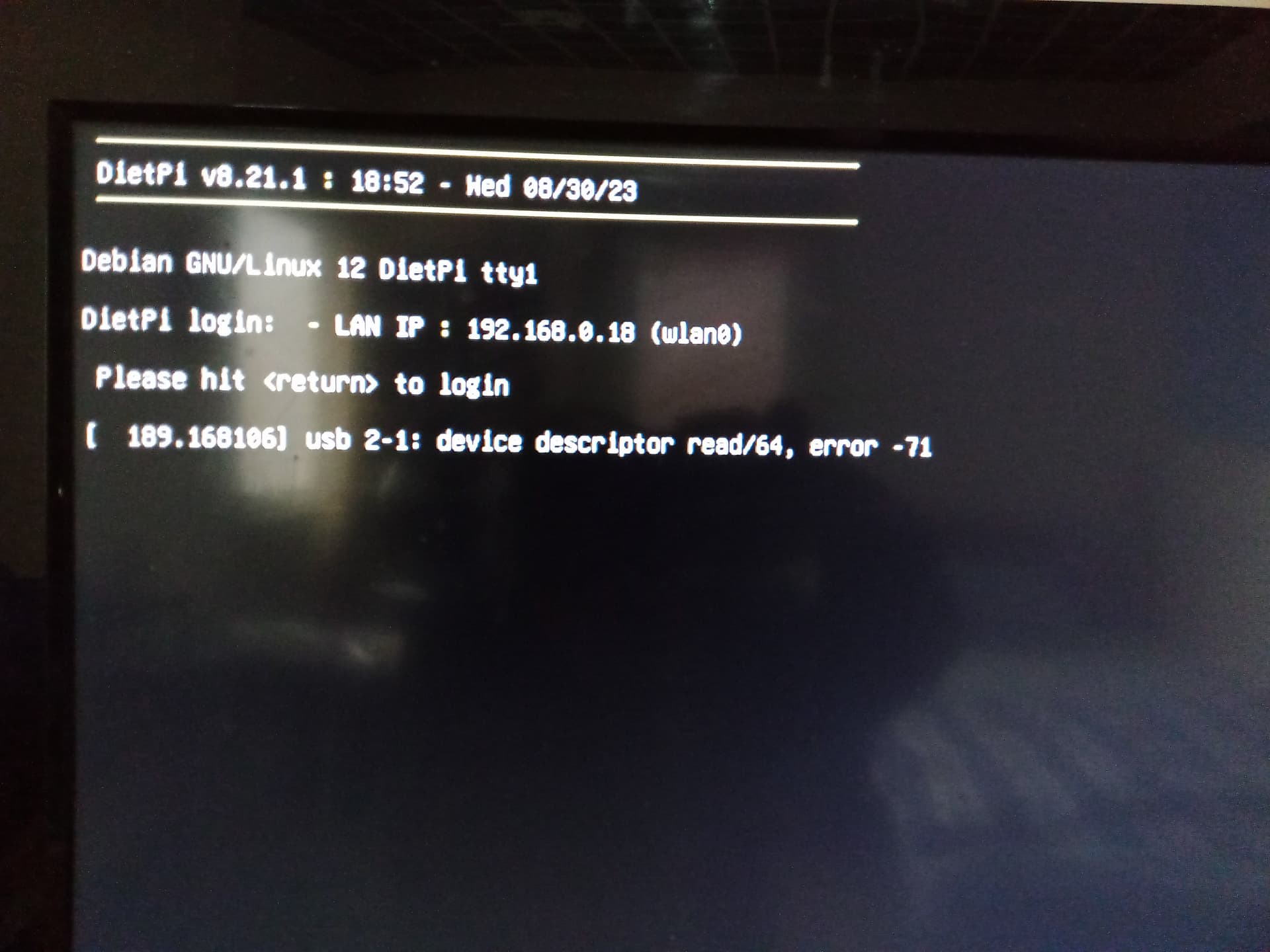
Question: so what is c.utf-8 ?
---
### Author:  [@Joulinar](https://dietpi.com/forum/u/Joulinar)
#### Post date: [30 August 2023 19:15 UTC](https://dietpi.com/forum/t/v8-21-cannot-ssh-via-dropbear-or-openssh/17781/8 "2023-08-30T19:15:47Z")
> [@siliconhippy](#):
>
> Question: so what is c.utf-8 ?
> **[UTF-8](https://en.wikipedia.org/wiki/UTF-8)**
>
> UTF-8 is a variable-length character encoding standard used for electronic communication. Defined by the Unicode Standard, the name is derived from Unicode Transformation Format – 8-bit.
> UTF-8 is capable of encoding all 1,112,064\[a\] valid Unicode code points using one to four one-byte (8-bit) code units. Code points with lower numerical values, which tend to occur more frequently, are encoded using fewer bytes. It was designed for backward compatibility with ASCII: the first 128 characters of U...
---
### Author:  [@siliconhippy](https://dietpi.com/forum/u/siliconhippy)
#### Post date: [30 August 2023 21:26 UTC](https://dietpi.com/forum/t/v8-21-cannot-ssh-via-dropbear-or-openssh/17781/9 "2023-08-30T21:26:29Z")
Well what is c.utf-8? ( I understand utf-8 format.)
Why is this default, as opposed to say en\_gb.utf-8 ?
I have en\_us.utf-8.
Now I have a problem pasting the dietpi-imager script in the ~/.bashrc file…get syntax errors I cannot see ! Some text coding errors…
* * *
This gives,
```auto
root@DietPi:~# source ~/.bashrc
-bash: /root/.bashrc: line 22: syntax error near unexpected token `)'
-bash: /root/.bashrc: line 22: `dietpi-imager() {'
For the ~/.bashrc file entry:
dietpi-imager() {
bash -c "$(curl -sSfL https://raw.githubusercontent.com/MichaIng/DietPi/master/.build/images/dietpi-imager)"
}
```
---
### Author:  [@Joulinar](https://dietpi.com/forum/u/Joulinar)
#### Post date: [31 August 2023 07:15 UTC](https://dietpi.com/forum/t/v8-21-cannot-ssh-via-dropbear-or-openssh/17781/10 "2023-08-31T07:15:39Z")
> [@siliconhippy](#):
>
> Well what is c.utf-8? ( I understand utf-8 format.)
> Why is this default, as opposed to say en\_gb.utf-8 ?
>
> I have en\_us.utf-8.
does this answer your question? [Solved: Re: Difference between C.utf8 and en\_us.utf8? (poi... - Hewlett Packard Enterprise Community](https://community.hpe.com/t5/operating-system-hp-ux/difference-between-c-utf8-and-en-us-utf8-points/m-p/4418197#M663511)
> [@siliconhippy](#):
>
> Now I have a problem pasting the dietpi-imager script in the ~/.bashrc file
Why are you doing this? What is the aim of it?
---
### Author:  [@siliconhippy](https://dietpi.com/forum/u/siliconhippy)
#### Post date: [31 August 2023 15:34 UTC](https://dietpi.com/forum/t/v8-21-cannot-ssh-via-dropbear-or-openssh/17781/11 "2023-08-31T15:34:34Z")
@Joulinar
1. Yes whatever computer vs US English means 😃.
2. I would like to shrink my backup OS so it doesn’t keep 2x in size everytime.
So I thought it would be nice to ask Bing Skype gpt a quick way such that I don’t have to copy and paste from GitHub all the time to run this script …the script is invoked correctly from the terminal ( I haven’t gone through it since I spent a lot of time accessing Jellyfin at port 8096 only to read later DietPi Jellyfin is at 8097 !)
But there seems to be a text encoding problem?
Anyway I can run the script manually on another USB stick with a 2nd DietPi instance on same PC to backup and shrink the first USB DietPi image when my configs are done 🙂
---
### Author:  [@Joulinar](https://dietpi.com/forum/u/Joulinar)
#### Post date: [31 August 2023 20:17 UTC](https://dietpi.com/forum/t/v8-21-cannot-ssh-via-dropbear-or-openssh/17781/12 "2023-08-31T20:17:16Z")
> [@siliconhippy](#):
>
> Jellyfin at port 8096 only to read later DietPi Jellyfin is at 8097 !)
yes as stated on our online docs 🙂
> [@siliconhippy](#):
>
> But there seems to be a text encoding problem?
I guess typos and syntax issues on your script.
---
### Author:  [@siliconhippy](https://dietpi.com/forum/u/siliconhippy)
#### Post date: [31 August 2023 22:40 UTC](https://dietpi.com/forum/t/v8-21-cannot-ssh-via-dropbear-or-openssh/17781/13 "2023-08-31T22:40:50Z")
Well it is not my script, but from DietPi GitHub.
Maybe their text encoding is not compatible with en\_us.utf-8, which would be surprising ! 🙈
---
### Author:  [@Joulinar](https://dietpi.com/forum/u/Joulinar)
#### Post date: [1 September 2023 06:08 UTC](https://dietpi.com/forum/t/v8-21-cannot-ssh-via-dropbear-or-openssh/17781/14 "2023-09-01T06:08:03Z")
> [@siliconhippy](#):
>
> Well it is not my scrip
What do you mean it is not your script? As far as I understand, you tried to create a new alias in `/root/.bashrc`, right? And there is a syntax error in the lines you added. Or what is the exact problem?
---
### Author:  [@siliconhippy](https://dietpi.com/forum/u/siliconhippy)
#### Post date: [1 September 2023 15:27 UTC](https://dietpi.com/forum/t/v8-21-cannot-ssh-via-dropbear-or-openssh/17781/15 "2023-09-01T15:27:45Z")
The text encoding error comes from a mismatch between c.utf-8 and en\_us.utf-8, due to how @MichaIng coded his dietpi-imager script, as far as I can tell.
But I don’t see anyone explaining the difference.
Going back to c.utf-8 would likely mean that I cannot use a password with special characters which is how this thread started…so I will take the lesser evil 🙈
---
### Author:  [@MichaIng](https://dietpi.com/forum/u/MichaIng)
#### Post date: [1 September 2023 17:36 UTC](https://dietpi.com/forum/t/v8-21-cannot-ssh-via-dropbear-or-openssh/17781/16 "2023-09-01T17:36:46Z")
The `dietpi-imager` does not touch the content of the image/filesystems, so is unrelated.
The C.UTF-8 vs en\_US.UTF-8 is only responsible for the output language of some programs (those which support different locales), but has no effect in keyboard/password inputs. Also C.UTF-8 is mostly identical to en\_US.UTF-8, as US English is commonly the default.
The only thing which affects password input is the keyboard layout. We do since some versions ago already prompt for changing/selecting the keyboard layout on first boot (skipped if it has been changed in `dietpi.txt`, AFAIK), when being connected via local console, so assure no such issues happen. Of course one must select the correct layout which matches the attached keyboard.
Best to assure the password is entered correctly, e.g. if the exact keyboard layout is not known for sure, is probably to do first run setup via SSH.