Okay, @MichaIng , let me just say sooo many kudos to you sir. I was able to boot off of a dietpi installer from the SD card slot, replace the symlinks just as you instructed, and, sure enough the system booted right up like nothing had ever happened. I know it’s probably very straightforward to you and something that’s old hat, but for someone like me it’s always a revelation when things like that at a very low level actually work as, generally speaking, it’s all very much voodoo to me in terms of what I know and am comfortable with.
I can’t thank you enough for taking the time to troubleshoot along with lil ole me and get me back up and running.
Now, the question is, as per usual because I’m a masochist at heart: do I attempt the kernel upgrade again and hope that there are no weird coincidences that cause any sort of i/o errors again?
You reported that it just works for you, and I’d like to be on kernel version 6 as I understand there are performance improvements. Further, the thing that initially prompted me to update is that I was trying to install support for ZFS, but was unable to complete install or load the kernel module because, I believe, I was missing the kernel headers needed. Would you think those headers would now be available to me using the version 6 kernel?
Why would the output of uname -r not match what’s available via apt when it comes to the kernel?
$ # sudo uname -a
Linux xxxxxxxxxxxxx 5.10.160-legacy-rk35xx #1 SMP Wed May 15 03:04:45 UTC 2024 aarch64 GNU/Linux
$ # sudo apt install linux-{image,dtb}-vendor-rk35xx
Reading package lists... Done
Building dependency tree... Done
Reading state information... Done
linux-image-vendor-rk35xx is already the newest version (24.8.0-trunk-dietpi1).
linux-dtb-vendor-rk35xx is already the newest version (24.8.0-trunk-dietpi1).
0 upgraded, 0 newly installed, 0 to remove and 0 not upgraded.
Was the newer kernel version (6.1-xxx) removed from the apt repository? Or is there something else I’m missing? Why would the two mismatch? I know there used to be an update to version 6.1-xxxx.
Great that it worked. Now that you have an SD card prepared for recovery when needed, you could just retry it. Reinstall the packages, and check whether there are I/O or filesystem errors thrown:
Also verify that the symlinks in /boot are consistently pointing to thr 6.1 vendor variants. If it fails again: probably SD card vs eMMC makes a difference. I can test it some time later, bit need the eMMC module for some other tests, currently. You could test the vendor upgrade on the SD card image. Still no prove, maybe there is another quirk/difference with the eMMC image.
For kernel headers:
apt install linux-headers-legacy-rk35xx
or with “vendor” respectively.
uname -r shows the currently loaded kernel version. Since you have two versions installed and adjusted the symlinks to point to the legacy one, this is what it shows.
ok many thanks, it is working now, but I have issue regarding the bluetooth. It is using RTL8852BE, the wifi is working fine, but unable to detect bluetooth. Is ther any missing steps here?
So, I’d switched to an armbian-based kernel per your instructions in order to be able to update the kernel from version 5 to version 6-based, which, after your guidance, has been working beautifully.
Now that 9.6.1 of Dietpi is out, and you’ve specifically moved to using your own apt repository, is there a way for me to get back on track with that latest Dietpi version? When I run dietpi-update, now, I get an error stating:
  The following signatures couldn't be verified because the public key is not available: NO_PUBKEY 93D6889F9F0E78D5
Fetched 49.9 kB in 4s (12.3 kB/s)
Reading package lists...
W: An error occurred during the signature verification. The repository is not updated and the previous index files will be used. GPG error: https://mirrors.tuna.tsinghua.edu.cn/armbian bullseye InRelease: The following signatures couldn't be verified because the public key is not available: NO_PUBKEY 93D6889F9F0E78D5
E: Failed to fetch https://mirrors.tuna.tsinghua.edu.cn/armbian/dists/bullseye/InRelease  The following signatures couldn't be verified because the public key is not available: NO_PUBKEY 93D6889F9F0E78D5
E: Some index files failed to download. They have been ignored, or old ones used instead.
My question is, is it safe to try and add that public key manually and then update, or is there a different repository that needs to be pointed to?
What is the best way for me to stay current with Dietpi releases at this juncture?
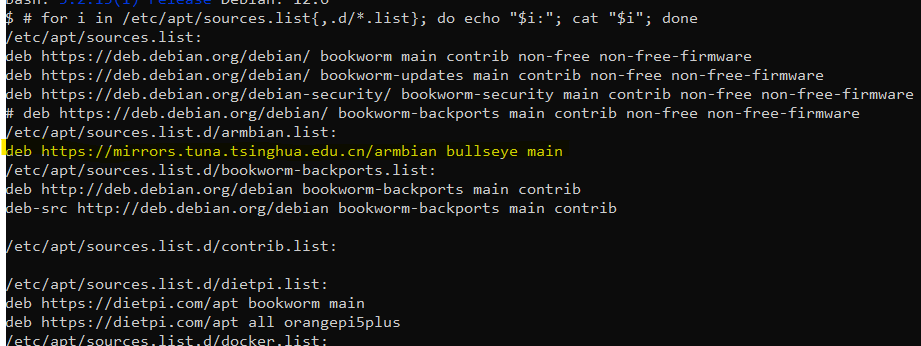
/etc/apt/sources.list.d/contrib.list:

/etc/apt/sources.list.d/dietpi.list:
deb https://dietpi.com/apt bookworm main
deb https://dietpi.com/apt all orangepi5plus
/etc/apt/sources.list.d/docker.list:
deb [arch=arm64 signed-by=/usr/share/keyrings/docker.gpg] https://download.docker.com/linux/debian bookworm stable
/etc/apt/sources.list.d/kopia.list:
deb [signed-by=/etc/apt/keyrings/kopia-keyring.gpg] http://packages.kopia.io/apt/ testing main
/etc/apt/sources.list.d/tailscale.list:
# Tailscale packages for debian bookworm
deb [signed-by=/usr/share/keyrings/tailscale-archive-keyring.gpg] https://pkgs.tailscale.com/stable/debian bookworm main
./test.sh: line 4: unexpected EOF while looking for matching ``'
did you create /etc/apt/sources.list.d/armbian.list manually?
Because our default on Orange Pi would be /etc/apt/sources.list.d/dietpi-armbian.list.
Next it is pointing to a dedicated mirror mirrors.tuna.tsinghua.edu.cn and not to global apt repository apt.armbian.com.
Furthermore, you have specified Debian Bullseye as source version, while the rest of your configuration is pointing to Debian Bookworm.
Best is to remove that list and create a new /etc/apt/sources.list.d/dietpi-armbian.list containing
Okay, so here is my current output from your command:
$ # for i in /etc/apt/sources.list{,.d/*.list}; do echo "$i:"; cat "$i"; done
/etc/apt/sources.list:
deb https://deb.debian.org/debian/ bookworm main contrib non-free non-free-firmware
deb https://deb.debian.org/debian/ bookworm-updates main contrib non-free non-free-firmware
deb https://deb.debian.org/debian-security/ bookworm-security main contrib non-free non-free-firmware
# deb https://deb.debian.org/debian/ bookworm-backports main contrib non-free non-free-firmware
/etc/apt/sources.list.d/armbian.list:
# deb https://mirrors.tuna.tsinghua.edu.cn/armbian bullseye main
deb https://apt.armbian.com/ bookworm main
/etc/apt/sources.list.d/bookworm-backports.list:
deb http://deb.debian.org/debian bookworm-backports main contrib
deb-src http://deb.debian.org/debian bookworm-backports main contrib

/etc/apt/sources.list.d/contrib.list:

/etc/apt/sources.list.d/dietpi.list:
deb https://dietpi.com/apt bookworm main
deb https://dietpi.com/apt all orangepi5plus
/etc/apt/sources.list.d/docker.list:
deb [arch=arm64 signed-by=/usr/share/keyrings/docker.gpg] https://download.docker.com/linux/debian bookworm stable
/etc/apt/sources.list.d/kopia.list:
deb [signed-by=/etc/apt/keyrings/kopia-keyring.gpg] http://packages.kopia.io/apt/ testing main
/etc/apt/sources.list.d/tailscale.list:
# Tailscale packages for debian bookworm
deb [signed-by=/usr/share/keyrings/tailscale-archive-keyring.gpg] https://pkgs.tailscale.com/stable/debian bookworm main